
Philips TAH2500 Headphones User Manual
Content
Philips TAH2500 Headphones: Complete Product Manual and Buyer Guide
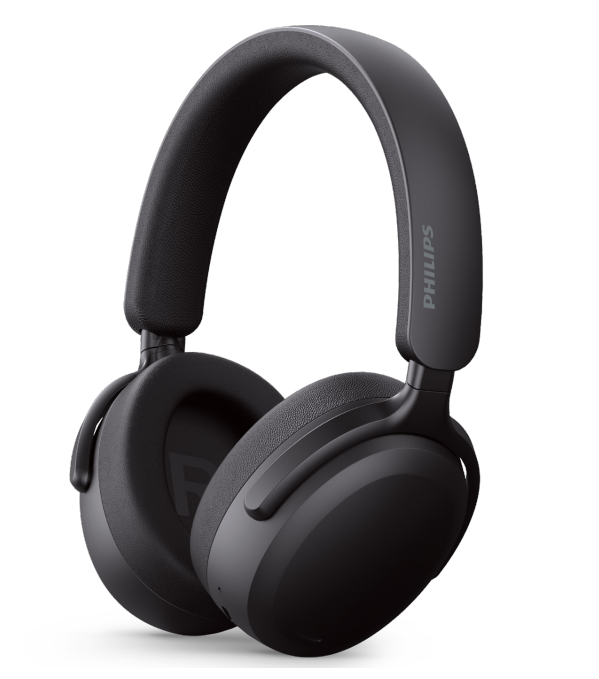
The Philips TAH2500 headphones are wireless over-ear headphones designed for everyday listening, work calls, travel, and casual gaming. With 40 mm dynamic drivers, Bluetooth 6.0, USB-C charging, and an over-ear closed-back design, the Philips TAH2500 Headphones aim to deliver a balanced mix of comfort, convenience, and strong passive isolation. They are a practical choice for users who want simple wireless connectivity, long battery life, and dependable sound without moving into premium pricing territory.
One of the biggest advantages of the Philips TAH2500 Headphones is their feature set for the price. Core specifications include a 20 Hz to 20 kHz frequency range, 32 ohm impedance, 112 dB sensitivity, and up to 10 meters of wireless range. The built-in Bluetooth profile support covers common everyday use cases such as music playback, hands-free calling, and media controls. Fast charging is another key benefit, with a short charge providing hours of playback. This makes the headphones especially appealing for commuters, students, remote workers, and budget-conscious buyers who need a reliable pair of wireless headphones for mixed use.
In terms of availability, the Philips TAH2500 Headphones are generally sold through Philips retailers, electronics stores, and online marketplaces. The estimated price range is typically in the budget-to-midrange category, often around $40 to $80 depending on region, promotions, and color variant. That pricing makes them attractive for anyone searching for affordable over-ear Bluetooth headphones with modern features and broad device compatibility.
How to Use Philips TAH2500 Headphones: Quick Start Guide
Pairing and first setup
- Charge the headphones fully before first use using the USB-C charging port.
- Turn on the headphones and activate Bluetooth pairing mode.
- Open Bluetooth settings on your phone, tablet, or laptop and select the Philips TAH2500.
- Confirm the connection and test music playback plus microphone input for calls.
Daily operation
- Use the built-in controls for playback, calls, and volume management.
- Wear the headphones with the ear cups fully covering your ears for best comfort and isolation.
- Keep the headset charged regularly to avoid interruptions during calls or travel.
Troubleshooting Philips TAH2500 Headphones Not Working
If the Philips TAH2500 Headphones will not connect, start by turning Bluetooth off and back on, then remove the device from your paired list and reconnect. If audio cuts out, move closer to the source device, as the wireless operating range is designed for up to 10 meters under normal conditions. If the headphones do not power on, charge them for at least 15 to 30 minutes and retry. If sound is low or distorted, check the volume on both the headphones and the connected device, then confirm the source app is not muted or limited.
There are no widely documented error codes for basic consumer use, so most issues are resolved through reset, recharge, and re-pairing steps. Preventive care includes avoiding overcharging, keeping the USB-C port clean, storing the headphones in a dry place, and updating connected device Bluetooth software when available. Warranty terms usually depend on the retailer and region, but Philips support and authorized service centers are the best options for repair or replacement help. For assistance, contact the Philips customer support channel in your country or the retailer where the product was purchased.
Philips TAH2500 Headphones Pros and Cons
Pros
- Comfortable over-ear design for long listening sessions.
- 40 mm drivers provide full-bodied sound with solid everyday bass.
- Bluetooth 6.0 and common audio profiles support easy device pairing.
- USB-C charging and fast-charge support improve convenience.
- Good value for money for students, commuters, and office users.
- Passive noise isolation from the closed-back fit works well in busy environments.
Cons
- Not a premium audiophile option for critical listening.
- Sound tuning may feel bass-forward for users who prefer a flat response.
- Noise control is limited compared with higher-end ANC models.
- Plastic construction is practical but not especially luxurious.
- Some alternatives from JBL, Sony, or Anker may offer more advanced app features.
Overall, the Philips TAH2500 Headphones offer strong value if the goal is simple wireless comfort rather than elite audio performance. They compare well against similarly priced Bluetooth over-ear headphones by focusing on battery convenience, comfort, and brand reliability rather than premium extras.
Customer Reviews of Philips TAH2500 Headphones
Customer feedback on the Philips TAH2500 Headphones is generally positive, especially for comfort and battery convenience. Typical ratings land around 4 out of 5 stars, with many users praising the easy pairing process, lightweight feel, and clear everyday sound. One common testimonial style comment is: “Great for work calls and music during my commute.” Another frequent positive note is that the fast charging feature makes them easy to use even on a busy schedule.
Common complaints focus on expectations versus price, especially among users hoping for stronger active noise cancellation or richer bass tuning. A few buyers also mention that the microphone quality is good for casual calls but not ideal for noisy streets. For most shoppers, the Philips TAH2500 Headphones are recommended as a practical purchase rather than a premium studio tool. They are a smart buy for users who want wireless over-ear headphones with dependable everyday performance.
Technical Specifications at a Glance
- Driver size: 40 mm
- Frequency response: 20 Hz to 20 kHz
- Impedance: 32 ohms
- Sensitivity: 112 dB
- Bluetooth version: 6.0
- Wireless range: Up to 10 meters
- Charging port: USB-C
- Supported profiles: HFP, A2DP, AVRCP
- Battery type: Rechargeable lithium-ion
- Quick charge support: 15 minutes for several hours of playback
Should You Buy Philips TAH2500 Headphones?
If you want affordable wireless over-ear headphones with dependable battery life, comfortable fit, and easy Bluetooth use, the Philips TAH2500 Headphones are a solid choice. They are especially suitable for travel, remote work, study sessions, and everyday entertainment. If you want advanced noise cancellation or premium materials, higher-end alternatives may be a better fit. For most users, though, the Philips TAH2500 Headphones strike a smart balance between price, comfort, and practical features.
Faqs
How do I set up philips TAH2500 Headphones for the first time?
Why are my philips TAH2500 Headphones not connecting to Bluetooth?
What should I do if philips TAH2500 Headphones have low sound or weak bass?
Are philips TAH2500 Headphones compatible with iPhone, Android, Windows, and Mac devices?
How can I improve battery life on philips TAH2500 Headphones?
How do I reset philips TAH2500 Headphones if they stop responding?
What is the best way to clean and maintain philips TAH2500 Headphones?
Can I use philips TAH2500 Headphones for calls and online meetings?
More philips manuals
Leave a Comment