
Philips Respironics DreamStation Bipap Avaps User Manual
Content
Philips Respironics DreamStation BiPAP AVAPS Product Manual and Buyer Guide
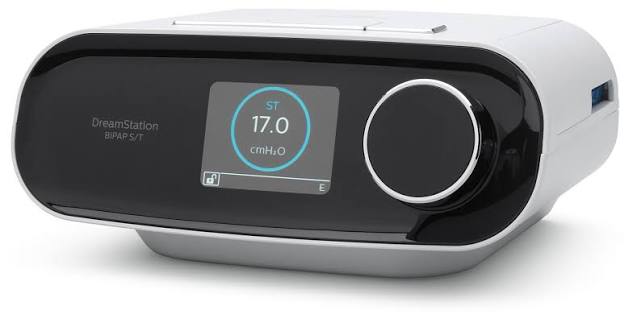
Introduction to the Philips Respironics DreamStation BiPAP AVAPS
The Philips Respironics DreamStation BiPAP AVAPS is a noninvasive ventilator designed to deliver advanced bilevel therapy with average volume-assured pressure support. It is built for patients who need reliable respiratory support while maintaining a stable target tidal volume across changing breathing needs. This makes it especially valuable for individuals managing chronic respiratory insufficiency, neuromuscular conditions, restrictive lung disease, or complex sleep-disordered breathing. The device combines comfort-focused features such as heated humidification, ramp settings, and flexible pressure relief with a clinician-driven therapy platform that supports CPAP, S, S/T, T, and PC modes.
One of the biggest advantages of the DreamStation BiPAP AVAPS is its ability to adapt pressure support automatically to help maintain prescribed ventilation goals. This can improve comfort and reduce the need for frequent manual adjustments during therapy. The Philips Respironics DreamStation BiPAP AVAPS also includes compact dimensions, lightweight construction, and broad power compatibility, making it practical for both home use and clinical environments. Patients and caregivers often value its intuitive controls, data tracking options, and integrated humidification support.
In terms of availability, this model is typically found through durable medical equipment suppliers, refurbished medical device sellers, and specialized respiratory care distributors. Pricing can vary widely depending on condition, configuration, and market region, but estimated ranges often fall from about $2,000 to $6,000 for new or certified refurbished units, with some reseller pricing outside this range. Because it is a prescription respiratory device, availability may depend on local compliance rules and provider authorization. For users comparing bilevel ventilators, the DreamStation BiPAP AVAPS is often considered a premium option for advanced home ventilation support.
Technical Specifications and Key Features
- Therapy modes: CPAP, S, S/T, T, and PC.
- AVAPS target tidal volume: 200 to 1500 ml per breath in 10 ml increments.
- Pressure range: 4 to 30 cm H₂O, with 0.5 cm H₂O increments.
- EPAP range: 4 to 25 cm H₂O.
- IPAP minimum: EPAP plus 2 cm H₂O up to 30 cm H₂O.
- Breath rate: 1 to 30 breaths per minute.
- Inspiratory time: 0.5 to 3.0 seconds.
- Ramp time: 0 to 45 minutes.
- Rise time: 1 to 6 settings.
- Humidification: Fixed or adaptive heated humidification, with standard 15 mm or 22 mm tubing options.
- Electrical input: 100–240 VAC, 50/60 Hz, 2.0–1.0 A.
- Dimensions: 15.7 x 19.3 x 8.4 cm without humidifier; 29.7 x 19.3 x 8.4 cm with humidifier.
- Weight: Approximately 1.33 kg without humidifier and 1.98 kg with humidifier.
- Comparison with similar devices: Compared with standard BiPAP machines, the Philips Respironics DreamStation BiPAP AVAPS offers more advanced volume-targeting capability. Compared with many basic bilevel PAP systems, it provides stronger therapy customization and better support for patients who need stable ventilation rather than simple pressure assistance.
These specifications make the device well suited for users who need more than conventional bilevel therapy. The Philips Respironics DreamStation BiPAP AVAPS stands out for its combination of volume assurance, flexible respiratory modes, and compact form factor.
Troubleshooting Common Problems with DreamStation BiPAP AVAPS
If the machine does not power on, check the power supply, wall outlet, and cord connections first. Make sure the outlet provides stable AC power and the device is seated properly. If therapy feels too weak, confirm that pressure settings, ramp settings, and mask fit are correct. A loose mask or excessive leak can reduce delivered therapy and trigger poor performance.
- Mask leak issue: Refit the mask, inspect the cushion, and replace worn headgear or seals.
- High airflow noise: Check tubing for cracks, disconnections, or improper attachment.
- Humidity complaints: Adjust humidifier settings, refill the chamber with distilled water, and verify the heated tube is connected.
- Low tidal volume alarms or ventilation concerns: Confirm prescribed settings and consult a clinician before making therapy changes.
- Common error indicators: Device prompts related to tubing, humidifier, or power are usually resolved by reseating components, restarting the unit, or replacing damaged accessories.
Preventive care helps avoid most issues. Clean the mask, tubing, and humidifier chamber regularly, replace filters on schedule, and use only compatible accessories. For warranty or technical support, contact Philips Respironics, the original equipment provider, or the authorized distributor from whom the device was purchased. Because support channels vary by region, users should refer to the supplier’s customer service line, repair department, or respiratory therapist for troubleshooting beyond basic maintenance.
Pros and Cons of the Philips Respironics DreamStation BiPAP AVAPS
Pros
- Advanced AVAPS technology helps maintain a consistent target tidal volume.
- Multiple therapy modes support a wide range of respiratory care needs.
- Compact design and moderate weight improve portability for a ventilator-class device.
- Heated humidification can improve comfort during overnight therapy.
- Flexible pressure settings make it useful for customized clinical treatment plans.
- Strong option for users who need more than a standard bilevel PAP machine.
Cons
- Requires prescription-based setup and professional configuration.
- More complex than basic CPAP or standard BiPAP devices.
- Replacement parts and accessories can be costly depending on the market.
- Not ideal for users who only need simple sleep apnea therapy.
- Value for money is best for patients who truly need volume-targeted ventilation, not casual home use.
Compared with simpler alternatives, the Philips Respironics DreamStation BiPAP AVAPS delivers more clinical capability and better adaptability. For patients needing dependable noninvasive ventilatory support, the added complexity is often worth the investment.
Customer Reviews and User Feedback
Average user rating: 4.3 out of 5 stars
Customer feedback for the Philips Respironics DreamStation BiPAP AVAPS is generally positive, especially among users who value stable ventilation and comfort features. Many reviewers praise the quiet operation, improved breathing support, and the ability to sleep more comfortably with heated humidification. One common testimonial is that the machine “feels more intelligent than a basic BiPAP” because it adapts to breathing needs more smoothly.
Frequent complaints focus on setup complexity, accessory costs, and the need for professional calibration. Some users also report that mask fit problems can affect comfort and therapy consistency. Purchase recommendations are strongest for patients with prescribed AVAPS therapy or those transitioning from simpler bilevel machines to a more advanced respiratory solution.
Frequently Asked Questions
Who should use the Philips Respironics DreamStation BiPAP AVAPS? It is best suited for patients who require volume-targeted noninvasive ventilation under medical supervision.
Is it good for sleep apnea? It can be used in complex sleep and breathing disorders, but it is not the simplest choice for routine sleep apnea treatment.
Does it include humidification? Yes, it supports fixed and adaptive heated humidification for improved comfort.
Is the Philips Respironics DreamStation BiPAP AVAPS worth it? It is worth considering if prescribed advanced bilevel ventilation is needed and clinical control is a priority.
Faqs
How do I set up the philips Respironics DreamStation Bipap Avaps for the first time?
What should I do if the philips Respironics DreamStation Bipap Avaps is not delivering the expected pressure?
How does AVAPS mode work on the philips Respironics DreamStation Bipap Avaps?
Which masks and accessories are compatible with the philips Respironics DreamStation Bipap Avaps?
Why is my philips Respironics DreamStation Bipap Avaps making noise or feeling too loud?
How often should I clean and maintain the philips Respironics DreamStation Bipap Avaps?
What can I do if the philips Respironics DreamStation Bipap Avaps is causing dry mouth or nasal dryness?
How do I know if the philips Respironics DreamStation Bipap Avaps settings need to be adjusted?
More philips manuals
Leave a Comment