
Philips BDP2180K Blu-ray Disc User Manual
Content
Philips BDP2180K Blu-ray Disc Player Manual and Product Guide
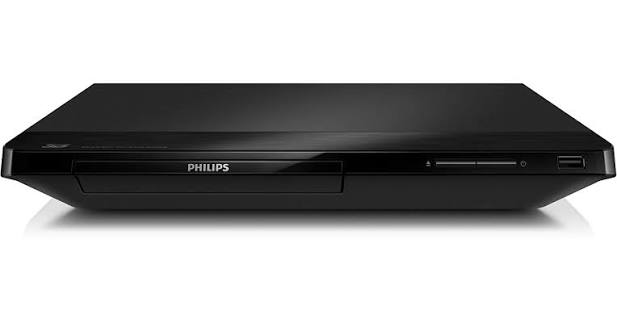
The Philips BDP2180K Blu-ray Disc player is a compact, full HD home entertainment device designed for users who want reliable disc playback, good picture enhancement, and broad format support in an easy-to-use player. The Philips BDP2180K Blu-ray Disc model supports Blu-ray, DVD, CD, and a wide range of file formats, making it a practical choice for movie fans, families, and anyone upgrading from a standard DVD player. It offers HDMI output with 1080p upscaling, progressive scan, and 3D capability, which helps deliver sharper visuals on modern televisions.
This Blu-ray Disc/DVD player also includes useful connectivity options such as HDMI, USB 2.0, Ethernet, and digital coaxial audio output. That makes it suitable for users who want simple wired network access, playback from external drives, or integration with a home theater system. Audio support includes Dolby Digital, Dolby Digital Plus, Dolby TrueHD, and DTS 2.0 plus digital out, giving it solid compatibility with common movie soundtracks and media libraries.
The Philips BDP2180K Blu-ray Disc player is best suited for everyday home use, second-room entertainment setups, and budget-conscious buyers who still want modern playback features. Its estimated price range is typically in the affordable-to-midrange segment, often around $40 to $100 depending on condition, region, and seller availability. It may be found through online marketplaces, electronics resellers, and remaining retail inventory in select regions.
Pros and Cons of the Philips BDP2180K Blu-ray Disc Player
Pros
- Excellent value for money for users who need a basic but capable Blu-ray player with 1080p output and video upscaling.
- Wide format support, including Blu-ray, DVD, CD, and many digital video files such as MKV, MP4, AVI, DivX, and H.264.
- Compact design makes it easy to place in small entertainment centers or bedroom setups.
- Useful connectivity with HDMI, USB, Ethernet, and coaxial digital audio output for flexible home theater integration.
- Strong audio compatibility with Dolby Digital, Dolby Digital Plus, Dolby TrueHD, and DTS support.
Cons
- Limited to essential features, so it is not ideal for users who want advanced smart TV apps or streaming-focused functions.
- Older-generation design means it may feel less premium than newer 4K Blu-ray or network-enabled alternatives.
- Best suited to standard Blu-ray and DVD playback rather than cutting-edge home cinema systems.
- Menu navigation and load times may feel slower compared with newer players from Sony, Panasonic, or LG.
Overall, the Philips BDP2180K Blu-ray Disc player delivers good value if you want dependable disc playback without paying for features you may not use. Compared with newer 4K Blu-ray players, it is less advanced, but for basic HD viewing it remains a practical and affordable option.
Customer Reviews and User Feedback for Philips BDP2180K Blu-ray Disc
Customer feedback for the Philips BDP2180K Blu-ray Disc player is generally positive, with users praising the sharp picture quality, easy setup, and strong compatibility with different disc types. Many buyers rate it around 4 to 5 stars for everyday home entertainment, especially when used with full HD televisions.
Common praise includes reliable Blu-ray playback, compact size, and solid audio output. One typical user comment is: “Great picture quality and very simple to use.” Another frequent compliment is that it works well as a budget-friendly replacement for older DVD players.
Common complaints usually focus on the lack of modern smart features and the fact that it is not a 4K player. Some users also mention that it feels basic compared with newer models. For shoppers who want a straightforward, affordable Blu-ray Disc player, the Philips BDP2180K is still a sensible buy, especially for secondary TVs or simple home theater setups.
If you need a compact Blu-ray Disc/DVD player with dependable performance and broad media support, the Philips BDP2180K remains a strong value-oriented choice.
Faqs
How do I set up the philips BDP2180K Blu-ray Disc player for the first time?
What should I do if my philips BDP2180K Blu-ray Disc player is not reading discs?
Which disc and file formats are supported by the philips BDP2180K Blu-ray Disc player?
Does the philips BDP2180K Blu-ray Disc player support 3D playback and 1080p upscaling?
How do I connect the philips BDP2180K Blu-ray Disc player to the internet for BD-Live?
Why is the picture quality on my philips BDP2180K Blu-ray Disc player blurry or unstable?
What audio features does the philips BDP2180K Blu-ray Disc player offer for home theater use?
How should I clean and maintain the philips BDP2180K Blu-ray Disc player for long-term performance?
More philips manuals
Leave a Comment