
Philips BDP1300 Blu-ray disc User Manual
Content
Philips BDP1300 Blu-ray Disc Player: A Practical Full HD Home Entertainment Solution
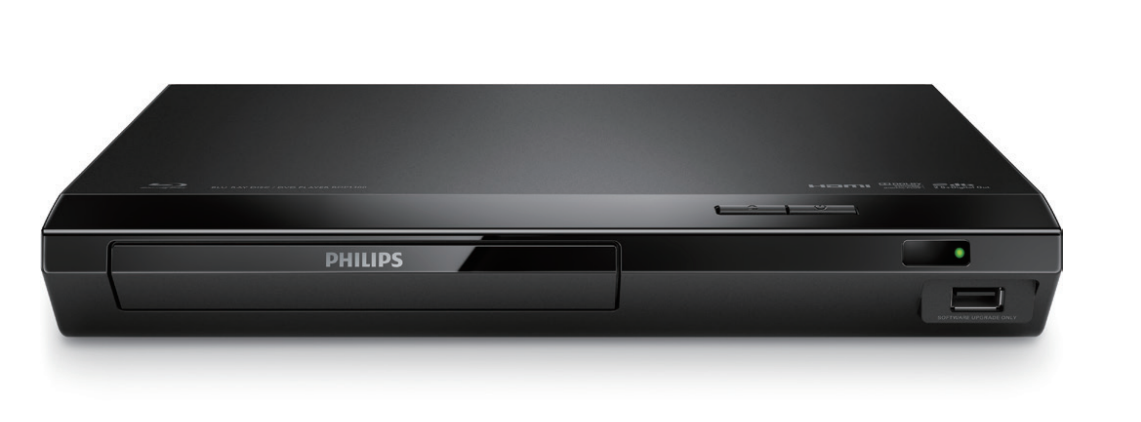
The philips BDP1300 Blu-ray disc player is a straightforward, budget-friendly choice for users who want reliable Blu-ray and DVD playback without unnecessary complexity. Designed for everyday home entertainment, it supports Full HD video output, disc upscaling, and a compact footprint that fits easily into most TV stands and media cabinets.
One of its biggest strengths is simplicity. The philips BDP1300 Blu-ray disc player is ideal for anyone upgrading an older DVD setup, building a secondary media room, or looking for an affordable disc player for a bedroom or family room. It supports a wide range of discs and formats, including Blu-ray, DVD, CD, and several recordable disc types, making it useful for mixed media libraries. HDMI output, USB playback, and EasyLink support add convenience for modern home setups.
In terms of value, the BDP1300 has historically sat in the entry-level Blu-ray category, with typical pricing generally around the low-cost used or refurbished market rather than current premium retail levels. Availability today is usually through third-party sellers, clearance inventory, or secondhand marketplaces, since this model is no longer positioned as a flagship current-release player. For shoppers seeking a basic, dependable Blu-ray disc player with 1080p support and practical features, it remains a sensible option.
Philips BDP1300 Specifications and Key Features
- Playback support: Blu-ray, DVD, CD, BD-R, BD-RE, DVD-R/RW, DVD+R/RW, CD-R/RW
- Video output: 720p, 1080i, and 1080p resolution support with video upscaling
- Disc compatibility: Full support for standard movie discs and recordable media formats
- Audio formats: Dolby Digital Plus, Dolby TrueHD, and DTS 2.0 + digital output
- Connections: HDMI output, digital coaxial audio output, USB 2.0 port
- Playback features: Progressive scan, EasyLink HDMI-CEC, on-screen display languages
- USB support: Plays media from USB storage devices for convenient file access
- Firmware updates: Upgradeable via USB for basic long-term maintenance
- Power use: Around 11 W during operation with standby below 1 W
- Region notes: Region coding varies by version and market
Compared with similar entry-level Blu-ray players, the philips BDP1300 Blu-ray disc model stands out for its mix of core playback features and lightweight operation. It is less advanced than players with built-in Wi‑Fi, streaming apps, or 4K support, but it delivers the essentials well. For users who mainly want disc playback rather than smart-home features, it remains competitive in the basic Blu-ray player category.
Pros & Cons of the Philips BDP1300 Blu-ray Disc Player
Pros
- Affordable and practical: Strong value for anyone who only needs Blu-ray and DVD playback.
- Good picture quality: 1080p output and upscaling improve the viewing experience on HDTVs.
- Easy setup: HDMI, USB, and EasyLink make installation simple for most users.
- Energy efficient: Low power consumption keeps running costs minimal.
- Compact design: Fits neatly into small entertainment spaces.
Cons
- No smart streaming: Lacks built-in apps, Wi‑Fi, and network features found on newer models.
- Basic feature set: Not suited for users wanting 4K playback or advanced media options.
- Older product line: Availability can be limited to used or refurbished units.
- Limited convenience features: No premium playback extras such as app ecosystems or voice control.
For buyers comparing it with alternatives, the philips BDP1300 Blu-ray disc player is best for straightforward disc playback rather than modern connected entertainment. If you want a simple, low-cost player for movies and DVDs, it offers solid value. If streaming and 4K are priorities, a newer Blu-ray or media streaming device will be the better choice.
Philips BDP1300 Customer Reviews and User Feedback
User feedback for the Philips BDP1300 is generally positive among buyers who value simplicity and reliable playback. Many reviewers give it around 4 out of 5 stars for easy setup, decent picture quality, and strong DVD-to-Blu-ray upgrade value. A common testimonial theme is that it “does exactly what it should” without complicated menus or network setup.
Common praises include smooth disc loading, clear 1080p output, and good compatibility with older DVD collections. Common complaints focus on the lack of smart features, limited modern connectivity, and the fact that newer alternatives may offer more convenience. Some users also mention that availability is inconsistent, which makes shopping for a new unit more difficult.
For most home users, the philips BDP1300 Blu-ray disc player is a reasonable purchase if the goal is dependable physical media playback. It is especially suitable for budget-conscious buyers, casual movie watchers, and anyone replacing an aging DVD player with a simple Blu-ray solution.
Faqs
How do I set up philips BDP1300 Blu-ray disc for the first time?
Why is my philips BDP1300 Blu-ray disc not reading discs?
What disc formats are compatible with philips BDP1300 Blu-ray disc?
How do I connect philips BDP1300 Blu-ray disc to a TV for the best picture quality?
Why does philips BDP1300 Blu-ray disc keep freezing during playback?
Does philips BDP1300 Blu-ray disc support HDMI and audio output options?
How can I improve loading speed on philips BDP1300 Blu-ray disc?
What is the best way to clean and maintain philips BDP1300 Blu-ray disc?
More philips manuals
Leave a Comment