
Philips 9400 DiamondClean Toothbrush User Manual
Content
Philips 9400 DiamondClean Toothbrush: Complete Product Manual and Buying Guide
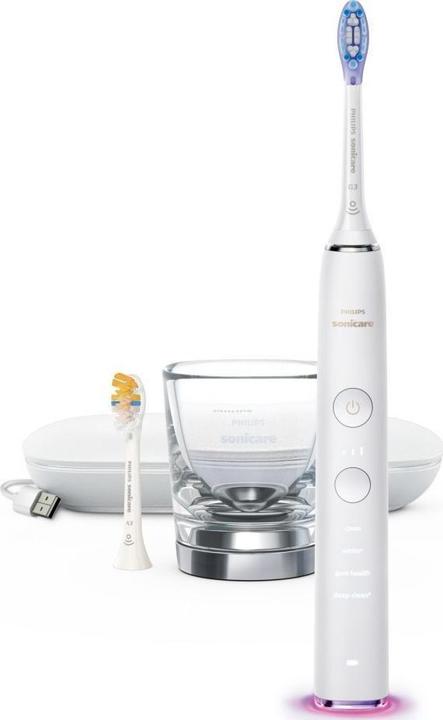
The Philips 9400 DiamondClean Toothbrush is a premium sonic electric toothbrush designed for users who want a smarter, more personalized brushing experience. Positioned in the upper tier of Philips Sonicare’s lineup, it combines high-speed sonic cleaning, app-based coaching, and multiple brushing modes to help improve daily oral care routines. With up to 62,000 brush movements per minute, pressure sensing, and brush-head tracking, this model is built for people who want more than a basic rechargeable toothbrush.
It is especially well suited to users who want to improve gum health, reduce plaque buildup, or polish away surface stains with a guided routine. The DiamondClean Smart 9400 is also a strong choice for frequent travelers thanks to its long battery life, USB charging accessories, and included travel case or travel pouch depending on the package. In real-world use, the toothbrush is aimed at adults who value convenience, dental feedback, and a more premium brushing feel. Compared with mid-range sonic toothbrushes, it offers more advanced app integration, smarter pressure control, and more detailed brushing guidance.
Estimated pricing typically falls in the premium range, often around £170 to £280 depending on the exact bundle, retailer, and brush-head package. Availability is generally strong through major electronics stores, online marketplaces, and official Philips retail channels, though model numbers and included accessories can vary by region. For shoppers searching for the philips 9400 DiamondClean Toothbrush, it is important to confirm the exact SKU before buying so the included charger, heads, and case match expectations.
Specifications for Philips 9400 DiamondClean Toothbrush
- Brushing technology: Sonic cleaning with up to 62,000 brush movements per minute for effective plaque removal and deep cleaning along the gumline.
- Cleaning modes: Common variants include Daily Clean, Deep Clean, White, and Gum Care, with adjustable intensity levels on some versions.
- Smart features: Bluetooth connectivity, app guidance, brushing feedback, pressure alerts, and brush-head replacement reminders.
- Battery: Rechargeable lithium-ion battery with up to 14 days of use on a full charge in many configurations.
- Charging: Charging glass, charging dock, USB travel case, or rechargeable travel pouch depending on the bundle.
- Voltage: Wide-voltage support in many versions, typically suitable for international travel.
- Included accessories: Usually includes one handle, multiple brush heads, and travel-oriented charging accessories.
- Water resistance: Designed for bathroom use and safe rinsing after brushing.
- Performance benchmark: Delivers a noticeably more guided and premium brushing experience than entry-level Sonicare models, with more advanced feedback than standard electric toothbrushes.
- Comparison with similar products: Compared with older DiamondClean or lower Sonicare models, the 9400 series offers stronger app integration, smarter pressure monitoring, and more refined brush-head control.
The Philips 9400 DiamondClean Toothbrush is best understood as a premium smart sonic toothbrush rather than a basic electric model. Its main advantages are speed, guidance, and customization.
Troubleshooting Philips 9400 DiamondClean Toothbrush Problems and Fixes
Common issues usually involve charging, brushing performance, Bluetooth syncing, or brush-head recognition. If the toothbrush does not power on, first confirm that it is seated correctly on the charger and that the outlet is working. If charging seems slow or incomplete, clean the charging base and handle contacts, then leave the brush on the charger for a full cycle.
- Problem: Brush will not turn on. Fix: Charge for at least 24 hours and check for debris on the charging contacts.
- Problem: Weak vibration or reduced power. Fix: Replace the brush head, clean the handle, and verify the battery is fully charged.
- Problem: App does not connect. Fix: Turn Bluetooth off and on, restart the app, and re-pair the toothbrush.
- Problem: Pressure alert activates too often. Fix: Use lighter hand pressure and let the sonic motion do the work.
- Problem: Brush-head tracking fails. Fix: Remove and reattach the head firmly, then sync the app again.
Some versions use indicator behavior rather than formal error codes, so flashing lights or battery signals usually point to charging or pairing issues rather than hardware failure. Preventive care includes rinsing the handle after every use, replacing brush heads every three months, and storing the toothbrush dry between sessions. Philips typically includes a 2-year limited warranty on many versions, and support is available through Philips customer service, authorized retailers, and product support pages. For direct help, users should contact Philips support through the official regional help center or the retailer where the toothbrush was purchased.
Pros and Cons of the Philips 9400 DiamondClean Toothbrush
Pros
- Excellent sonic cleaning performance with up to 62,000 movements per minute.
- Smart app feedback helps improve brushing habits and coverage.
- Pressure sensor support helps protect gums and enamel.
- Premium accessories such as a charging glass and travel case make it travel-friendly.
- Multiple brushing modes provide flexibility for whitening, gum care, and daily cleaning.
- Strong value for users who will use the smart features regularly.
Cons
- Higher price than mid-range electric toothbrushes.
- App features may feel unnecessary for users who prefer a simple routine.
- Replacement heads can add long-term cost.
- Some bundles differ by region, which can make comparison shopping confusing.
- Charging time and accessory setup may be more involved than basic models.
For value for money, the Philips 9400 DiamondClean Toothbrush makes the most sense for users who want guided brushing, gum protection, and a premium design. Buyers who want a simpler clean at a lower price may prefer a less advanced Sonicare model or a standard oscillating toothbrush. Compared with alternatives, the 9400 stands out for smart features and polished user experience rather than low cost.
Customer Reviews of the Philips 9400 DiamondClean Toothbrush
Customer feedback is generally positive, with many users praising the strong cleaning feel, sleek design, and helpful app coaching. Typical review ratings cluster around 4 to 5 stars, especially from users upgrading from older manual or entry-level electric toothbrushes. Many testimonials mention cleaner-feeling teeth after the first week and better brushing habits thanks to the pressure alerts.
- Praise: “The brushing power feels professional and my teeth feel smoother after every use.”
- Praise: “The app helped me stop brushing too hard and improved my routine.”
- Complaint: “The price is high, especially once replacement heads are included.”
- Complaint: “Bluetooth features are useful, but not everyone needs them daily.”
Buyers who value smart coaching, premium accessories, and advanced sonic cleaning are the most likely to recommend the Philips 9400 DiamondClean Toothbrush. Users who want a budget-friendly toothbrush or a no-app experience may prefer simpler alternatives. Frequent issues mentioned in reviews include accessory variation between bundles and the ongoing cost of brush-head replacements, but overall satisfaction remains strong among premium toothbrush shoppers.
Faqs
How do I set up the philips 9400 DiamondClean Toothbrush for the first time?
Why is my philips 9400 DiamondClean Toothbrush not turning on, and how do I fix it?
What cleaning modes does the philips 9400 DiamondClean Toothbrush offer, and which one should I use?
How do I know if the brush head on my philips 9400 DiamondClean Toothbrush is compatible?
Why does the philips 9400 DiamondClean Toothbrush feel weak or less powerful over time?
How often should I replace and clean the brush head on my philips 9400 DiamondClean Toothbrush?
What should I do if my philips 9400 DiamondClean Toothbrush charger is not working?
How can I get the best whitening and plaque-removal results from the philips 9400 DiamondClean Toothbrush?
More philips manuals
Leave a Comment