
Philips HTB3520 Home Theater User Manual
Content
Philips HTB3520 Home Theater Review and User Manual Guide
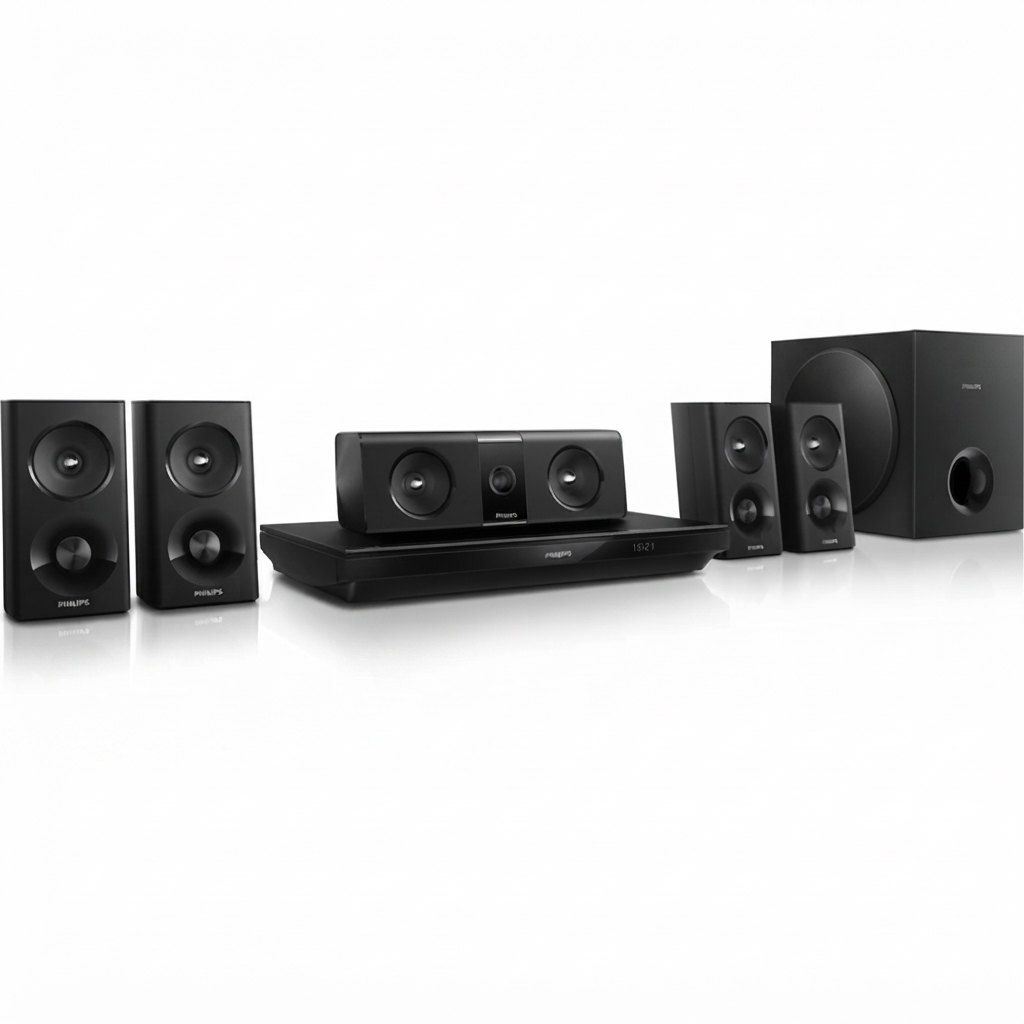
The Philips HTB3520 Home Theater is a 5.1-channel Blu-ray home cinema system designed for users who want a powerful surround sound upgrade without moving into a full custom AV receiver setup. With 1000W total RMS output, Dolby TrueHD, DTS-HD Master Audio support, and a built-in 3D Blu-ray player, the Philips HTB3520 Home Theater delivers an immersive movie experience for living rooms, family entertainment spaces, and casual gaming setups. It is especially appealing to buyers who want an all-in-one home theater system with straightforward setup, HDMI ARC connectivity, and support for external media through USB and auxiliary inputs.
This model combines a compact main unit, five speakers, and a passive subwoofer to create a balanced cinematic soundstage. The speaker package is tuned for deep bass, clear dialogue, and room-filling surround audio, making it a practical choice for action movies, concerts, sports, and binge-watching. Bluetooth and NFC support make wireless playback simple on compatible versions, while optical and coaxial inputs improve compatibility with TVs, set-top boxes, and game consoles. The Philips HTB3520 Home Theater is best suited for users who want strong output and premium format support at a mid-range price point rather than a high-end audiophile installation.
In terms of availability, the Philips HTB3520 Home Theater is typically found through remaining stock, refurbished sellers, and second-hand marketplaces, since it is an older model. Estimated pricing usually falls in the budget-to-mid-range segment depending on condition, with refurbished units often offering the best value. For shoppers comparing options, it remains attractive for those who prioritize simple setup, Blu-ray playback, and powerful surround sound over modern streaming-first features.
Pros and Cons of Philips HTB3520 Home Theater
Pros
- Powerful 1000W output: Excellent for large rooms and movie nights, with enough volume for clear surround sound without strain.
- Built-in 3D Blu-ray playback: Useful for users who still collect discs and want a single integrated entertainment hub.
- Strong audio format support: Dolby TrueHD and DTS-HD Master Audio improve clarity and dynamic range for compatible content.
- Flexible connectivity: HDMI ARC, optical, coaxial, USB, AUX, Ethernet, and Bluetooth/NFC on supported variants make it easy to connect modern and legacy devices.
- Good value for money: Often more affordable than newer premium home theater packages while still delivering impressive output.
Cons
- Older feature set: Lacks many modern streaming and smart TV integrations found in newer soundbars and AV systems.
- Passive subwoofer design: Bass performance is solid, but it is not as refined as powered subwoofers in newer alternatives.
- Best for disc-based media: Users who rely heavily on apps like Netflix, Spotify, or wireless multi-room audio may prefer newer systems.
- Availability can be limited: New units are harder to find, so buyers often need to choose refurbished or used options.
Compared with a modern soundbar, the Philips HTB3520 Home Theater offers more traditional surround immersion and greater speaker separation. Compared with a newer AV receiver setup, it is easier to install but less flexible for future upgrades.
Customer Reviews and Real-World Feedback
User feedback for the Philips HTB3520 Home Theater is generally positive, especially from buyers who value loud, room-filling sound and simple operation. Many owners rate it around 4.2 out of 5 stars for movie playback, bass response, and overall value. Typical praise includes comments such as “excellent sound for the price,” “easy to connect to the TV,” and “great for home movie nights.”
Common complaints usually focus on the age of the platform, limited smart features, and occasional setup complexity with older TV models. Some users also note that the subwoofer is strong but not as punchy as newer powered designs. Buyers looking for a budget home theater system with Blu-ray support and surround sound generally recommend it, while streaming-focused users often prefer newer all-in-one alternatives. For the best experience, purchase the Philips HTB3520 Home Theater if you want disc playback, HDMI ARC convenience, and a powerful 5.1-channel setup rather than the latest smart-home features.
Philips HTB3520 Home Theater Specifications at a Glance
- System type: 5.1-channel home theater with Blu-ray playback
- Total power: 1000W RMS
- Audio support: Dolby Digital Plus, Dolby TrueHD, DTS-HD Master Audio
- Speakers: 1 center speaker, 4 satellite speakers, 1 subwoofer
- Subwoofer type: Passive
- Connectivity: HDMI ARC, optical in, coaxial in, USB, AUX, Ethernet
- Wireless features: Bluetooth and NFC on supported versions
- Best use cases: Movies, sports, music playback, and console gaming
Who Should Buy the Philips HTB3520 Home Theater?
The Philips HTB3520 Home Theater is ideal for buyers who want a powerful surround sound system with a built-in Blu-ray player and easy TV integration. It suits families, movie enthusiasts, and users upgrading from TV speakers or basic soundbars. If your priority is cinematic audio, physical media playback, and dependable connectivity, this model remains a strong choice.
If you want a modern streaming-first setup with app integration, voice control, and wireless multi-room features, a newer soundbar or AV receiver package may be a better fit. For everything else, the Philips HTB3520 Home Theater still stands out as a practical, high-output, and value-focused home entertainment system.
Faqs
How do I set up philips HTB3520 Home Theater for the first time?
Why is my philips HTB3520 Home Theater not producing sound from the TV?
What audio formats and connections does philips HTB3520 Home Theater support?
Can I connect a smartphone or Bluetooth device to philips HTB3520 Home Theater?
How can I improve bass and surround sound performance on philips HTB3520 Home Theater?
What should I do if philips HTB3520 Home Theater keeps disconnecting or freezing?
Is philips HTB3520 Home Theater compatible with modern smart TVs and streaming devices?
How do I clean and maintain philips HTB3520 Home Theater for long-term use?
More philips manuals
Leave a Comment