
Philips sonicare Kids Toothbrush User Manual
Content
Philips Sonicare Kids Toothbrush Review and Product Manual
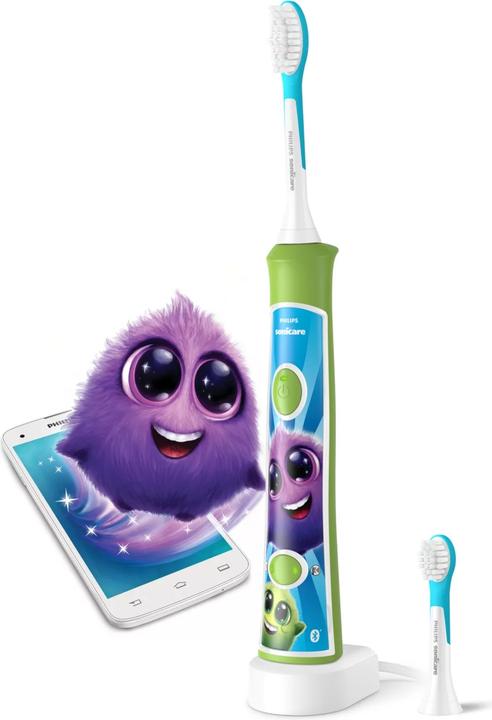
The Philips Sonicare Kids Toothbrush is a child-friendly electric toothbrush designed to make daily oral care easier, more effective, and more engaging for young brushers. Built with a slim ergonomic handle, rubber grip, easy click-on brush heads, and a gentle sonic cleaning system, it helps children develop healthy brushing habits while delivering a deeper clean than a manual toothbrush. The Philips Sonicare Kids Toothbrush is especially useful for families looking for a beginner-friendly electric toothbrush for children ages 3 and up, including kids who need help learning proper brushing technique or who benefit from a more fun, structured routine.
One of its biggest advantages is the combination of kid-focused design and practical performance. Features such as KidTimer and Quadpacer encourage brushing for the recommended duration, while the illuminated display and two power modes support a more customized brushing experience. Some versions also include Bluetooth connectivity and app-based guidance, which can help motivate children with rewards and interactive coaching. The rechargeable lithium-ion battery offers long runtime, with some models lasting up to 2 or even 3 weeks depending on the version and use. Compared with a basic manual brush, this model offers better consistency, easier handling, and a more engaging routine for children who need motivation.
Estimated pricing for the Philips Sonicare Kids Toothbrush typically falls in the mid-range electric toothbrush category, often around $25 to $60 depending on the model, bundle, and retailer. Availability is generally strong through major online stores, electronics retailers, and Philips channels, with replacement brush heads widely sold separately. For parents seeking a dependable, kid-oriented electric toothbrush, the Philips Sonicare Kids Toothbrush remains a strong option for everyday use, travel, and supervised home brushing.
Technical Specifications and Key Features of Philips Sonicare Kids Toothbrush
- Power source: Rechargeable lithium-ion battery for convenient cordless use.
- Battery life: Up to 2 weeks on some models and up to 3 weeks on others, depending on usage and version.
- Voltage: 100-240 V or 110-220 V, making it suitable for travel and international charging in many regions.
- Cleaning speed: Up to 62,000 brush movements per minute for sonic cleaning performance.
- Brush head system: Easy click-on brush heads designed for simple replacement.
- Timer functions: KidTimer and Quadpacer support better brushing habits and even cleaning.
- Power modes: Two modes on many versions, including low and high settings for different ages and comfort levels.
- Handle design: Slim ergonomic body with rubber grip and anti-roll styling for small hands.
- Display: Illuminated display on selected models for easier visibility.
- Connectivity: Some connected versions support smartphone app pairing for guided brushing.
In performance terms, the Philips Sonicare Kids Toothbrush is designed to remove plaque more effectively than a manual brush while staying gentle enough for developing teeth and gums. Compared with entry-level children’s electric toothbrushes, it offers better sonic output, a more durable battery, and stronger habit-building features. Compared with premium app-based kids’ brushes, it may offer fewer advanced smart features on non-connected models, but it usually delivers better value for families who want reliable cleaning without paying for extras they may not use.
Troubleshooting Guide for Philips Sonicare Kids Toothbrush
If the Philips Sonicare Kids Toothbrush will not turn on, first check whether the battery needs charging and confirm the charger is properly seated. If brushing power feels weak, replace the brush head, fully recharge the handle, and inspect the head connection for debris or moisture. If the brush turns off unexpectedly, the battery may be depleted or the handle may need a reset by placing it on the charger for several hours.
- Problem: Toothbrush does not start. Fix: Charge fully, check the outlet, and ensure the handle is dry.
- Problem: Weak vibration or reduced cleaning. Fix: Replace worn brush heads and clean the handle connection.
- Problem: Charger light not working. Fix: Try another outlet and inspect the charger base for damage.
- Problem: Bluetooth pairing fails on connected models. Fix: Reinstall the app, restart the phone, and re-pair within range.
- Problem: Child finds vibration uncomfortable. Fix: Use the lower power mode and a softer brush head.
There are no widely used public error codes on most versions, so recurring problems are usually resolved through charging, cleaning, or brush head replacement. To prevent issues, rinse the brush head after each use, avoid storing the handle while wet, and replace brush heads regularly. Philips offers a 2-year limited warranty on many models, and some products may qualify for extended coverage when registered shortly after purchase. For help, visit the official Philips support site or contact Philips customer support through the support section for your specific model.
Pros and Cons of Philips Sonicare Kids Toothbrush
Pros
- Kid-friendly design with a comfortable rubber grip and anti-roll body.
- Strong sonic cleaning performance for a children’s toothbrush.
- Timer features help children brush for the right amount of time.
- Long battery life makes it practical for home use and travel.
- Replacement brush heads are easy to find and install.
- Some versions include app support, which can make brushing more fun.
Cons
- Higher cost than a manual toothbrush or basic battery-powered kids’ brush.
- Some children may need time to adjust to sonic vibration.
- Connected features may not be useful for every family.
- Replacement heads add ongoing ownership cost.
- Non-connected models offer fewer smart features than premium alternatives.
Overall, the Philips Sonicare Kids Toothbrush offers solid value for money if the goal is better brushing habits, easier handling, and dependable cleaning. Compared with manual brushes, it is more effective and more motivating. Compared with some budget electric toothbrushes for kids, it usually feels sturdier and performs better, though it is also priced higher. Families who want a balance of quality, convenience, and child-friendly design will likely find it a worthwhile purchase.
Customer Reviews and User Feedback for Philips Sonicare Kids Toothbrush
Customer feedback for the Philips Sonicare Kids Toothbrush is generally positive, with many parents rating it around 4 to 5 stars for ease of use, battery life, and how well it encourages consistent brushing. A common praise is that children enjoy the timer and playful brushing experience, while parents appreciate the improved routine and cleaner feeling teeth. One typical testimonial is: “My child actually wants to brush now, and the timer makes mornings much easier.”
Common complaints usually focus on price, replacement brush head costs, and the learning curve for children who are new to electric brushing. Some families also mention that the vibration feels strong at first, especially for younger children. Despite these concerns, many buyers recommend the Philips Sonicare Kids Toothbrush for families seeking a dependable children’s electric toothbrush with long-term value and better brushing habits.
Faqs
How do I set up the philips sonicare Kids Toothbrush for the first time?
Why is my philips sonicare Kids Toothbrush not turning on, and how can I fix it?
How do I use the philips sonicare Kids Toothbrush with KidTimer and KidPacer features?
What toothbrush heads are compatible with the philips sonicare Kids Toothbrush?
How often should I replace the brush head on a philips sonicare Kids Toothbrush?
Why does my child’s philips sonicare Kids Toothbrush feel too strong or uncomfortable?
How do I clean and maintain a philips sonicare Kids Toothbrush properly?
What should I do if the philips sonicare Kids Toothbrush stops holding a charge?
More philips manuals
Leave a Comment