
Philips BDP1502 DVD Player User Manual
Content
Philips BDP1502 DVD Player Review and User Manual Overview
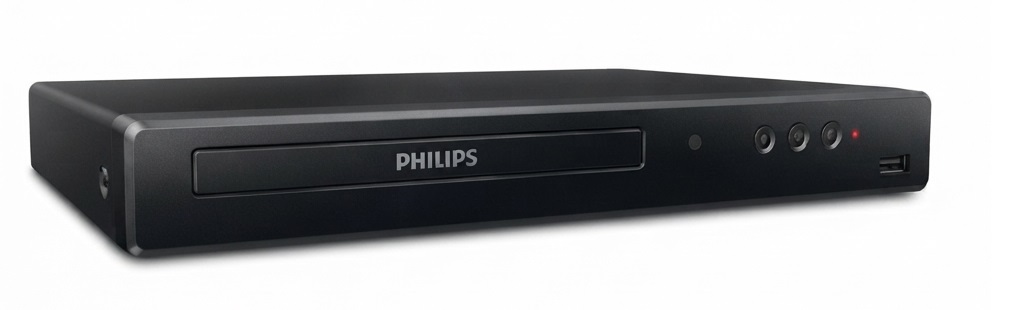
The Philips BDP1502 DVD Player is a compact Blu-ray and DVD player designed for users who want simple, reliable disc playback with modern HDMI connectivity. It supports Blu-ray Disc playback in full HD 1080p and also upscales standard DVDs to near-HD quality, making older movie collections look noticeably sharper on compatible TVs. For households that still enjoy physical media, this model offers a practical balance of picture quality, ease of use, and broad disc compatibility.
This player is aimed at movie watchers, families, and budget-conscious buyers who need a straightforward home entertainment device without smart streaming features. It is especially useful for secondary rooms, older TV setups with HDMI input, and users who want a dedicated disc player for DVDs, Blu-ray movies, music CDs, and supported recordable media. The Philips BDP1502 DVD Player also includes audio support such as Dolby Audio and DTS output, which helps deliver clearer sound when connected to a compatible TV or audio system.
In terms of availability, the Philips BDP1502 DVD Player appears to be sold mostly through third-party marketplaces and refurbished or remaining-stock listings rather than broad retail channels. Its estimated price range is typically around $45 to $90, depending on condition, seller, and whether a remote is included. For buyers comparing value, it remains an affordable option if the main goal is dependable disc playback and HDMI upscaling rather than streaming apps or advanced smart features.
Pros and Cons of the Philips BDP1502 DVD Player
Pros
- Sharp Blu-ray playback in full HD 1080p, making it suitable for movie collections and home theater setups.
- DVD upscaling through HDMI improves standard discs for better viewing on modern televisions.
- Compact and lightweight design fits easily into small entertainment centers or bedroom setups.
- Supports multiple disc formats, including Blu-ray, DVD, CD, and recordable media, which adds flexibility.
- Good value for money for users who only need a basic disc player without smart-TV functions.
Cons
- No built-in streaming apps, so it cannot replace a smart media box or streaming player.
- Region limitations apply to discs, which may be a drawback for international collectors.
- Availability can be inconsistent, and buyers may need to rely on marketplace listings.
- Some listings report missing remotes or sold-as-is units, so package contents should be checked carefully.
- Compared with newer universal players, it is a simpler product with fewer advanced features.
Overall, the Philips BDP1502 DVD Player is a strong value choice for users who want an inexpensive, easy-to-use disc player. Compared with more expensive alternatives, it focuses on core playback performance rather than extras, which may be ideal for viewers who simply want reliable movie playback.
Customer Reviews of the Philips BDP1502 DVD Player
Customer feedback for the Philips BDP1502 DVD Player is generally positive, with many users praising its picture clarity, easy setup, and solid value. Common ratings often land around 4.5 to 4.8 out of 5 stars on marketplace listings, especially when the unit includes a remote and is fully tested. One frequent comment is that the player works well straight out of the box and handles older DVDs better than many expected.
Positive testimonials often mention “good picture quality,” “simple HDMI hookup,” and “perfect for DVD collections.” Common complaints include occasional missing accessories, limited availability, and confusion around region codes or media compatibility. A few users also note that this is not a smart player, so buyers expecting streaming support may be disappointed.
Recommended for:
- Users who want a dependable Blu-ray and DVD player for home entertainment.
- Buyers looking for a budget-friendly replacement for an older disc player.
- People with large DVD collections who want HDMI upscaling on modern TVs.
If the goal is straightforward disc playback at a reasonable price, the Philips BDP1502 DVD Player is a practical purchase.
Philips BDP1502 DVD Player Setup, Features, and Usage Guide
What is included and what you need
The Philips BDP1502 DVD Player typically requires an HDMI cable for connection to a television, and the cable is usually not included. Before setup, confirm that the package includes the remote control, power cable, and user guide if you are buying from a reseller.
How to connect the Philips BDP1502 DVD Player
- Place the player on a stable, ventilated surface near your TV.
- Connect the HDMI cable from the player to an available HDMI input on the television.
- Plug the power cord into an electrical outlet.
- Select the matching HDMI input on the TV.
- Insert a disc and use the remote to begin playback.
Supported playback and performance
This Philips BDP1502 DVD Player supports Blu-ray discs, DVD-video, DVD-R, DVD-RW, CD, CD-R, CD-RW, and certain media files depending on disc format. It is designed to upscale standard DVDs to 1080p over HDMI, which can improve the appearance of older titles on HDTVs. For home theater users, its audio support helps deliver a more immersive experience when connected to compatible speakers or AV equipment.
Who should buy it
- Collectors who still watch physical discs regularly.
- Families needing a simple, no-fuss movie player.
- Budget shoppers replacing an older DVD or Blu-ray device.
- Users who prefer a compact player with HDMI output and easy setup.
Who should skip it
- Anyone who wants streaming apps built into the player.
- International buyers needing full region-free playback.
- Users looking for advanced smart-home or wireless features.
Frequently Asked Questions About the Philips BDP1502 DVD Player
Does the Philips BDP1502 DVD Player support HDMI?
Yes, the Philips BDP1502 DVD Player uses HDMI for video and audio output, which makes setup simple on most modern televisions.
Can it upscale DVDs?
Yes, it upscales standard DVDs to 1080p through HDMI for improved image quality on compatible TVs.
Is it a smart DVD player?
No, it is a traditional disc player and does not include built-in streaming services or app support.
Is it worth buying in 2026?
Yes, if the goal is affordable Blu-ray and DVD playback. It is especially useful for users with existing disc collections who want a simple and reliable player.
Faqs
How do I set up the philips BDP1502 DVD Player for the first time?
Why is my philips BDP1502 DVD Player not reading discs properly?
What picture and sound settings should I use with the philips BDP1502 DVD Player?
Is the philips BDP1502 DVD Player compatible with all DVD formats and TVs?
How do I fix no signal or blank screen issues on the philips BDP1502 DVD Player?
What are the main features of the philips BDP1502 DVD Player for everyday use?
How can I improve playback quality on the philips BDP1502 DVD Player?
How should I clean and maintain the philips BDP1502 DVD Player for long-term use?
More philips manuals
Leave a Comment