
Philips 7100 Sonicare Toothbrush User Manual
Content
Philips 7100 Sonicare Toothbrush Manual and Product Guide
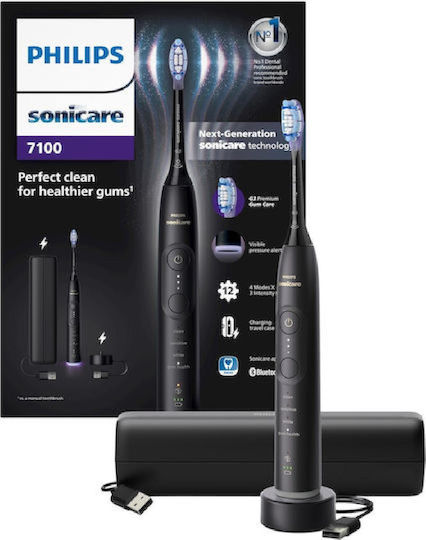
The Philips 7100 Sonicare Toothbrush is a premium rechargeable electric toothbrush built for users who want stronger plaque removal, gentler gum care, and smarter brushing feedback in one device. It uses Next-Generation Sonicare technology with up to 62,000 brush movements per minute, which helps lift plaque efficiently while staying comfortable for daily use. The 7100 series is especially appealing to people with sensitive teeth, gum concerns, braces, or anyone upgrading from a basic electric toothbrush to a more advanced sonic model.
One of the biggest advantages of the Philips 7100 Sonicare Toothbrush is its combination of 4 brushing modes, 3 intensity levels, and a visible pressure alert. This gives users more control over their routine while helping prevent overbrushing and gum irritation. Many versions also include smart app connectivity, a travel case, and a premium gum-care brush head, making it a strong choice for home use and travel. The rechargeable lithium-ion battery offers up to 21 days of use on a full charge, which is ideal for busy routines and frequent travelers.
In 2026, the estimated price range for the Philips 7100 Sonicare Toothbrush is typically around $159.99 to $183.99 in the U.S., depending on color, retailer, and bundle. It is widely available through major retailers and official Philips channels, with some bundles including additional brush heads or a charging travel case. If you are looking for a feature-rich electric toothbrush with gum-care focus, the Philips 7100 Sonicare Toothbrush is a practical and high-value option.
Specifications for Philips 7100 Sonicare Toothbrush
- Cleaning technology: Next-Generation Sonicare technology for high-speed sonic brushing and deep plaque removal.
- Brush movement speed: Up to 62,000 brush movements per minute.
- Brushing modes: 4 modes, including Clean, White, Sensitive, and Gum Health.
- Intensity settings: 3 levels for customized comfort and cleaning power.
- Pressure feedback: Visible pressure alert helps prevent brushing too hard.
- Battery type: Rechargeable lithium-ion battery.
- Battery life: Up to 21 days on a full charge.
- Voltage: 100-240 V, suitable for international use.
- Charging: USB-A charging cable and charger base, depending on package.
- Included brush head: Often shipped with a G3 Premium Gum Care brush head.
- Travel support: Some bundles include a travel case or charging travel case.
- Comparison note: Compared with entry-level Sonicare models, the Philips 7100 Sonicare Toothbrush adds more modes, more intensity control, and better gum-focused features. Against higher-end premium models, it may offer fewer advanced automation features, but it remains a strong mid-to-upper tier choice for most users.
Troubleshooting Philips 7100 Sonicare Toothbrush Problems
Most common issues with the Philips 7100 Sonicare Toothbrush are simple to fix. If the toothbrush does not turn on, charge it for several hours and check that the charging base and cable are seated properly. If the brush vibrates weakly, the brush head may not be attached correctly or may need replacing. If you notice reduced battery life, allow a full charge cycle and avoid storing the handle on a charger continuously for long periods unless instructed by the manual.
If the pressure alert activates too often, reduce brushing force and let the brush head do the work. This is especially important when using the Sensitive or Gum Health modes. There are no widely used user-facing error codes on most Philips Sonicare handles, but flashing indicators usually point to low battery, charging issues, or a brush head connection problem. Keeping the charging contacts clean and dry can prevent many of these faults.
The Philips 7100 Sonicare Toothbrush typically includes a 2-year warranty in many regions. For support, check the official Philips support page for your exact model number or contact Philips customer care through the company’s regional support channels, retailer support, or the product registration system. If problems continue, request a warranty replacement rather than attempting internal repairs.
Pros and Cons of the Philips 7100 Sonicare Toothbrush
Pros
- Powerful sonic cleaning with up to 62,000 brush movements per minute.
- Four brushing modes and three intensity levels support different oral care needs.
- Visible pressure alert helps protect gums and enamel.
- Long battery life makes it convenient for travel and daily use.
- Premium gum-care focus makes it a strong choice for sensitive mouths.
- App support on select versions adds brushing guidance and routine tracking.
Cons
- Higher price than basic electric toothbrushes.
- Some bundles include a USB-A cable instead of USB-C, which may feel dated.
- Replacement brush heads can add to long-term ownership cost.
- Users wanting the most advanced smart features may prefer higher-end alternatives.
For value for money, the Philips 7100 Sonicare Toothbrush sits in a strong middle ground: it is more capable than entry-level models, but generally less expensive than flagship premium Sonicare options. It is a smart buy for users who want gum care, customization, and dependable performance without paying for every top-tier feature.
Customer Reviews for Philips 7100 Sonicare Toothbrush
Customer feedback for the Philips 7100 Sonicare Toothbrush is generally positive, with many users praising the cleaner feel, softer brushing experience, and helpful pressure alert. Common star ratings typically fall around 4.4 to 4.7 out of 5 in retail listings, especially when buyers value battery life and gum comfort.
Typical praise includes comments such as, “My gums feel healthier after two weeks,” and “The pressure alert helped me stop brushing too hard.” Common complaints focus on the price, the cost of replacement heads, and the fact that some packages do not include every accessory users expect. A few reviewers also mention that the charging setup is less modern than USB-C-based competitors.
Overall, the Philips 7100 Sonicare Toothbrush is recommended for users who want a high-quality sonic toothbrush with strong cleaning performance and dependable everyday usability. It is especially appealing for families, frequent travelers, and people with sensitive gums who want a more guided brushing routine.
Faqs
How do I set up the philips 7100 Sonicare Toothbrush for the first time?
What should I do if my philips 7100 Sonicare Toothbrush is too strong or makes my gums feel sensitive?
Which brush head works best with the philips 7100 Sonicare Toothbrush for plaque removal and gum care?
How do I fix a philips 7100 Sonicare Toothbrush that will not turn on or charge?
What do the brushing modes on the philips 7100 Sonicare Toothbrush do?
How can I get the best cleaning performance from a philips 7100 Sonicare Toothbrush?
Is the philips 7100 Sonicare Toothbrush compatible with standard Sonicare replacement heads and chargers?
How do I maintain and clean the philips 7100 Sonicare Toothbrush to keep it working well?
More philips manuals
Leave a Comment