
Philips PET1035 Portable DVD player User Manual
Content
Philips PET1035 Portable DVD Player Review and Manual
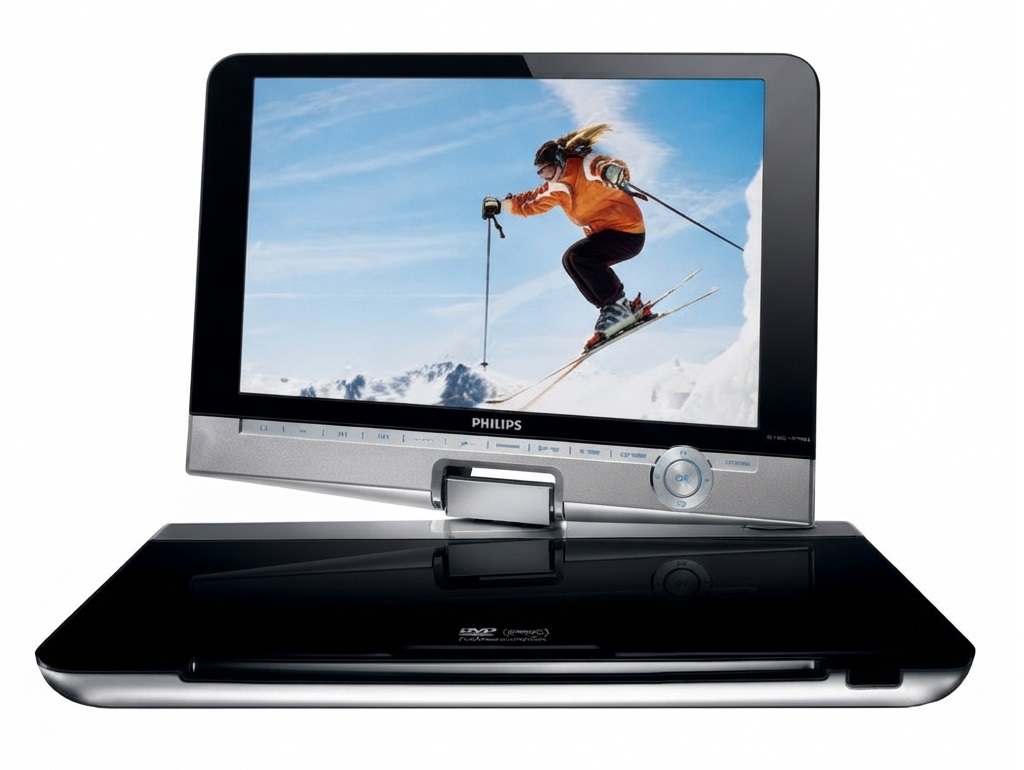
The Philips PET1035 Portable DVD player is a compact travel-friendly entertainment device designed for users who want disc playback on the go. With its 10.2-inch widescreen LCD, slim portable design, and support for multiple video formats, it remains a practical choice for road trips, family outings, and home viewing in rooms where a full-size player is unnecessary. The unit is especially appealing to parents, frequent travelers, and anyone who still relies on physical media for movies, shows, or instructional discs.
One of the biggest advantages of the Philips PET1035 Portable DVD player is its combination of portability and broad format support. It is built to handle DVD, DVD+/-R, DVD+/-RW, (S)VCD, CD, and selected digital video formats such as DivX and MPEG4, depending on the version and region. That makes it more versatile than many basic portable DVD players that only handle standard DVD playback. Its LCD screen, compact footprint, and low power consumption also make it convenient for use in cars, hotel rooms, and temporary setups.
The estimated price range for the Philips PET1035 Portable DVD player on the secondary market is typically around $40 to $120, depending on condition, accessories, and battery health. New retail availability is limited because this is an older model, but it is still commonly found through used electronics sellers, marketplace listings, and replacement-parts channels. For buyers who value disc compatibility, portable viewing, and a familiar hardware interface, the Philips PET1035 Portable DVD player still offers solid utility.
Specifications for the Philips PET1035 Portable DVD Player
- Display: 10.2-inch widescreen LCD for portable movie playback and travel entertainment.
- Dimensions: Approximately 27 x 19 x 3.8 cm, making it easy to carry in a bag or vehicle storage compartment.
- Weight: About 1.5 kg, which is manageable for mobile use but heavier than ultra-compact media players.
- Power supply: DC 9V input with current requirements around 2.2A; compatible adapters vary by region.
- Power consumption: Roughly 20W during operation.
- Operating temperature: 0 to 50°C, suitable for typical indoor and car-based use.
- Video system: NTSC, PAL, and Auto support for broader disc compatibility.
- Laser wavelength: 650 nm, standard for DVD reading technology.
- Playback support: DVD, DVD+/-R, DVD+/-RW, CD-R/RW, (S)VCD, and select compressed video formats in supported variants.
- Audio/video outputs: Commonly includes analog audio and composite video connections for TV or monitor output.
Compared with smaller portable DVD players, the Philips PET1035 Portable DVD player offers a larger screen and more comfortable viewing experience. Compared with newer tablet-based entertainment devices, it is less flexible for streaming but better suited for users with large DVD collections and no need for internet access.
Pros and Cons of the Philips PET1035 Portable DVD Player
Pros
- Large 10.2-inch display: Better visibility than 7- or 8-inch models, especially for long viewing sessions.
- Broad disc support: Plays a wide range of DVD and CD formats, making it useful for mixed media libraries.
- Portable design: Slim enough for travel, family trips, and temporary setups in bedrooms or kitchens.
- Simple operation: Easy to use for children, seniors, and anyone who prefers physical media controls.
- Good value on the used market: Often priced lower than newer portable entertainment devices with similar screen sizes.
Cons
- Older technology: No streaming apps, wireless media features, or modern smart connectivity.
- Used-condition risk: Battery life, screen condition, and disc-drive wear can vary significantly.
- Limited availability: Mostly sold secondhand, so finding complete accessories may take time.
- Heavier than modern tablets: Less convenient than lightweight digital devices for long handheld use.
- Best for disc users only: Not ideal if all media is already digital or cloud-based.
As a value-for-money purchase, the Philips PET1035 Portable DVD player is strongest for users who need dependable DVD playback rather than smart features. Alternatives such as compact media tablets offer more versatility, but they do not replace discs as directly or as simply.
Customer Reviews of the Philips PET1035 Portable DVD Player
Customer feedback for the Philips PET1035 Portable DVD player is generally positive, especially among buyers who wanted a simple travel DVD solution. Many users rate it around 4 out of 5 stars for its screen size, easy controls, and solid format support. A common praise is that the display is large enough for kids in the back seat or for comfortable viewing in hotel rooms. One typical comment is: “Great screen for road trips and very easy to set up.”
Common complaints focus on battery wear, aging disc mechanisms, and the challenge of finding replacement chargers or remotes for older units. Some users also mention that the unit performs best when used with external power for long sessions. Buyers looking for a reliable used portable DVD player should prioritize listings that include the original adapter, remote, and a battery in good condition.
For families, frequent travelers, and collectors who still use physical media, the Philips PET1035 Portable DVD player remains a worthwhile option if purchased from a trusted seller and tested before regular use.
Faqs
How do I set up the philips PET1035 Portable DVD player for the first time?
Why is my philips PET1035 Portable DVD player not reading discs?
What video and disc formats are compatible with the philips PET1035 Portable DVD player?
How can I improve battery life on the philips PET1035 Portable DVD player?
Why is the screen on my philips PET1035 Portable DVD player dim or showing poor picture quality?
Can I connect the philips PET1035 Portable DVD player to a TV or external display?
What should I do if the philips PET1035 Portable DVD player keeps freezing or skipping during playback?
How do I clean and maintain the philips PET1035 Portable DVD player properly?
More philips manuals
- Philips BDP2180K Blu-ray Disc User Manual
- Philips 7100 Sonicare Toothbrush User Manual
- Philips DreamStation 2 Advanced CPAP Machine User Manual
- Philips Respironics DreamStation Bipap Avaps User Manual
- Philips 8200 Series Ambilight TV 43PUS8200 User Manual
- Philips DreamStation Go Auto CPAP Machine User Manual
Leave a Comment