
Usage: Realme Smartphone ColorOS 5.1 User Manual
Content
realme Smartphone ColorOS 5.1
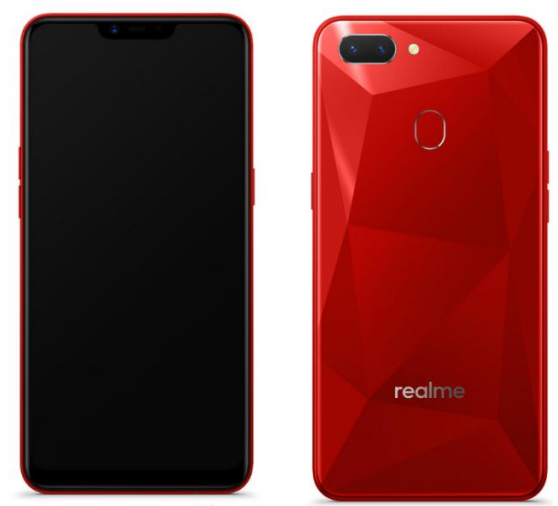
Introduction
The realme Smartphone ColorOS 5.1 represents a seamless fusion of powerful hardware and an intuitive user interface designed for modern smartphone users. Built on the robust ColorOS 5.1 platform, this device offers a smooth, customizable experience with enhanced security, battery optimization, and smart features that cater to both everyday consumers and tech enthusiasts. Its sleek design, combined with efficient performance,,e makes it suitable for multitasking, gaming, photography, and communication.
Key benefits include a user-friendly interface optimized for speed and stability, advanced AI-powered camera functionalities, and long-lasting battery life, all wrapped in an affordable price range typically between $150 and $,250, depending on the variant and region. This smartphone is ideal for young professionals, students, and budget-conscious users seeking quality and performance without compromising on style or functionality. Available through online and retail outlets globally, the realme Smartphone ColorOS 5.1 ensures accessibility for a wide audience.
Technical Specifications and Features of realme Smartphone ColorOS 5.1
- Operating System: ColorOS 5.1 based on Android 8.1 Oreo, offering enhanced customization and smooth navigation.
- Processor: Octa-core MediaTek Helio P60 or equivalent, optimized for balanced performance and power efficiency.
- Display: 6.0-inch IPS LCD with Full HD+ resolution (1080 x 2160 pixels), delivering vibrant visuals and sharp clarity.
- RAM and Storage: Options typically include 4GB RAM with 64GB internal storage, expandable via microSD card up to 256GB.
- Camera System: Dual rear cameras (16MP + 2MP) with AI enhancements for portrait and low-light photography; 16MP front camera for selfies.
- Battery: 3415mAh non-removable battery with intelligent power saving modes for extended usage.
- Connectivity: 4G LTE, Wi-Fi 802.11 b/g/n, Bluetooth 5.0, GPS, and USB Type-C support.
- Additional Features: Fingerprint sensor, face unlock, Dolby Atmos sound support, and AI Facial Recognition.
When compared to similar mid-range smartphones in the market, the realme Smartphone ColorOS 5.1 stands out for its AI-driven camera capabilities and efficient ColorOS customization, providing a user experience that balances speed with rich features.
Get started
Quick look
ColorOS 5.1 New Features
With ColorOS 5.1, noticeably,,y the graphics and colors are more vivid and crisp. Even with its design, it hasn't lost touch with its fundamental purpose: to use with ease and unparalleled effort to protect privacy. There’s a Screen Clock that updates you with time, calls, and messages even when the screen is
off. The calculator has been more efficient with its added functions for more conversions. You can fix your volume buttons to adjust to a specific sound,d and then there’s Privacy Passcode that adds more layers to prevent digital theft from getting your personal data.
Brand-new visual design
ColorOS 5.1 is a visual treat. It’s easy on the eye,e and the background colors are relaxing. The App icon has a brand new makeover, er having circular shapes,, and Control Center has green color with a white background, which is soothing to the eyes. To have a cleaner and minimalist setting, System Apps sorts and groups settings like Call, Contacts, Messages, Phone Managers,, and others into one location.
Photo album on Smart Assistant
Smart Assistant. We all know that Smart Assistant is your happy helper and intuitively knows what you want, and one of those is memories. It will show photo albums of pictures that matter to you.
Enjoy the new features of the Calculator.
The new Calculator app not only combines the standard and scientific calculators but also adds useful functions that will come in handy in time.
Share your internet connection through Wi-Fi Tethering Wi-Fi Tethering. This makes your phone as a Wi-Fi router, which basically has the same functionality to that as a traditional router which enabling the sharing of the internet to other Wi-Fi devices.
Make use of the Screen Clock.
Screen Clock. If you want to know who called you or messaged you without opening the screen, then you would love the Screen Clock function. You can set display time and reminders like missed calls, unread SMS, unread WeChat, and QQ messages, even when the screen is off.
Fixed your volume button to a specific ringer
Default Volume Button Adjustment. Sometimes you want to manage the volume of the ringtone using the physical buttons, but the one that gets adjusted is the music volume. You can now choose the physical buttons to either adjust for the Ringtone Volume or Media volume only.
Prevent theft by using Privacy Passcode.
Privacy Passcode. We all know how some apps are snooping to get your personal data stored on your phone. Privacy Passcode toughens your privacy through h series of encryption methods and a secret question that you can customize. When this is turned on, the validation will be used for all privacy features , such as App Encryption and Private Safe.
Add a Marker Pen to highlight when you take and edit a screenshot.
Add Marker Pen. You can capture what’s displayed on the current screen and take long screenshots of your conversations on any messenger, or a screenshot of a full web page, or a screenshot of some long pages in apps. You can edit the screenshots directly on the Photos app using a set of professional editing tools. Also, a marker pen has been added to highlight words, draw, and personalize the screenshot you’ve taken.
New camera features for taking photos and selfies.
More new stickers. There are new stickers that you can choose from. Your pictures will definitely be cooler, cuter, and funnier. To use stickers to decorate your photo, choose STICKER, click , then choose from the array of stickers.
- Size and Weight
- Height
- 156.2mm
- Width
- 75.6mm|
- Thickness
- 8.2mm
- Weight
- 168g with battery
Basic Parameters
- Operating System
- ColorOS 5.1, based on Android 8.1
- GPU
- adreno506
- RAM
- 3GB/4GB
- Storage
- 32GB/64GB
- Battery
- 4230mAh
- Processor
- Qualcomm Snapdragon 450
- Size
- 6.2 inches (15.8cm)|
- Type
- Corning Glass
- Resolution
- 1520 by 720 pixels
- Colors
- 16.7 million colors
- Touch
- Multi-touch, Capacitive Screen
Camera
- Rear Sensor
- 13-megapixel & 2-megapixel
- Front Sensor
- 8-megapixel|
- Flash
- Yes
- Aperture
- Rear: f/2.2+f/2.4
- Front: f/2.2
- ConnectivityFrequencies:
- GSM:850/90
- 0/1800/1900MHz
- WCDMA:850/900/2100MHz
- FDD-LTE: Bands 1/3/5/8
- TD-LTE: Bands 38/40/41 (2535-2655MHz)
- SIM Card Type
- Dual Nano SIM Cards & Micro SD Card (Total 3 slots) |
- GPS
- GPS/aGPS|
- Bluetooth
- 4.2
- WI-FI
- 2.4GHz
- OTG
- Supported
- NFC
- No
- Sensors
- Fingerprint Sensor
- Light Sensor
- Proximity Sensor
- Acceleration Sensor
- G-sensor
- Pedometer
- E-Compass
- In the Box
- Handset
- Case Cove
- Screen Protector(pre-applied)
- Adapter
- Cable
- Warranty Card,
- Quick Guard
- SIM Slot ljector
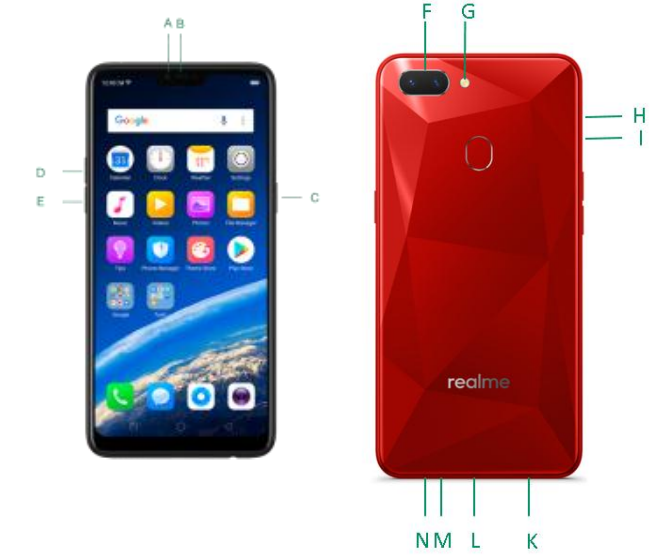
RMX1805 features
- Front camera
- Receiver
- Sleep/Wake button
- Volume up button
- Volume down button
- Rear camera
- Flash
- SIM card tray
- SIM tray hole
- Speaker
- Micro-USB port
- Microphone
- Headset jack
Maintenance and Repair
Phone Cases
Keeping your phone protected from damage should be pretty important to you. The phone case that comes along with your phone can effectively mitigate your concerns. realme original phone case is made of TPU material, which is lightweight and soft, and helps keep the original 'feel' of the phone, since the case is a tight-fitting overlay. It does a good job of protecting against drops and shock damage on the corners and rear of your phone, and can also reduce the damage caused by extreme temperatures, liquid, and dust invasion, etc.
Screen Protector
realme provides you with an original HD clear screen protector made of PET material, which is a thin piece of electro-conductive film that self-adheres to your screen. It protects your screen from cracking, and also offers resistance to scratches, fingerprints , and abrasions. Besides, the realme screen protector ensures high definition and sensitivity of the screen, which will not affect the screen display quality.
Maximize battery life and lifespan.
- Note: Rechargeable batteries have a limited number of charge cycles and may eventually need to be replaced. It is normal for the battery to lose its capacity over time, but you can do the following to maximize its life and lifespan.
- Use realme original accessories. Charge the phone with the realme original power adapter and USB cable. Charging with third-party charger accessories might impact battery lifespan or even cause security incidents.
- Use at a suitable temperature. realme smartphone battery is designed to have a good performance in a wide range of ambient temperatures, with 16° C to 25° C as the ideal comfort zone. When the temperature is higher than 45°C, battery capacity will be irreversibly damaged, and the phone might even short-circuit and burn.
- Do not use when charging. Programs such as long-time calls, games, or online videos will make the phone get warm quickly.
- Do not fully discharge your phone's battery. Charge your phone when your battery level goes down to 10%. If the phone's battery is fully discharged, the battery could fall into a deep discharge state, which will cause it to be slightly damaged.
- Store the phone long-term. If you plan to store the phone for a long time, charge it to 60% or above every month.
- External environment. Avoid exposing your phone battery to a humid environment or sun exposure.
- Keep a good using habit. Using features such as Bluetooth, Wi-Fi, and GPS or keeping them active in the background may drain the battery significantly. Turn them off when not in use to save the battery. Dimming your screen and reducing the screen timeout setting can also preserve the battery life.
- Do not charge with a portable power bank frequently. If a power bank supplies current that is above your phone battery's capacity, then it will cause damage to your battery gradually. Make sure the power bank you buy is of good quality, and has power ratings which are suitable for your phone, basically match the current to the wall charger you use.
Keep Clean
Your mobile phone could be a hotspot for bacteria, so cleaning your phone is of great importance. Follow these steps:
- To clean your phone, unplug all cables and turn it off first.
- Dip the included cleaning cloth or a soft, slightly damp, lint-free cloth in distilled water or low-concentration alcohol, and shake or squeeze to remove any excess liquid.
- Slightly wipe across your phone. Avoid getting moisture in openings.
- Gently wipe the screen with the dry part of the microfiber cloth, but don't try to pick up all the excess water if it means pressing hard.
Do not attempt to dry your phone with an external heat source, such as a hair dryer. If impurities cannot be cleaned up, contact the realme Service Center for professional assistance.
Keep dry and solve water damage
Do not use your phone in the rain, or near washbasins or other wet locations. Take care not to spill any food or liquid on your phone. In case your phone gets wet, follow these emergency measures:
- Take your phone out of the liquid immediately, unplug all cables, and turn off your phone.
- If your phone has a removable battery, remove it.
- Use a tissue or soft cloth to thoroughly absorb water stains or liquids on the surface of your phone, and gently shake the phone in the realmesite direction of liquid inflow.
- Let your phone dry thoroughly before turning it on again. Avoid drying your phone with an external heat source, such as a hot air hair dryer.
If your phone has a serious water damage, take your phone, warranty card, and proof of purchase to a nearby realme Customer Center for repairs at once.
Use connectors, ports, and buttons.
Never force a connector into a port,t for that might cause damage, which is not covered by warranty service. Check for obstructions on the port. If the connector and port don't join with reasonable ease, they probably don't match. Make sure that the connector matches the port and that you have positioned the connector correctly in relation to the port.
Other information
Mobile phones are perishable items;s, use them with care. The following instructions might help to protect your phone:
- Do not drop your phone or let it receive a substantial impact.
- Do not place your phone in a microwave oven or other high-voltage equipment; otherwise, it might cause damage, fire , or explosion.
- Do not leave the phone in hot, humid, or dusty environments. This may cause the phone to malfunction.
- Your phone contains small parts, which may present a choking hazard to small children. Keep your phone and its accessories away from small children.
- Do not paint your phone. Paint will block the sensors and lead to phone disoperation.
- Dirty sockets might cause poor contact or electrical leakage. Regularly clean the power socket.
- Do not take out the SIM or SD card when transmitting or saving information; otherwise, some important information might be lost.
- Use only the supplied or approved antenna for replacement. Modified accessories might damage the phone or violate the administrative regulations of radio devices.
Note:
Read all safety information carefully before using the phone to ensure personal safety and proper use. Consumable parts (such as the battery and earphones) possess different warranty periods from your phone. Check with your warranty receipt for details.
Troubleshooting Common Issues with realme Smartphone ColorOS 5.1
Users of the realme Smartphone ColorOS 5.1 may encounter occasional issues such as unresponsive touch screens, network connectivity problems, or battery drainage. Below are typical problems and their solutions:
- Touchscreen Unresponsive: Restart the device; clean the screen with a microfiber cloth; ensure no screen protectors interfere; if persistent, consider a factory reset or screen replacement.
- Mobile Data or Network Issues: Reset network settings via Settings > System > Backup & Reset > Reset Network Settings; switch SIM cards to confirm carrier problems; update system software regularly.
- Battery Drains Quickly: Close background apps, disable unnecessary connectivity features like Bluetooth or GPS when not in use, and check for software updates that optimize battery performance.
- Error Codes: For specific error codes, consult the realme Support website or contact customer service for tailored solutions.
Preventive measures include regular software updates, avoiding extreme temperatures, and protecting the device from physical damage. realme offers warranty coverage typically valid for one year, including hardware repairs and software support through official service centers and online help portals.
For additional assistance, users can reach realme Support via their official website or authorized service centers globally.
Pros and Cons of realme Smartphone ColorOS 5.1
- Pros:
- Affordable price point offering strong value for mid-range performance.
- ColorOS 5.1 provides a clean, customizable interface with smooth multitasking.
- AI-enhanced dual-camera system delivers quality photos in varied conditions.
- Good battery life with intelligent power management features.
- Fast fingerprint and face unlock for convenient security.
- Cons:
- ColorOS 5.1 is based on Android 8.1, which is outdated compared to newer Android versions, limiting access to some latest apps and features.
- Display uses IPS LCD instead of AMOLED, which may result in less vibrant colors and deeper blacks.
- Average processor performance compared to newer mid-range chipsets.
- Limited availability of software updates beyond security patches.
In comparison with alternatives like Xiaomi Redmi Note series or Samsung Galaxy A series, the realme Smartphone ColorOS 5.1 offers competitive camera AI and overall smooth user experience at a comparable or lower cost, making it a sensible choice for budget-conscious buyers.
Customer Reviews and Feedback on realme Smartphone ColorOS 5.1
Customers generally praise the realme Smartphone ColorOS 5.1 for its responsive interface, reliable camera performance, and solid battery life. Many users rate it around 4 out of 5 stars, appreciating the value-for-money aspect and user-friendly OS customization.
Common praises focus on the bright display and efficient multitasking capabilities, while typical complaints involve occasional lag in heavy gaming and cover an outdated Android version, limiting app compatibility. Some users have reported minor touch screen delays and network connectivity glitches, which can usually be resolved with system updates or resetting network settings.
Overall, the phone is recommended for everyday use, especially for students and professionals seeking an affordable yet capable smartphone. Users looking for the latest Android features may consider newer models, but find the realme Smartphone ColorOS 5.1 a dependable option for basic to moderate smartphone needs.
Faqs
How do I set up my realme Smartphone ColorOS 5.1 for the first time?
What should I do if my realme Smartphone ColorOS 5.1 is freezing or unresponsive?
How can I optimize the battery life on my realme Smartphone running ColorOS 5.1?
Can I customize the navigation gestures and buttons on realme Smartphone ColorOS 5.1?
Is realme Smartphone ColorOS 5.1 compatible with all SIM cards and memory cards?
How do I safely clean and maintain my realme Smartphone with ColorOS 5.1?
What are the key features of ColorOS 5.1 on realme Smartphones that improve user experience?
How can I troubleshoot network connectivity issues on realme Smartphone ColorOS 5.1?
More realme manuals
Leave a Comment