
Usage & Setup: Realme Smartphone ColorOS 5.2 User Manual
Content
Realme Smartphone ColorOS 5.2
Introduction
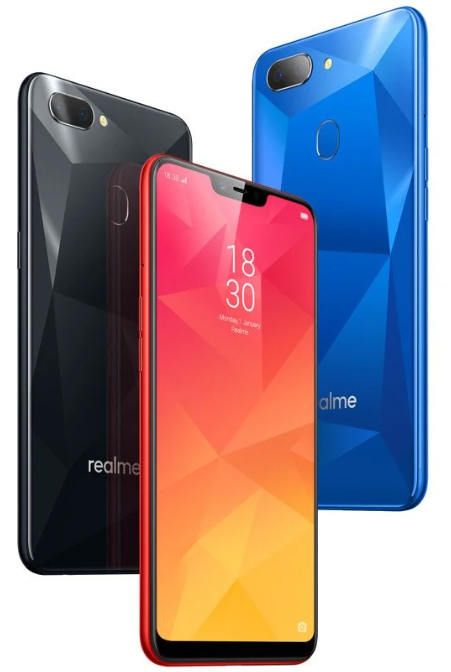
The realme Smartphone ColorOS 5.2 offers a robust and user-friendly mobile experience designed to balance performance, style, and affordability. Powered by the efficient ColorOS 5.2 interface, this smartphone delivers smooth multitasking capabilities, enhanced battery management, and a suite of smart features tailored for everyday use. With a sleek design and vibrant display, it targets tech-savvy users and budget-conscious consumers seeking a reliable device for communication, entertainment, and productivity.
Key benefits include optimized system performance with ColorOS 5.2’s intelligent resource allocation, a customizable user interface with gesture navigation, and enhanced security options such as fingerprint and facial recognition. The smartphone is ideal for social media enthusiasts, mobile gamers, and professional users looking for a dependable device that supports both work and leisure.
Available in various markets globally, the realme Smartphone ColorOS 5.2 typically falls within the mid-range price bracket, estimated between $150 to $250 depending on configuration and region. Its availability through official retail stores and online platforms ensures broad access, making it a popular choice for first-time smartphone buyers and those upgrading from older models.
In the Box
- realme 2 pro
- Adapter
- Micro USB Cable
- Important Information Booklet with Warranty Card
- Quick Start Guide
- SIM Card Ejector
- Screen Protect Film
- Case
Product ID
- RMX1801/RMX1803/RMX1807
Technical Specifications
- Model: realme 2 Pro
- Appearance: Black See、Blue Ocean、Ice Lake(No 8+128G) 4+64G / 6+64G / 8+128G (8+128G not has ice lake)
- Size and Weight
- Height 156.7mm
- Width 74mm
- Thickness: 8.5mm
- Weight: 174g with battery
Basic Parameters
- Operating System: ColorOS 5.2, based on Android 8.1
- GPU: Adreno 512
- RAM: 4GB/6GB/8GB
- Storage: 64GB/128GB
- Battery: 3500mAh (TYP) 3415mAh(MIN)
- Processor: SDM660 lite
Display:
- Size: 6.3 inches
- Type: LTPS TFT
- Resolution: 2340 by 1080 pixels)
- Colors: 16.7 million colors
- Touch: Multi-touch, Capacitive Screen
Camera
- Rear Sensor: 16-megapixel & 2-megapixel
- Front Sensor: 16-megapixel
- Flash: LED Flash
- Aperture:
- Rear: f/1.8+f/2.4
- Front: f/2.0
Connectivity
- Frequencies:
- GSM:850/900/1800/1900MHz
- WCDMA:850/900/2100MHz
- FDD-LTE: Bands 1/3/5/7/8/20
- TD-LTE: bands 38/40/41 (2535-2655MHz)
- SIM Card Type: Dual Nano SIM Cards & Micro SD Card (Total 3 slots)
- GPS: GPS/aGPS/Glonass/BeiDou
- Bluetooth: BT5.0
- Wi-Fi: 2.4/5GHz 802.11 a/b/g/n/ac
- OTG: Supported
- NFC: No
Sensors
- M-sensor
- Gravity Sensor
- Gyro-meter
- Fingerprint Sensor
- Light and Proximity Sensor
- OTG
In comparison to similar mid-range smartphones like Xiaomi Redmi Note 7 or Samsung Galaxy M20, the realme Smartphone ColorOS 5.2 stands out for its efficient ColorOS customization, superior AI camera features, and competitive pricing without sacrificing build quality or essential features.
Buttons and components
Features
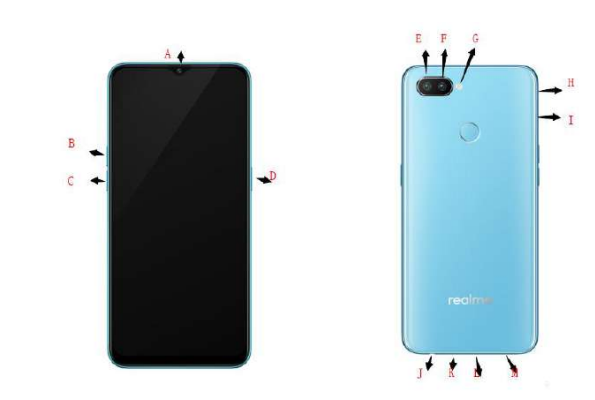
- Front camera (Several holes above the front camera are the receiver)
- Receiver Volume up button
- Volume down button
- Sleep/Wake button
- Rear camera1
- Rear camera2
- Flash
- SIM tray hole
- SIM card tray
- Headset jack
- Microphone
- Micro-USB port
- Speaker
ColorOS 5.2 Features
ColorOS 5.2 aims to make your phone to be true to its name, a Smart one. New features are clever and convenient. In this quick-paced life, we wanted your device to get ahead and do things for you so you can focus on other things,, while your phone will do the rest. Smart Sidebar has been added for smart multitasking. There’s also Smart Driving to make you focus on the road. Save more battery with Smart Power Saver and have Talia as a reliable assistant when you’re typing a message. With all these and more features, ColorOS 5.2 still tightens its grip on security and privacy.
- Exciting user interface
The new ColorOS 5.2 makes use of the screen more. Quick functions just got more quicker. One touch on the sidebar and you’ll have shortcuts to your favorite apps and tools. One scan and you’ll have a translation and personal information that can be directly saved to your contacts. ColorOS 5.2 goes beyond convenience and efficiency. It is simply smart. - New clever features of Smart Assistant
Smart assistant maximizes the use of your camera. Just one snap and you’ll get tons of information just by mere clicking the camera button. It's now a lot easier and smarter to scan documents, scan & translate images and texts, scan name cards to be saved on your contacts, and translate photos to make travel and life more convenient. - Smart snaps with Smart Scan
There are more things you can do with your camera apart from taking pictures and selfies. One snap and have languages translated in an instant. Scan business cards and have all information saved in your contacts. - New clever features of Smart Assistant
Smart assistant maximizes the use of your camera. Just one snap and you’ll get tons of information just by mere clicking the camera button. It's now a lot easier and smarter to scan documents, scan & translate images and texts, scan an amecard to be saved on your contacts, and translate photos to make travel and life more convenient. - ORoaming
To stay connected with loved ones and to still check business and work from time to time, we need data. It is now a necessity, and we know it,, and we would want to make things easier for you. Roaming makes you purchase an international data package without the need to buy a SIM card. It supports 62 countries/regions. Now you can truly enjoy your trip. - Be a master video editor.
Impress your social media followers and friends with your videos. You can now add close-up and pulsation to the videos you have taken to make them more fun and artsy. - Smart Driving
A small distraction whiledistraction while driving can cause an accident. Even if we really don't want to answer a phone call or have a glimpse of who messaged us or what the notification is for, but the urge to check it is so str,,ong and our focus on the road is diverted. It has been said that checking the phone is one of the biggest reasons for senseless accidents on the,, road and we wanted to avoid that and save lives instead. - Game Space
Game space will definitely make each gamer happy. Imagine putting all your favorite games in one place. This will make it a lot easier to find the game that you would want to play. They will be gathered in one application, which serves as a hub,b so it wouldn't be scattered around your home screen. N, ow let's enter the game space. - Scanning names to save on Contacts
Save new contact information in a snap. You just need a name card or a business card. Fast and convenient. No need to type each information on your phone. - Save more battery with Smart Power Saver..
Optimize the power of your battery and manage those apps and settings that use the most power. Know how to save more power so you can use it,, especially when it is most needed. - Say hello to Talia, your new TouchPal assistant. nt
Optimize the power of your battery and manage those apps and settings that use up the most power. Know how to save more power so you can use it,, especially when it is most needed.
Sleep/Wake button
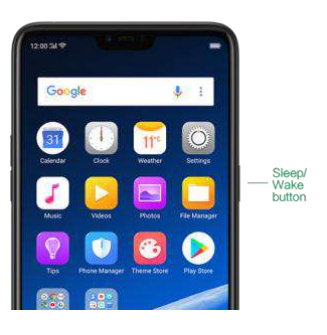
The Wake/Sleep button on the right side of your phone has a number of different uses.
When the phone is on
- Wake or lock the screen: With the phone is powered on, press the Wake/Sleep button once, and it will wake the phone up to the point that you can see the lock screen, like the clock and any notifications that are set up to display there. When the phone screen is awakened, pressing this button will blacken the screen and lock the phone.
- Take a screenshot: Press and hold the Sleep/Wake and Volume Down buttons at the same time, me and your phone will take a picture of whatever is displayed on the screen. Click the screenshot, and then choose to a take a long screenshot, send, edit,, or delete the screenshot. If you save the screenshot, you can view it on Photos.
- End a call: Go to [Settings] > [Additional Settings] > [Accessibility] and turn on [Power Button Ends Call], then you can press the Sleep/Wake button to end phone calls.
- Turn off the phone: Press and hold the Sleep/Wake button for a few seconds, whether the phone is on the lock screen or home screen, it will ask you to slide down to power off the device.
- Force restart the phone: Press and hold the Sleep/Wake and Volume Up buttons for about 10 to 12 seconds until your device is turned on. View force restart your phone.
When the phone is off
- Turn on the phone: Press and hold the Sleep/Wake button for a few seconds until you see the realme logo.
- Force Restart the phone: Press and hold the Sleep/Wake and Volume Up buttons until your device is turned on. View force restart your phone.
- Enter Recovery Mode: Press and hold the Sleep/Wake and Volume Down buttons at the same time to enter Recovery Mode.
Maintenance and Repair
Phone Cases
Keeping your phone protected from damage should be pretty important to you. The phone case that comes along with your phone can effectively mitigate your concerns. realme original phone case is made of TPU material, which is lightweight and soft, and helps keep the original 'feel' of the phone, since the case is a tight-fitting overlay. It does a good job of protecting against drops and shock damage on the corners and rear of your phone, and can also reduce the damage caused by extreme temperatures, liquid, and dust invasion, etc.
Screen Protector
realme provides you with an original HD clear screen protector made of PET material, which is a thin piece of electro-conductive film that self-adheres to your screen. It protects your screen from cracking, and also offers resistance to scratches, fingerprints, and abrasions. Besides, the realme screen protector ensures high definition and sensitivity of the screen, which will not affect the screen display quality.
Maximize battery life and lifespan.
Note: Rechargeable batteries have a limited number of charge cycles and may eventually need to be replaced. It is normal for the battery to lose its capacity over time, but you can do the following to maximize its life and lifespan.
- Use realme original accessories. Charge the phone with the realme original power adapter and USB cable. Charging with third-party charger accessories might impact battery lifespan or even cause security incidents.
- Use at a suitable temperature. realme smartphone battery is designed to have a good performance in a wide range of ambient temperatures, with 16° C to 25° C as the ideal comfort zone. When the temperature is higher than 45°C, battery capacity will be irreversibly damaged, and the phone might even short-circuit and burn.
Do not use when charging. Programs such as long-time calls, games,, or online videos will make the phone get warm quickly. - Do not fully discharge your phone's battery. Charge your phone when your battery level goes down to 10%. If the phone's battery is fully discharged, the battery could fall into a deep discharge state, which will cause it to be slightly damaged.
- Store the phone long-term. If you plan to store the phone for a long time, charge it to 60% or above every month.
- External environment. Avoid exposing your phone battery to a humid environment or sun exposure.
- Keep a good using habit. Using features such as Bluetooth, Wi-Fi, and GPS or keeping them active in the background may drain the battery significantly.
- Turn them off when not in use to save the battery. Dimming your screen and reducing the screen timeout setting can also preserve the battery life.
- Do not charge with a portable power bank frequently. If a power bank supplies current that is above your phone battery's capacity, then it will cause damage to your battery gradually. Make sure the power bank you buy is of good quality, and has power ratings that are suitable for your phone, basically match the current to the wall charger you use.
Troubleshooting Common Issues in realme Smartphone ColorOS 5.2
Users may occasionally experience issues such as unresponsive touchscreens, network connectivity problems, or battery drain. Here are common problems and practical solutions:
- Unresponsive Screen: Restart the device, clean the screen with a microfiber cloth, and ensure the software is updated regularly to prevent glitches.
- Mobile Data Not Working: Reset network settings via Settings > System > Backup & Reset. If issues persist, try rebooting or testing with a different SIM card.
- Battery Draining Quickly: Close background apps, reduce screen brightness, and disable unnecessary connectivity features like Bluetooth or GPS when not in use.
- Fingerprint Sensor Failure: Clean the sensor, re-register fingerprints, or update the system software for improved stability.
Preventive measures include keeping the device software up to date, protecting it from extreme temperatures, and handling the hardware with care. Warranty coverage typically includes hardware defects and software issues under normal use, with official realme support available via their website and authorized service centers worldwide.
Pros and Cons of realme Smartphone ColorOS 5.2
- Pros:
- The efficient ColorOS 5.2 interface provides smooth multitasking and customization.
- Strong AI camera capabilities enhance photo quality for the budget segment.
- Competitive pricing offers excellent value for mid-range smartphone buyers.
- Reliable battery life with fast charging support for extended use.
- Good build quality and premium design aesthetics.
- Cons:
- Operating system based on Android 8.1, which may feel outdated compared to newer versions.
- Occasional software bugs that require updates or resets.
- Limited availability of software upgrades beyond ColorOS 5.2 in some regions.
- Performance may lag with very intensive gaming or multitasking compared to flagship models.
The realme Smartphone ColorOS 5.2 offers a balanced package for users seeking affordable technology without compromising essential smartphone features, though those wanting the latest Android experience or maximum processing power might consider alternatives.
Customer Reviews and Feedback on realme Smartphone ColorOS 5.2
Customers generally praise the realme Smartphone ColorOS 5.2 for its user-friendly interface, responsive camera system, and solid battery performance. Many users appreciate the smooth operation of ColorOS 5.2 and its customization options, awarding the device an average rating of 4 out of 5 stars.
Common positive remarks include the vibrant display quality and value-for-money proposition. Some users report occasional software glitches and desire more frequent updates. Complaints about slower processing under heavy load appear, but are not widespread.
Overall, buyers recommend the realme Smartphone ColorOS 5.2 especially for everyday tasks, photography enthusiasts on a budget, and those new to smartphones seeking a dependable device. Most advise confirming software updates and network compatibility before purchase to optimize user experience.
Faqs
How do I set up my realme Smartphone ColorOS 5.2 for the first time?
What should I do if my realme Smartphone ColorOS 5.2 is not responding or freezing?
How can I optimize battery performance on realme Smartphone ColorOS 5.2?
What are the key gesture features available on realme Smartphone ColorOS 5.2 and how do I use them?
Can I use realme Smartphone ColorOS 5.2 with older Android apps and accessories?
How do I manage app permissions and protect privacy on realme Smartphone ColorOS 5.2?
What steps should I follow to maintain and care for my realme Smartphone ColorOS 5.2?
How do I update the realme Smartphone ColorOS 5.2 to the latest version?
More realme manuals
Leave a Comment