
Setup: Remington Pro Power Hair Clipper HC5150 User Manual
Content
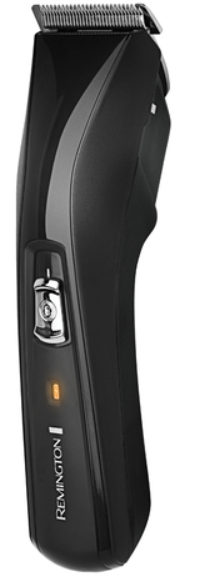
Remington Pro Power Hair Clipper HC5150
Introduction
The Remington Pro Power Hair Clipper HC5150 is designed for men seeking professional-grade grooming with ease and versatility. Featuring a powerful Pro Power motor, this clipper delivers twice the cutting speed of previous models, ensuring efficient and smooth trimming for all hair types, whether wet or dry. Its self-sharpening surgical steel blades maintain precision over time, providing consistently sharp cuts without frequent maintenance.
This hair clipper is ideal for home users who desire salon-quality results without the hassle or cost of frequent barber visits. It suits a wide range of grooming needs, from simple trims to detailed styling, boasting 15 adjustable length settings from 1 mm to 42 mm for personalized looks. The cordless design offers up to 30 minutes of uninterrupted use, making it convenient for both quick touch-ups and thorough grooming sessions.
Available at an estimated price range of around £30 (or equivalent in other currencies), the Remington HC5150 is competitively positioned in the market for affordable yet high-performance hair clippers. It can be purchased through various online retailers and official Remington outlets, often accompanied by free delivery offers and straightforward return policies.
Specifications and Key Features of Remington Pro Power Hair Clipper HC5150
- Motor: Pro Power motor with 5800 RPM for twice the cutting speed compared to previous Remington models
- Blades: Self-sharpening surgical steel blades for long-lasting sharpness
- Cutting Length Range: Adjustable from 1 mm to 42 mm using two attachment combs
- Length Settings: 15 precise steps for customized hair lengths
- Power Source: Corded and cordless operation with up to 30 minutes of cordless run time
- Charging Time: Approximately 14 hours for full battery recharge
- Accessories Included: Two attachment combs, cleaning brush, blade oil, and power cable
- Weight & Design: Lightweight plastic body weighing around 500 grams for easy handling
- Comparison: Offers a broader cutting range (1-42 mm) and faster motor speed than Philips Series 3000 QC5130, which is limited to 21 mm and has a similar motor speed but shorter cordless operation
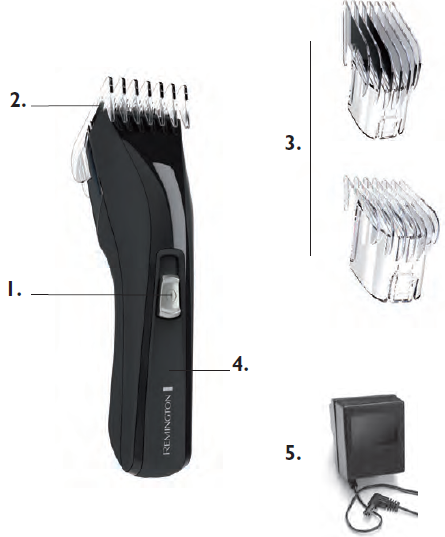
Part
- On/Off Switch
- Blade set
- 2 attachment guide combs
- Charging indicator light
- Charging adaptor
IMPORTANT SAFETY INSTRUCTIONS
WARNING – TO REDUCE THE RISK OF BURNS, ELECTROCUTION, FIRE, OR INJURY TO PERSONS:
- An appliance should never be left unattended when plugged into a power outlet.
- Keep the power plug and cord away from heated surfaces.
- Make sure the power plug and cord do not get wet.
- Do not unplug the product with wet hands.
- Do not use the product with a damaged cord. A replacement can be obtained via the nearest Remington® Service Centre.
- Charge, use, and store the product at a temperature between 15°C and 35°C.
- Always unplug from the mains when cleaning.
- Only use the parts supplied with the appliance.
- The trimmer is not washable. If it falls into water, ensure the power outlet is switched off before removing.
- Keep this product out of reach of children. The use of this appliance by persons with reduced physical, sensory, or mental capabilities or a lack of experience and knowledge can give rise to hazards. Persons responsible for their safety should give explicit instructions or supervise the use of the appliance.
HOW TO USE
BEFORE STARTING THE CUT
- Inspect the clipper, making sure that it is free from hair and dirt.
- Seat the person so that their head is approximately at your eye level.
- Before cutting, always comb the hair so it is tangle-free and dry.
TO ATTACH A COMB
Hold the comb with its teeth upward.
Slide it onto and along the track of the left and right sides of the housing unit; the front of the combs firmly sits against the clipper blade.
TO REMOVE THE COMB
Holding the clipper with the blades facing away from you, firmly push the comb upward and away from the blades.
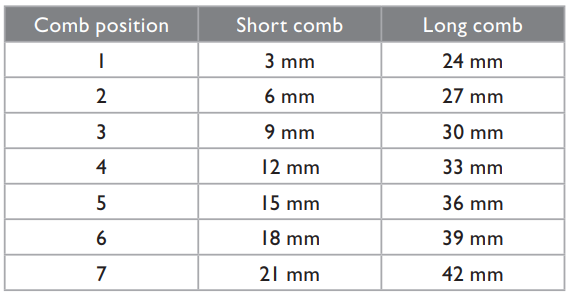
The comb attachment is marked accordingly on its outside middle surface. (3-21mm & 24-42mm)
INSTRUCTIONS FOR HAIR CUTTING
NOTE: For even cutting, allow the comb attachment/blade to cut its way through the hair. Do not force it through quickly. If you are cutting for the first time, start with the maximum comp attachment.
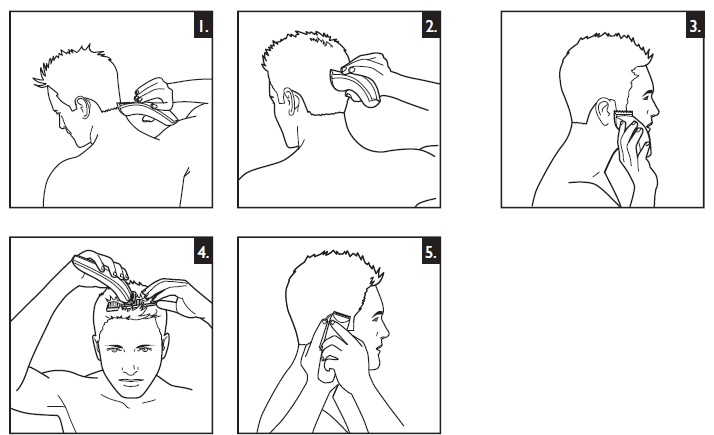
STEP 1 – Nape of the neck – PICTURE 1
- Set the comb attachment to 3mm or 6mm.
- Hold the clipper with the blade teeth pointing upwards. Begin starting at the centre of the head at the base of the neck.
- Slowly lift the clipper, working upwards and outwards through the hair, trimming just a little at a time.
STEP 2 – Back of the head – PICTURE 2
- With the comb attachment set on 12mm or 18mm, cut the hair at the back of the head.
STEP 3 – Side of the head – PICTURE 3
- Set the comb attachment to 3mm or 6mm guide to trim sideburns. Then change the setting to 9mm and continue to cut to the top of the head.
STEP 4 – Top of the head – PICTURE 4
- Use the longer length comb attachment and set it to 24mm or 27mm,, then cut hair on top of the head against the direction in which the hair normally grows.
- For longer hair on top, use the longer length comb attachment (24-42mm) to achieve the desired style.
- Always work from the back of the head.
STEP 5 – The finishing touches – PICTURE 5
- Use the clipper without an attachment comb for close trimming around the base and sides of the neck. Use the ear comb guides to get a clean line around each ear. For the required ear comb guide, angle the clipper and lightly stroke around each ear to the back of the neck.
- To produce a clean, straight line at the sideburns, reverse the hair clipper. Place the reversed clipper at right angles to the head, tips of the blades lightly touching the skin, and then work downwards.
Troubleshooting Guide for Remington Pro Power Hair Clipper HC5150
Common issues with the Remington HC5150 include reduced cutting efficiency, battery not charging, or the clipper not powering on. To resolve these:
- Reduced Cutting Performance: Clean the blades regularly with the included brush; apply blade oil to maintain sharpness and smooth operation.
- Battery Not Charging: Ensure the power cable is securely connected; try a different outlet. If charging persists as an issue, the battery may need replacement or professional servicing.
- Clipper Not Powering On: Check if the device is switched on and the battery is charged. Perform a reset by disconnecting and reconnecting the charger after a few minutes.
Preventive care includes cleaning after each use, storing the device in a dry place, and avoiding cutting extremely thick or wet hair continuously to protect the motor. The Remington HC5150 typically comes with a manufacturer’s warranty; users should register their product and consult the official Remington support for repairs or assistance.
For technical support, users can contact Remington customer service via their official website or authorized retailer channels.
SERVICE AND WARRANTY
- This product has been checked and is free of defects. We warrant this product against any defects that are due to faulty material or workmanship for 3 years from the original date of consumer purchase. If the product should become defective within the warranty period, we will repair any such defect or elect to replace the product or any part of it without charge,, provided there is proof of purchase. This does not mean an extension of the warranty period.
- In the case of a warranty,, simply call the REMINGTON® Service Center in your region.
- This warranty is offered over and above your normal statutory rights.
- The warranty shall apply in all countries in which our product was sold via an authorised dealer.
- This warranty does not include cutters, rs which are consumable parts. Also not covered
is damage to the product by accident or misuse, abuse, alteration to the product,, or use inconsistent with the technical and/or safety instructions required. This warranty shall not apply if the product has been dismantled or repaired by a person not authorised by us.
Pros & Cons of Remington Pro Power Hair Clipper HC5150
- Pros:
- Powerful Pro Power motor ensures fast, efficient cutting for all hair types.
- Wide range of cutting lengths (1-42 mm) with 15 adjustable settings for versatile styling.
- Self-sharpening surgical steel blades reduce maintenance needs.
- Convenient cordless use with up to 30 minutes of runtime provides flexibility.
- Includes essential accessories such as combs, a cleaning brush, and blade oil.
- Competitive pricing offers excellent value for professional-level performance.
- Cons:
- Charging time is relatively long at around 14 hours compared to competitors.
- Only two comb attachments may feel limiting for users wanting more precise incremental length control.
- Some users find the adjustment mechanism slightly fiddly or less stable compared to multi-comb systems.
- Battery runtime of 30 minutes may be insufficient for very thick or long hair sessions.
Customer Reviews and Feedback on Remington Pro Power Hair Clipper HC5150
Users praise the Remington Pro Power Hair Clipper HC5150 for its strong motor performance and sharp blades, noting quick and clean haircuts with minimal effort. The cordless feature and ergonomic design are frequently highlighted as valuable for home grooming convenience.
Common complaints include the long charging time and occasional difficulty adjusting the clipper’s length settings. Some reviewers mention that the battery life could be longer for extended grooming sessions. Overall, the device earns an average rating of around 4 out of 5 stars, with many recommending it for personal and family use due to its balance of price and performance.
Many customers recommend purchasing this clipper for those wanting a reliable, easy-to-use device with professional results at a reasonable cost. Users are advised to regularly oil and clean the blades to maintain optimal performance.
Faqs
How do I properly set up the remington Pro Power Hair Clipper HC5150 for first-time use?
What should I do if the remington Pro Power Hair Clipper HC5150 blade is not cutting evenly?
Can the remington Pro Power Hair Clipper HC5150 be used corded and cordless, and how does that affect battery life?
How do I attach and remove comb attachments on the remington Pro Power Hair Clipper HC5150?
How often should I clean and maintain the remington Pro Power Hair Clipper HC5150 blades?
What safety precautions should I follow when using the remington Pro Power Hair Clipper HC5150?
Why does the remington Pro Power Hair Clipper HC5150 stop working during cordless use?
Are the remington Pro Power Hair Clipper HC5150 blades suitable for trimming wet hair or beards?
More remington manuals
- How to Use: Remington QuickCut Hair Clipper HC4255 User Manual
- Setup: Remington Hair Clipper HC5810 User Manual
- How to Use: Remington ColourCut Hair Clipper HC5038 User Manual
- Setup: Remington WETech Body Groomer BHT6250 User Manual
- Setup: Remington Body Groomer BHT2000A User Manual
- How to Use: Remington PrecisionCut Hair Clipper HC5300 Instruction Manual
Leave a Comment