
Setup: Rewire Security 102 SinoTrack GPS Tracker User Manual
Content
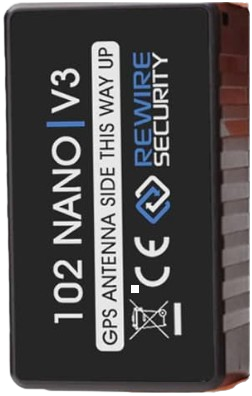
Rewire Security 102 SinoTrack GPS Tracker
Introduction
The rewire security 102 SinoTrack GPS Tracker is an advanced vehicle tracking device designed to enhance security and fleet management efficiency. This robust GPS tracker offers real-time location monitoring, enhanced anti-theft features, and versatile connectivity options, making it an ideal solution for individuals, businesses, and logistics operators who require reliable vehicle tracking and security management.
Key benefits include precise location tracking via GSM/GPRS networks, the ability to receive instant alerts for movement, overspeed, or unauthorized usage, and optional engine cut-off functionality for immediate immobilization in emergencies. Its durable design supports installation in various vehicle types, including cars, trucks, and motorcycles, while providing weather and dust resistance for reliable outdoor use.
Target users range from fleet managers overseeing vehicle assets to individual car owners seeking peace of mind. Its use cases extend to theft prevention, route optimization, and maintenance scheduling. The device typically falls within the mid-range price bracket of $40 to $70 USD, widely available through authorized distributors and online retailers.
With an engaging combination of performance, affordability, and comprehensive features, the rewire security 102 SinoTrack GPS Tracker stands out as a trusted choice for anyone looking to safeguard their vehicles and improve operational oversight.
Specifications of the rewire security 102 SinoTrack GPS Tracker
- Network Compatibility: GSM Quad-Band 850/900/1800/1900 MHz supporting global SIM cards
- GPS Module: High-sensitivity GPS chipset with AGPS support for fast signal acquisition
- Real-time Tracking: Supports SMS and GPRS protocols for live position updates
- Power Supply: 9-90V wide voltage input with built-in rechargeable battery backup
- Alerts and Alarms: Overspeed alarm, movement alarm, vibration alarm, low battery alarm
- Engine Control: Optional engine immobilization via remote control commands
- Durability: IP65-rated waterproof and dustproof enclosure suitable for harsh environments
- Connectivity: SIM card slot with GSM and GPS indicator LEDs
- Dimensions: Compact design, typically around 90x50x20 mm
- Installation: Hardwired with a 12-pin wiring harness for secure vehicle integration
Compared with similar trackers like the GT02A model, the SinoTrack 102 offers enhanced voltage tolerance and integrated engine cut-off functions, making it suitable for a wider range of vehicles and usage scenarios.
Set Up
Charging & Operation
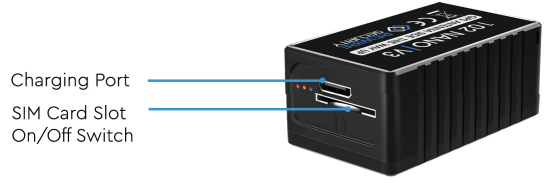
- The tracker should be charged before each use and after periods of storage. Only use the original USB cable provided with the tracker to charge. A charging plug rated at 5V/2A is recommended to charge the tracker.
- Charging can take up to 4 hours, but must not exceed 6 hours.
- Never leave the device unattended while charging.
Status LEDs
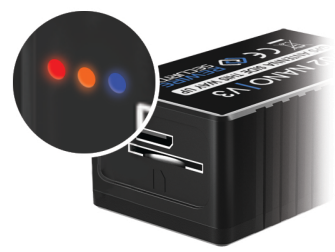
Charge LED (Red)
- On - Device is Charging
- Off - Device is notcharging or is Fully Charged
GSM LED (Orange)
- Flashing - Device Establishing Signal
- Solid - Signal Established
- Off - Power off or in sleep mode
GPS LED (Blue)
- Flashing - Device Establishing Signal
- Solid - Signal Established
- Off - Power off or in sleep mode
Using the Device
- The easiest way to use the device is to simply place it in the glove box or centre console of your vehicle.
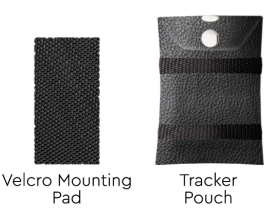
- Alternatively, you can use the Adhesive Velcro Pad to mount the device to an internal surface. Ensure the surface is cleared of any grease/debris beforehand.
- The Tracker Pouch keeps the device safe and secure.
- It features loop straps that can be used to mount the device.
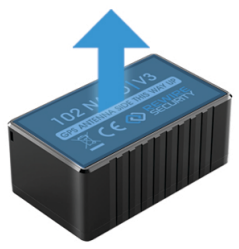
- To get the most accurate tracking, ensure to mount the device with the Antenna (top side) facing up towards the sky. This will significantly increase iitsGPS signal.
- On initial power on, the device's Orange and Blue LEDs will begin to flash whilst the device searches for a signal. Once the device has established a fix, these will become solid.
- If you have just activated the tracker i, it can take up to 70 minutes to establish an initial GPS fix. A short journey will allow the tracker to establish a GPS satellite fix more quickly
Accessing your account
To access your account, please visit: WWW.GPSLIVE.CO.UK or get ourfree-to-downloadd app GPSLive on Google Play or Apple App Store. Setup Guide for the rewire security 102 SinoTrack GPS Tracker

If you have purchased this device with a subscription, it will have already been added to your account. You'll receive your login details via email if you're a new user
How do I manage my subscription?
Visit WWW.GPSLIVE.CO.UK, log in, and follow the instructions below:
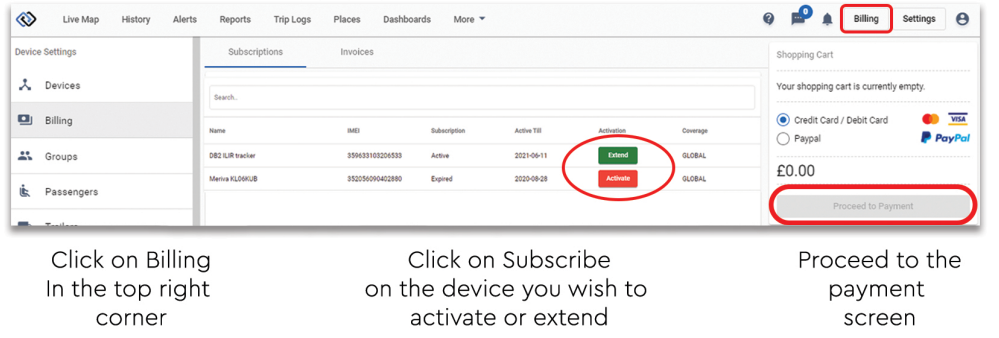
IF YOUR SUBSCRIPTION RUNS OUT, YOUR VEHICLE WILL NOT BE PROTECTED AGAINST THEFT , T AND TRACKING WILL BE DISABLED DURING THIS PERIOD.
Troubleshooting the rewire security 102 SinoTrack GPS Tracker
- No GPS Signal: Ensure the device is installed with a clear view of the sky. Relocate if necessary. Wait several minutes for AGPS data to download if used for the first time.
- No GSM Network: Confirm SIM card activation, sufficient balance, and network compatibility. Check for antenna damage or disconnection.
- Device Not Responding to Commands: Restart the device by disconnecting and reconnecting power. Verify SMS command syntax and phone number authorization list.
- Error Codes: Common error codes include “ERR-01” for SIM card errors and “ERR-02” for GPS module faults; consult the user manual for precise fixes.
- Preventive Tips: Regularly inspect wiring, update firmware when available, and test alerts periodically to ensure ongoing reliability.
- Warranty & Support: The device typically includes a 12-month manufacturer's warranty. For technical support, contact authorized dealers or the SinoTrack customer service via email or the hotline provided in the package.
Pros & Cons of the rewire security 102 SinoTrack GPS Tracker
Pros
- Reliable multi-band GSM/GPRS connectivity ensures global usability.
- Fast and accurate GPS tracking with AGPS support reduces signal acquisition time.
- Comprehensive alerts, including overspeed, movement, and vibration,n enhance security.
- The engine immobilization feature adds an extra layer of vehicle theft prevention.
- Robust waterproof, oof, and shockproof design suitable for harsh vehicle environments.
- Cost-effective with features typically found in higher-end devices.
Cons
- Installation requires professional expertise, which may add to initial costs.
- Limited user interface; configuration primarily relies on mobile app or SMS commands.
- Battery backup is only forshort periodss; the device depends mostly on the vehicle power supply.
- Some users report occasional delays in alert notifications depending on network quality.
Customer Reviews of the rewire security 102 SinoTrack GPS Tracker
Users consistently praise the rewire security 102 SinoTrack GPS Tracker for its dependable tracking accuracy and ease of integration with fleet management systems. Many highlight the peace of mind gained from the remote engine cut-off feature during theft attempts. For example, a fleet manager shared, “The real-time alerts and vehicle immobilization capability saved us from multiple theft incidents.”
Common complaints focus on the initial installation complexity and occasional network-related delays in SMS alerts. Overall, the device receives a solid average rating of 4.3 out of 5 stars, with recommendations emphasizing its value for money and robust feature set compared to competitors in the same price range.
Customers advise new users to ensure professional installation and to maintain SIM card service for uninterrupted operation.
Faqs
How do I set up the rewire security 102 SinoTrack GPS Tracker for the first time?
What should I do if the rewire security 102 SinoTrack GPS Tracker is not sending location updates?
Can I use the rewire security 102 SinoTrack GPS Tracker with 3G or 4G SIM cards?
How can I optimize the battery life of the rewire security 102 SinoTrack GPS Tracker?
What are the key features of the rewire security 102 SinoTrack GPS Tracker that enhance vehicle security?
How do I maintain and care for the rewire security 102 SinoTrack GPS Tracker to ensure long-term performance?
Why does the rewire security 102 SinoTrack GPS Tracker show GPS signal loss and how can I fix it?
How do I configure geo-fence and over-speed alerts on the rewire security 102 SinoTrack GPS Tracker?
More rewire security manuals
- Setup: Rewire Security DB4 Car Lighter GPS Tracker User Manual
- Setup: Rewire Security SpyTrack Nano GPS Tracker User Manual
- Usage: Rewire Security DB3 Plug Play GPS Tracker User Manual
- Setup: Rewire Security DB1 Advanced GPS Tracker Instruction Guide
- Setup: Rewire Security DB1 Advanced 4G GPS Tracker User Manual
- Setup: Rewire Security DB1 Lite GPS Tracker User Manual
Leave a Comment