
Setup: Rewire Security SpyTrack Nano GPS Tracker User Manual
Content
Rewire security SpyTrack Nano GPS Tracker
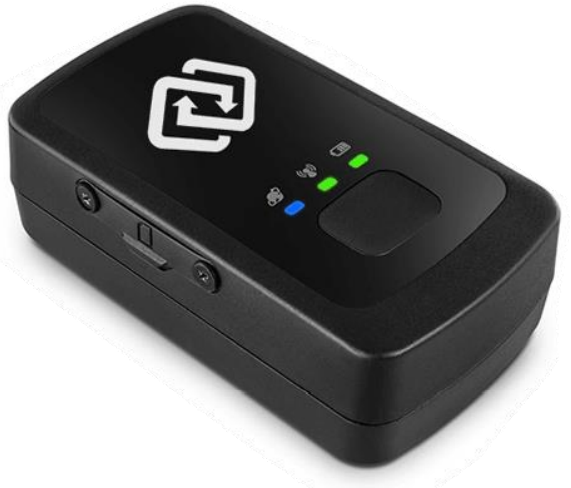
Introduction
The rewire security SpyTrack Nano GPS Tracker is a compact, high-performance device designed for real-time vehicle and asset tracking. Ideal for fleet managers, parents, and security-conscious individuals, this GPS tracker delivers accurate location data, instant alerts, and remote monitoring capabilities. With its advanced GPS and GSM technology, the SpyTrack Nano ensures reliable tracking in urban and remote environments, making it a top choice for both personal and commercial use.
Key benefits include real-time location updates, geofencing, motion detection, and remote engine cut-off (optional). The device is easy to install, discreet, and features a long-lasting battery. Whether you're tracking a vehicle, valuable equipment, or a loved one, the rewire security SpyTrack Nano GPS Tracker offers peace of mind and enhanced security. Available for purchase online and through authorized dealers, the device typically retails between $120 and $180, depending on features and accessories.
Specifications of the rewire security SpyTrack Nano GPS Tracker
- Quad-band GSM/GPRS for global coverage
- High-precision GPS and GLONASS positioning
- Working voltage: 9-90V DC (compatible with most vehicles)
- Operating temperature: -20°C to +65°C
- Humidity: 5%–95% non-condensing
- Waterproof and dustproof design (IP65 rating)
- Real-time tracking via SMS or GPRS
- Geofencing and motion detection alerts
- Remote engine cut-off (optional)
- Internal backup battery for power failure alerts
- AGPS support for faster signal acquisition
- LED indicators for GPS, GSM, and power status
- Compact size: 85mm x 55mm x 25mm
- Weight: 120g
Compared to similar products, the rewire security SpyTrack Nano GPS Tracker stands out with its robust build, versatile connectivity, and advanced security features, making it a reliable choice for demanding tracking needs.
Features
The Spytrack Nano is one of the most advanced GPS trackers on the market to date. Below are the main features of the Spytrack Nano:
- Real-Time GPS Tracking
- Small Form Factor: 68 grams
- Accessible on PC, Mac, iOS, or Android devices
- Rechargeable Battery with a Battery Life of Up to 10 days
- Instant Alerts by E-mail & Text Message & Smartphone APP
- Geo-fencing Capabilities
- SOS Button for emergencies
- 1 Year Warranty
What’s Included
Included in the box with the Spytrack Nano are the following:
- Spytrack Nano GPS Tracker
- Mini USB Charging Cable
- Installed SIM card with Global Coverage
- Quick Start Instruction Guide
Set Up
SpyTrack Nano SIM Card
- Note: The SIM card comes preinstalled on the device. Please do not remove or replace it. If you experience a problem you believe may be related to the preinstalled SIM card, please contact Rewire Security.
Charging the Device
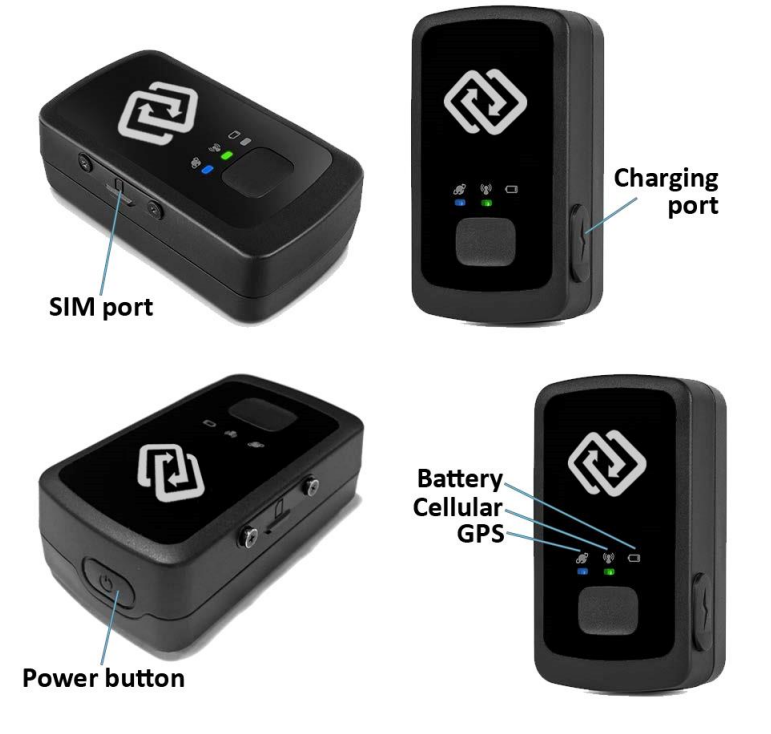
- To charge the Spytrack Nano, lift the flap covering the charging port and plug the charger cable end into the unit via the USB port, then plug the charger into a USB power source. The
battery LED light on the front of the tracker will be flashing fast when charging, and it will be solid when fully charged. The LED in the center will blink green periodically to indicate that it still has power. If the battery LED flashes red, that means the battery level is low, and the GPS tracker should be charged.
Spytrack Nano Power On/Off
- To turn the device on, press the Power button on the top of the device once. As the device obtains a mobile signal, the middle LED will begin blinking and will start relaying location data. To turn off the device, press and hold the Power button on the top of the device. If the left-most LED light on the device is flashing blue, your tracker is trying to locate a cellular signal over which to send the location data.
Activating the Device
- After purchasing the device, you must purchase the SpyTrack Service plan that allows the device to send your data to your SpyTrack account. Spytrack Service includes: Prepaid SIM card with global coverage, Spytrack Website, and Spytrack APP subscriptions. You can activate your device and service plan at: https://www.rewiresecurity.co.uk/spytrack-service-activation
- Follow the activation steps on the website, and within a few minutes, you will receive an email with details about the device, along with the username and password to log in to https://spytrackgps.co.uk. Change your password upon logging in for the first time and begin enjoying tracking your vehicle and assets!
Device Placement
- Make sure the device is placed near a window or on a surface that does not obstruct the signal reception. Placing the device in the boot of a car saloon is not recommended. Move the GPS tracker near where you want to place it and check the green GPS signal to ensure that reception is available in that position. The Spytrack Nano is water-resistant, yet we do not recommend placing the device in a place where it may become submerged in water.
Spytrack GPS Tracking Portal
- https://spytrackgps.co.uk/ is the portal that allows you to track your GPS tracker. Access to the platform comes free of charge, included with the Spytrack Service plan.
Getting Started
- To log into the Spytrack portal, check your email for your Spytrack activation email containing your username and password. For best security results, please change your password upon logging in for the first time. You can access the “Settings” menu on the left top left corner of the website. Once in the settings menu, go to the “My Account” tab to change your password.
- To learn more about Spytrack Portal, please visit: https://www.rewiresecurity.co.uk/spytrackguide/
Troubleshooting the rewire security SpyTrack Nano GPS Tracker
Common issues include no GPS signal, SIM card errors, and power failures. Solutions: check SIM card activation, ensure a clear sky view for GPS, and verify power connections. Error codes are displayed via LED indicators or SMS alerts. Preventive measures include regular firmware updates and proper installation. The device comes with a one-year warranty. For support, contact rewire security customer service or visit their official website.
Pros & Cons of the rewire security SpyTrack Nano GPS Tracker
Pros
- Compact and discreet design
- Reliable real-time tracking
- Advanced security features
- Easy installation and setup
- Long battery life
Cons
- Requires professional installation for advanced features
- Subscription fees may apply for some services
- Limited battery life in continuous tracking mode
The rewire security SpyTrack Nano GPS Tracker offers excellent value for money, especially for users needing robust, reliable tracking solutions.
Customer Reviews of the rewire security SpyTrack Nano GPS Tracker
Users praise the device for its accuracy, ease of use, and reliable alerts. Common complaints include occasional connectivity issues and the need for professional installation. The average star rating is 4.5 out of 5. Many recommend the device for fleet management and personal security. Frequently mentioned issues are resolved with proper setup and support.
Faqs
How do I set up the rewire security SpyTrack Nano GPS Tracker for the first time?
What should I do if my rewire security SpyTrack Nano GPS Tracker is not sending location updates?
Can the rewire security SpyTrack Nano GPS Tracker be used with both Android and iOS devices?
How often should I charge or maintain my rewire security SpyTrack Nano GPS Tracker for optimal battery performance?
What are the best practices for installing the rewire security SpyTrack Nano GPS Tracker in a vehicle?
What key features make the rewire security SpyTrack Nano GPS Tracker stand out from other GPS trackers?
How can I troubleshoot if the rewire security SpyTrack Nano GPS Tracker app shows 'No Signal'?
Is the rewire security SpyTrack Nano GPS Tracker compatible with third-party tracking platforms or software?
More rewire security manuals
- Setup: Rewire Security 102 SinoTrack GPS Tracker User Manual
- Setup: Rewire Security DB4 Car Lighter GPS Tracker User Manual
- Usage: Rewire Security DB3 Plug Play GPS Tracker User Manual
- Setup: Rewire Security DB1 Advanced GPS Tracker Instruction Guide
- Setup: Rewire Security DB1 Advanced 4G GPS Tracker User Manual
- Setup: Rewire Security DB1 Lite GPS Tracker User Manual
Leave a Comment