
Samsung SCX-5 Series Laser MFP Printer User Manual
Content
Samsung SCX-5 Series Laser MFP Printer: Complete Product Manual
Introduction
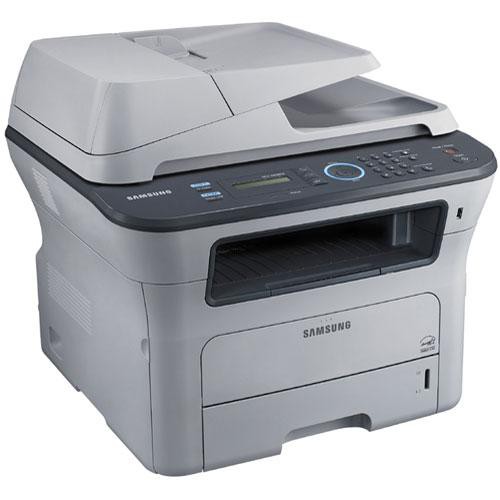
The Samsung SCX-5 Series Laser MFP Printer is a monochrome multifunction printer built for small offices, workgroups, and home business users who need fast, reliable black-and-white printing, scanning, copying, and faxing in one compact device. Designed as a laser MFP, it combines efficient output with business-friendly features such as automatic duplex printing, network connectivity, and high-capacity paper handling. In practical use, this makes it a strong choice for teams that regularly process invoices, reports, forms, and multi-page documents.
One of the biggest advantages of the Samsung SCX-5 Series Laser MFP Printer is its balance of speed and office productivity. Typical models in the SCX-5 family deliver around 35 pages per minute, with 1200 dpi-class output and duplex support that helps reduce paper consumption. Many versions also include Ethernet networking, USB connectivity, and an automatic document feeder for scanning and copying stacks of pages quickly. These features make it especially useful for administrative departments, legal offices, healthcare practices, and small businesses that need dependable document workflow.
Pricing for the Samsung SCX-5 Series Laser MFP Printer varies depending on model, condition, and market availability, but older units generally appear in the mid-range used-office-equipment segment, often around $100 to $500. New-old-stock or refurbished business printers may cost more when sourced through specialty sellers. Availability is limited because this is not a current consumer flagship line, so most buyers will find it through refurbished channels, office liquidation vendors, or secondhand marketplaces. For organizations seeking a durable laser multifunction printer with low running costs, the Samsung SCX-5 Series Laser MFP Printer remains a practical and budget-conscious option.
Pros and Cons of the Samsung SCX-5 Series Laser MFP Printer
Pros
- Fast monochrome output, typically around 35 ppm, which suits busy office environments and high-volume document printing.
- Automatic duplex printing helps cut paper use and is ideal for reports, contracts, and internal documents.
- Network-ready connectivity on many models makes it easy to share across a small team.
- Strong multifunction capability with print, copy, scan, and fax in one device reduces the need for separate equipment.
- Good value for money on the used market, especially compared with newer laser MFPs that often cost significantly more.
- Solid paper handling and office-oriented build quality make it a dependable choice for regular workloads.
Cons
- Monochrome printing only, so it is not suitable for color marketing materials or photo documents.
- Older design means some units may lack modern features such as cloud printing or advanced mobile app integration.
- Availability of parts, toner, and support can be inconsistent depending on the exact model and region.
- Compared with newer alternatives from HP, Brother, or Canon, the interface and software may feel less current.
- Best value usually comes from refurbished models, which can vary in condition and maintenance history.
Overall, the Samsung SCX-5 Series Laser MFP Printer offers excellent value for small offices that prioritize speed, duplex printing, and multifunction utility over color output and smart features. Against newer competitors, it may look dated, but for straightforward document-heavy workflows, it remains a cost-effective workhorse.
Customer Reviews and Real-World Feedback
Users commonly rate the Samsung SCX-5 Series Laser MFP Printer around 4 out of 5 stars in business-oriented feedback, especially when the unit is well maintained. Many buyers praise the fast printing speed, reliable scanning, and low cost per page, while others highlight that it performs well for everyday office tasks like copying forms and printing text documents.
Typical praise includes comments such as, “It prints quickly and handles a full office workload without slowing down,” and, “A great refurbished buy for our admin team.” Common complaints focus on toner cost, aging firmware, and occasional setup frustration with network printing or driver compatibility. Some users also report that used units may require maintenance sooner than expected, particularly rollers or feeders.
For buyers who want a dependable black-and-white laser multifunction printer and do not need color printing, the Samsung SCX-5 Series Laser MFP Printer is often recommended as a smart purchase. It is especially appealing for offices that value productivity, duplex printing, and simple document handling over modern touchscreen features.
Key Features at a Glance
- Laser multifunction printer for print, scan, copy, and fax workflows
- Monochrome output for business documents and everyday office use
- Fast print speeds suitable for workgroups and small businesses
- Automatic duplex printing to save paper
- USB and Ethernet connectivity on many models
- ADF support for multi-page scanning and copying
- Designed for high-volume document handling
Who Should Buy the Samsung SCX-5 Series Laser MFP Printer?
This printer is best for offices, freelancers, and home business users who print mostly text-based documents and need an affordable multifunction printer with reliable laser performance. It is also a good fit for organizations replacing aging office machines with a durable, practical model that can handle scanning, copying, and faxing in one unit.
Buying Advice
If purchasing a refurbished or used Samsung SCX-5 Series Laser MFP Printer, check the page count, toner condition, ADF rollers, and network functions before buying. A well-maintained unit can still deliver strong office performance, but older equipment should always be evaluated for maintenance history and consumable availability.
Faqs
How do I set up the samsung SCX-5 Series Laser MFP Printer for the first time on a home or office network?
Why is my samsung SCX-5 Series Laser MFP Printer not printing after driver installation?
How do I scan documents from the samsung SCX-5 Series Laser MFP Printer to my computer?
What paper types and sizes work best with the samsung SCX-5 Series Laser MFP Printer?
How can I fix paper jams in the samsung SCX-5 Series Laser MFP Printer without damaging the machine?
How do I improve print quality on the samsung SCX-5 Series Laser MFP Printer when pages look faded or streaky?
Is the samsung SCX-5 Series Laser MFP Printer compatible with modern Windows and macOS computers?
How often should I clean and maintain the samsung SCX-5 Series Laser MFP Printer for reliable performance?
More samsung manuals
Leave a Comment