
Samsung 5003 Series LED TV User Manual
Content
Samsung 5003 Series LED TV: Full HD Performance in a Compact, Budget-Friendly Design
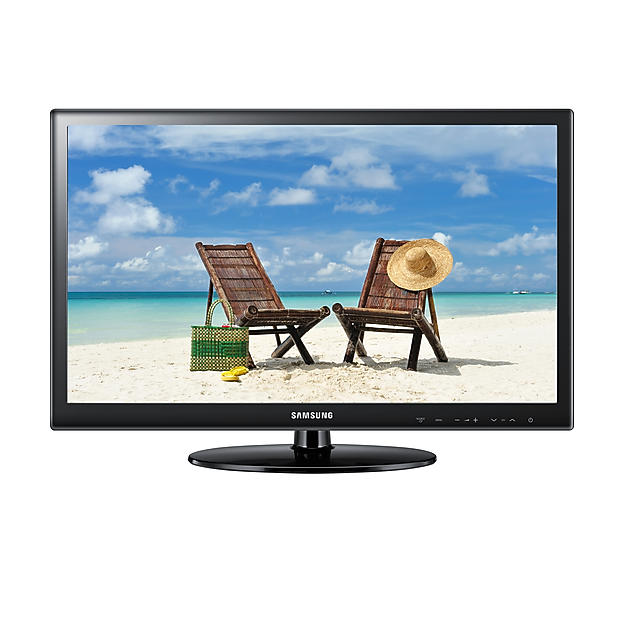
The samsung 5003 Series LED TV is a practical Full HD television built for everyday viewing, secondary rooms, bedrooms, dorms, and small living spaces. It is best known for delivering a 1920 x 1080 resolution, a simple user experience, and a lightweight form factor that makes setup easy. For shoppers looking for an affordable LED TV that handles broadcast TV, streaming devices, gaming consoles, and DVD players without unnecessary complexity, the samsung 5003 Series LED TV remains a solid entry-level choice.
One of its biggest strengths is value for money. The picture quality is sharp for its class, especially on the 40-inch model, and the design stays slim enough for wall mounting or tabletop placement. It typically includes essential connections such as HDMI, USB, component, composite, and RF input, covering most basic home entertainment needs. The built-in 10W x 2 stereo speakers are adequate for casual viewing, while the low power consumption supports efficient daily use.
This TV is aimed at budget-conscious buyers who want reliable performance without paying for premium smart features, advanced HDR, or high refresh-rate gaming capabilities. It is especially suitable for cable TV, antenna broadcasts, and simple home theater setups. Estimated pricing generally falls in the low-budget to lower-midrange category on the resale or remaining-stock market, with availability varying by region because the model is older and often sold through third-party sellers, refurbished channels, or local electronics marketplaces.
Samsung 5003 Series LED TV Specifications and Key Features
- Display type: LED-LCD TV with Full HD resolution
- Resolution: 1920 x 1080 at 60Hz, which is ideal for HD broadcasts and external media devices
- Screen size: Commonly available in 40-inch class formats, with compact variants in some regions
- Picture performance: HyperReal Engine, Clear Motion Rate 100, and Wide Colour Enhancer Plus on supported regional versions
- Audio: 10W x 2 speaker output with basic stereo sound
- Connectivity: HDMI, USB, component input, composite input, RF input, and optical digital audio output on many versions
- Typical refresh rate: 60Hz, suitable for everyday TV and casual gaming
- Power use: Low-power design with standby consumption under 0.3W on some models
- Mounting: Wall-mount compatible with VESA support on supported versions
- Build: Lightweight chassis for easy installation and relocation
In comparison with many newer smart TVs, the samsung 5003 Series LED TV focuses on core viewing quality rather than app ecosystems, voice control, or advanced HDR processing. Compared with similarly priced older LED TVs, it stands out for dependable Full HD output and broad compatibility with basic home entertainment gear.
Pros and Cons of the Samsung 5003 Series LED TV
Pros
- Affordable value: A strong budget option for buyers who need a dependable HDTV without premium pricing.
- Full HD clarity: The 1080p panel produces crisp detail for cable channels, streaming sticks, and Blu-ray playback.
- Simple setup: Easy to install, especially for users who want a straightforward TV with minimal configuration.
- Lightweight design: Easier to move, mount, or place in secondary rooms than heavier modern sets.
- Good basic connectivity: HDMI and USB ports cover common everyday use cases.
Cons
- No advanced smart features: It lacks the built-in streaming platform, app store, and voice assistant functions found in newer smart TVs.
- Basic sound quality: The integrated speakers are serviceable, but external speakers improve clarity and bass significantly.
- Limited gaming performance: The 60Hz panel is fine for casual use but not ideal for competitive gaming or modern high-frame-rate consoles.
- Older model availability: New units may be difficult to find, so buyers often need to consider refurbished or used listings.
Overall, the samsung 5003 Series LED TV offers good value for money if the goal is a reliable Full HD display for basic home entertainment. Compared with newer alternatives, it gives up smart functionality and picture-enhancement features, but it remains competitive for simple, low-cost viewing needs.
Customer Reviews of the Samsung 5003 Series LED TV
Typical customer feedback trends positive, with many users praising the picture quality, lightweight build, and easy setup. Common review highlights include comments such as “great picture for the price,” “perfect for a bedroom TV,” and “lightweight and easy to mount.” Many buyers rate it around 4 out of 5 stars for everyday performance and value.
Frequently mentioned complaints focus on the basic audio output, the lack of smart TV features, and limited modern connectivity. Some users also note that availability can be inconsistent because the model is older. For buyers who want a simple LED TV for a child’s room, guest space, or casual viewing, the samsung 5003 Series LED TV is often recommended. For users who expect streaming apps, stronger built-in speakers, or gaming-focused features, a newer smart TV may be a better fit.
Faqs
How do I set up samsung 5003 Series LED TV for the first time?
Why is my samsung 5003 Series LED TV not turning on, and what should I check first?
How can I improve picture quality on samsung 5003 Series LED TV for movies and sports?
What devices are compatible with samsung 5003 Series LED TV through HDMI and USB?
How do I fix no sound or low sound on samsung 5003 Series LED TV?
Can I connect a soundbar or home theater system to samsung 5003 Series LED TV?
What should I do if samsung 5003 Series LED TV has blurry or unstable streaming apps?
How should I clean and maintain samsung 5003 Series LED TV without damaging the screen?
More samsung manuals
Leave a Comment