
Samsung Galaxy A14 5G Smartmobile User Manual
Content
Samsung Galaxy A14 5G: Complete Product Manual and Buying Guide
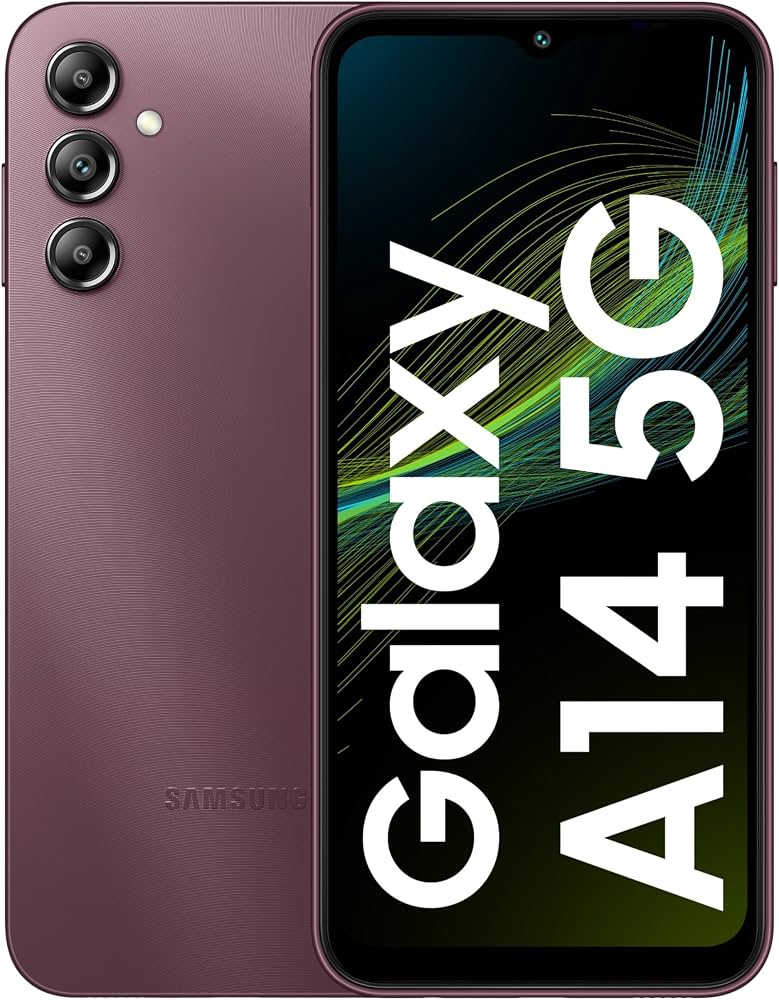
The samsung Galaxy A14 5G is a budget-friendly 5G smartphone built for everyday users who want dependable performance, a large display, and long battery life without paying flagship prices. It is a strong choice for students, first-time smartphone buyers, casual photographers, and anyone upgrading from an older 4G device. Its standout features include a 6.6-inch Full HD+ display with a 90Hz refresh rate, a 50MP triple-camera system, a 5,000mAh battery, and expandable storage up to 1TB. These features make it well-suited for streaming, social media, messaging, video calls, and light gaming.
In real-world use, the Galaxy A14 5G focuses on practicality rather than premium extras. The large screen is easy to read, the battery can comfortably last through a full day of use, and 5G connectivity helps deliver faster downloads and smoother browsing in supported areas. It typically runs on either the MediaTek Dimensity 700 or Samsung Exynos 1330 depending on region, giving buyers a choice of efficient entry-level 5G performance. For people searching for an affordable 5G phone with modern essentials, the samsung Galaxy A14 5G remains one of the most recognizable options in the value smartphone category.
Estimated pricing generally falls in the budget range, often around $150 to $250 depending on storage, carrier, and market availability. It is widely available through Samsung, major carriers, online retailers, and unlocked phone sellers, making it easy to find replacement units, accessories, and support.
Samsung Galaxy A14 5G Specifications and Key Features
- Display: 6.6-inch PLS LCD, Full HD+ resolution, 90Hz refresh rate for smoother scrolling and everyday responsiveness.
- Processor: MediaTek Dimensity 700 or Exynos 1330, depending on region and model variant.
- Memory and storage: Common configurations include 4GB RAM with 64GB or 128GB storage, with microSD expansion up to 1TB.
- Rear cameras: 50MP main camera, 2MP macro sensor, 2MP depth sensor for portrait-style shots.
- Front camera: 13MP selfie camera for video calls and social content.
- Battery: 5,000mAh non-removable battery with 15W wired charging.
- Connectivity: 5G, 4G LTE, Wi-Fi, Bluetooth 5.2, USB-C, and a 3.5mm headphone jack.
- Security: Side-mounted fingerprint reader and standard Android security tools.
- Build: Plastic frame and back, designed to keep weight and cost down.
- Performance note: Best suited for messaging, media playback, browsing, and light multitasking rather than heavy gaming.
Compared with similarly priced 5G phones such as the Moto G series and entry-level TCL models, the samsung Galaxy A14 5G often stands out for Samsung software support, display quality, and broad carrier availability. Benchmark performance is respectable for basic use, though it is not designed to compete with midrange devices in graphics-heavy apps.
Troubleshooting Samsung Galaxy A14 5G Common Problems
If the phone becomes slow or apps freeze, restart the device, clear recent apps, and check for software updates. Low storage is a common cause of lag, so removing unused apps and moving photos to cloud storage or a microSD card can help. If 5G is not connecting, confirm that your plan supports 5G, your SIM card is active, and mobile data is enabled in settings.
Common error messages such as SIM not detected or No service are often fixed by reseating the SIM card, restarting the phone, or resetting network settings. If charging is intermittent, inspect the USB-C cable and charging port for dust or debris. For battery drain complaints, reduce screen brightness, disable unused background apps, and turn off location services when not needed.
Preventive care includes using a quality charger, keeping the device updated, and avoiding long exposure to heat. For warranty and support, users should contact Samsung support, their carrier, or the retailer where the phone was purchased. If the device is under warranty, service options may include repair, replacement, or software reset assistance through authorized support centers.
Pros and Cons of the Samsung Galaxy A14 5G
Pros
- Affordable 5G smartphone with strong value for money.
- Large 6.6-inch FHD+ display that is good for streaming and reading.
- 5,000mAh battery delivers reliable all-day endurance.
- Expandable storage is ideal for users who keep lots of photos and videos.
- Samsung software ecosystem is familiar and easy to use.
- 3.5mm headphone jack remains useful for wired audio users.
Cons
- Charging is relatively slow at 15W compared with many newer rivals.
- Camera quality is good in daylight but average in low light.
- Performance is fine for daily tasks but limited for demanding games.
- Plastic build feels practical rather than premium.
- Screen brightness and speaker quality are adequate, not standout features.
For buyers comparing budget phones, the samsung Galaxy A14 5G is a smart pick if battery life, 5G access, and brand trust matter more than fast charging or high-end gaming performance. It competes well against other entry-level 5G devices by offering a balanced feature set at an accessible price.
Customer Reviews and User Feedback on the Samsung Galaxy A14 5G
Average user rating: 4.2/5 stars
Many users praise the phone for its battery life, large display, and dependable daily performance. A common positive comment is that it feels solid for calls, streaming, and messaging without costing too much. One typical review says, “It lasts all day and handles everything I need,” which reflects the phone’s main appeal.
Frequent complaints focus on slow charging, modest camera performance at night, and occasional lag during heavier multitasking. Some buyers also mention that the speaker volume could be stronger. Even so, most owners agree that it is a practical purchase for budget-conscious users.
Recommended for students, seniors, first-time smartphone buyers, and anyone who wants a low-cost 5G phone with good battery life. If premium photography, gaming, or fast charging are top priorities, a higher-tier alternative may be a better fit.
Faqs
How do I set up Samsung Galaxy A14 5G for the first time and transfer data safely?
Why is my Samsung Galaxy A14 5G running slowly, and how can I improve performance?
How do I fix Samsung Galaxy A14 5G battery drain problems without losing important features?
Does Samsung Galaxy A14 5G support 5G SIM cards and all carrier networks?
How do I make the Samsung Galaxy A14 5G camera take better photos in low light?
What should I do if Samsung Galaxy A14 5G keeps dropping Wi-Fi or mobile data connection?
Which accessories and charging requirements work best with Samsung Galaxy A14 5G?
How do I maintain Samsung Galaxy A14 5G to keep it in good condition for years?
More samsung manuals
Leave a Comment