
How to Use: Sharper Image Star Wars Coffee Maker CM3-SRW-DVST User Guide
Content
Sharper Image Star Wars Coffee Maker CM3-SRW-DVST
Introduction
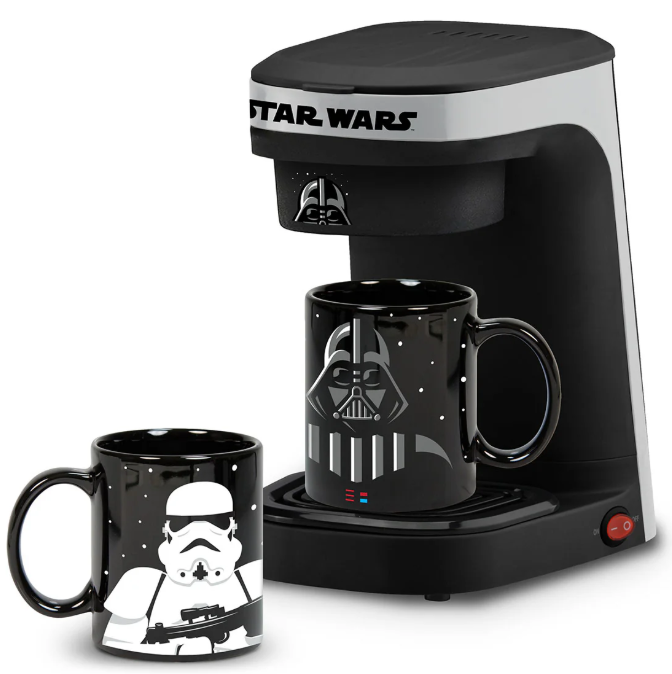
The sharper image Star Wars Coffee Maker CM3-SRW-DVST is a unique single-serve coffee brewer designed for Star Wars fans who want to infuse their mornings with a touch of galactic flair. Featuring iconic Darth Vader and Stormtrooper motifs, this coffee maker combines stylish design with high functionality to deliver a fresh, flavorful cup of coffee in under 90 seconds. It is perfect for individuals looking for a fast, convenient coffee solution that also serves as a collectible and conversation piece.
This coffee maker stands out with its rapid brewing technology, customizable brewing options for ground coffee, and inclusion of two 12-ounce collectible mugs, making it ideal for both solo drinkers and couples who appreciate Star Wars memorabilia. The product is tailored for home or office use, appealing primarily to fans of sci-fi, collectors, and coffee enthusiasts seeking a novelty appliance.
Available at major retailers and online stores, the CM3-SRW-DVST typically ranges between $45 and $60, offering excellent value for its combination of design, speed, and ease of use. Its official licensed status assures authenticity and quality, making it a sought-after gift or personal purchase for Star Wars aficionados.
BEFORE FIRST USE
- Read all instructions carefully and keep them for future reference.
- Remove all packaging.
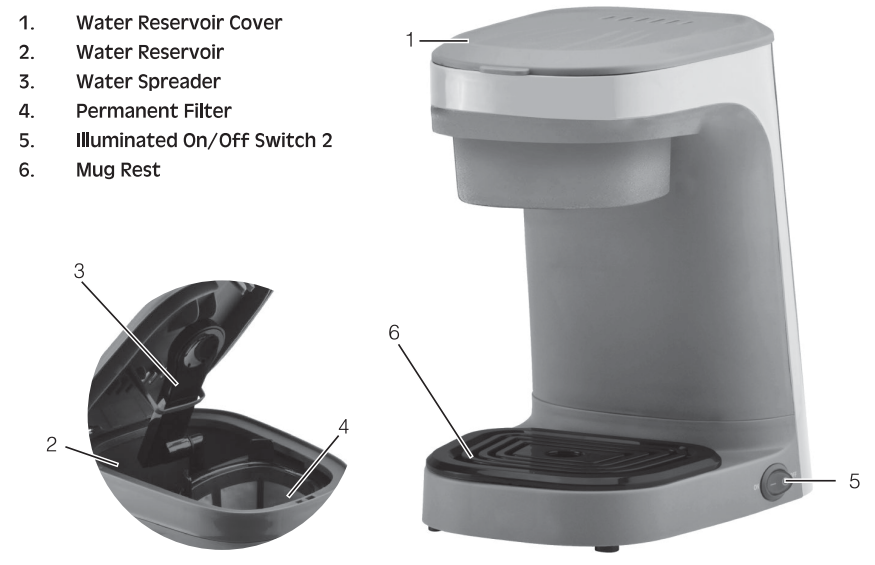
- Wash the Permanent Filter.
- Follow the directions in the "HOW TO USE" section, using water only.
- Discard the water.
HOW TO USE YOUR COFFEE MAKER
HOW TO BREW COFFEE:
- Fill your favorite mug with fresh cold water. Pour into the Water Reservoir. NOTE: Minimum amount of water is 8 oz. (236 ml), maximum 14 oz. (414 ml).
- Do not overfill.
- Place the mug on the Mug Rest.
- Fill the Permanent Coffee Filter with approximately 1 tbsp. (15 ml) Or 1 scoop of filter coffee grounds for every 8 oz. (236 ml) of coffee.
- Plug the unit into a 120 Volt A.C. outlet.
- Press the On/Off Switch to the "On" position.
- Once the coffee has finished dripping into the mug, press the On/Off Switch to the "Off" position.
- Unplug the unit from the outlet or follow directions above to prepare another cup of coffee. Be careful when opening the Reservoir Cover when the unit is hot,
How to Heat Water for Tea, Hot Chocolate, etc.
- Fill your favorite mug with fresh cold water.
- Pour into the Water Reservoir, NOTE: Minimum amount of water is 8 oz. (236 ml), maximum 14 oz.|(414 ml).
- Remove the Permanent Coffee Filter.
- Add a tea bag, hot chocolate, or instant food , etc, to the mug and place it on the Mug Rest.
- Plug the unit into a 120 Volt A.C. outlet.
- Press the On/Off Switch to the "On" position.
IMPORTANT: Once the water has finished dripping into the mug, press the On/Off Switch to the "Off position.
Unplug the unit from the outlet or follow the directions above for more hot water. Be careful when opening the Reservoir Cover when the unit is hot. CARE AND CLEANING
- Unplug the unit and allow it to cool..
- Wipe the Coffee Maker with a damp cloth. Do not use.. NEVER IMMERSE THE COFFEE MAKER IN WATER OR ANY OTHER LIQUID.
- The Permanent Filter can be removed and washed in warm soapy water, rinsedand dried.
DESCALING:
- Under normal use, a deposit of scale may form on the inside of the Coffee Maker. This scale buildup can clog the Coffee Maker. To remove scale,, follow the low directions below
- Fill your mug 2/3 full with white vinegar and then to the top with cold water
- Pour into the Water Reservoir, NOTE: Minimum amount of water is 8 oz. (236 ml), maximum 14 oz.(414 ml)
- Place the mug on the Mug Rest.
- Plug the unit into a 120 Volt A.C. outlet
- Press the On/Off Switch to the "On" position.
- IMPORTANT: Once the water has finished dripping into the mug, press the On/Off Switch to the "Off" position.
- Unplug the unit from the outlet or,, if necessary, repeat the descaling directions above. Be careful when opening the Reservoir Cover when the unit is hot. Wash the Permanent Filter in warm, soapy water.
Technical Specifications and Key Features of the Sharper Image Star Wars Coffee Maker CM3-SRW-DVST
- Model: CM3-SRW-DVST
- Design: Dual-character Star Wars theme featuring Darth Vader and Stormtrooper
- Brewing Capacity: Single cup up to 12 oz per brew
- Brewing Time: Under 90 seconds for an 8-oz cup, up to 2.5 minutes for a 14-oz mug
- Included Accessories: Two 12 oz collectible Star Wars mugs
- Compatibility: Uses ground coffee with a single-serve scoop filter
- Power: Approximately 1000 watts for efficient heating
- Controls: One-touch operation for ease of use
- Cleaning: Self-cleaning function to maintain optimal performance
- Additional Features: Removable drip tray to accommodate mugs up to 7¼" tall
- Comparison: Compared to similar single-cup brewers, this model emphasizes themed design and rapid brewing speed while focusing on ground coffee rather than capsule systems
Troubleshooting Guide for the Sharper Image Star Wars Coffee Maker CM3-SRW-DVST
Common issues users may encounter include:
- Machine Not Brewing: Ensure the unit is plugged in and the water reservoir is filled. Check that the coffee basket is properly seated.
- Slow Brewing or No Heat: Verify power connection and clean the coffee maker using the self-cleaning function to remove mineral buildup.
- Leaking Coffee or Water: Check the drip tray placement and ensure the coffee basket is correctly installed.
- Error Codes: While the CM3-SRW-DVST does not display specific error codes, inconsistent operation often indicates the need for descaling or cleaning.
Preventive maintenance involves regular cleaning after 30 brews and using filtered water to reduce scale buildup. For warranty and support, the product typically includes a limited 11-year manufacturer's Customers can contact Sharper Image customer service through their official website or the retailer where the product was purchased for assistance.
Pros and Cons of the Sharper Image Star Wars Coffee Maker CM3-SRW-DVST
Pros
- Unique Star Wars Design: Appeals strongly to fans with collectible mugs and thematic styling.
- Fast Brewing Speed: Ready-to-drink coffee in under 90 seconds, faster than many comparable models.
- Ease of Use: Simple one-touch operation and easy maintenance with self-cleaning features.
- Value for Money: Combines novelty and function at a competitive price point.
- Compatible with Ground Coffee: Allows coffee customization, unlike capsule-only brewers.
Cons
- Single Brew Only: Not suitable for brewing multiple cups simultaneously.
- No Capsule Compatibility: May be less convenient for users preferring pods or capsules.
- Limited Volume Options: Primarily brews up to 12 oz, which may not suit users desiring larger servings.
Customer Reviews and Feedback on the Sharper Image Star Wars Coffee Maker CM3-SRW-DVST
Users consistently praise the sharper image Star Wars Coffee Maker CM3-SRW-DVST for its fast brewing time and unique collector appeal. Many highlight the quality of the included Darth Vader and Stormtrooper mugs as a major plus. The majority rate it positively, often awarding 4 to 5 stars for design and functionality.
Common complaints relate to the single-serve limitation and the absence of capsule compatibility, which some users find less convenient compared to other single-cup machines. Despite these minor critiques, reviewers recommend the product for Star Wars fans who enjoy fresh ground coffee and want a visually appealing, quick coffee maker.
Overall, customer testimonials emphasize that this coffee maker is an excellent gift choice or a fun addition to a themed kitchen, offering high satisfaction,, especially when used as intended.
Faqs
How do I set up the sharper image Star Wars Coffee Maker CM3-SRW-DVST for the first time?
What should I do if the sharper image Star Wars Coffee Maker CM3-SRW-DVST is not brewing coffee properly?
Can I use both ground coffee and capsules with the sharper image Star Wars Coffee Maker CM3-SRW-DVST?
What are the key features of the sharper image Star Wars Coffee Maker CM3-SRW-DVST that enhance my coffee brewing experience?
How do I clean and maintain my sharper image Star Wars Coffee Maker CM3-SRW-DVST to ensure long-lasting performance?
What is the maximum cup size that fits under the coffee spout of the sharper image Star Wars Coffee Maker CM3-SRW-DVST?
Why does my sharper image Star Wars Coffee Maker CM3-SRW-DVST produce coffee with grounds or a gritty texture?
Is the sharper image Star Wars Coffee Maker CM3-SRW-DVST compatible with standard electrical outlets and what are its power requirements?
More sharper image manuals
- Setup: Sharper Image Purify 5 Air Purifier User Manual
- How to Use: Sharper Image DIGITAL ULTRASONIC HUMIDIFIER User Guide
- How to Use: Sharper Image Tower Heater Rise 20H User Manual
- How to Use: Sharper Image BACON EXPRESS TOASTER User Guide
- Sharper Image SI-470 Canister Garment Steamer User Manual
- How to Use: Sharper Image PORTABLE ICE MAKER User Manual
Leave a Comment