
How to Use: Sharper Image DIGITAL ULTRASONIC HUMIDIFIER User Guide
Content
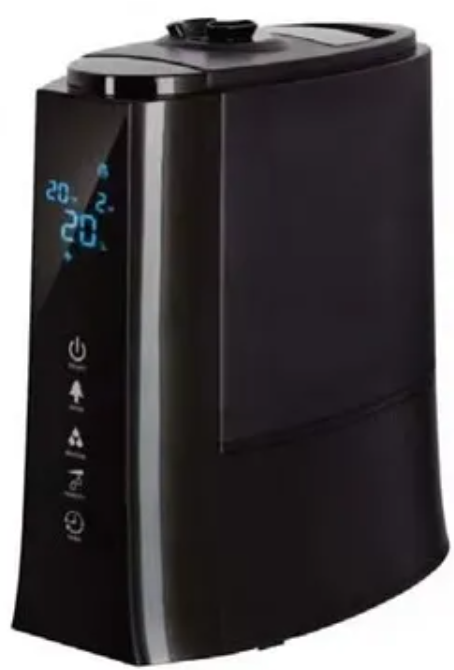
Sharper Image Digital Ultrasonic Humidifier
Introduction
The sharper image DIGITAL ULTRASONIC HUMIDIFIER is a modern solution designed to enhance indoor air quality by maintaining optimal humidity levels efficiently and quietly. Leveraging ultrasonic technology, this humidifier creates a fine, cool mist that quickly moisturizes the air without the use of heat, making it safe for families with children and pets. Its digital controls offer precise humidity management, ensuring comfort and health benefits such as relief from dry skin, allergies, and respiratory discomfort.
Ideal for use in bedrooms, offices, nurseries, and living spaces, this humidifier caters to individuals seeking a compact, user-friendly device with advanced features like adjustable mist output, auto shutoff, and LED display. The unit’s whisper-quiet operation and energy-efficient design make it suitable for overnight use and continuous operation during colder months or in dry climates.
Priced competitively in the range of approximately $40 to $80, the sharper image DIGITAL ULTRASONIC HUMIDIFIER is widely available through online retailers and select brick-and-mortar stores. Its blend of affordability, advanced features, and stylish design positions it well among mid-range ultrasonic humidifiers, appealing to health-conscious consumers and tech-savvy users alike.
IDENTIFICATION OF PARTS

FEATURES
- High efficiency, cool mist humidification
- Recommended for rooms 320-430 sq. ft.
- Manual and automatic humidity level controls
- 5-liter tank provides up to 26 hours of mist (on low setting)
- Optional ionizer air purification
- Special plastic with nano-silver material prohibits the growth of bacteria
- Ceramic balls soften hard water
- Ceramic filter eliminates odors
- Easy-to-read LCD display with auto dimming feature
- Displays the temperature and relative humidity
- Controlled by touchscreen or wireless remote
- Automatic shutoff timer (1-12 hours)
- Adjustable mist output (low/medium/high)
- Adjustable, two-directional nozzle
- Ultra-quiet operation
- Easy-to-fill tank with built-in handle
- Low energy consumption (saves 85% -90% of electricity vs. traditional steam humidifiers)
Specifications and Features of Sharper Image Digital Ultrasonic Humidifier
- Technology: Ultrasonic vibration with piezoelectric transducer for silent, cool mist output
- Tank Capacity: Approximately 1.5 liters, supporting up to 12 hours of continuous runtime
- Digital Controls: Adjustable humidity level settings and mist intensity with LED display for easy monitoring
- Auto Shutoff: Safety feature activates when water reservoir is empty
- Power Consumption: Low energy usage, typically under 30 watts
- Additional Features: Directional mist nozzle, nightlight option, and filter-free design for minimal maintenance
- Performance: Efficient humidification for rooms up to 300 square feet, rapid moisture dispersion without heat generation
- Comparison: Compared to similar ultrasonic humidifiers, it offers improved digital precision and longer runtime than many basic models, while lacking the large tank capacity of high-end units
- Model: SPS-702
- Power supply: 120V 60Hz
- Motor: 30W
- Water tank capacity: 5L
- Max Evaporation Rate: 400ml/H
- Noise level: ≤35dB(A)
HOW IT WORKS
The Digital Ultrasonic Humidifier uses an ultrasonic high-frequency oscillator to turn water into a superfine cool mist — tiny water particles measuring 1 to 5 microns. A built-in fan blows the mist into the air, where it evaporates to provide the required humidity.
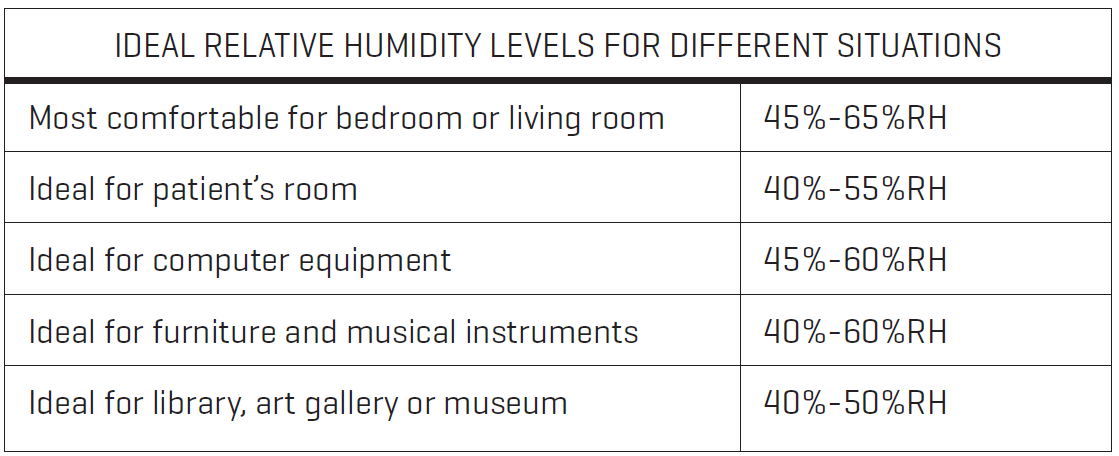
WHAT IS RELATIVE HUMIDITY?
Relative humidity (abbreviated RH) is the ratio of the partial pressure of water vapor to the equilibrium vapor pressure of water at a given temperature. Relative humidity depends on the temperature and the air pressure.
It requires less water vapor to attain high relative humidity at low temperatures. More water vapor is required to attain high relative humidity in warm or hot air.
OPERATING INSTRUCTIONS
- Place unit on a hard, flat surface.
- Fill tank with clean water (cold or room temperature).
- Place the tank on the base.
- Plug the unit into an AC outlet
- Switch on the unit by pressing the “ON/OFF” button. The LED display will illuminate BLUE and the mist output will default to Level 2. The LED display also shows the current temperature and the relative humidity.
- Press the “MAX-MIN” button to adjust the mist volume from Level 1 (low) to Level 3 (high).
- Press the “ANION” button to begin generating ions, which purify the air. Ions are charged particles that bond with airborne bacteria and other contaminants. These bonded particles become heavier, causing them to fall from the air, leaving the air cleaner, with fewer airborne contaminants. When the ionizer is on, the LED display will show a tree icon. Press the “ANION” button again to stop this function.
SETTING THE HUMIDITY
This unit can run continuously, or it can be programmed to maintain a consistent level of humidity that suits your needs.
- Press the “HUMIDITY” button once. The LED display flashes “Co” for “constant operation.” In this mode, the desired humidity level has not been programmed. The unit will generate mist constantly, regardless of the humidity level in the room.
- Press the button again to program the humidity, from 45%RH to 75%RH, in increments of 5%. Stop pressing the button when you reach your desired humidity setting. After three seconds, desired humidity level will disappear and the display will resume showing the current humidity. The humidity icon will flash, indicating that the unit is monitoring the humidity and will adjust itself automatically to maintain your desired level of humidity. Note: If desired humidity is less than the current humidity, the unit will go into sleep mode and stop producing mist. If the current humidity drops below your desired level, the unit will automatically resume producing mist.
- To return to the “constant operation” mode, keep pressing the “HUMIDITY” button until the LCD display shows “Co.”
GENERAL MAINTENANCE
In areas with hard water (high concentration of calcium, magnesium or other minerals in the water), you may notice a white powder residue on the unit, as well as scales on the surfaces of the water basin, transducer and/or the inner surface of the water tank. Scales on the surface of transducer will render the unit inoperable.
WE RECOMMEND:
- Use cold boiled water or distilled water. Clean the transducer, water tank and basin unit every week.
- Change the water in water tank often to keep it fresh.
- Drain the water and allow the entire unit to dry before storing it.
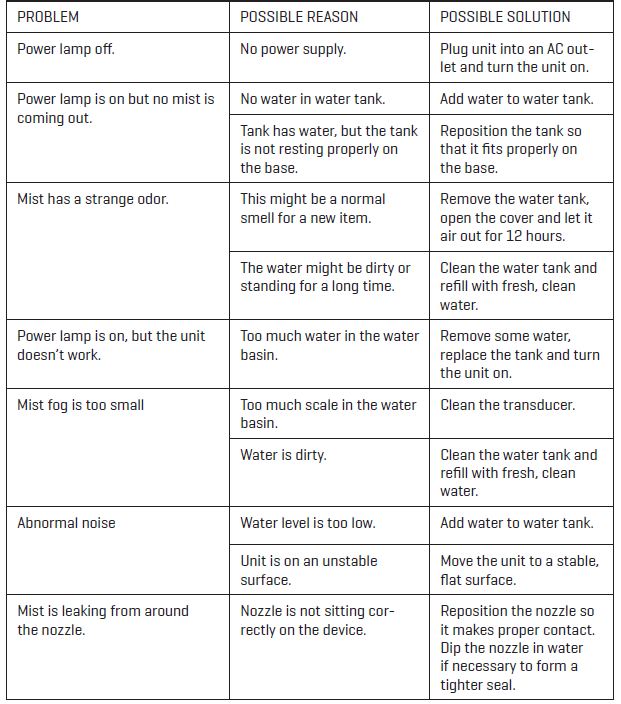
TROUBLE SHOOTING GUIDE
WARRANTY
Sharper Image branded items purchased from SharperImage.com include a 1-year limited replacement warranty.
If you have any questions not covered in this guide, please call our Customer Service department at 1 (877) 210-3449. Customer Service agents are available Monday through Friday, 9:00 a.m. to 6:00 p.m. ET.
Pros & Cons of the Sharper Image Digital Ultrasonic Humidifier
- Pros:
- Quiet Operation: Ultrasonic technology ensures near-silent mist generation, ideal for nighttime use.
- Safe and Cool Mist: No heating element means it's safe to use around children and pets.
- Easy Maintenance: Filter-free design eliminates recurring costs and simplifies cleaning.
- Digital Precision: Adjustable humidity levels with digital display offer precise environmental control.
- Value for Money: Affordable price point combined with advanced features delivers good cost efficiency.
- Cons:
- Water Capacity: Moderate tank size requires refilling every 10-12 hours in heavy use.
- No Built-in Humidistat: Lacks automatic humidity sensing to regulate output, requiring manual adjustments.
- Potential Mineral Buildup: Requires use of distilled or demineralized water to avoid white dust and prolong unit life.
- Limited Coverage: Optimal for small to medium rooms; larger spaces may require multiple units or alternative models.
Customer Reviews of the Sharper Image Digital Ultrasonic Humidifier
Users generally praise the sharper image DIGITAL ULTRASONIC HUMIDIFIER for its quiet operation and ease of use. Many highlight the convenience of the digital controls and the pleasantly subtle mist output that improves indoor air comfort without noise disturbance. Typical customer ratings average around 4 out of 5 stars, with several reviewers recommending it for bedrooms and nursery rooms due to its safety features and gentle mist.
Common complaints focus on the relatively small water tank requiring frequent refills during extended use, and occasional reports of mineral buildup if tap water is used instead of distilled water. Some users note the absence of an automatic humidistat which would enhance convenience by managing humidity levels autonomously. Despite these issues, most reviews conclude that the product offers excellent value for the price and meets expectations for a compact ultrasonic humidifier.
Overall, it is recommended for individuals seeking a quiet, digital ultrasonic humidifier for small to medium indoor spaces who prioritize safety and low maintenance.
Faqs
How do I set up my sharper image DIGITAL ULTRASONIC HUMIDIFIER for the first time?
Why is my sharper image DIGITAL ULTRASONIC HUMIDIFIER not producing mist or has weak output?
Can I use essential oils or fragrances in my sharper image DIGITAL ULTRASONIC HUMIDIFIER?
How do I clean and maintain my sharper image DIGITAL ULTRASONIC HUMIDIFIER to prevent mold and bacteria?
What should I do if my sharper image DIGITAL ULTRASONIC HUMIDIFIER is making unusual noises?
How do I adjust the humidity output on my sharper image DIGITAL ULTRASONIC HUMIDIFIER?
What is the recommended room size for the sharper image DIGITAL ULTRASONIC HUMIDIFIER?
How should I store my sharper image DIGITAL ULTRASONIC HUMIDIFIER when not in use?
More sharper image manuals
- How to Use: Sharper Image Star Wars Coffee Maker CM3-SRW-DVST User Guide
- How to Use: Sharper Image BACON EXPRESS TOASTER User Guide
- Setup: Sharper Image Purify 5 Air Purifier User Manual
- How to Use: Sharper Image PORTABLE ICE MAKER User Manual
- How to Use: Sharper Image Tower Heater Rise 20H User Manual
- Setup: Sharper Image 2-IN-1 STEAM MOP SI-160 User Manual
Leave a Comment