
How to Use: Sharper Image PORTABLE ICE MAKER User Manual
Content
Sharper Image Portable Ice Maker

Introduction
The Sharper Image Portable Ice Maker is a compact, efficient appliance designed to deliver fresh ice quickly and conveniently wherever you need it. This versatile machine produces bullet-shaped ice in under 15 minutes, making it ideal for home kitchens, offices, dorm rooms, RVs, or outdoor gatherings. Its portability and ease of use allow you to enjoy ice on demand without relying on bulky freezers or traditional ice trays.
With a 1.7-quart water reservoir and the ability to produce up to 22 pounds of ice within 24 hours, this portable ice maker balances performance with a space-saving design. The unit measures 14 inches long, 9.5 inches wide, and 13 inches tall, weighing just 22 pounds, making it easy to transport and store. Its transparent top cover lets you monitor ice production without opening the lid, and the digital control panel offers simple operation with selectable ice cube sizes.
Targeted toward individuals who value convenience and reliability, the Sharper Image Portable Ice Maker suits a broad range of users—from cocktail enthusiasts to campers and busy families. The device is available through major online retailers and specialty stores, typically priced between $75 to $170, offering competitive value for its speed and portability.
FEATURES
- Rubber stopper
- Water tank
- Compressor
- Plug and power cord
- Front lid
- View window
- Back front cover
- Control Panel
- Water tray
- Evaporator
- Ice shovel
- Ice basket

SPECIFICATIONS
- Daily ice output: Approx. 22 lbs. in 24 hours
- Ice storage capacity: 1.3 lbs.
- Compressor: High efficiency CFC free R134a
- Water reservoir capacity: 1.8 Qts.
- Dimensions: 14” L x 9.5” W x 13” H
- Voltage: AC 220-240V/50Hz
- Power cord: 60” length with 3-prong safety plug
IMPORTANT: BEFORE USING YOUR PORTABLE ICE MAKER FOR THE FIRST TIME
- Do not turn this device upside down, as this may damage the compressor.
- Place device on a flat level surface. Allow 6” of space on the top, back and sides for proper ventilation.
- Let the device sit for at least 2 hours, with the front lid open.
CONTROL PANEL OPERATION
- ON/OFF: Turns unit ON or OFF.
- ICE FULL: This light will come on with a “BEEP-BEEP” noise when the ice has reached the maximum capacity of the storage cabinet. Remove ice with the scoop and press ON/OFF to resume ice making.
- ICE: This light will turn solid green when the ice is being made.
ADD WATER: This light will come on with a long “BEEP” noise when the reservoir is empty. If you wish to make more ice, turn the device off, add water and turn it back on.
OPERATING INSTRUCTIONS
- Open the lid and fill the reservoir with water. Use clean, potable water only. (NOTE: Make sure the water level in the water reservoir is not over the ice collecting tray.)
- Plug the device into an AC outlet.
- Press the ON/OFF button to turn the unit on. The ice maker begins to work and the the ICE button will light up constant green.
- The first batch of ice will be ready in approximately 10 minutes. (NOTE: For the first three cycles, the ice may be small and irregular in size. This is normal. Due to fast freezing, ice cubes may appear “Cloudy.” This is air trapped in the water and will not affect quality or taste of ice.)
IMPORTANT: If there is water in the reservoir but no ice is being made, there may be air in the line. Remove the rubber stopper to let a few drops of water out. The rubber stopper is accessible from inside the reservoir. - When the ice tray is full, you will hear a “BEEP-BEEP” noise, and the ICE FULL light will illuminate. Please remove some ice with the scoop. Press ON/OFF to resume making ice. Do not allow the ice tray to overfill.
- Although this unit makes ice, it is NOT a freezer. Ice that is left in this device will melt and then be re-frozen. You must remove the ice as it is made, and store it in a freezer or cooler. (NOTE: If the compressor stops for any reason such as water shortage, too much ice, power failure, etc. do not start the system right away. Wait 3 minutes, and then re-start the ice maker.)
CARE AND MAINTENANCE
- Wipe the inside and allow to air dry thoroughly after every use.
- Do not allow water to stagnate inside the device.
- Clean the interior with a diluted solution of water and vinegar.
- Do not immerse in water.
- Do not spray ice maker with chemicals.
- Rinse thoroughly before starting. Remove the rubber stopper and allow excess water to drain out the bottom.
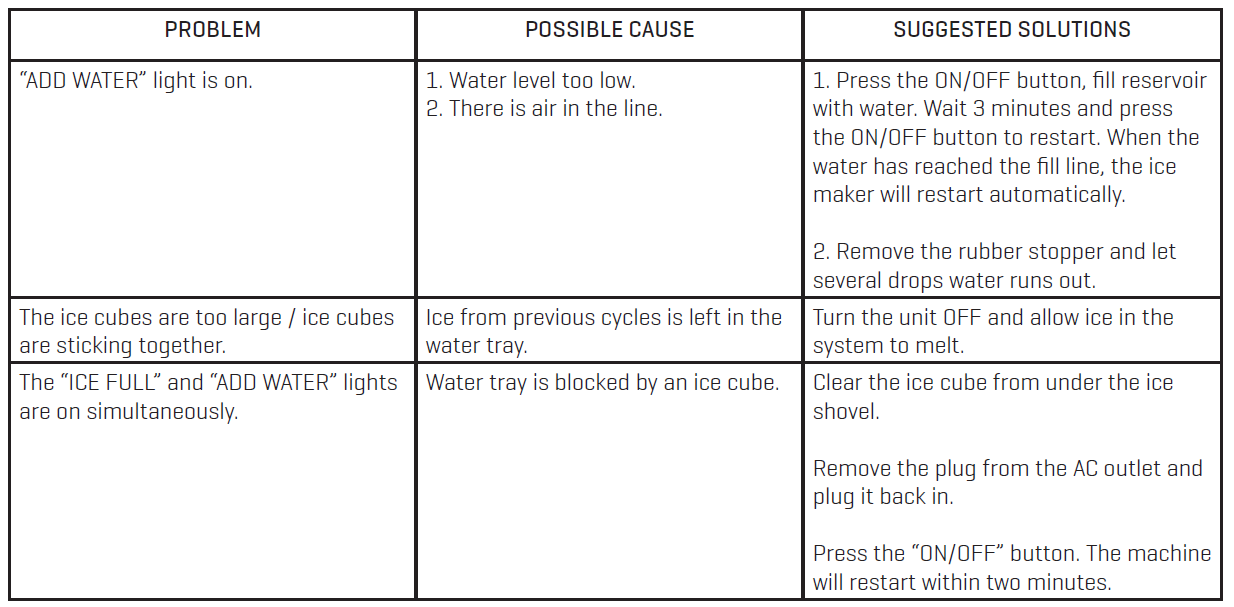
TROUBLESHOOTING
Pros & Cons of the Sharper Image Portable Ice Maker
- Pros:
- Produces ice quickly—bullet-shaped ice in under 15 minutes, great for instant use.
- Compact and lightweight design (22 lbs) for easy portability and countertop use.
- Large ice capacity: up to 22 lbs in 24 hours, sufficient for small to medium gatherings.
- User-friendly digital controls with selectable small or large ice cubes.
- Transparent lid allows easy monitoring without interrupting the cycle.
- Good value for money considering its features and performance.
- Cons:
- Ice does not stay cold inside the unit; requires transferring to a freezer for storage.
- Ice cubes may come out slightly wet, which can cause clumping if stored improperly.
- Some users report occasional loud fan noise, possibly affecting quiet operation.
- Not suitable for very large-scale ice needs compared to commercial machines.
- Requires regular cleaning and maintenance to avoid odors or buildup.
Compared to alternatives, the Sharper Image Portable Ice Maker offers a great balance of speed, portability, and price, making it preferable for casual users over larger, more expensive commercial units.
WARRANTY
Sharper Image branded items purchased from SharperImage.com include a 1-year limited replacement warranty. If you have any questions not covered in this guide, please call our Customer Service department at 1 (877) 210-3449. Customer Service agents are available Monday through Friday, 9:00 a.m. to 6:00 p.m. ET.
Customer Reviews and Feedback on the Sharper Image Portable Ice Maker
Many users appreciate the sharper image PORTABLE ICE MAKER for its fast ice production and ease of use. Customers frequently praise how it fits well in small spaces and reliably produces ice within 15 minutes, enhancing parties or daily convenience.
On average, the product receives around 4 out of 5 stars. Positive testimonials highlight the convenience of making fresh ice without needing a freezer ice tray and the ability to use purified water for cleaner ice cubes. One verified buyer noted, "I really wish I’d bought this years ago," emphasizing the value for home use.
Common complaints include the ice melting quickly if not moved to a freezer and occasional fan noise during operation. Some users recommend scooping and mixing the ice after production to reduce wetness and clumping. Despite minor drawbacks, many recommend the product for casual and portable ice-making needs, especially in apartments or RVs.
Faqs
How do I set up the Sharper Image PORTABLE ICE MAKER for the first time?
What should I do if the Sharper Image PORTABLE ICE MAKER is not making ice?
How often should I clean the Sharper Image PORTABLE ICE MAKER?
Can I use the Sharper Image PORTABLE ICE MAKER in extreme temperatures?
What are the key features that make the Sharper Image PORTABLE ICE MAKER different?
How do I troubleshoot a loud noise from the Sharper Image PORTABLE ICE MAKER fan?
Is the Sharper Image PORTABLE ICE MAKER compatible with alkaline water?
Why does the ice produced by the Sharper Image PORTABLE ICE MAKER stick together?
More sharper image manuals
- How to Use: Sharper Image BACON EXPRESS TOASTER User Guide
- Setup: Sharper Image 2-IN-1 STEAM MOP SI-160 User Manual
- How to Use: Sharper Image DIGITAL ULTRASONIC HUMIDIFIER User Guide
- Setup & Usage : Sharper Image ULTRASONIC HUMIDIFIER VOTIV 4 User Manual
- How to Use: Sharper Image Star Wars Coffee Maker CM3-SRW-DVST User Guide
- Usage: Sharper Image HANDHELD GARMENT STEAMER THREAD PASSPORT User Manual
Leave a Comment