
Setup: Sino Track GPS Tracker ST-907 User Manual
Content
Sino Track GPS Tracker ST-907
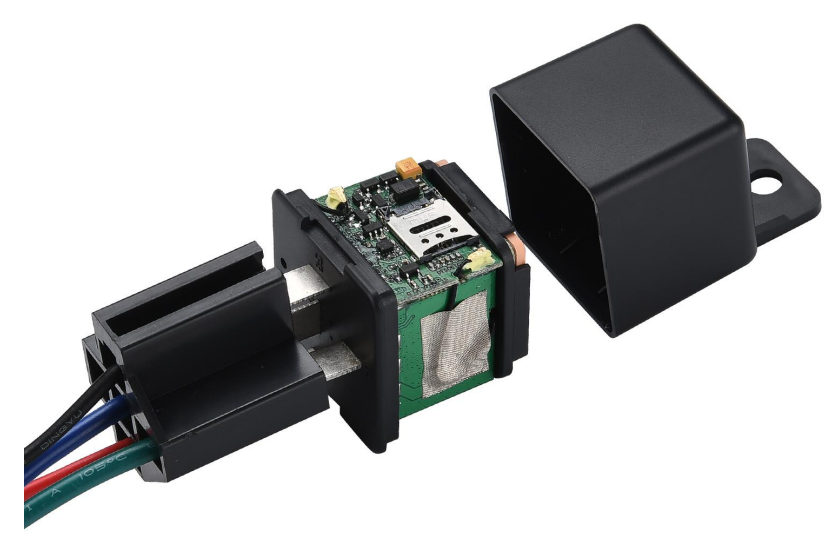
Introduction
The Sino Track GPS Tracker ST-907 is a compact and reliable tracking device designed to provide real-time location monitoring for vehicles, assets, and personal use. It offers precise GPS positioning combined with GSM communication technology, ensuring accurate and continuous tracking even in challenging environments. This tracker is ideal for fleet managers, logistics companies, vehicle owners, and individuals who need to safeguard valuable property or monitor movements efficiently.
Key benefits of the ST-907 include easy installation, long battery life, and compatibility with mobile apps and web platforms for seamless tracking. Its robust build and magnet mounting option allow for discreet placement on vehicles or assets, enhancing security without drawing attention. The device supports multiple tracking modes such as real-time, geo-fencing, and historical route playback, making it versatile across various use cases.
Typically available in the price range of $30 to $50, the Sino Track GPS Tracker ST-907 balances cost-effectiveness with advanced features. It can be purchased through specialized GPS tracking retailers and online platforms, with options for bundled services including SIM cards and subscription plans for data usage. Overall, the ST-907 suits users seeking affordable, dependable GPS tracking for personal or commercial applications.
Specifications
- Dimensions: Compact size, approximately 86 x 62 x 30 m,m for easy concealment
- Battery: Built-in rechargeable lithium battery with up to 1 month standby time
- GPS ModuleHigh-sensitivityty GPS chipset for rapid satellite lock and accurate positioning
- Network: GSM/GPRS for communication; supports SMS and data transmission over cellular networks.
- Tracking Modes: Real-time tracking, geo-fencing alerts, historical route playback, and SOS emergency functionality
- Installation: Magnet mount for effortless, tool-free attachment to vehicles or assets
- Compatibility: Works with smartphone apps and web platforms for live tracking and management
- Performance Benchmarks: Location accuracy within 5 meters under optimal GPS conditions
- Additional Features: Low battery alerts, movement alerts, and remote engine cut-off (depending on configuration)
Compared to similar products like iTrack Micro GPS or Magellan GPS Trackers, the ST-907 offers competitive battery life and versatile installation options at a more affordable price point, making it a preferred choice for small to medium fleet management and personal asset security.
Quick Start
Thank you for purchasing our GPS tracker.
This Quick User shows how to operate the device smoothly and correctly.
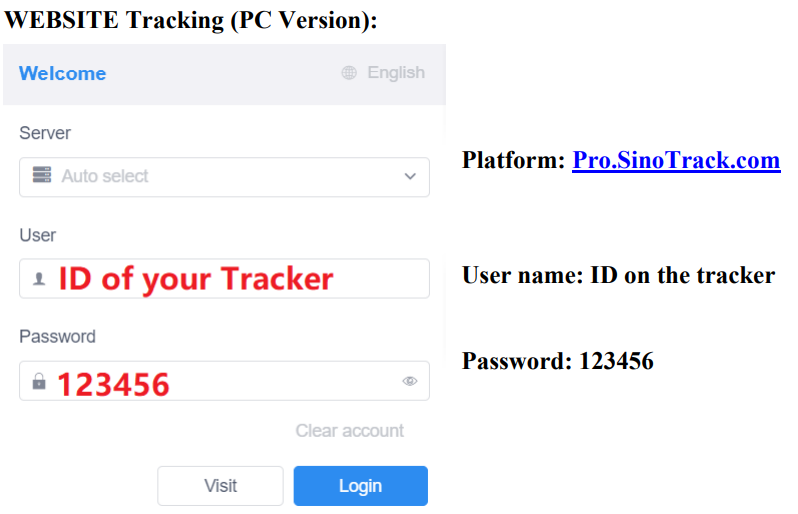
WEBSITE Tracking (PC Version):
APPLICATION Tracking (Mobile APP):
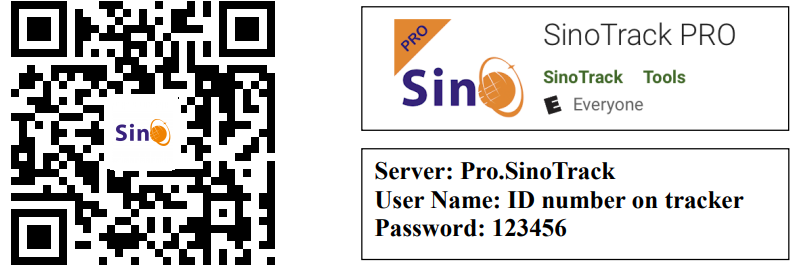
You can search SinoTrack PRO on the APP Store (iOS) or Google Play (Android), Or Download from the QR Code:
If you have more SinoTrack GPS trackers, and want to manage them in one account, please contact us. We will create an account for you, so you can monitor multiple devices on the platform at the same time.
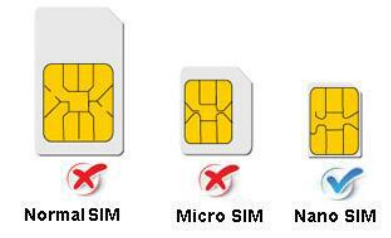
Choose a GSM card; it should be a Normal SIM card, without a PIN code.
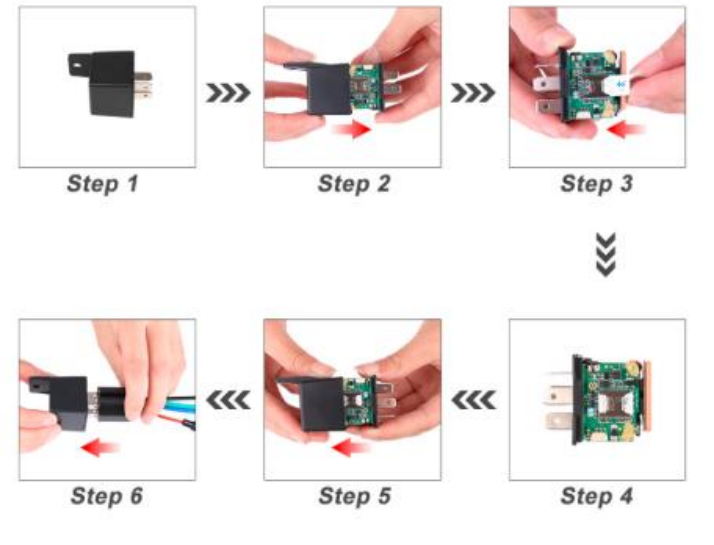
- Open the top cover of the tracker by screw.
- Properly insert the GSM card, and the tracker will start. And connect the external power supply.
- Put the device outside for around 30 seconds, the LED lights will keep lighting on, and for device can work normally.
- Dialing the device number, it will hang up and reply tracking message with valid Lon and lat.
- Please send SMS to tracker to set the APN: (the yellow placeSMS: 8030000 APN
(APN is Access Point Name of your SIM Card, please check with your SIM Card provider if you don’t know it)
If the APN needs the User name and Password, please send the command: SMS: 8030000 APN APNuser APNpassword - Send SMS to set trackers to our server:
SMS: 8040000 45.112.204.246 8090 - If you set it all up, you can track it online.
If the device is not online, please check the device settings, send: RCONF to the device, and it will reply with the settings.- The APN is correct.
- The IP and Port are correct.;
- The ID on the platform is correct.
- The device working model, (SMS model or GPRS model)
Installation
- The GPS antenna side should be towards to clear sky. (Can’t put under Metal, but Glass and Plastics are ok)
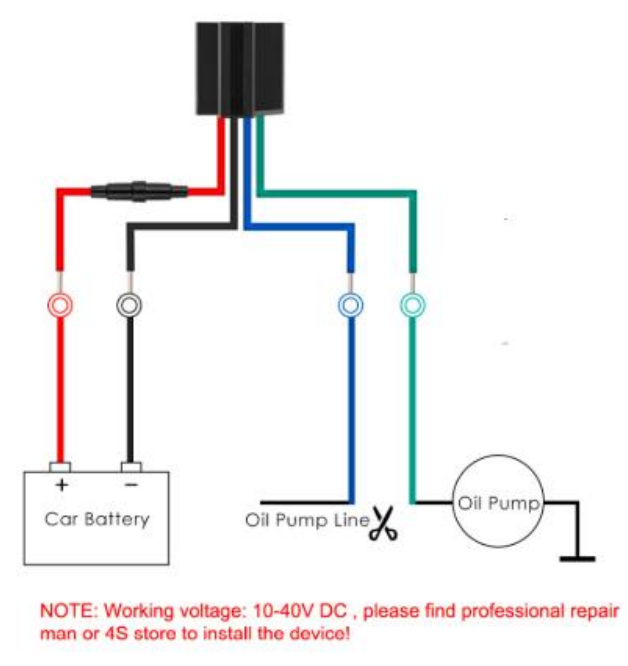
Connect the wires:
Troubleshooting Guide for Sino Trackk GPS Tracker ST-907
- Device Not Powering On: Ensure the battery is charged; connect the tracker to a power source using the supplied cable. If the issue persists, reset the device by holding the power button for 10 seconds.
- No GPS Signal: Place the device in an open area with a clear view of the sky. Avoid metal enclosures or underground garages that block satellite signals.
- SIM Card Issues: Check SIM card activation, ensure proper insertion, and confirm sufficient balance or data plan. Replace the SIM card if damaged.
- Error Codes: Common error codes, such as "GSM no network," indicate poor signal reception; move to an area with better cellular coverage.
- Connectivity Problems: Verify APN settings are correct for your cellular provider; reset network settings if needed.
- Preventive Measures: Regularly update device firmware via the official app, avoid exposure to extreme temperatures, and secure the device properly to prevent damage.
The Sino Track GPS Tracker ST-907 generally comes with a 12-month warranty covering manufacturing defects. For technical support, users can contact the manufacturer’s customer service via their website or hotline, typically provided in the product packaging.
Pros and Cons of Sino Track GPS Tracker ST-907
Pros
- Easy Installation: Magnetic mounting allows quick and secure attachment without tools.
- Long Battery Life: Up to one month of standby time reduces the need for frequent charging.
- Accurate Tracking: High GPS sensitivity ensures precise real-time location updates.
- Affordable Price: Competitive pricing provides good value compared to similar GPS trackers.
- Versatile Use Cases: Suitable for vehicle tracking, asset protection, and personal safety.
Cons
- Dependence on GSM Network: Tracking functionality relies on cellular coverage, which may be limited in remote areas.
- SIM Card Required: Users must manage SIM activation and data plans separately.
- Limited Advanced Features: Lacks some high-end options like live audio monitoring or extensive sensor integration found in premium trackers.
Overall, the Sino Trackk GPS Tracker ST-907 offers solid performance and value, making it a practical choice for budget-conscious users. Alternatives may provide more features but often at significantly higher costs.
Customer Reviews and Feedback on Sino Track GPS Tracker ST-907
Users generally praise the Sino Track GPS Tracker ST-907 for its reliability and ease of use. Many highlight the long battery life and straightforward installation as major benefits, giving the product an average rating of 4 out of 5 stars. Customers appreciate the real-time tracking accuracy and responsive customer support services.
Common complaints include occasional GSM signal loss in remote areas and the need to manage SIM cards independently. Some users have noted that setup instructions could be clearer for beginners, but acknowledge that customer support resolves issues effectively. Overall, the tracker is recommended for personal vehicle monitoring, with frequent buyers emphasizing its affordability and consistent performance.
Faqs
How do I set up the sino track GPS Tracker ST-907 for the first time?
What should I do if my sino track GPS Tracker ST-907 is not sending location updates?
Can the sino track GPS Tracker ST-907 perform remote engine cut-off for vehicle security?
What are the key anti-theft features of the sino track GPS Tracker ST-907?
Is the sino track GPS Tracker ST-907 compatible with motorcycles and different vehicle voltages?
How can I optimize the battery life and performance of my sino track GPS Tracker ST-907?
What routine maintenance is required to keep the sino track GPS Tracker ST-907 functioning properly?
How do I configure geofencing alerts on the sino track GPS Tracker ST-907 to monitor vehicle boundaries?
More sino track manuals
Leave a Comment