
Setup: Sino Track GPS Tracker ST-901 User Manual
Content
Sino Track GPS Tracker ST-901
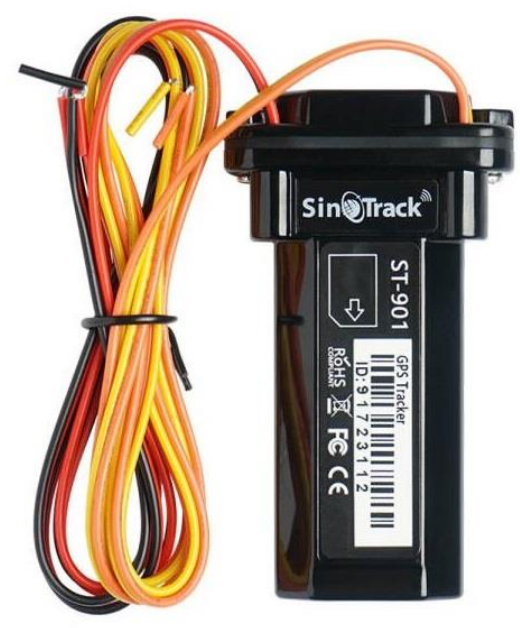
Introduction
The Sino Track GPS Tracker ST-901 is a highly reliable vehicle tracking device designed for real-time location monitoring, asset management, and fleet control. Combining advanced GPS and GSM technology, it offers precise positioning with global coverage, making it ideal for personal vehicles, business fleets, rental cars, and logistics. The tracker’s compact design and easy installation with magnetic mounting allow for discreet placement and hassle-free use.
Key benefits of the ST-901 include its long battery life, real-time tracking updates via SMS or a mobile app, and geo-fencing capabilities that alert users when the vehicle enters or leaves designated areas. The device supports remote engine cut-off and movement alerts, enhancing security and theft prevention. It is suitable for businesses seeking efficient fleet management solutions or individuals wanting to safeguard personal transportation.
Priced competitively in the mid-range segment, typically between $50 and $80, the Sino Track GPS Tracker ST-901 is widely available through online retailers and specialized GPS equipment suppliers. Its affordability, paired with robust features, makes it a valuable tool for both commercial and private users.
Specifications and Key Features of Sino Track GPS Tracker ST-901
- Dimensions: Compact and lightweight for easy installation
- Battery: Built-in rechargeable lithium battery with up to 10 days of standby time
- GPS Accuracy: Within 5 meters for precise location tracking
- Communication: GSM/GPRS module supporting quad-band frequencies for worldwide coverage
- Tracking Modes: Real-time tracking, SMS mode, and GPRS mode via mobile app or web platform
- Geo-fencing: Customizable zones with instant alerts on boundary crossing
- Alerts: Movement detection, low battery, overspeed, and engine cut-off notifications
- Installation: Magnetic mount and plug-and-play setup, no professional installation needed
- Water Resistance: IP65 rated for protection against dust and water splashes
- Platform Compatibility: iOS and Android apps, web-based control panel
Compared to similar models like the Sino Track ST-902 or other market competitors such as the TK103, the ST-901 provides a balanced performance with longer battery life and an easier user interface, while maintaining competitive pricing.
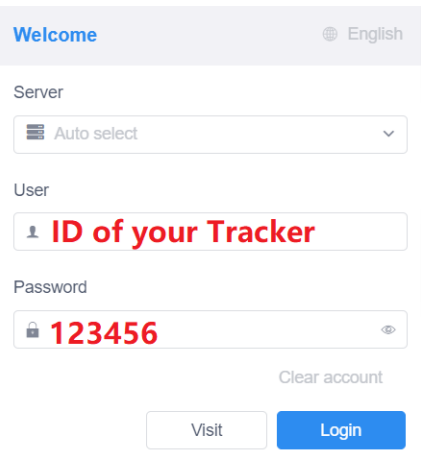
WEBSITE Tracking (PC Version)
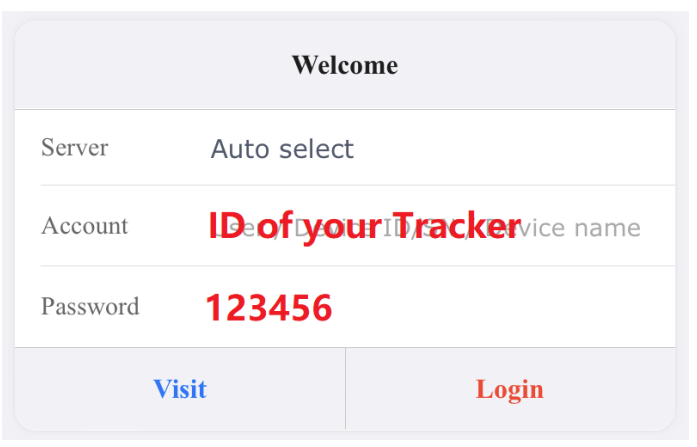
- Platform: Pro.SinoTrack.com
- User name: ID on the tracker
- Password: 123456
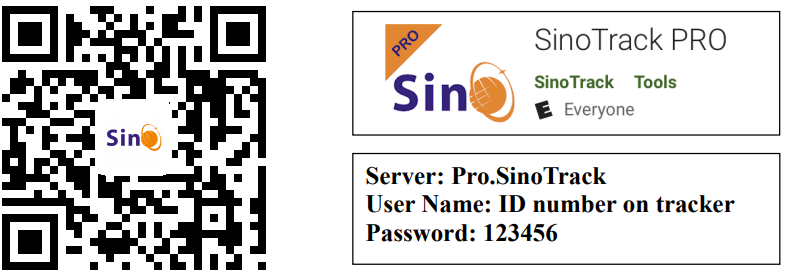
APPLICATION Tracking (Mobile APP)
You can search SinoTrack PRO on the APP Store (iOS) or Google Play (Android),, Or Download from the QR Code:
If you have more SinoTrack GPS trackers, and want to manage them in one account, please contact us. We will create an account for you, so you can monitor multiple devices on the platform at the same time.
Choose a GSM card; it should be a Normal SIM card, without a PIN code.
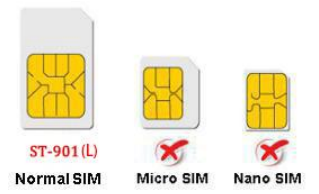
- Open the top cover of the tracker by screw.
- Properly insert the GSM card, the tracker will start, and Connect the external power supply.
- Put the device outside for around 30 seconds, the LED lights will keep lighting on,, which means for device can work normally.
- Dialing the device number, it will hang up and reply tracking message with valid Lon and lat.
- Please send SMS to tracker to set the APN: (the yellow place is BLANK) SMS: 8030000 APN (APN is Access Point Name of your SIM Card, please check with your SIM Card provider if you don’t know it)
If the AP needs the User name and Password, please send the command: SMS: 8030000 APN APNuser APNpassword. - Send SMS to set trackers to our server: SMS: 8040000 45.112.204.246 8090
- If you set it all up, you can track it online.
If the device is not online, please check the device settings, send: RCONF to the device.
It will reply to the setting.
- The APN is correct.
- The IP and Port correctecte.t;
- The ID on the platform is correct.
- The device working model, (SMS model or GPRS model)
LED Status
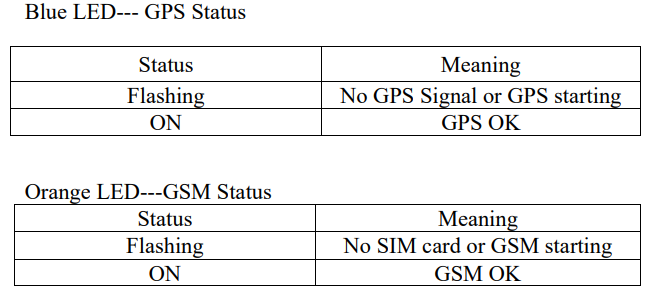
- The default password is: 0000
- The default mode is normal working (ACC Mode). GPS Status: A is a valid location; V is an invalid location.
- Alarm mode is on.
- Alarm will be sent to the 3-control number.
- Battery from 0 to 100%
Installation
The GPS antenna side should be towards to clear sky. (Can’t put under Metal, but Glass and Plastic are ok)
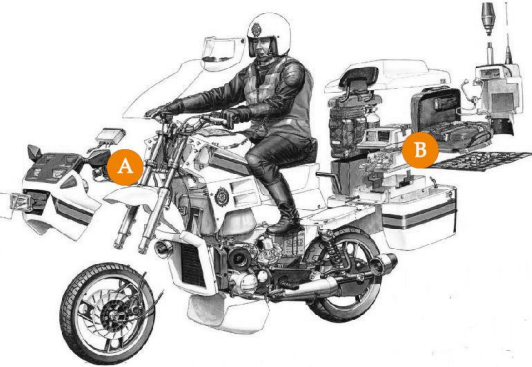
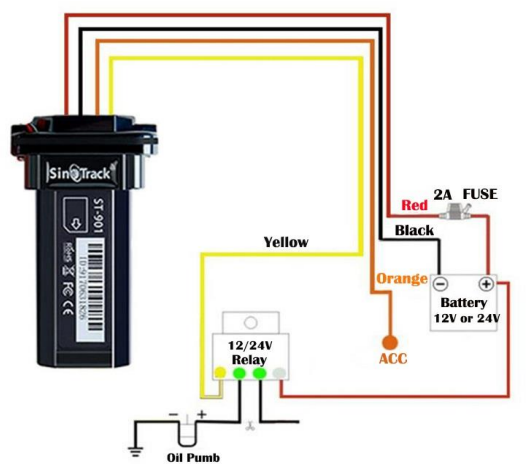
Connect the wires:
Online Track:
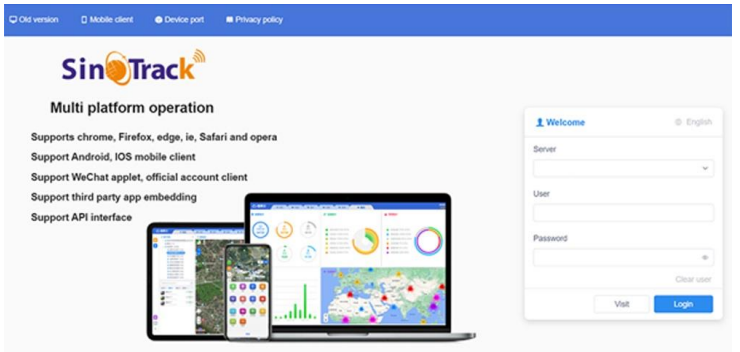
Please log in from www.SinoTrack.com or http://45.112.204.246
Troubleshooting Sino Track GPS Tracker ST-901
- Issue: Device not responding or offline
Solution: Check SIM card activation and signal strength; ensure battery is charged; restart tracker. - Issue: Inaccurate location data
Solution: Ensure a clear sky view for the GPS signal; reset the device; update the firmware if available. - Issue: No SMS or alerts received
Solution: Verify SIM card credit/balance; verify correct phone number settings; check device SMS center number. - Error Codes: Refer to the manual for specific GSM/GPS status LED codes indicating network or satellite issues.
- Preventive Measures: Regularly charge the device; keep the SIM card active; avoid placing the tracker in metal-encased compartments.
The Sino Track GPS Tracker ST-901 typically comes with a 6 to 12-month manufacturer's warranty. For support, users can contact official Sino Track customer service via their website or authorized resellers. Technical assistance includes phone support, email, and online chat options.
Pros & Cons of Sino Track GPS Tracker ST-901
Pros
- Accurate Real-Time Tracking: GPS accuracy within 5 meters ensures reliable location updates.
- Long Battery Life: Up to 10 days of standby reduces frequent charging needs.
- User-Friendly Interface: Easy setup with mobile app and web platform for convenient monitoring.
- Comprehensive Alerts: Movement, geo-fence, and overspeed alerts enhance vehicle security.
- Affordable Pricing: Competitive price point offers great value compared to similar devices.
Cons
- Limited Waterproofing: IP65 rating means it is not fully waterproof; avoid submersion.
- SIM Card Dependent: Requires an active GSM SIM with a data plan for real-time tracking.
- Basic Installation: Magnetic mount suitable for metal surfaces only, limiting placement options.
- App Features: Some advanced features may require software updates or subscription plans.
Overall, the Sino Track GPS Tracker ST-901 offers solid performance and reliability, making it a strong contender for users needing affordable and effective vehicle tracking with user-friendly features.
Customer Reviews and Feedback on Sino Track GPS Tracker ST-901
Users consistently praise the Sino Track GPS Tracker ST-901 for its accuracy and ease of use. Many appreciate the long battery life and real-time alerts that enhance the security of their vehicles. The mobile app receives positive remarks for its intuitive design and seamless tracking experience.
Common complaints include occasional difficulties with SIM card setup and limited waterproofing. Some users mention that signal strength can vary indoors or in dense urban areas. Nevertheless, the majority recommend the device for personal and commercial use due to its reliability and value for money.
Ratings typically average around 4 to 4.5 stars out of 5, reflecting strong overall satisfaction. Purchase recommendations often emphasize the tracker’s affordability combined with comprehensive features,, making it suitable for fleet managers, car owners, and logistics operators seeking dependable GPS monitoring solutions.
Faqs
How do I set up the sino track GPS Tracker ST-901 for the first time?
What should I do if my sino track GPS Tracker ST-901 is not sending location updates?
Can the sino track GPS Tracker ST-901 be used with both motorcycles and cars effectively?
What are the key features of the sino track GPS Tracker ST-901 that enhance vehicle security?
Is the sino track GPS Tracker ST-901 compatible with modern 3G or 4G networks?
How can I optimize the battery life and performance of my sino track GPS Tracker ST-901?
What maintenance steps are necessary to keep the sino track GPS Tracker ST-901 functioning reliably?
How do I troubleshoot common problems like geo-fence or over-speed alarms not triggering on the sino track GPS Tracker ST-901?
More sino track manuals
Leave a Comment