
Setup : Sino Track GPS Tracker ST-904/ST-904L 4G User Manual
Content
Sino Track GPS Tracker ST-904/ST-904L 4G
Introduction
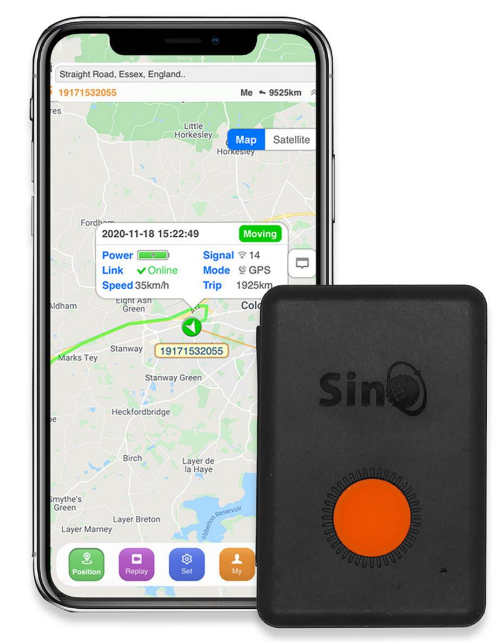
The Sino Track GPS Tracker ST-904/ST-904L 4G is a compact, waterproof personal tracking device designed for real-time location monitoring of people, pets, vehicles, and valuables. Leveraging advanced GPS and AGPS dual positioning technology, this tracker delivers accurate location updates with a precision of up to 5 meters. With built-in 4G LTE support, the ST-904/ST-904L ensures reliable connectivity and fast data transmission, making it ideal for both urban and remote environments.
Key features include an SOS emergency button, two-way voice communication, geofencing, movement and speeding alerts, and a long-lasting battery that provides up to 15 days of standby time. The device is lightweight, easy to install, and suitable for children, elderly family members, pets, luggage, and vehicles. Its robust design and versatile functionality make it a top choice for personal safety, asset tracking, and fleet management.
The Sino Track GPS Tracker ST-904/ST-904L 4G is widely available online and in electronics stores, with prices typically ranging from $35 to $60, depending on the retailer and included accessories. Whether you need peace of mind for your loved ones or want to keep tabs on valuable assets, this tracker offers a reliable, user-friendly solution.
Specification
- Content: Specs.
- Dim.: 58*39*20mm
- Weight: 52g
- Network: GSM/GPRS/LTE
- Band: GSM 850/900/1800/1900Mhz/ LTE-FDD B1/B2/B3/B4/B5/B7/B8/B28/B66
- GPS sensitivity: -159dBm
- GPS accuracy: 5m
- Battery: 3.7V 1200mAh battery
- Stand by: 7-15 days
- Storage Temp.: -40°C to +85°COperation Temp. -20°C to +55°C
- Humidity: 5%--95% non-condensing
- Car charger: 12-24V input ; 5V-1A output
- Wall charger: 110-220V input ; 5V-1A output
Hardware Description
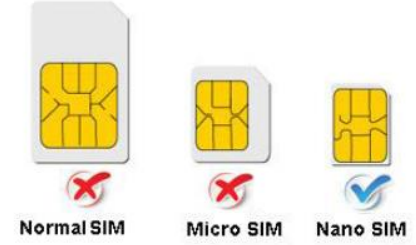
Note: SIM CARD INSTALLATION GUIDE:
2G Version Only GSM SIM card works in this model.
If you use a 3G or 4G card, please confirm that it has a GSM function. Please confirm the SIM Card without a PIN Code.
HOW TO QUICKLY SET UP THE TRACKER
STEP 1. – Activate Sim
Install the new SIM card with 2G/4G network function into your mobile phone and activate the SIM card. Make sure it can make a call, send a text,, and has an internet connection. Once this is confirmed, insert the SIM into your tracker.
STEP 2. – Turn on the tracker
- Charge it for about 1 hour first.
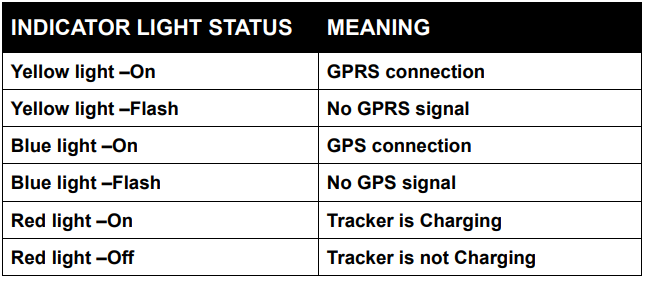
- The yellow and blue indicator lights will start flashing while it searches for a network and GPS.
- Please wait 5 minutes in a good reception area (by a window or outside) for both lights to come on constantly. It will continue to flash yellow if it can not find a network. Move it to another location.
- Please note, when the device has a GPS signal, it will get a GPS location. If not, it will get its location using LBS/WIFI.
STEP 3. - Setting APN for the tracker
- You need to know your tracker’s SIM card's APN (Every SIM card carrier has its own APN content. We have three methods to find out APN content: check the SIM card carrier on the internet or put the SIM card into the cell phone to find out APN, or you can ask your SIM card's provider).
- Please note the following operations need from another phone number s, send text messages command to the tracker’s SIM card’s phone number to set the tracker's APN.
For example:
- APN is: everywhere
- APN username is: eesecure
- APN password is: secure
- If your SIM card’s APN does not require a username and password, then send the command(8030000+space+APN) to the tracker, and it will reply “SET OK”. Text command is: 8030000 everywhere.
- If your APN has with username and password: Then send text Command (8030000+Space+APN+space+APN user+Space+APN pass) to the tracker : 8030000 everywhere eesecure secure
Please note: Different SIM card has different APNs. Please apply the above formula according to your actual APN to set up your machine.
STEP 4. - Setting GPRS mode
Send text command to the device to set GPRS mode:7100000
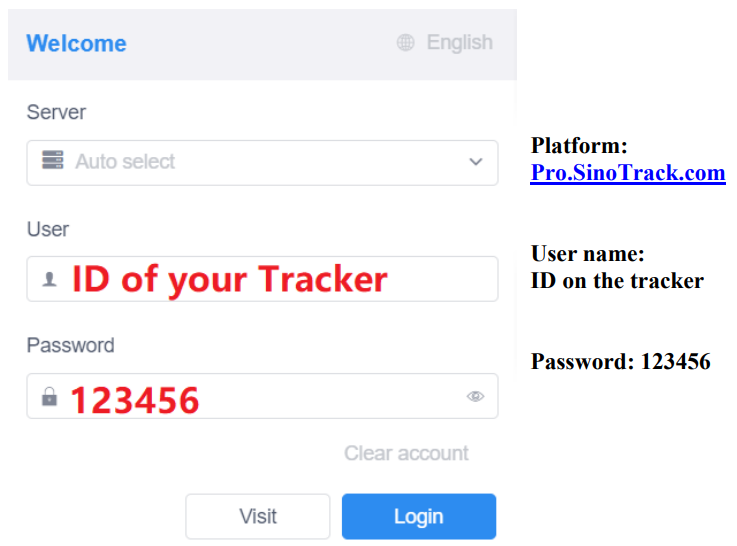
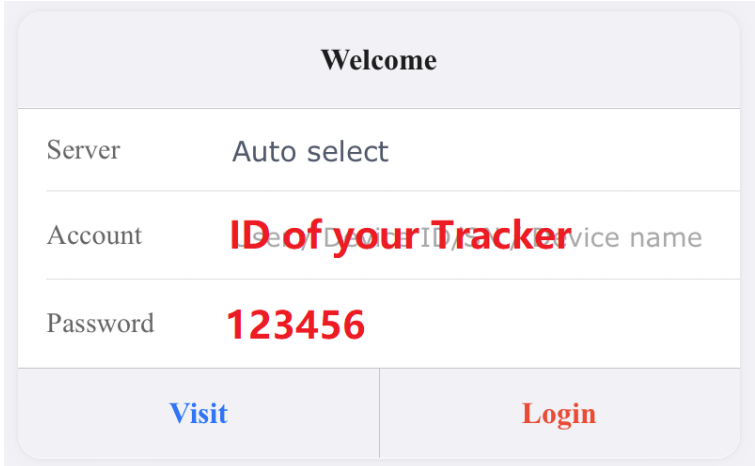
Then wait about 30 seconds, both blue and orange lights should stay ON, which means you can go to the notrackpro web or app to check if the tracker is active. (Username is your tracker’s ID number that is written on the product, password: 123456)
If you set ok of all, you can track it online, it's upt'sup online but shows the China location, then take it to the outside, where the signal is good place to get a GPRS signal. When it gets a signal, it will update your location.
START ONLINE TRACKING
WEBSITE TRACKING
WEBSITE Tracking (PC Version):
- Platform:
Pro.SinoTrack.com - User name:
ID on the tracker - Password:
123456
APPLICATIONS FOR ANDROID/IOS
You can search SinoTrack PRO on the APP Store (iOS) or Google Play (Android), Or Download from the QR Code:
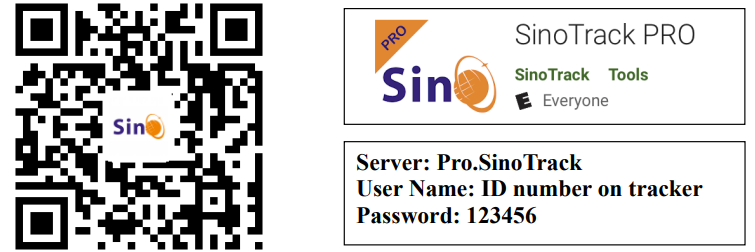
If you have more SinoTrack GPS trackers, and want to manage them in one account, please contact us. We will create an account for you, so you can monitor multiple devices on the platform at the same time.
Notices:
- GPS tracking can be used outdoors.
- Please make sure the SIM card supports making calls, sending messages, and the GPRS network.
- Please make sure the SIM card has sufficient balance.
- Please make sure the SIM card has turned off call divert
- Please insert the SIM card correctly.
- Do not assemble and disassemble the device at will.
Troubleshooting Common Issues
Users of the Sino Track GPS Tracker ST-904/ST-904L 4G may occasionally encounter connectivity, battery, or alert issues. Common problems include:
- No GPS Signal: Ensure the device is outdoors or near a window. Restart the tracker and check for firmware updates.
- Low Battery: Charge the device using the provided wall or car charger. Avoid extreme temperatures to prolong battery life.
- Failed Alerts or SMS: Verify SIM card compatibility and network coverage. Check device settings for correct phone numbers and alert configurations.
- Error Codes: Refer to the user manual for specific codes. For example, “S32,000000,1” may indicate a successful command execution.
Preventive measures include regular charging, firmware updates, and proper installation. The device comes with a standard 1-year warranty. For support, contact the manufacturer via their official website or customer service email. Online forums and community groups also provide helpful troubleshooting tips.
Pros and Cons of the Sino Track GPS Tracker ST-904/ST-904L 4G
Pros
- Compact, lightweight, and waterproof design for versatile use
- Accurate GPS and AGPS positioning with 5m precision
- Long battery life (up to 15 days standby)
- Real-time tracking, geofencing, and movement alerts
- 4G LTE support for fast, reliable connectivity
- Easy setup and user-friendly mobile app
Cons
- Battery life may be shorter with frequent use or in poor signal areas
- Some users report occasional connectivity issues in remote locations
- The setup process may be challenging for non-tech-savvy users
- Value for money depends on usage frequency and network costs
Compared to similar trackers, the Sino Track GPS Tracker ST-904/ST-904L 4G offers a balanced mix of features, reliability, and affordability, making it a strong contender in the personal and asset tracking market.
Customer Reviews and Testimonials
The Sino Track GPS Tracker ST-904/ST-904L 4G has received positive feedback from users worldwide. Many praise its accurate real-time tracking, long battery life, and ease of use. Common praises include:
- “Perfect for tracking my elderly parents—peace of mind knowing their location at all times.” (5 stars)
- “Great for my pet and luggage—compact and reliable.” (4.5 stars)
- “Easy to set up and use, with clear alerts and notifications.” (4 stars)
Some users mention occasional connectivity issues in remote areas and a desire for longer battery life. Overall, the device is highly recommended for personal safety, asset tracking, and peace of mind. Most reviewers rate it 4 to 5 stars and suggest it for anyone seeking a reliable, affordable GPS tracker.
Faqs
How do I set up the sino track GPS Tracker ST-904/ST-904L 4G for the first time?
What should I do if my sino track GPS Tracker ST-904/ST-904L 4G is not getting a GPS signal?
Can I use the sino track GPS Tracker ST-904/ST-904L 4G with any SIM card?
How do I check the current settings and configuration of my sino track GPS Tracker ST-904/ST-904L 4G?
What features make the sino track GPS Tracker ST-904/ST-904L 4G different from other GPS trackers?
How can I troubleshoot SMS command issues with my sino track GPS Tracker ST-904/ST-904L 4G?
How often should I maintain my sino track GPS Tracker ST-904/ST-904L 4G?
What is the battery life and charging process for the sino track GPS Tracker ST-904/ST-904L 4G?
More sino track manuals
Leave a Comment