
Setup: Sino Track GPS Tracker ST-909 User Manual
Content
Sino Track GPS Tracker ST-909
Introduction
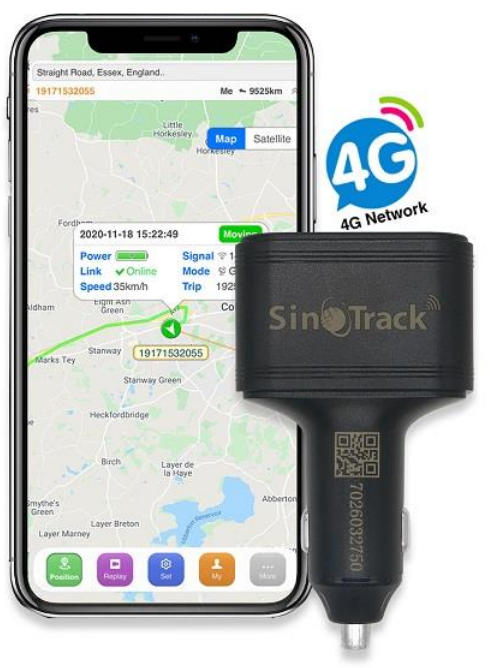
The Sino Track GPS Tracker ST-909 is a robust, reliable vehicle tracking device designed to provide real-time location monitoring with high precision. Ideal for fleet managers, individual vehicle owners, and logistics companies, this tracker offers a versatile solution for enhancing vehicle security, optimizing routes, and improving asset management. The ST-909 stands out with its compact design, ease of installation, and seamless integration with mobile and web tracking platforms.
Key benefits include accurate GPS + GSM dual-mode positioning, real-time alerts for movement, ignition, and geo-fencing breaches, and extensive compatibility with various SIM networks globally. This device supports multiple tracking modes, including live tracking and historical route playback, making it suitable for both personal and commercial usage. With user-friendly app support, users can monitor on the go from smartphones or desktops.
The Sino Track GPS Tracker ST-909 is typically priced in the mid-range market, approximately between $30 and $60, depending on the retailer and regional availability. It is widely available through online marketplaces and specialized GPS equipment suppliers, often accompanied by local customer support and warranty options. Its balance of affordability and functionality makes it a popular choice for users seeking dependable vehicle tracking solutions.
Specifications of Sino Track GPS Tracker ST-909
- Positioning Technology: GPS + GSM dual-mode for enhanced accuracy and global coverage
- Communication Bands: GSM 850/900/1800/1900 MHz compatible with most cellular networks
- Power Supply: Operating voltage range typically 9-36V DC, suitable for cars, trucks, and motorbikes
- GPS Accuracy: Approximately 10 meters (2D RMS) under open sky conditions
- Data Transmission: Supports GPRS Class 12 TCP/IP for real-time data transfer
- Tracking Modes: SMS commands, mobile app, and web platform support with live tracking and route history
- Alerts & Notifications: Movement, speeding, geo-fencing, ignition on/off, and low battery alerts
- Dimensions: Compact size, typically around 65 x 40 x 15 mm for discreet installation
- Operating Temperature: -20°C to +70°C, suitable for diverse climatic conditions
- Additional Features: Over-speed alarm, power cut alarm, SOS emergency button, and tampering alarm
Compared to similar GPS trackers like the VT100-L or YB04, the ST-909 offers competitive GPS precision and extensive GSM band support, making it versatile for international use while maintaining user-friendly functionality.
Quick Start
Thank you for purchasing our GPS tracker.
This Quick User shows how to operate the device smoothly and correctly.
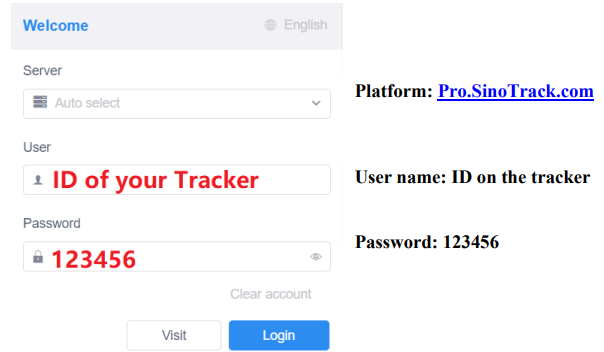
WEBSITE Tracking (PC Version):
APPLICATION Tracking (Mobile APP):
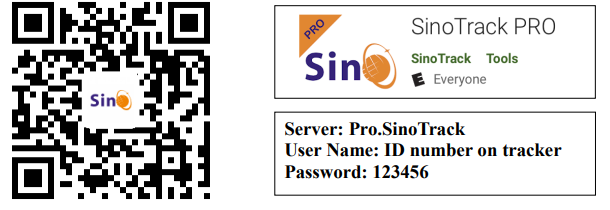
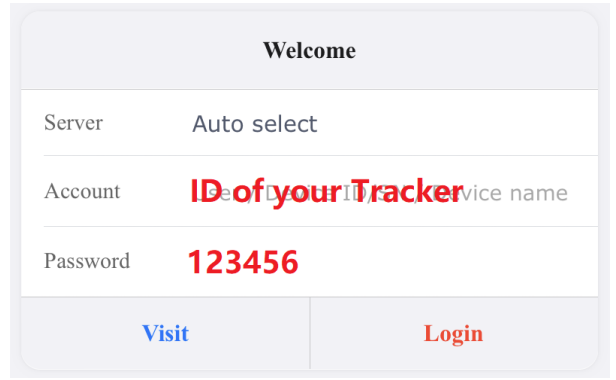
You can search SinoTrack PRO on the APP Store (iOS) or Google Play (Android), Or Download from the QR Code:
If you have more SinoTrack GPS trackers, and want to manage them in one account, please contact us. We will create an account for you, so you can monitor multiple devices on the platform at the same time.
Choose a GSM card; it should be a Micro SIM card, without a PIN code.
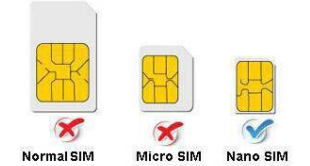
- Properly insert the GSM card, and the tracker will start. And connect the external power supply.
- Put the device outside for around 30 seconds, the LED lights will keep lighting, and for device can work normally.
- Dialing the device number, it will hang up and reply tracking message with valid Lon and lat.
- Please send SMS to tracker to set the APN: (the yellow place is BLANK) SMS: 8030000 APN
(APN is Access Point Name of your SIM Card, please check with your SIM Card provider if you don’t know it)
If the APN needs the User name and Password, please send the command:
SMS: 8030000 APN APNuser APNpassword
For example: if you use Vodafone (pre-pay) in the UK, the APN is, APN User is wap, APN pass is wap
You should send SMS command: 8030000 wap wap (Send SMS: Send SMS command from your mobile to the SIM Card in Tracker) - Send SMS to set trackers to our server: (in default, don’t need to change) SMS: 8040000 45.112.204.246 8090
- If you set it all up, you can track it online.
If the device is not online, please check the device settings, send: RCONF to the device, and it will reply with the settings.- The APN is correct.;
- The IP and Port are correct.
- The ID on the platform is correct;
- The device working model, (SMS model or GPRS model)
How to install
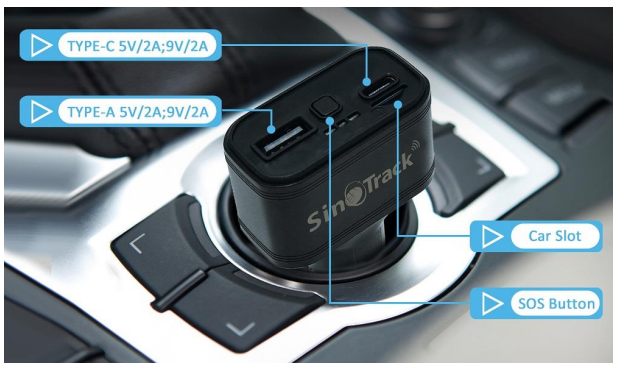
Insert the SIM Card in ST-909, and insert ST-909 into the car cigarette lighter.
Troubleshooting for Sino Track GPS Tracker ST-909
- Device Not Responding: Check SIM card installation and ensure it is active with sufficient credit or data plan. Confirm the tracker is properly powered.
- GPS Signal Weak or No Fix: Ensure the tracker is placed in an open area without metal obstructions blocking satellite signals. Avoid enclosed compartments like trunks or engine bays.
- GPRS Connection Issues: Verify APN settings for the SIM card are correctly configured. Restart the device after changes.
- Error Codes: Common error codes include “NO GPS”, indicating satellite connection issues, and “NO GSM” for network problems. Resetting the device often resolves temporary faults.
- Preventive Measures: Regularly update firmware if supported, keep the device clean and free of moisture, and ensure wiring connections are secure to prevent power interruptions.
The Sino Track GPS Tracker ST-909 typically comes with a limited warranty (usually 1 year) covering hardware defects. For technical support, users should contact the authorized dealer or manufacturer’s customer service via email or phone, often provided in the product packaging or official website.
Pros & Cons of Sino Track GPS Tracker ST-909
Pros
- Accurate and Reliable Tracking: Dual GPS and GSM positioning ensure precise location data.
- Wide Compatibility: Supports multiple GSM frequency bands for global use.
- User-Friendly Interface: Mobile app and web platform for easy monitoring.
- Compact Design: Discreet installation without compromising functionality.
- Comprehensive Alerts: Multiple alert types enhance vehicle security and management.
Cons
- Initial Setup Complexity: May require some technical knowledge for SIM card and APN configuration.
- Signal Dependence: GPS accuracy can be affected by dense urban areas or heavy foliage.
- Limited Firmware Updates: Occasional lack of updates can affect long-term device optimization.
- Value for Money: While affordable, competitors may offer additional features like internal battery backup or extended warranty.
Compared to alternatives like the VT100-L, which offers 4G connectivity and advanced monitoring, the ST-909 remains a solid choice for users prioritizing cost-efficiency and reliable basic GPS tracking.
Customer Reviews of Sino Track GPS Tracker ST-909
Users consistently praise the Sino Track GPS Tracker ST-909 for its dependable real-time tracking and easy-to-use mobile app interface. Many highlight its accuracy and responsiveness in alert notifications as key benefits. For example, fleet owners report improved vehicle management and theft prevention.
Common complaints include challenges with initial SIM card and APN setup, as well as occasional GPS signal loss in heavily obstructed areas. Overall, the device receives an average user rating of 4 out of 5 stars, with many recommending it for personal vehicles and small to medium fleet operations.
Customers appreciate the device’s affordable price point paired with solid performance, making it a preferred choice for budget-conscious buyers seeking essential GPS tracking features.
Faqs
How do I set up the sino track GPS Tracker ST-909 for the first time?
What should I do if the sino track GPS Tracker ST-909 is not sending location updates?
Can I use the sino track GPS Tracker ST-909 with any mobile network or SIM card?
How do I change the password on my sino track GPS Tracker ST-909?
What does the SOS button do on the sino track GPS Tracker ST-909?
How can I monitor my vehicle's location history with the sino track GPS Tracker ST-909?
Is the sino track GPS Tracker ST-909 waterproof and suitable for all vehicle types?
How often should I maintain or update the sino track GPS Tracker ST-909?
More sino track manuals
Leave a Comment