
Setup: Sino Track GPS Tracker User Manual
Content
Sino Track GPS Tracker
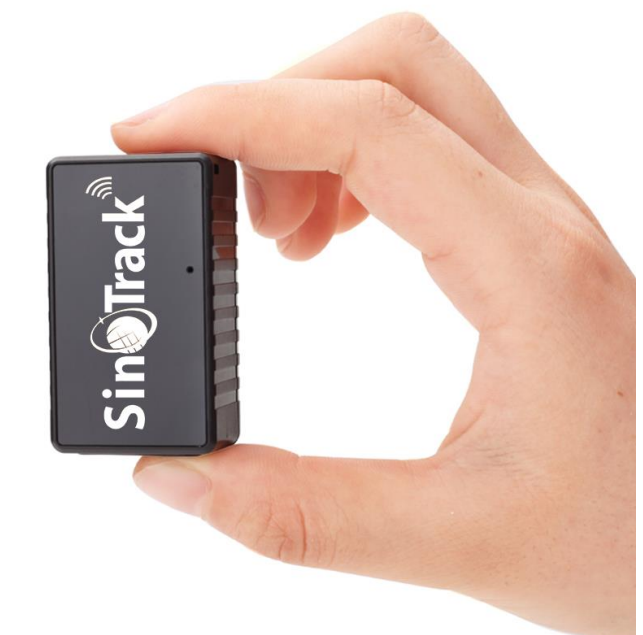
Introduction
The Sino Track GPS Tracker is a compact, high-precision vehicle tracking device designed to provide real-time location monitoring and security for cars, motorcycles, trucks, and commercial fleets. Renowned for its global network compatibility and robust build, this tracker delivers accurate positioning with GPS sensitivity up to -159dBm and location accuracy within 5 to 10 meters. It offers seamless integration with mobile and web platforms, enabling users to monitor their vehicles conveniently from smartphones and computers.
Key benefits include instant SMS alerts on movement detection, geofencing capabilities for virtual boundary notifications, a durable IP67 waterproof and dustproof rating, and a long-lasting internal battery that supports tracking even when the vehicle's power is cut. These features make the Sino Track GPS Tracker ideal for personal vehicle security, fleet management, and anti-theft applications.
Targeted towards vehicle owners, fleet operators, and security-conscious users, this device facilitates route optimization, speed alerts, and detailed travel reports. The estimated price range typically falls between $40 to $70, depending on the model and vendor, with wide availability through online retailers and authorized distributors globally.
Technical Specifications
- Dim.
- 48*28*20mm
- Weight
- 50g
- Network
- GSM/GPRS
- Band
- 850/900/1800/1900Mhz
- GPS sensitivity
- -159dBm
- GPS accuracy
- 5m
- Battery
- 3.7V 1050mAh battery
- Stand by
- 7-15 days
- Storage Temp.
- -40°C to +85°C
- Operation Temp.
- -20°C to +55°C
- Humidity
- 5%--95% non-condensing
- Car charger
- 12-24V input ; 5V-1A output
- Wall charger
- 110-220V input; 5V-1A output
Hardware Description
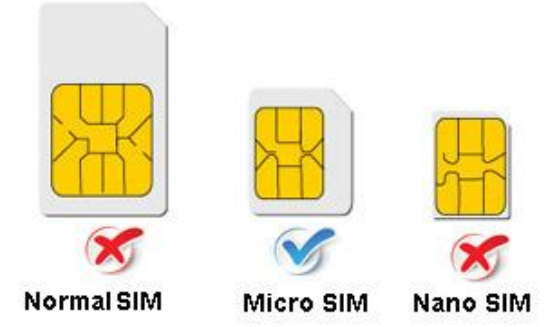
Note: GSM SIM CARD INSTALLATION GUIDE:
ST-903 Only a GSM SIM card works in this model. If you use ST-903L, please use a 4G SIM Card. Please confirm the SIM Card without a PIN Code.
HOW TO QUICKLY SET UP THE TRACKER
STEP 1. – Activate Sim
Install the new SIM card with 2G(GSM) or 4G network function into your mobile phone and activate the SIM card. Make sure it can make a call, send a text, and has an internet connection. Once this is confirmed, insert the SIM into your tracker.
STEP 2. – Turn on the tracker
- Charge it for about 1 hour first.
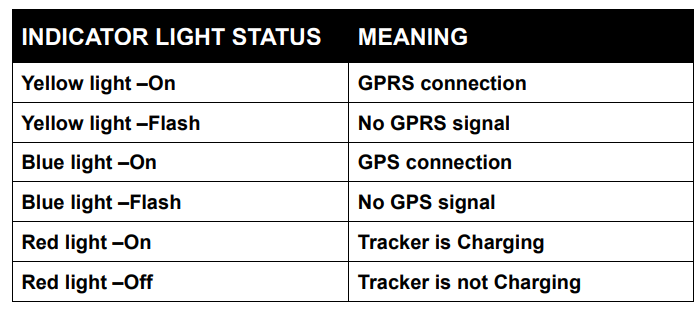
- The yellow and blue indicator lights will start flashing while it searches for a network and GPS.
- Please wait 5 minutes in a good reception area (by a window or outside) for both lights to come on constantly. It will continue to flash yellow if it can not find a network. Move it to another location.
- Please note, when the device has a GPS signal, it will get a GPS location. If not, it will get its location using LBS.
STEP 3. - Setting APN for the tracker
- You need to know your tracker’s SIM card's APN (Every SIM card carrier has its own APN content. We have three methods to find out APN content: check the SIM card carrier on the internet or put the SIM card into the cell phone to find out APN, or you can ask your SIM card's provider.
- Please note the following operations needed: From another phone number , send a text message command to the tracker’s SIM card’s phone number to set the tracker's APN.
For example:
APN is: everywhere
APN username is: eesecure APN password is: secure
- If your SIM card’s APN does not require a username and password, then send the command(8030000+space+APN) to the tracker, and it will reply “SET OK”. Text command is: 8030000 everywhere
- If your APN has with username and password:
Then send text Command (8030000+Space+APN+space+APN user+Space+APN pass) to the tracker : 8030000 everywhere eesecure secure
Please note: Different SIM card has different AAPNs. Please apply the above formula according to your actual APN to set up your machine.
STEP 4. - Setting GPRS mode
- Send text command to the device to set GPRS mode:7100000
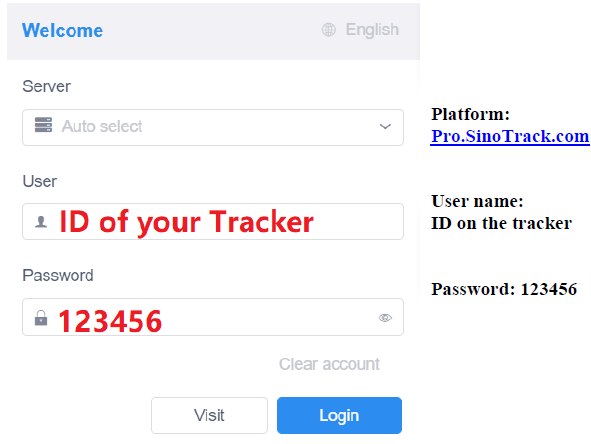
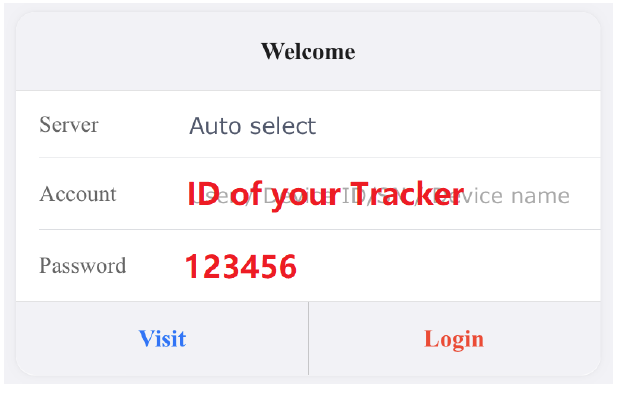
- Then wait about 30 seconds, both blue and orange lights should stay O, N, which means you can now log in to the Sinotrackpro web or app to check if the tracker is active. (Username is your tracker’s ID number that is written on the product, password: 123456)
- If you set it all up, you can track it online. If it is online but shows the China location, then take it to the outside, which signals a good place to get a GPRS signal. When it gets a signal, it will update your location.
START ONLINE TRACKING
WEBSITE TRACKING
WEBSITE Tracking (PC Version):
APPLICATIONS FOR ANDROID/IOS
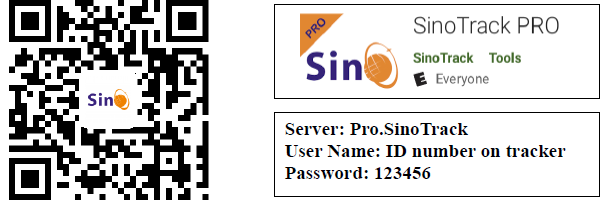
You can search SinoTrack PRO on the APP Store (iOS) or Google Play (Android), Or Download from the QR Code:
If you have more SinoTrack GPS trackers, and want to manage them in one account, please contact us. We will create an account for you, so you can monitor multiple devices on the platform at the same time.
Troubleshooting Common Issues with Sino Track GPS Tracker
- Issue: Device not reporting location
Solution: Ensure the SIM card is activated, has sufficient balance, and the PIN code is disabled. Verify proper SIM card insertion and network signal availability. - Issue: No SMS alerts on movement
Solution: Confirm SMS function is enabled; check if call divert is off; ensure the device battery is charged. - Error Code: Network connection failure
Fix: Check GSM bands compatibility with local carriers; reposition the device for better signal reception; restart the device. - Preventive Measures: Avoid unauthorized disassembly; operate the device outdoors for optimal GPS reception; periodically check battery status and recharge as needed.
The Sino Track GPS Tracker comes with a manufacturer's warranty covering hardware faults, along with customer support services accessible via official websites and authorized dealers for troubleshooting assistance and firmware updates.
Pros & Cons of Sino Track GPS Tracker
- Pros:
- Highly accurate real-time tracking with minimal deviation (5-10 meters)
- Robust IP67 waterproof and dustproof design suitable for harsh environments
- Long battery life with an internal backup battery supporting up to 5 hours of tracking after a power loss
- Instant SMS alerts for movement detection and geofence breaches
- Lifetime free web server access for tracking on mobile and web applications
- Cons:
- Require a proper SIM card without a houta PIN code for full functionality
- Performance can be affected by extreme weather conditions or obstructed GPS signals
- Some users report initial setup complexity without technical assistance
- Battery standby duration varies significantly with usage mode, requiring frequent recharges for heavy users
Overall, the Sino Track GPS Tracker offers excellent value for money compared to alternatives, especially for users needing reliable global tracking and advanced alert features.
Customer Reviews and Feedback on Sino Track GPS Tracker
Users consistently praise the Sino Track GPS Tracker for its accurate GPS location tracking and reliable alert system. Many highlight the device's ability to send instant SMS notifications upon motion detection and its durable waterproof casing as top features. Star ratings commonly average between 4 and 4.5 out of 5.
However, some customers mention occasional difficulty during initial SIM card setup and express a desire for more detailed user manuals. A few reviews note that battery life can be shorter than expected if used continuously in high-power modes. Despite these concerns, most recommend the device for personal vehicle security and fleet management due to its comprehensive tracking capabilities and competitive pricing.
Faqs
How do I set up the sino track GPS Tracker for the first time?
What should I do if the sino track GPS Tracker is not connecting to the network?
How does the motion detection feature work on the sino track GPS Tracker?
Can I use the sino track GPS Tracker with both Android and iOS devices?
What is the typical GPS accuracy and battery life of the sino track GPS Tracker?
How can I optimize the performance of my sino track GPS Tracker for better tracking?
What maintenance steps are necessary to keep the sino track GPS Tracker working reliably?
How does the internal battery of the sino track GPS Tracker protect against power disconnection?
More sino track manuals
Leave a Comment