
Usage: Sino Track GPS Tracker ST-901M User Manual
Content
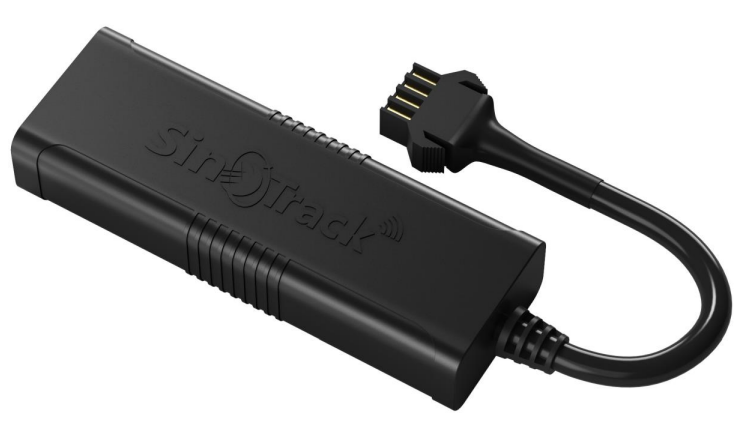
Sino Track GPS Tracker ST-901M
Introduction
The Sino Track GPS Tracker ST-901M is a highly reliable and versatile vehicle tracking device designed for real-time location monitoring. Engineered with advanced GPS and GSM technologies, it offers precise tracking, easy installation, and robust performance suitable for personal vehicles, fleet management, and logistics operations. Its compact design and long battery life make it a perfect choice for users who need accurate vehicle tracking without constant maintenance.
Key benefits of the ST-901M include live tracking via mobile apps or SMS, geofencing alerts, movement notifications, and an SOS emergency button. These features provide enhanced security and peace of mind by enabling instant awareness of your vehicle's status and location. The tracker supports multiple communication protocols, ensuring compatibility with various networks globally.
This device targets individual car owners, commercial fleet operators, and companies requiring asset protection and route optimization. Typical use cases span theft prevention, trip history logging, and driving behavior monitoring.
The Sino Track GPS Tracker ST-901M is competitively priced in the range of $30 to $50, making it an affordable yet feature-rich option in the GPS tracker market. It is widely available through online retailers and authorized distributors worldwide.
Technical Specifications and Features of Sino Track GPS Tracker ST-901M
- Network compatibility: Quad-band GSM 850/900/1800/1900 MHz for global coverage
- GPS Module: High-sensitivity GPS chipset with positioning accuracy up to 10 meters
- Real-time tracking: Supports GPRS and SMS tracking modes with configurable update intervals
- Battery: Built-in rechargeable lithium battery (typically 800mAh) offering standby time of up to 7 days
- Dimensions: Compact size, approximately 70mm x 40mm x 20m,m facilitating discreet installation
- Alerts and notifications: Geo-fence alarms, low battery alerts, movement alerts, and SOS button for emergencies
- Installation: Plug and play with magnetic or adhesive mounting options for vehicles
- Additional features: Remote engine cut-off capability, history playback, and multi-language support
Compared to other GPS trackers in its class, such as the iStartek VT100-L or iTrack Micro Tracker, the ST-901M balances affordability with a strong feature set focused on user-friendly operation and reliable tracking performance.
Troubleshooting and Support for Sino Track GPS Tracker ST-901M
- Common issues: Device not powering on — ensure battery is charged and SIM card is correctly inserted; No GPS signal — check for an open sky view and verify GPS antenna connection
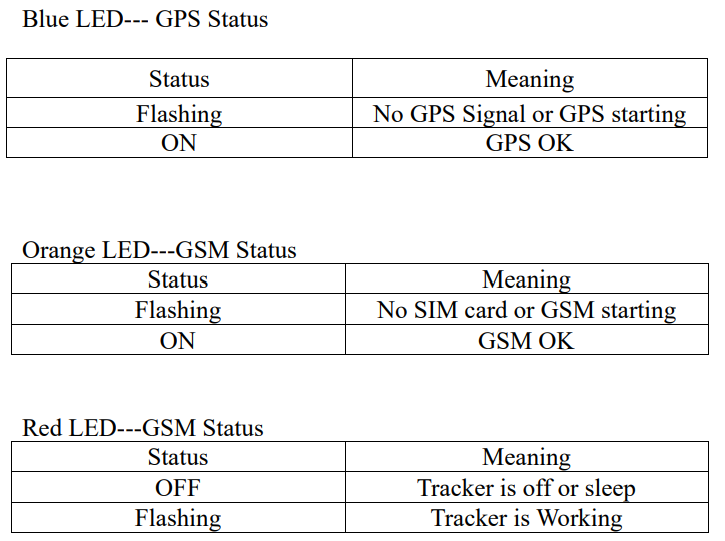
- Error codes: Flashing LED patterns indicate GSM or GPS signal issues. Slow blinking indicates normal operation; rapid blinking suggests network problems.
- Fixes: Restart the device by powering off and on; reinsert the SIM card; update APN settings for GPRS configuration if data tracking fails.
- Preventive measures: Regularly charge the device; keep firmware updated; avoid placing the device in metal enclosures that block signals.
- Warranty and support: The ST-901M typically comes with a 12-month manufacturer's warranty. Customer support is available via email, phone, or the official website for troubleshooting assistance and firmware updates.
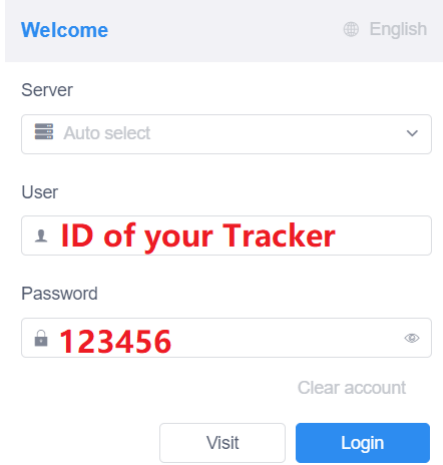
WEBSITE Tracking (PC Version)
- Platform: Pro.SinoTrack.com
- User name: ID on the tracker
- Password: 123456
APPLICATION Tracking (Mobile APP)
You can search SinoTrack PRO on the APP Store (iOS) or Google Play (Android), Or Download from the QR Code:
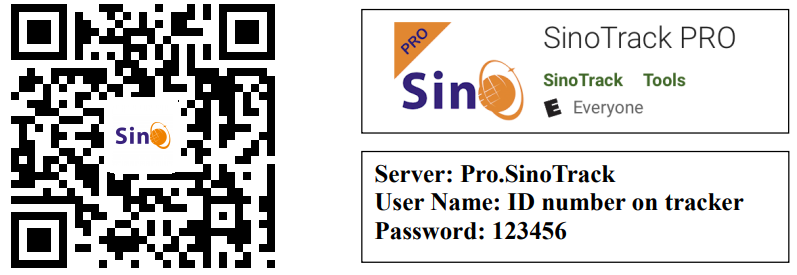
If you have more SinoTrack GPS trackers, and want to manage them in one account, please contact us. We will create an account for you, so you can monitor multiple devices on the platform at the same time.
- Choose a GSM card; it should be a Normal SIM card, without a PIN code.
- Open the top cover of the tracker by screw.
- Properly insert the GSM card, and the tracker will start, and connect the external power supply.
- Put the device outside foaroundssecondsds, the LED lights will keep lighting on the stands so the device can work normally.
- Dial the device number, it will hang up and reply tracking message with valid Lon and lat.
- Please send SMS to tracker to set the APN: (the yellow place s BLANK) SMS: 8030000 APN (APN is Access Point Name of your SIM Card, please check with your SIM Card provider if you don’t know it)
If the APN needs the User name and Password, please send the command: SMS: 8030000 APN APNuser APNpassword. - Send SMS to set trackers to our server: SMS: 8040000 45.112.204.246 8090
- If you set it all up, you can track it online. If the device is not online, please check device settings, send: RCONF to the device
It will reply with the settings.
- The APN is correct.
- The IP and Port are correct.
- The ID on the platform is correct.
- The device working model, (SMS model or GPRS model)
LED Status
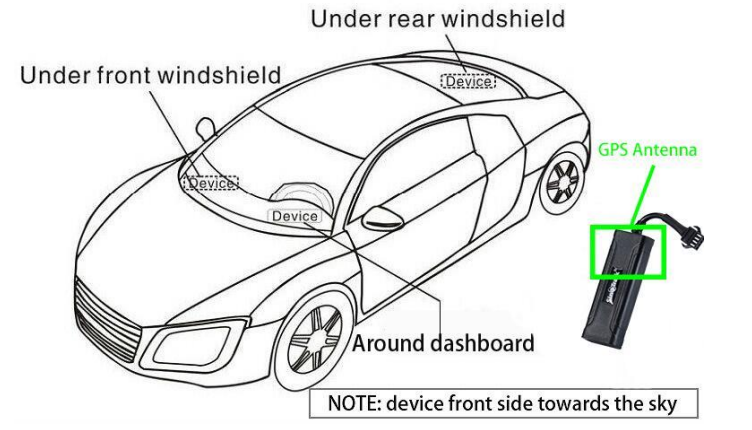
Installation
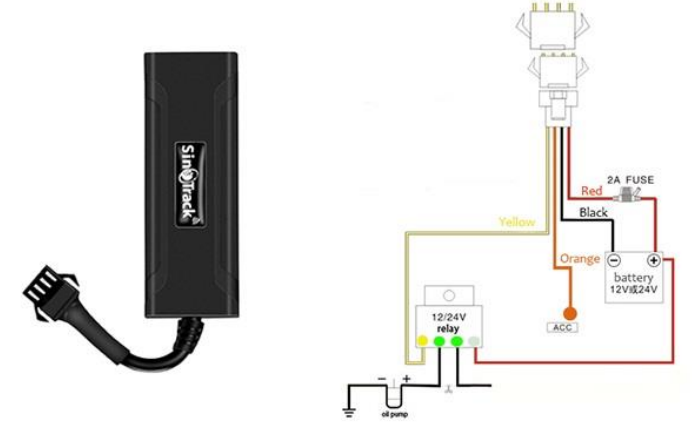
The GPS antenna side should be towards to clear sky. (Can’t put under Metal, but Glass and Plastic are ok)
Connect the wires:
Online Track
Please log in from www.SinoTrack.com or http://45.112.204.246
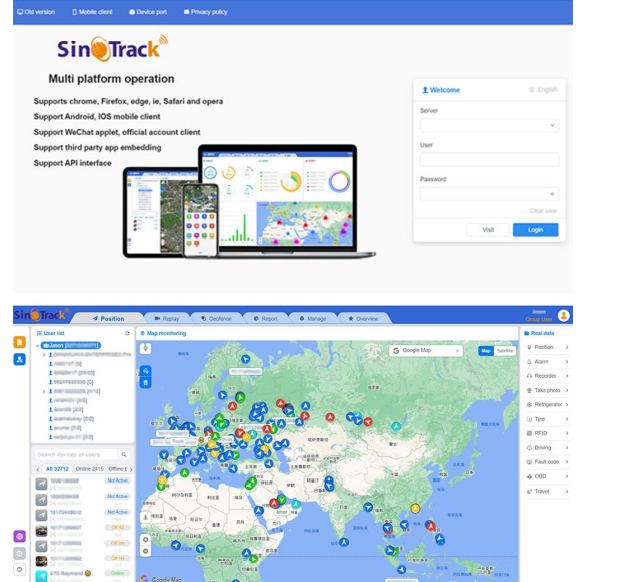
You can also download our APPS on the website to track on your mobile:
Pros and Cons of the Sino Track GPS Tracker ST-901M
- Pros:
- Compact and easy to install with magnetic or adhesive options
- Reliable real-time tracking with both SMS and GPRS modes
- Long battery life of up to a week on standby
- Comprehensive alert system including geo-fence and SOS emergency
- Affordable price point compared to premium GPS trackers
- Cons:
- Limited battery life under continuous tracking mode
- May require occasional manual firmware updates
- Dependent on GSM network coverage; no built-in Wi-Fi or LTE support
- The user interface and app may have a learning curve for beginners
- The ST-901M offers excellent value for money for users needing dependable vehicle tracking without high-end complexities, standing strong against alternatives like the VT100-L,, which may cost more and offer additional but complex features.
Customer Reviews and User Feedback oSino Trackck GPS Tracker ST-901M
Customers frequently praise the Sino Track GPS Tracker ST-901M for its accuracy in vehicle location and ease of installation. Many users highlight the convenience of receiving timely geo-fence notifications and SOS alerts, which enhance their vehicle security.
Common complaints include the occasional difficulty in configuring APN settings for GPRS tracking and the need to recharge the battery more often if used continuously. Despite this, the overall star rating averages around 4 out of 5, reflecting satisfaction with performance and support.
Users recommend the ST-901M for both personal and commercial use, especially for those seeking affordable GPS tracking with essential features. The device is also noted for its durable build and responsive customer service, making it a reliable choice.
Faqs
How do I set up the sino track GPS Tracker ST-901M for the first time?
What should I do if the sino track GPS Tracker ST-901M is not sending location updates?
Can the sino track GPS Tracker ST-901M detect when the vehicle ignition is turned on or off?
What are the key security features of the sino track GPS Tracker ST-901M?
Is the sino track GPS Tracker ST-901M compatible with smartphones and what app does it use?
How can I optimize the tracking accuracy and performance of the sino track GPS Tracker ST-901M?
Does the sino track GPS Tracker ST-901M require a built-in battery or external power source?
What maintenance is recommended to keep the sino track GPS Tracker ST-901M functioning properly?
More sino track manuals
Leave a Comment