
Usage: Sino Track GPS Tracker ST-900 User Manual
Content
Sino Track GPS Tracker ST-900
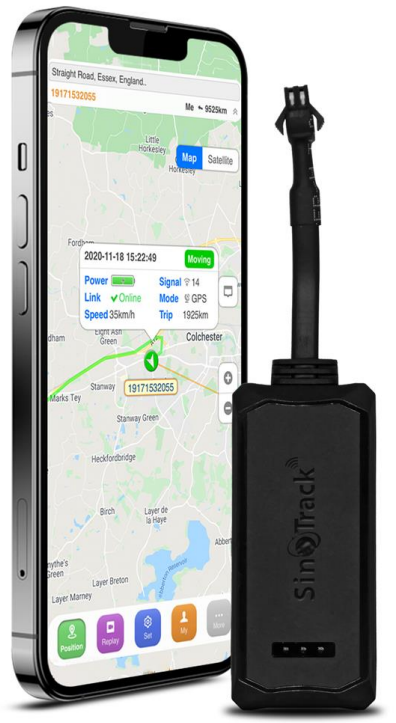
Introduction
The Sino Track GPS Tracker ST-900 is a high-performance vehicle tracking solution designed for fleet managers, business owners, and private vehicle owners seeking reliable, real-time location monitoring. With advanced GPS+GSM+GPRS technology, the ST-900 delivers precise location data, instant alerts, and seamless remote management. Its rugged design and long battery life make it ideal for both commercial and personal use, including car, truck, and motorcycle tracking.
Key benefits include real-time tracking, geofencing, speed monitoring, and instant SMS/GPRS alerts. The device supports remote configuration, anti-theft features, and easy integration with mobile apps and web platforms. Whether you need to monitor your fleet, protect your vehicle, or ensure family safety, the Sino Track GPS Tracker ST-900 offers peace of mind and operational efficiency.
Target users include logistics companies, taxi services, delivery fleets, and individual vehicle owners. The ST-900 is widely available online and in electronics stores, with an estimated price range of $45–$75, making it a cost-effective choice for reliable GPS tracking.
Specifications of the Sino Track GPS Tracker ST-900
- Positioning System: GPS + GSM + GPRS
- Accuracy: 5–10 meters (2D RMS)
- Working Voltage: 9–90V DC (compatible with most vehicles)
- Working Current: 22mA @ 12V, 12mA @ 24V
- GPS Fix Time: Cold start: 38s, Warm start: 28s, Hot start: 2s
- Operating Temperature: -20°C to +70°C
- Humidity: 20%–80% RH
- Dimensions: 64.5 x 23 x 12.5 mm
- Weight: 45g
- Network: GSM 850/900/1800/1900MHz, GPRS Class 12
- Features: Real-time tracking, geofencing, speed alert, remote configuration, SMS/GPRS reporting
The Sino Track GPS Tracker ST-900 outperforms many entry-level trackers with its wide voltage range, fast GPS lock, and robust build. Compared to similar models like the YB04 and VT100-L, the ST-900 offers superior battery efficiency and broader compatibility.
Quick Start
Thank you for purchasing our GPS tracker.
This Quick User shows how to operate the device smoothly and correctly.
WEBSITE Tracking (PC Version):
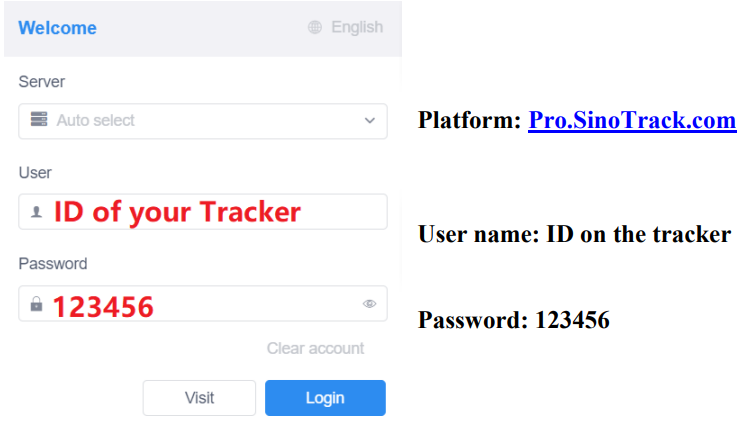
APPLICATION Tracking (Mobile APP):
You can search SinoTrack PRO on APP Store (iOS) or Google Play (Android) Or Download from the QR Code:
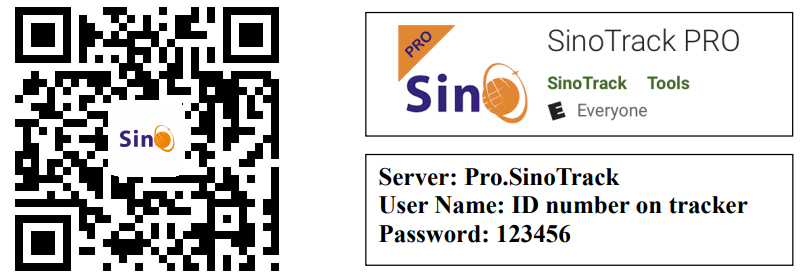
If you have more SinoTrack GPS trackers, and want to manage them in one account, please contact us, we will create an account for you, so you can monitor multiple devices on the platform at the same time.
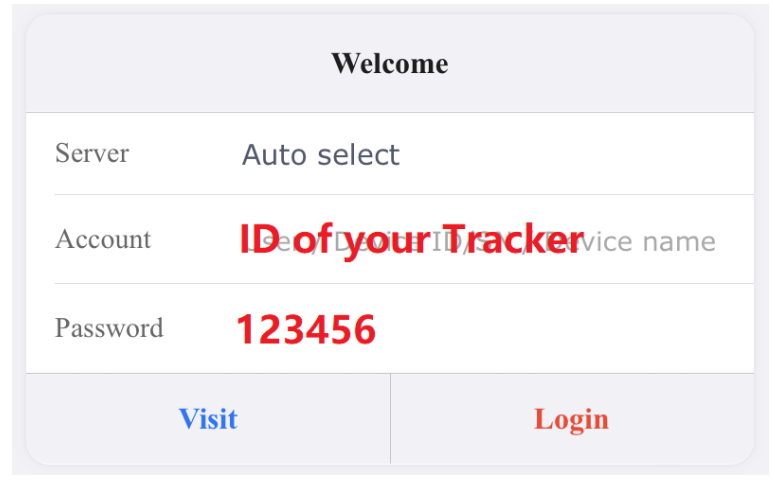
Choose GSM card, it should be Normal SIM card, without PIN code.
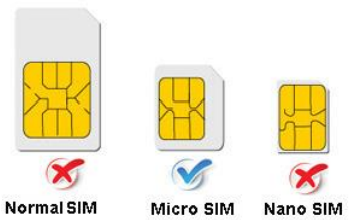
- Open the top cover of tracker.
- Proper insert GSM card, the tracker will start, connect external power supply.
- Put device outside around 30s, LED lights will keep lighting on stands for device can work normally.
- Dialing device number, it will hang up and reply tracking message with valid Lon and lat.
- Please send SMS to tracker to set the APN: (the yellow place is BLANK)
SMS: 8030000 APN
(APN is Access Point Name of your SIM Card, please check with your SIM Card provider if you don’t know it)
If the APN need User name and Password, please send the command: SMS: 8030000 APN APNuser APNpassword - Send SMS to set trackers to our server:
SMS: 8040000 45.112.204.246 8090 - If you set ok of all, you can track it online.
If the device is not online, please check device setting, send: RCONF to device, It will reply the setting.- The APN is correct;
- The IP and Port is correct;
- The ID on platform is correct;
- The device working model, (SMS model or GPRS model)
Installation
- The GPS antenna side should towards to clear sky.(Can’t put under Metal, but Glass and Plastic is ok)
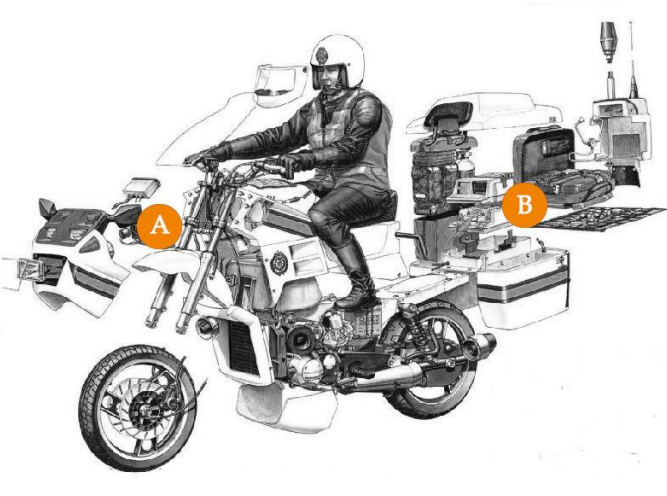
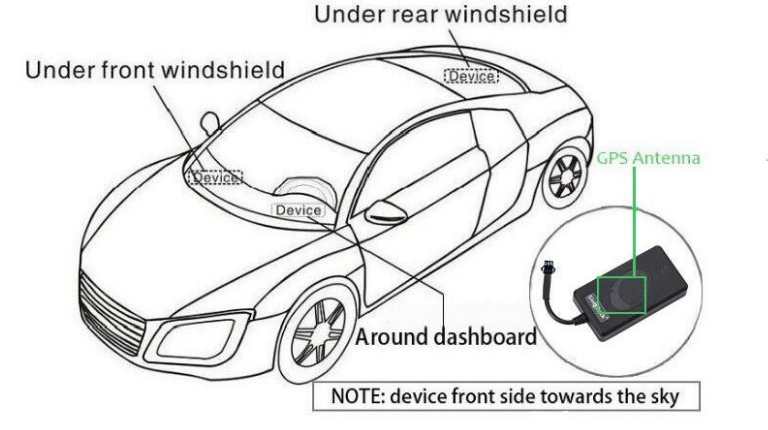
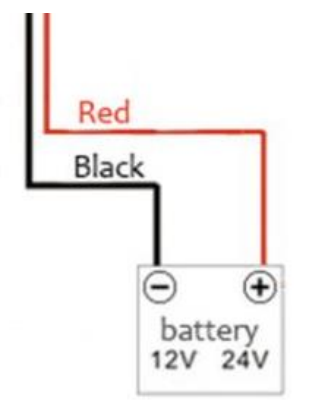
Connect the wires:
Troubleshooting Common Issues with the Sino Track GPS Tracker ST-900
- No GPS Signal: Ensure the device is installed in a location with a clear sky view. Check for obstructions or metal shielding.
- Device Not Responding: Verify power connection and SIM card status. Restart the device and check for firmware updates.
- Error Code E01: SIM card not detected. Reinsert the SIM card and ensure it is activated.
- Slow GPS Fix: Wait for a clear sky view or move the device to an open area.
- Intermittent Tracking: Check network coverage and SIM card balance. Ensure the device is securely mounted.
Preventive measures include regular firmware updates, proper installation, and periodic battery checks. The Sino Track GPS Tracker ST-900 comes with a 12-month warranty. For support, contact customer service at support@sinotrack.com or visit the official website.
Pros and Cons of the Sino Track GPS Tracker ST-900
Pros
- High accuracy and fast GPS lock
- Wide voltage compatibility for various vehicles
- Real-time tracking and instant alerts
- Easy installation and remote configuration
- Cost-effective compared to premium models
Cons
- Limited advanced features compared to high-end trackers
- Basic mobile app interface
- Requires a stable GSM network for optimal performance
The Sino Track GPS Tracker ST-900 offers excellent value for money, especially for users needing reliable, no-frills vehicle tracking. It’s a solid choice for small fleets and individual users.
Customer Reviews for the Sino Track GPS Tracker ST-900
Users consistently rate the Sino Track GPS Tracker ST-900 4.5/5 stars for its reliability and ease of use. Common praises include accurate tracking, quick setup, and responsive customer support. Some users mention occasional signal drops in remote areas, but overall satisfaction is high. Many recommend it for fleet management and personal vehicle security. Frequent buyers highlight its durability and value, making it a top pick among budget-friendly GPS trackers.
Faqs
How do I set up the sino track GPS Tracker ST-900 for first-time use?
What should I do if the sino track GPS Tracker ST-900 is not showing accurate location data?
Can the sino track GPS Tracker ST-900 be used on motorcycles and cars?
What are the key features of the sino track GPS Tracker ST-900 that enhance vehicle security?
How can I troubleshoot connectivity problems with the sino track GPS Tracker ST-900?
Is the sino track GPS Tracker ST-900 compatible with 4G LTE networks?
How often should I perform maintenance on the sino track GPS Tracker ST-900 to ensure optimal performance?
What steps can optimize the battery life of the sino track GPS Tracker ST-900 during long-term use?
More sino track manuals
Leave a Comment