
Smart Tech 650 SMART Document Camera User Manual
Content
Introduction
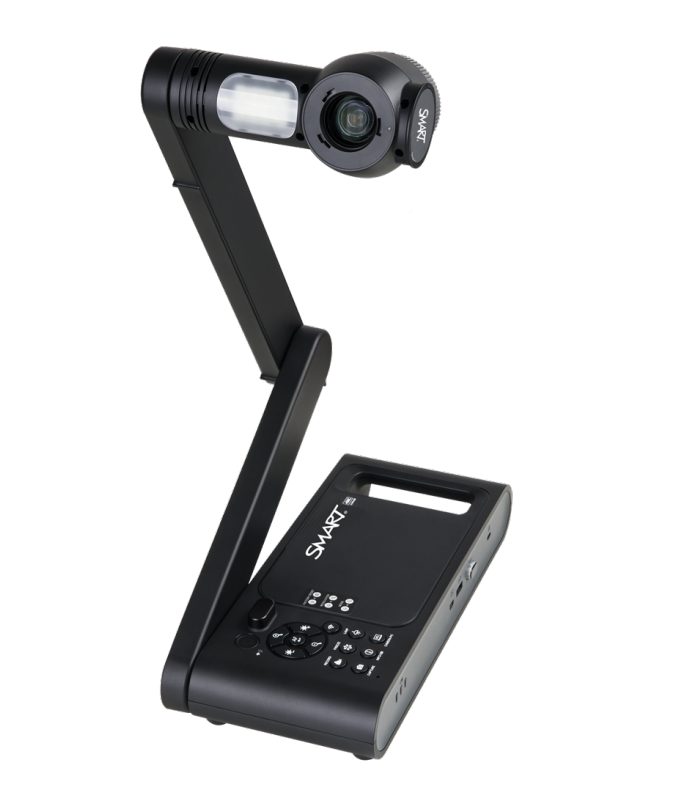
The smart tech 650 SMART Document Camera is a high-performance classroom and presentation tool designed to display books, worksheets, 3D objects, and live demonstrations in stunning 4K detail. Built for educators, trainers, hybrid meeting rooms, and AV professionals, it combines a 13 MP CMOS sensor, 10x optical zoom, 23x digital zoom, and up to 60 fps capture for smooth, sharp image delivery. This makes the smart tech 650 SMART Document Camera especially useful for science lessons, remote learning, document annotation, and video conferencing where clarity matters.
One of its biggest strengths is flexibility. It supports HDMI, USB, and Wi-Fi connectivity, so users can connect to displays, computers, or wireless networks with ease. The built-in LED light, autofocus modes, and wide shooting area improve usability in different lighting and presentation setups. It also includes an internal battery, making it more portable than many fixed document cameras. For users who need a reliable classroom document camera with premium image quality, this model stands out as a strong mid-to-high-end option.
Estimated pricing typically falls in the mid-hundreds of dollars, with common market listings varying by region, retailer, and bundle. Availability is generally strong through education suppliers, office technology retailers, and SMART-authorized channels. If you are comparing the smart tech 650 SMART Document Camera with basic USB document cameras, this model offers noticeably better resolution, zoom capability, and wireless presentation features.
Specifications
- Camera sensor: 1/3.2-inch CMOS sensor
- Image resolution: 13 megapixels with 3840 × 2160 output
- Frame rate: Up to 60 fps for smooth live capture
- Zoom: 10x optical zoom and 23x digital zoom, for 230x total zoom
- Output options: HDMI, USB, and Wi-Fi streaming
- HDMI output: 4K, 1080p, and 720p support
- USB output: Multiple resolutions up to 4K, including 3840 × 2160
- Wi-Fi streaming: Supports 4K and lower-resolution wireless streaming modes
- Power: DC 5 V, 3 A adapter with universal AC input support
- Battery: Internal Li-ion battery for mobile use
- Focus modes: Automatic, manual, and area focus
- Compared with similar products: It offers more zoom and higher output resolution than many entry-level document cameras, while competing with premium classroom models in the same category.
Detailed Description
The smart tech 650 SMART Document Camera is designed to capture physical objects and display them in real time on a monitor, projector, or computer. It works by using a high-resolution CMOS sensor mounted on an adjustable camera arm, allowing users to point the lens at paper documents, textbooks, lab samples, or small objects. The built-in LED light improves visibility, while the autofocus system helps keep content sharp during live demonstrations.
In real-world use, the device is ideal for teachers showing workbook pages, tutors explaining problem-solving steps, or presenters demonstrating product details. Its wide shooting area and powerful zoom make it easy to show both large pages and close-up details. The build quality is practical and classroom-ready, with a sturdy arm, integrated handle, and front-panel controls that support repeated daily use. Materials and layout are designed for frequent setup and repositioning rather than fragile desktop use.
User experience is generally centered on convenience and image quality. The camera produces crisp visuals, while the wireless and wired options give users freedom to switch between in-room presentations and computer-based sharing. For anyone seeking a document camera with 4K output, strong zoom, and flexible connectivity, this model is an appealing solution.
Setup Guide
Setting up the smart tech 650 SMART Document Camera is straightforward. First, place the unit on a stable flat surface and unfold the camera arm into its operating position. Connect the power adapter, then choose your preferred connection method: HDMI for direct display output, USB for computer use, or Wi-Fi for wireless sharing. If you are using a computer, install any required document camera software before connecting the device.
Next, turn on the camera and select the desired resolution from the connected display or software interface. Configure autofocus, manual focus, or area focus depending on the subject. For classroom or conferencing use, test brightness, zoom, and image alignment before the session begins. If pairing over Wi-Fi, make sure the camera and host device are on the same compatible network or connection mode. For the best results, keep the camera centered over the material and adjust the light to reduce shadows.
Safety matters during setup. Avoid placing the camera near liquids, extreme heat, or unstable edges. Do not force the arm or lens components into position. If the image does not appear, check cable seating, input selection, and power status before restarting the unit.
Troubleshooting
Common issues with the smart tech 650 SMART Document Camera usually relate to connectivity, image quality, or software recognition. If there is no image on the display, confirm that the HDMI or USB cable is fully connected and that the monitor is on the correct input source. If the wireless connection fails, recheck Wi-Fi settings and confirm the camera is broadcasting in the correct mode. If the image is blurry, clean the lens gently and switch from manual focus to autofocus.
Another frequent problem is dark or uneven lighting. In that case, reposition the LED light or move the object closer to the center of the shooting area. If the device is not detected by a computer, disconnect and reconnect the USB cable, then restart both the camera and the host device. Some systems may also require updated drivers or software permissions.
For preventive care, keep the lens clean, avoid overextending the camera arm, and store the unit in a dry area. Warranty coverage and support are typically handled through SMART support channels and authorized resellers. For help, users should contact the seller, product support portal, or education technology distributor where the device was purchased.
Pros & Cons
Pros
- Excellent image quality: The 13 MP sensor and 4K output deliver sharp visuals for classrooms and meetings.
- Strong zoom range: 10x optical zoom and 23x digital zoom help show fine details clearly.
- Flexible connectivity: HDMI, USB, and Wi-Fi support make it easy to use in different environments.
- Fast frame rate: Up to 60 fps supports smooth live demonstrations and motion capture.
- Portable design: The internal battery adds mobility for teachers and presenters.
- Good value for advanced users: It offers premium features that justify the price for education and professional use.
Cons
- Higher cost than entry-level models: Budget users may find simpler USB document cameras more affordable.
- Feature complexity: Wireless and multi-output options may require a short learning curve.
- Setup can vary by environment: Best performance depends on correct software, cables, and display settings.
- Overkill for basic needs: Users who only need occasional document scanning may not use all the advanced features.
Overall, the smart tech 650 SMART Document Camera is best suited to users who need serious classroom performance and flexible presentation options. Compared with basic alternatives, it offers better clarity, more zoom, and stronger wireless capability.
Customer Reviews
Customer feedback for the smart tech 650 SMART Document Camera is generally positive, with many users giving it around 4.5 out of 5 stars. Teachers often praise the crisp 4K image, smooth motion, and easy sharing across HDMI and Wi-Fi. One reviewer said, “The detail is excellent for science demos and worksheet review.” Another noted, “Setup was simple once the software was installed, and the zoom is powerful enough for small objects.”
Common complaints usually mention price, occasional software setup steps, or the need to learn the wireless workflow. Some users also want more plug-and-play simplicity for first-time use. Even so, most buyers recommend it for classrooms, training rooms, and remote teaching where image quality and connectivity matter. If you need a reliable document camera for frequent use, this model is often considered a strong purchase.
Faqs
How do I set up smart tech 650 SMART Document Camera for the first time?
What should I do if smart tech 650 SMART Document Camera is not showing an image?
Which devices and software are compatible with smart tech 650 SMART Document Camera?
How do I use the 4K and zoom features on smart tech 650 SMART Document Camera effectively?
Why is the smart tech 650 SMART Document Camera image blurry, and how can I fix it?
Can smart tech 650 SMART Document Camera be used for live video conferencing?
How do I connect smart tech 650 SMART Document Camera to Wi-Fi or wireless mode?
How should I clean and maintain smart tech 650 SMART Document Camera for long-term use?
Tags
More smart tech manuals
Leave a Comment