
Smart Tech Smart Board GX Series Interactive Display SBID-GX165 User Manual
Content
smart tech Smart Board GX Series Interactive Display SBID-GX165: Comprehensive Product Manual
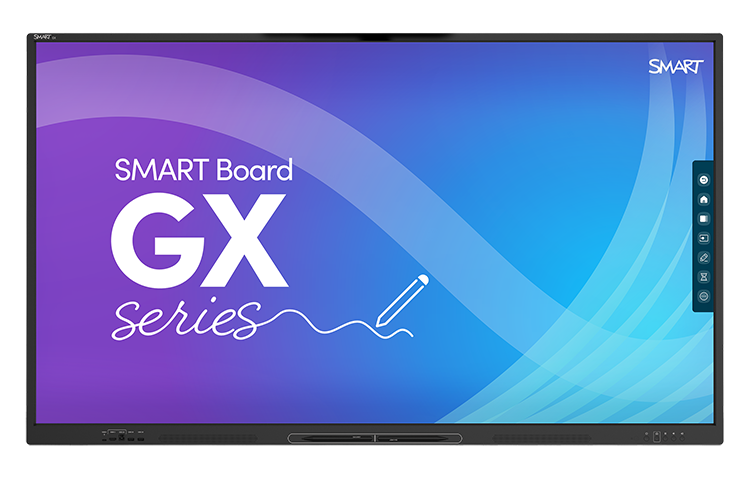
The smart tech Smart Board GX Series Interactive Display SBID-GX165 is a 65-inch 4K interactive display designed for classrooms, meeting rooms, and collaborative workspaces. It combines ultra-sharp UHD resolution, fast touch response, and a durable anti-glare glass surface to deliver a smooth, reliable presentation and learning experience. With its large-format screen and intuitive multi-touch performance, the SBID-GX165 is built for organizations that need an easy-to-use digital whiteboard, display hub, and collaboration tool in one device.
One of the biggest strengths of the smart tech Smart Board GX Series Interactive Display SBID-GX165 is its balance of professional-grade performance and practical simplicity. It offers 4K UHD resolution, 60 Hz refresh rate, 178° viewing angles, and up to 20-point touch support on compatible systems, making it suitable for interactive lessons, brainstorming sessions, and hybrid meetings. The display is also built with fully tempered anti-glare glass, helping reduce reflections in bright rooms while improving durability in daily use.
Typical pricing for the SBID-GX165 usually falls in the mid-range professional display category, often estimated between $2,000 and $4,500 depending on region, bundled accessories, and installation requirements. Availability is generally strongest through authorized resellers, commercial AV suppliers, and education technology distributors. For schools, offices, and training centers, this model is especially attractive because it delivers a large 65-inch workspace without the complexity of a separate interactive whiteboard and projector setup.
Specifications for smart tech Smart Board GX Series Interactive Display SBID-GX165
- Screen size: 65 inches diagonal
- Resolution: 4K UHD (3840 × 2160)
- Aspect ratio: 16:9
- Refresh rate: 60 Hz
- Brightness: 400 cd/m² or higher
- Response time: 8 ms or faster
- Viewing angle: 178°
- Glass: Fully tempered, anti-glare, 4 mm thick
- Touch accuracy: ±1 mm
- Minimum object size: 2.0 mm
- Touch performance: Up to 20 points on Windows and Mac, 10 points on Chrome OS
- Audio: 2 integrated 15 W speakers
- Connectivity: HDMI 2.0, DisplayPort support, USB Type-C, RJ45, VGA, RS-232, and USB ports
- Mounting: VESA 600 × 400 mm
- Weight: About 42 kg
- Service life: 50,000+ hours
Compared with similar 65-inch interactive panels, the SBID-GX165 stands out for its strong touch precision, reliable 4K image quality, and classroom-friendly durability. It competes well with other entry-to-mid-level interactive displays by offering premium core specifications without the higher cost of advanced enterprise collaboration models.
Detailed Description of the SBID-GX165 Interactive Display
The smart tech Smart Board GX Series Interactive Display SBID-GX165 works as a large touchscreen display that supports touch input, digital annotation, media playback, and screen sharing. Users can write, draw, navigate presentations, and interact with on-screen content using fingers or compatible styluses. Its infrared touch technology is designed to deliver responsive input and accurate writing performance for both education and business environments.
The display’s 4K UHD panel produces sharp text, clear graphics, and detailed video output, which is especially helpful for spreadsheets, diagrams, lesson content, and collaborative planning sessions. The anti-glare tempered glass improves visibility in rooms with overhead lighting or windows, while the black frame gives the unit a clean, professional appearance. The built-in speakers provide convenient audio for video lessons, meetings, and training sessions without requiring external sound equipment in smaller spaces.
In real-world use, this interactive display is well suited for classrooms, boardrooms, training rooms, and shared offices. Teachers can annotate lessons directly on screen, while teams can use it for live brainstorming, workflow reviews, and hybrid presentations. The user experience is simple, responsive, and familiar, making it accessible even for first-time users who need a dependable interactive display rather than a complicated AV system.
Setup Guide for smart tech Smart Board GX Series Interactive Display SBID-GX165
- Unbox the display carefully and inspect the screen, frame, cables, and accessories for shipping damage.
- Mount the unit on a wall bracket or cart that supports the VESA 600 × 400 mm pattern and the display’s weight.
- Connect the power cable and confirm that the wall outlet matches the required electrical specification for your region.
- Attach a source device using HDMI, USB Type-C, or DisplayPort-compatible connections as needed.
- Connect USB touch cables if your installation requires touch back-channel functionality.
- Power on the display and complete the initial setup menu, including language, input selection, and image settings.
- Pair wireless peripherals or network connections if your configuration includes Wi-Fi, Bluetooth, or LAN integration.
For best results, adjust brightness, touch calibration, and sound levels during installation. If the touchscreen does not respond, check the USB connection, verify the active input source, and restart the display after reconnecting cables. Always keep ventilation areas clear and avoid placing the unit near heat sources or direct moisture. Use two or more people when lifting the display to reduce the risk of injury or damage.
Troubleshooting the SBID-GX165 Interactive Display
- Problem: No image on screen. Check the input source, cable seating, and connected device output resolution.
- Problem: Touch input is unresponsive. Confirm the USB touch cable is connected and restart both the display and source device.
- Problem: Poor touch accuracy. Clean the glass surface and verify calibration settings if supported by the connected system.
- Problem: Audio is missing. Inspect volume settings, HDMI audio output, and external speaker routing if used.
- Problem: Reflections or glare. Adjust room lighting and screen angle to improve visibility.
- Problem: Intermittent connectivity. Replace damaged cables and test with a different HDMI or USB source.
Preventive maintenance includes regular screen cleaning with a soft microfiber cloth, careful cable management, and periodic inspection of mounting hardware. If you see an error code from a connected computer or AV system, verify the input format, update firmware or drivers on the source device, and test with a known-good cable. Warranty coverage and support options typically depend on the seller and region, so keep your purchase receipt and product serial number available when requesting help.
Pros and Cons of smart tech Smart Board GX Series Interactive Display SBID-GX165
Pros
- Excellent 4K clarity: The 65-inch UHD screen is sharp enough for text-heavy presentations and detailed visuals.
- Responsive touch experience: Fast response time and precise touch accuracy support smooth annotation and collaboration.
- Durable build: Tempered anti-glare glass improves everyday reliability in busy environments.
- Built-in speakers: Integrated audio makes setup easier for classrooms and meeting rooms.
- Versatile connectivity: HDMI, USB Type-C, LAN, and other ports make integration straightforward.
- Good value for money: It offers strong core features without the cost of premium enterprise boards.
Cons
- No ultra-premium collaboration features: It may lack advanced smart conferencing tools found in higher-end alternatives.
- Large and heavy: Installation may require professional mounting and two-person handling.
- Price still significant: Smaller schools or startups may need to budget carefully.
- Best with proper setup: Performance depends on compatible cables, source devices, and calibration.
For buyers comparing the SBID-GX165 with alternatives, the strongest case for purchase is its mix of image quality, touch performance, and dependable everyday usability. It is ideal for organizations that want a practical interactive display rather than a complex all-in-one conferencing platform.
Customer Reviews for the Smart Board GX Series Interactive Display
Customer feedback for the smart tech Smart Board GX Series Interactive Display SBID-GX165 is generally positive, with many users praising the sharp 4K image quality, intuitive touch response, and solid build. A typical rating pattern is around 4.4 out of 5 stars, especially from classrooms and training centers that value simplicity and reliability.
- “Excellent for lessons and presentations.” Users often highlight how easy it is to annotate and share content on the large screen.
- “Very clear display, even in bright rooms.” Reviewers appreciate the anti-glare glass and strong brightness.
- “Setup took longer than expected.” Some customers mention that mounting and cable management require patience.
- “Great value compared with more expensive brands.” Buyers often see it as a smart investment for education and business.
Frequent complaints usually involve installation complexity, cable organization, or the need for compatible accessories. Overall, it is a strong purchase recommendation for teams that want a dependable interactive display with professional visual quality and practical everyday features.
Faqs
How do I set up smart tech Smart Board GX Series Interactive Display SBID-GX165 for the first time in a classroom or meeting room?
What should I do if smart tech Smart Board GX Series Interactive Display SBID-GX165 is not responding to touch or pen input?
Which devices and operating systems work best with smart tech Smart Board GX Series Interactive Display SBID-GX165?
What are the key features of smart tech Smart Board GX Series Interactive Display SBID-GX165 that improve collaboration?
How do I connect a laptop or wireless device to smart tech Smart Board GX Series Interactive Display SBID-GX165?
Why is smart tech Smart Board GX Series Interactive Display SBID-GX165 showing a blank screen even though it is powered on?
How can I optimize image quality and performance on smart tech Smart Board GX Series Interactive Display SBID-GX165?
What maintenance and cleaning routine should I follow for smart tech Smart Board GX Series Interactive Display SBID-GX165?
Tags
More smart tech manuals
Leave a Comment