
How to Pair: Sony Wireless Stereo Headphone System User Manual
Content
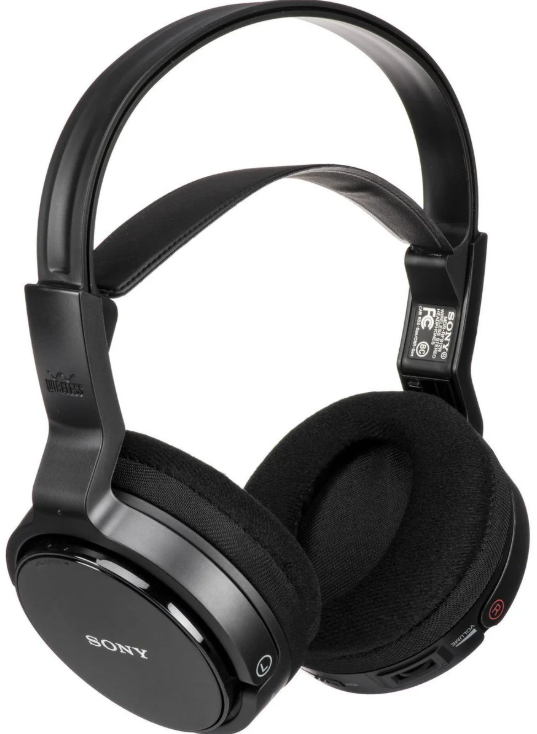
Sony Wireless Stereo Headphone System
Introduction
The Sony Wireless Stereo Headphone System delivers an exceptional audio experience,, combining advanced wireless technology with superior sound quality. Designed to provide freedom of movement without compromising on audio fidelity, these headphones feature dynamic closed-back drivers, noise-cancelling capabilities, and long-lasting battery performance. Ideal for music enthusiasts, remote workers, and travelers, the system supports high-resolution audio formats via Bluetooth and offers seamless device connectivity.
These headphones incorporate Sony’s proprietary technology, such as DSEE Extreme upscaling and integrated noise cancellation processors, ensuring clear, rich sound with reduced ambient noise. The ergonomic design with circumaural earcups provides comfortable extended use, while multi-microphone arrays enable crystal-clear calls and voice assistant compatibility. With rapid USB-C charging and up to 30 hours of wireless playback, users can enjoy uninterrupted listening throughout the day.
Targeted at audiophiles, professionals, and casual listeners seeking premium wireless audio, the system suits use cases ranging from office environments and commuting to home entertainment. Pricing for Sony's wireless stereo headphone models typically ranges from around $150 to $,,400 depending on features and generation, widely available through Sony’s official store and major electronics retailers.
Checking the included items
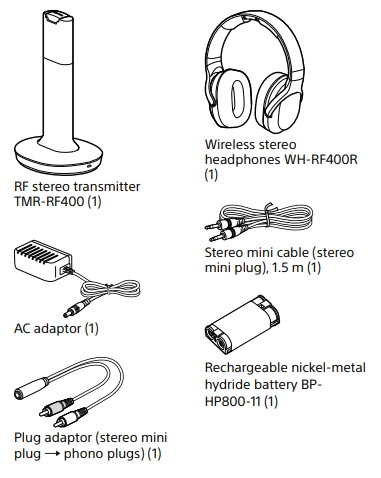
Some features are a wireless system that allows you to listen to a program free the restriction of a cable
- Up to 45 meters (150 feet) reception range*
- High fidelity sound reproduction
- New mode “VOICE” for clear hearing of personal voice range
- Noise reduction system to reproduce a clear sound with minimum transmission noise
- Comfortable fit
- Smooth and Comfortable Earpads
- Long playback time (maximum 20 hours)
- Easy recharging function with secure charging mechanism
- Rechargeable Battery
- Automatic tuning on headphones for optimum signal reception
- 3 transmission channels available
- Volume control function and sound effect function on the headphones
- Transmission distance varies depending on the conditions of use
How to use
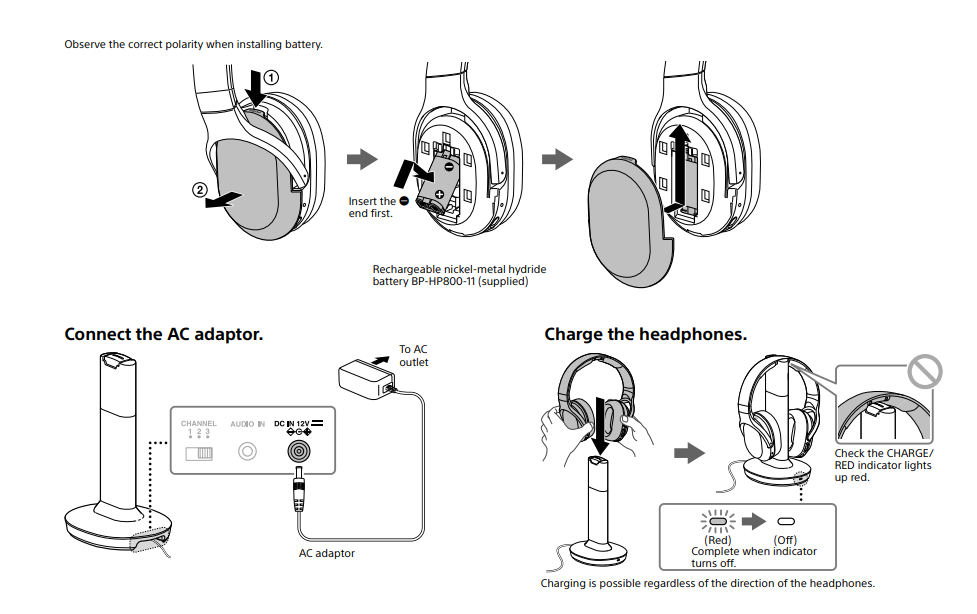
Insert the supplied rechargeable battery BP-HP800-11 into the left housing of the headphones.
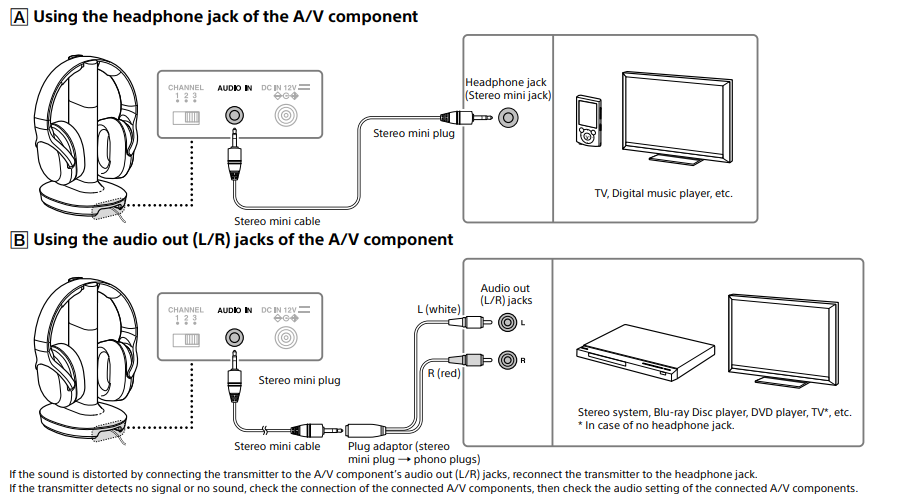
Connect the A/V component, following hookup A or B below.
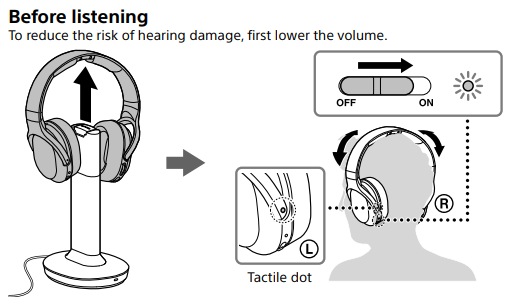
Wear the headphones.
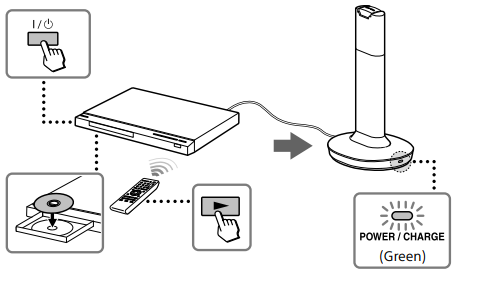
Start playback of the A/V component.
Troubleshooting
If you run into any problems using this system, use the following checklist. Should any problem persist, consult your nearest Sony dealer.
No sound/Low sound
- Check the connection of the A/V component or the AC adaptor.
- Check that the A/V component is turned on.
- If you connect the transmitter to an A/V component using the headphone jack, raise the volume level on the connected A/V component within the range where the sound is not distorted.
- Change the radio frequency with the CHANNEL selector on the transmitter, then change the radio frequency to that of the transmitter with the AUTO TUNING button on the headphones.
- Use the headphones near the transmitter, or change the position of the transmitter.
- Charge the supplied rechargeable battery, or replace dry batteries with new ones. If the POWER indicator is still off after charging, take the headphones to a Sony dealer.
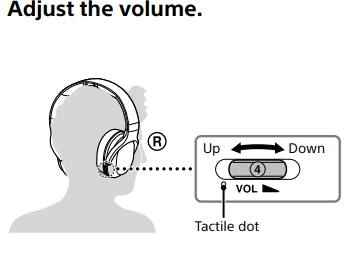
- Raise the headphone volume.
- The transmitter turns off if no signal or a low signal is input for 4 minutes. If you connect the transmitter to an A/V component using the headphone jack, raise the volume level on the connected A/V component within the range where the sound is not distorted.
Distorted or intermittent sound (sometimes with noise)
- Use the headphones near the transmitter, or change the position of the transmitter.
- Do not place the transmitter on a metallic table.
- If you connect the transmitter to an A/V component using the headphone jack, lower the volume level on the connected A/V component within the range where the sound is not distorted.
- Change the radio frequency with the CHANNEL selector on the transmitter, then change the radio frequency to that of the transmitter with the AUTO TUNING button on the headphones.
- Charge the supplied rechargeable battery, or replace dry batteries with new ones. If the POWER indicator is still off after charging, take the headphones to a Sony dealer. Loud background noise
- If you connect the transmitter to an A/V component using the headphone jack, raise the volume level on the connected A/V component within the range where the sound is not distorted.
- Charge the supplied rechargeable battery, or replace dry batteries with new ones. If the POWER indicator is still off after charging, take the headphones to a Sony dealer.
- Do not place the transmitter on a metallic table.
- Use the headphones near the transmitter.
The POWER/GREEN indicator flashes green..
- No signal or a low signal is input. Start playback of the A/V component, or raise the volume of the connected A/V component within the range where the sound is not distorted; otherwise,, the transmitter will turn off. If no signal or a low signal is input for about 4 minutes, the transmitter turns off automatically..
Battery cannot be charged/ CHARGE/RED indicator flashes red, or does not light up r.e.d
- Check that the right/left of the headphones and transmitter correspond, and put the headphones on the transmitter correctly.
- Install the supplied rechargeable nickel-metal hydride battery. Dry batteries and rechargeable batteries other than the supplied ones cannot be charged.
- If the CHARGE/RED indicator does not light up red even though you put the headphones on the transmitter and wait for a while, it may be the end of the battery's lifetime. You can order the supplied rechargeable battery BP-HP800-11 from the store where you purchased this system, or at your nearest Sony dealer.
- Charging may not be completed if the transmitter’s contact pin and the headphones’ contact point are dusty. Wipe them with a cotton bud, etc. Short usage time (the supplied rechargeable battery)
- Clean the + and - terminals of the supplied rechargeable battery and the charging terminal of the transmitter headphone with a dry cloth.
- Recharge the supplied rechargeable battery after it the fully discharged.
Specifications
RF stereo transmitter (TMR-RF400)
- Modulation
- FM stereo
- Carrier frequency
- 915.5 MHz, 916.0 MHz, 916.5 MHz
- Channel
- Ch1, Ch2, Ch3
- Transmission distance
- Approx. 45 m (150 ft) of longest
- Audio inputs
- Stereo mini jack
- Power requirements
- DC 12 V (from the supplied AC adaptor)
- Dimensions Approx.
- 130 mm × 273 mm × 160 mm (5 1/8 × 10 3/4 × 6 3/8 in) (w/h/d)
- Mass
- Approx. 265 g (10 oz)
- Rated power consumption
- 2.0 W
- Operating temperature
- 5°C to 35°C (41°F to 95°F)
Wireless stereo headphones (WH-RF400R)
- Frequency response
- 10 Hz – 22,000 Hz
- Power source supplied rechargeable nickel-metal hydride battery BP-HP800-11, or commercially available (LR03 (size AAA) dry batteries
- Mass
- Approx. 275 g (10 oz)
- Operating temperature
- 5°C to 35°C (41°F to 95°F)
Pros & Cons of the Sony Wireless Stereo Headphone System
- Pros:
- Advanced noise cancellation with multiple microphones reduces ambient noise effectively, enhancing listening focus in noisy environments.
- High-fidelity sound with wide frequency range response (up to 40,000 Hz on premium models) and support for the LDAC codec ensures superior audio quality.
- Comfortable circumaural design with plush ear pads suited for long listening sessions.
- Long battery life of up to 30 hours of wireless playback with quick charging capabilities (10 minutes charge for 5 hours of playback).
- Multipoint Bluetooth connectivity allows simultaneous connection to two devices, improving user convenience.
- Includes useful features like speak-to-chat and customizable ambient sound control via Sony’s app.
- Cons:
- Price can be higher compared to some competitors in the wireless headphone market, possibly limiting budget-conscious buyers.
- Wired operation is limited; headphones generally do not work when charging via USB-C cable, which may inconvenience some users.
- Some users report a snug fit that may require adjustment for larger head sizes.
- Ambient sound mode, while innovative, may not fully satisfy users wanting complete transparency to outside sounds.
Compared to alternatives like Bose QuietComfort or Sennheiser Momentum Wireless, Sony’s Wireless Stereo Headphone System stands out for its combination of noise-cancelling performance, sound customization features, and codec support, offering excellent value for audiophiles and tech-savvy users.
Customer Reviews of Sony Wireless Stereo Headphone System
Users consistently praise the Sony Wireless Stereo Headphone System for its impressive noise-cancelling effectiveness and rich, clear audio reproduction. Many highlight the comfort during extended wear, making it suitable for daily commuting or work-from-home setups. The speak-to-chat functionality receives positive feedback for its convenience during conversations without removing the headphones.
Common complaints include the inability to use the headphones while charging and occasional tightness in fit for larger heads. Battery life and quick charge features are often recommended, making these headphones reliable for long trips. Star ratings average around 4.5 out of 5, with multiple verified purchasers recommending the product for anyone seeking a premium wireless headphone experience.
Sample Testimonials
- ★★★★★ "The noise cancellation is top-notch, perfect for noisy offices and travel. The sound quality is crisp and balanced." – Sarah M.
- ★★★★☆ "Comfortable with good battery life. Wish I could use them while charging, but minor inconvenience." – James K.
- ★★★★★ "Best wireless headphones I’ve owned. The multi-device connection is a game-changer." – Priya R.
Faqs
How do I set up the sony Wireless Stereo Headphone System for the first time?
What should I do if my sony Wireless Stereo Headphone System audio is unclear or has static noise?
Can the sony Wireless Stereo Headphone System connect via Bluetooth with multiple devices?
How can I optimize the sound performance of my sony Wireless Stereo Headphone System?
Is the sony Wireless Stereo Headphone System waterproof or safe to use in wet conditions?
How do I maintain and care for my sony Wireless Stereo Headphone System to extend its lifespan?
What are the main features that distinguish the sony Wireless Stereo Headphone System from other wireless headphones?
How do I troubleshoot pairing issues with my sony Wireless Stereo Headphone System?
Tags
More sony manuals
- Setup: Sony Smartphone Xperia 5 User Manual
- How to Setup: Sony Motorcycle Helmet Cam DB5 User Manual
- How to Use: Sony Ultra HD Blu-ray™ / DVD Player User Manual
- Sony Wireless Noise Cancelling Headset WF-1000XM5 User Guide
- How to Use: Sony Wireless Speaker Ult Field 1 User Manual
- Sony PlayStation5 Game Console CFI-1116A User Guide
Leave a Comment