
How to Pair: Soundcore H30i wireless on-ear headphones User Manual
Content
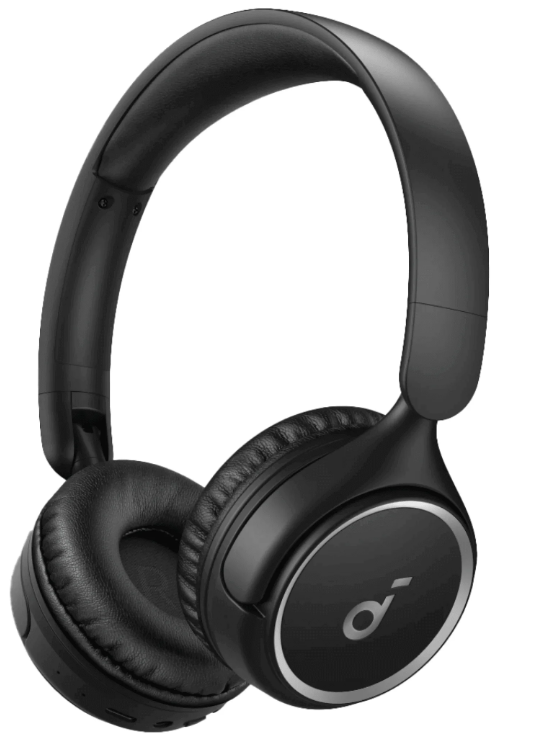
Soundcore H30i Wireless On-Ear Headphones
Introduction
The Soundcore H30i wireless on-ear headphones are designed to deliver exceptional audio quality with a focus on pure bass and long-lasting battery life, making them ideal for music enthusiasts and commuters alike. These headphones feature 40mm oversized drivers, ensuring powerful sound reproduction, alongside enhanced bass via Soundcore's BassUp technology. The H30i offers a remarkable 70-hour playtime on a single charge, with fast charging capabilities that provide 4 hours of playtime from just a 5-minute charge. The ergonomic design and soft, detachable earcups ensure all-day comfort, while Bluetooth 5.3 ensures a stable and seamless connection. Targeted at those seeking a reliable and affordable audio solution, these headphones are perfect for long listening sessions. The estimated price range is around $37 USD to $50 USD, depending on the region. They are available in various colors, including black, rose, and red, and can be purchased from online retailers like Amazon and Noon. Whether you're a student, a professional, or someone who loves music, the Soundcore H30i wireless on-ear headphones are a great choice for anyone looking for a balance of quality and affordability.
Specifications
- Input: 5V 0.8A
- Output: 5V 0.34A
- Battery capacity:
60mAh*2 (earbuds) +800mAh (charging case) - Playtime (with ANC off): 12H/60H
- Playtime (with ANC on): 10H/50H
- Charging time:
- Full Charging Time (charging case) for earbuds 1H
- Full Charging Time (type C) for charging case 3H
- Driver unit: 11 mm dynamic driver
- Frequency response: 20Hz - 20kHz
- Impedance: 16Ω
- Waterproof rating (earbuds): IPX5
- Bluetooth version: 5.3
- Bluetooth range: 10m
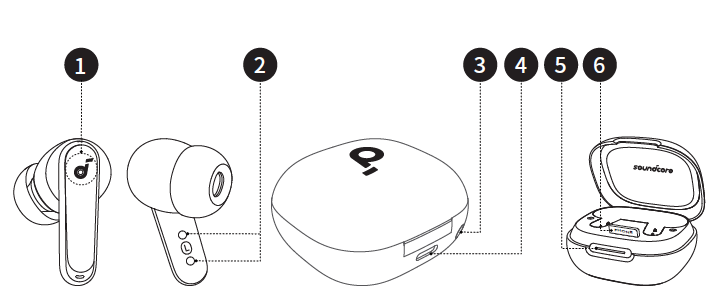
Overview
- Touch Control Area
- USB-C Charging Port
- Charging Contactors
- LED Light Strip
- Reset Button
- Phone Stand
WEARING
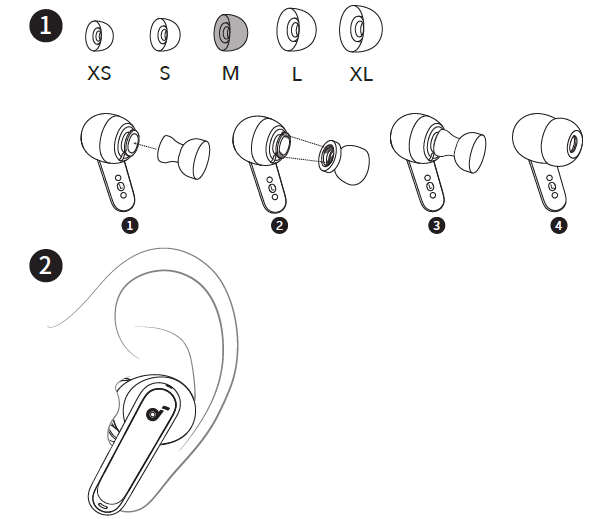
Choose the ear tips that fit your ears best and take a fit test in the Soundcore app to ensure you get the best ANC performance..
POWERING ON & PAIRING
Open the charging case, and the earbuds will automatically power on and enter Bluetooth pairing mode. Select "Soundcore P40i" from your device's Bluetooth list when connecting for the first time.
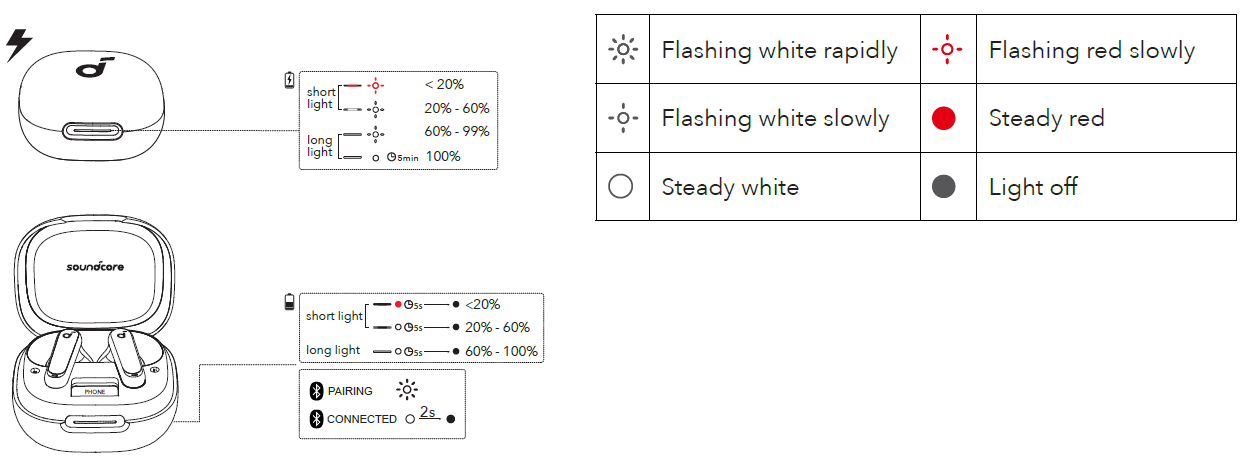
- When pairing, the LED light strip will start flashing white slowly. After the pairing is successful, the LED light strip will stay on for 2 seconds and then go off.
CHARGING
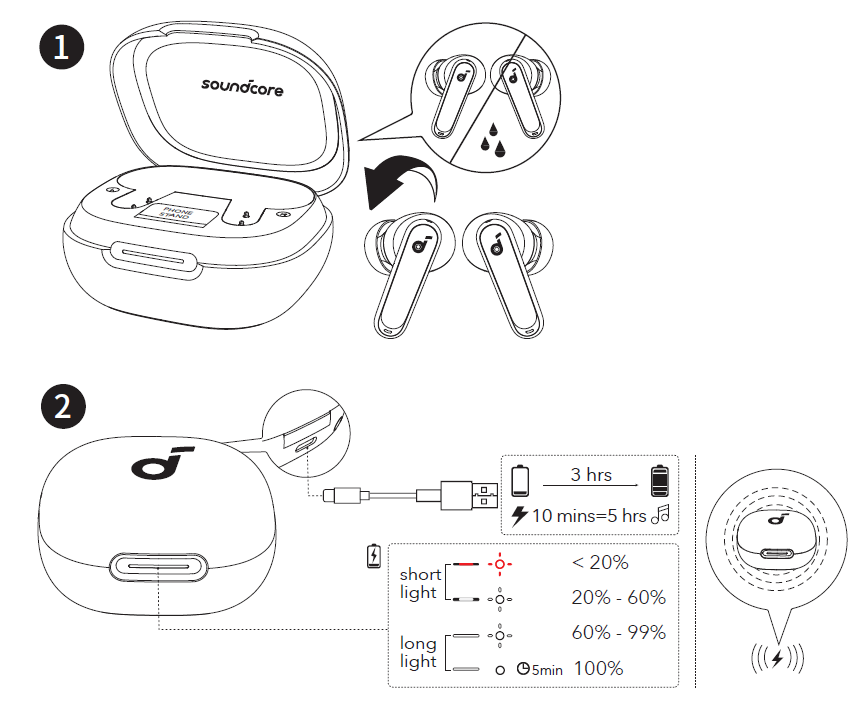
- Place the earbuds in the charging case and close it.
Fully dry off the earbuds and the USB-C charging port before charging. - Connect the charging case to a power supply by using a certified USB-C charging cable. Alternatively, position the charging case at the center of your wireless charger for wireless charging.
DUAL CONNECTIONS
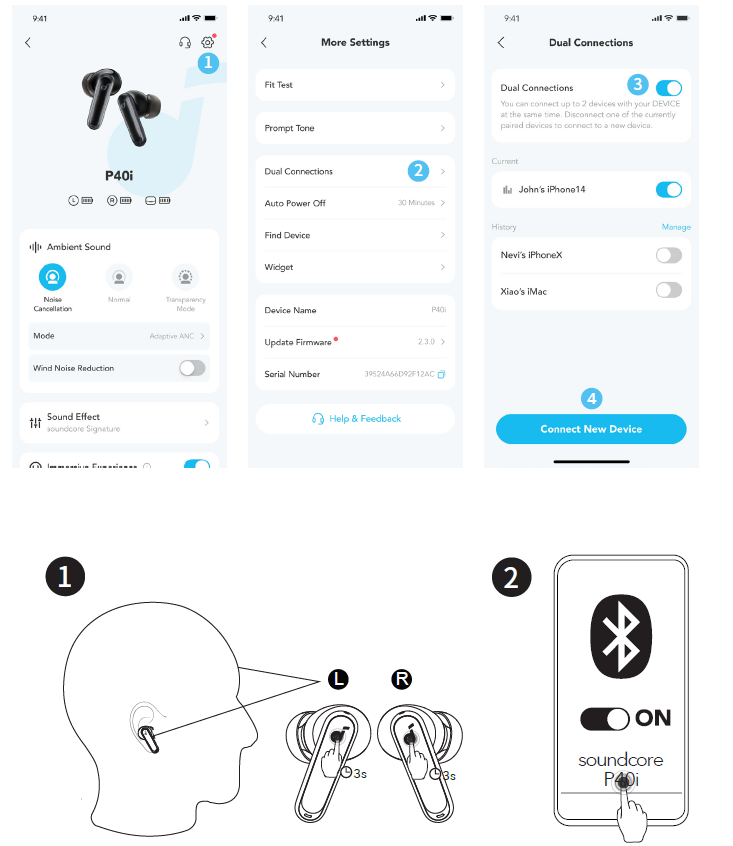
To connect the earbuds with two Bluetooth devices at the same time, first open the Soundcore app, go to settings,, and select Dual Connections > Enable Dual Connections > Connect New Device.
After completing the app configuration, wear the earbuds, then press and hold the touchpad on both earbuds for 3 seconds simultaneously.
MANUAL PAIRING
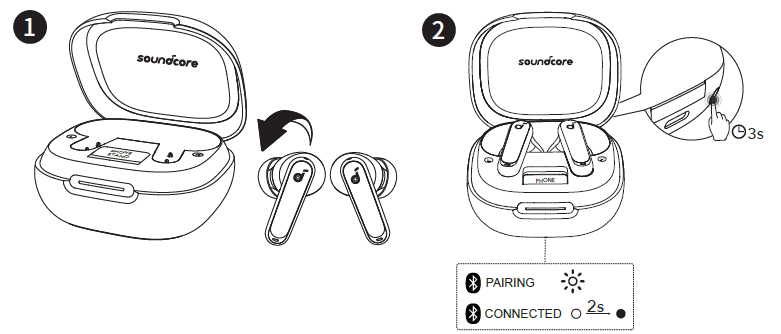
To manually enter Bluetooth pairing mode, place the earbuds in the charging case and leave the case open. Press and hold the reset button behind the charging case for 3 seconds until the LED light strip flashes white rapidly.
CONTROLS
AMBIENT SOUND
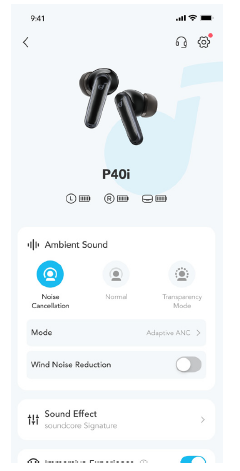
You can select noise cancellation, normal, or transparency mode in the Soundcore app.
- Adaptive ANC: Optimize noise cancellation by adapting to your ears and environment.
- Transparency: Stay aware of your surroundings while listening to music.
POWERING OFF
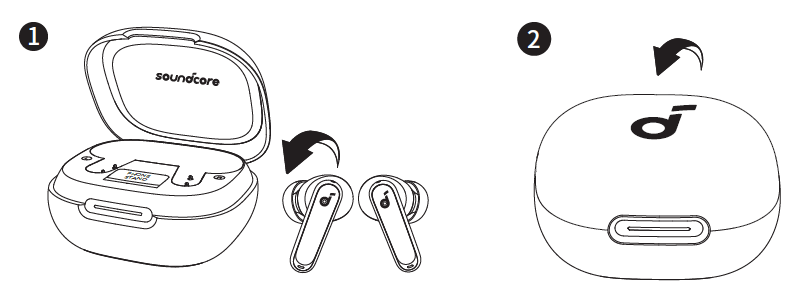
To power off, return the earbuds to the charging case and close it.
RESET
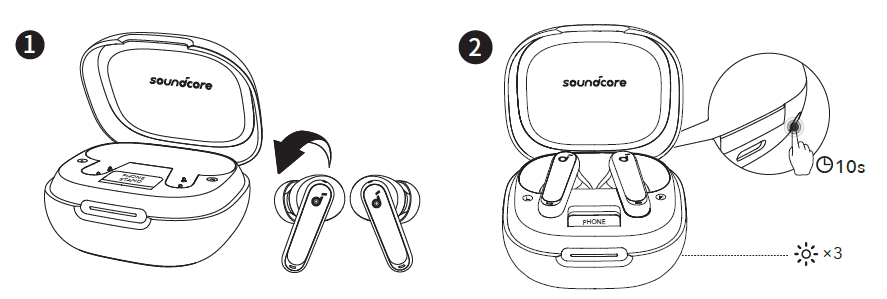
Place the earbuds in the charging case and leave the case open. Press and hold the reset button behind the charging case for 10 seconds until the LED light strip flashes white rapidly three times.
LED LIGHT GUIDE
Firmware Update
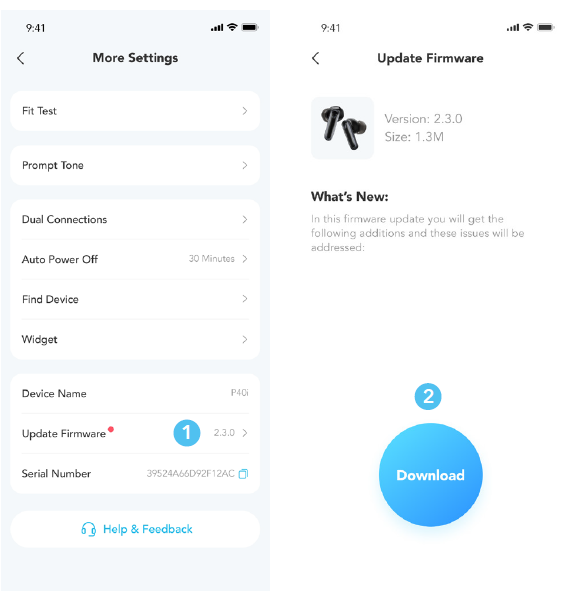
You will be notified when a new firmware version is detected upon connecting the earbuds to the app. Ensure the earbuds are placed in the charging case, and the case remains open until the firmware update is complete. During the update, ensure the earbuds are being charged and avoid any usage.
Troubleshooting Guide
Here are some common issues and solutions for the Soundcore H30i wireless on-ear headphones:
- Headphones Not Turning On: Ensure the headphones are fully charged and try resetting them by holding the power button for 10 seconds until the LED blinks.
- Audio Delay: Check for interference from other Bluetooth devices and ensure your source device is not malfunctioning.
- App Connectivity Issues: Clear the Soundcore app cache and try reconnecting the headphones.
For any further assistance, please contact Soundcore support through their official website. The Soundcore H30i wireless on-ear headphones typically come with a standard limited warranty; check the packaging or manufacturer's website for details.
Pros and Cons of Soundcore H30i Wireless On-Ear Headphones
Pros
- Long Battery Life: Offers up to 70 hours of playtime on a single charge, making it suitable for extended use without frequent recharging.
- Enhanced Bass: Soundcore's BassUp technology ensures a rich audio experience with deep bass notes.
- Comfortable Design: Ergonomic shape and soft earcups provide comfort during extended listening sessions.
Cons
- Lack of Water Resistance: Not suitable for use in wet conditions due to the risk of water entering the USB and AUX-IN ports.
- No Voice Assistant Support: Does not support voice assistants like Siri or Google Assistant.
Customer Reviews for Soundcore H30i Wireless On-Ear Headphones
Users of the Soundcore H30i wireless on-ear headphones often praise their long battery life and bass quality, making them a popular choice among music enthusiasts. Some users have noted that while the headphones are lightweight and comfortable, they may not be ideal for those seeking a more premium build quality or additional features like sweat resistance. Overall, the H30i is rated highly for its value for money, offering a great balance of performance and affordability. Common complaints include the lack of water resistance and no support for voice assistants, but these are generally considered minor drawbacks given the headphones' strengths. Ratings often fall in the range of 4 to 4.5 stars out of 5, with many users recommending them as a budget-friendly option for those seeking reliable wireless headphones.
More soundcore manuals
- Pairing & Usage: Soundcore K20i wireless earbuds User Manual
- How to Pair: Soundcore Liberty 4 NC True-Wireless Earbuds User Manual
- Pairing & Usage: Soundcore Life P3i Hybrid Active Earbuds User Manual
- Pairing & Usage: Soundcore R50i/P20i/P25i Earbuds User Manual
- Pairing: Soundcore Life A2 NC+ Wireless Earbuds Setup Guide
- How to Pair: Soundcore Life A3i Earbuds User Manual
Leave a Comment