
Pairing & Usage: Soundcore K20i wireless earbuds User Manual
Content
Soundcore K20i Wireless Earbuds
Introduction
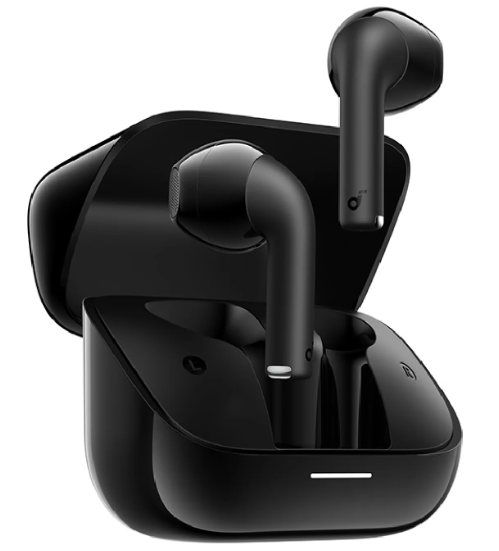
Welcome to the future of affordable, high-quality audio with the Soundcore K20i wireless earbuds. Designed for music lovers, podcast enthusiasts, and everyday commuters, these semi-in-ear earbuds deliver a balanced blend of comfort, clarity, and convenience. Engineered by Anker, a leader in consumer electronics, the Soundcore K20i stands out with its 13mm dynamic drivers and innovative torus design, ensuring rich, detailed sound with enhanced bass thanks to BassUp technology.
One of the key benefits of the Soundcore K20i wireless earbuds is their impressive 36-hour total playtime, powered by a compact charging case that also supports fast charging—just 10 minutes in the case gives you an additional 2 hours of playback. The semi-in-ear fit, weighing a mere 3.3g per earbud, provides a secure and comfortable experience without the need for ear tips, making them ideal for extended listening sessions.
For those who value clear communication, the K20i features AI-powered noise reduction and dual-microphone ENC (Environmental Noise Cancellation), ensuring your voice is isolated from background noise during calls. Gamers will appreciate the dedicated Game Mode, which reduces latency for a more immersive experience. With 22 preset EQ settings and fully customizable sound profiles via the Soundcore app, you can tailor your audio to match your personal preferences.
The Soundcore K20i wireless earbuds are perfect for students, professionals, and fitness enthusiasts seeking reliable, budget-friendly audio gear. Available in multiple chic colors, these earbuds are widely accessible online and in select retail stores, typically priced between $19 and $29, offering exceptional value for their feature set.
Specifications
- Driver Size: 13mm dynamic drivers for clear, powerful sound
- Bass Technology: BassUp for enhanced low-frequency performance
- Playtime: Up to 6 hours per earbud, 36 hours with charging case
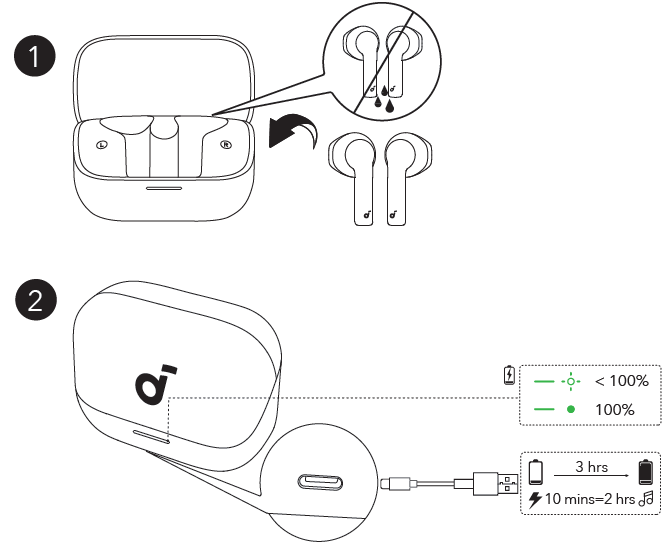
- Fast Charging: 10 minutes in case = 2 hours of playback
- Bluetooth: Bluetooth 5.3 for stable, energy-efficient connectivity
- Range: Up to 10 meters (33 feet)
- Frequency Response: 20Hz – 20kHz
- Microphones: Dual-mic ENC with AI noise reduction for clear calls
- Water Resistance: IPX5 rated for sweat and splash protection
- Weight: 3.3g per earbud for lightweight comfort
- Charging Case Battery: 700mAh
- Earbud Battery: 43mAh each
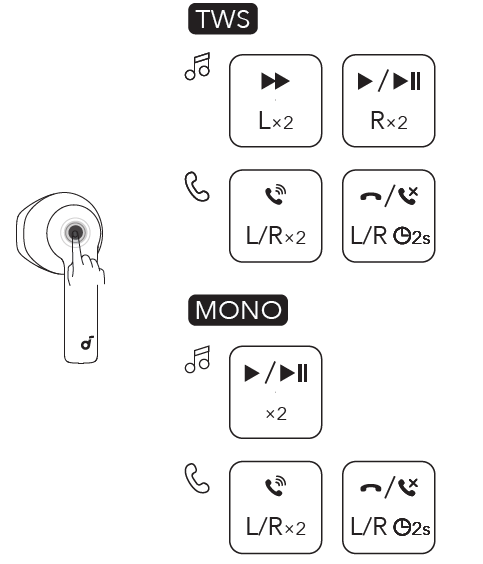
- Touch Controls: Intuitive touch commands for playback, volume, and calls; customizable via app
- EQ Customization: 22 preset EQs + fully customizable sound profiles
- Game Mode: Low-latency audio for gaming
- Warranty: Varies by retailer; check local policies
Comparison: The Soundcore K20i wireless earbuds compete favorably with other budget semi-in-ear models, offering longer battery life, customizable sound, and advanced call features compared to similarly priced alternatives. While they lack active noise cancellation (ANC) and wireless charging, their comfort, audio quality, and value make them a strong choice in the entry-level segment.
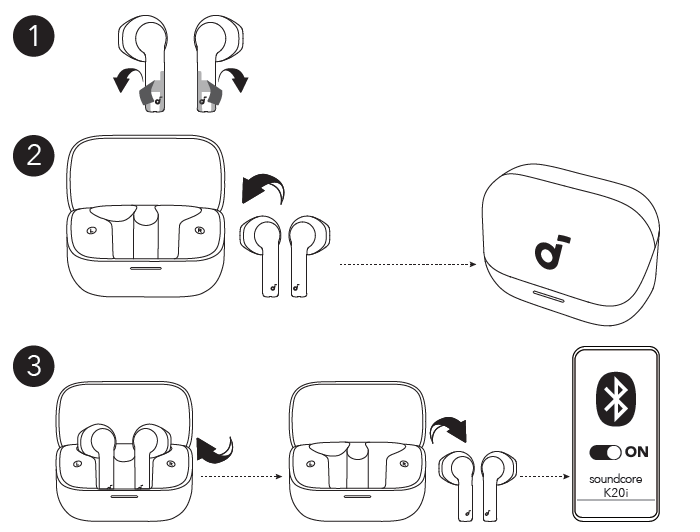
POWERING ON & PAIRING
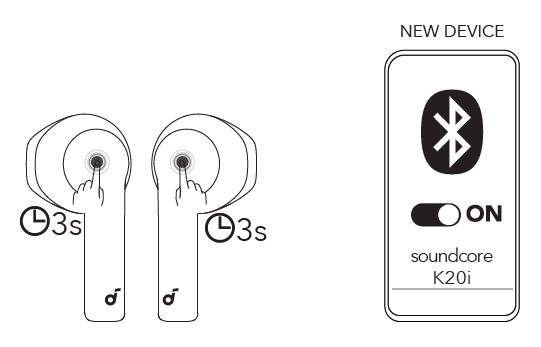
MANUAL PAIRING
CHARGING
CONTROLS
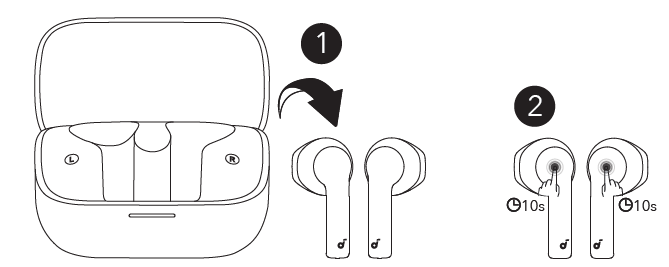
RESET
Important Safety Instructions
- Do not disassemble.
- Keep out of the reach of children. The product contains small parts that may be a choking hazard.
- The battery shall not be exposed to excessive heat, such as sunshine, fire , or the like.
- Do not use the product in environments with too high or too low temperatures, and never expose the product to strong sunshine or very wet environments.
- Ensure there is no liquid, sweat,,t or water on the charging port when charging.
- Refer to your user manual for your earphones' waterproof level and follow the corresponding instructions.
- For IPX4: Do not expose earphones to dripping or splashing water.
- For IPX4, IPX5, and IPX6: Do not submerge earphones in water.
Troubleshooting Common Issues
Even the best wireless earbuds can encounter issues. Here’s how to resolve common problems with your Soundcore K20i wireless earbuds:
- Earbuds Not Turning On: Ensure they are charged. Place them in the case and check the LED indicator. If issues persist, reset the earbuds (refer to the user manual).
- Connection Drops: Move closer to your device, ensure Bluetooth is enabled, and remove potential interference sources. Forget the device in Bluetooth settings and re-pair if necessary.
- Poor Call Quality: Make sure the microphones are unobstructed. Use the Soundcore app to update firmware for optimal performance.
- Touch Controls Unresponsive: Clean the earbuds’ touch area. Check for app updates and reconfigure touch settings if needed.
- Battery Drains Quickly: Disable features like BassUp or Game Mode when not needed. Ensure the charging case is fully charged.
Preventive Measures: Keep your Soundcore K20i wireless earbuds clean and dry, avoid extreme temperatures, and regularly update the firmware via the Soundcore app for the best performance and longevity.
Warranty & Support: Most retailers offer a 30-day return and replacement policy. For further assistance, contact Anker customer support through their official website or app. Always keep your proof of purchase for warranty claims. 24-month limited warranty
Pros & Cons of Soundcore K20i Wireless Earbuds
Pros
- Exceptional Battery Life: Up to 36 hours with the charging case, plus fast charging support.
- Comfortable Fit: Lightweight, semi-in-ear design stays secure without ear tips.
- Clear Sound Quality: 13mm drivers and BassUp deliver rich, detailed audio.
- Customizable Audio: 22 EQ presets and app-based sound profiles for personalized listening.
- Reliable Connectivity: Bluetooth 5.3 ensures stable pairing and low latency.
- Good Call Quality: Dual-mic ENC with AI noise reduction for clear voice calls.
- Budget-Friendly: Priced competitively for the feature set.
Cons
- No Active Noise Cancellation: Only passive noise isolation.
- No Wireless Charging: Charging case requires a cable.
- Basic Water Resistance: IPX5 rating protects against splashes but not submersion.
- Plastic Build: Durable but lacks premium materials.
Value for Money: The Soundcore K20i wireless earbuds offer excellent value, especially for users prioritizing battery life, comfort, and customizable sound over premium features like ANC or wireless charging.
Customer Reviews and Feedback
User feedback for the Soundcore K20i wireless earbuds highlights their strong performance in the budget category. Many customers praise the comfortable fit, impressive battery life, and clear sound quality, especially for podcasts and casual listening. The fast charging feature and intuitive touch controls are frequently mentioned as standout benefits.
Common complaints include the lack of active noise cancellation and the plastic build feeling less premium compared to higher-end models. Some users note that while call quality is good in quiet environments, it can struggle in very noisy settings.
Overall, the Soundcore K20i wireless earbuds receive solid 4-star ratings from most reviewers, with particular recommendations for students, commuters, and anyone seeking reliable, affordable audio gear[4]. Frequent purchasers suggest buying from reputable retailers to ensure warranty coverage and genuine products.
Testimonial Example: “For the price, these earbuds are a steal. They're comfortable for all-day use, and the battery lasts forever. Sound is clear, but don’t expect bass-heavy tracks to shake your skull—it’s balanced and pleasant.”
Long-Tail Keywords and Semantic Optimization
To help you find the best wireless earbuds for your needs, consider these related search terms: best budget wireless earbuds, semi-in-ear Bluetooth earbuds with long battery life, affordable earbuds with customizable EQ, Soundcore K20i review, Anker Soundcore K20i vs competitors, wireless earbuds for podcasts and calls, comfortable earbuds for all-day use, best value wireless earbuds under $30.
Faqs
How do I set up soundcore K20i wireless earbuds for the first time?
What should I do if my soundcore K20i wireless earbuds are not charging properly?
How can I use the Soundcore app to personalize sound on the soundcore K20i wireless earbuds?
Are soundcore K20i wireless earbuds compatible with both Android and iOS devices?
What are the main features of the soundcore K20i wireless earbuds that improve call quality?
How can I maximize battery life and playtime with soundcore K20i wireless earbuds?
What steps should I take if one earbud of my soundcore K20i wireless earbuds is not connecting or producing sound?
How do I properly clean and maintain my soundcore K20i wireless earbuds for long-term use?
More soundcore manuals
- Pairing & Usage: Soundcore Life P3i Hybrid Active Earbuds User Manual
- How to Pair: Soundcore H30i wireless on-ear headphones User Manual
- Pairing: Soundcore Life A2 NC+ Wireless Earbuds Setup Guide
- How to Pair: Soundcore Liberty 4 NC True-Wireless Earbuds User Manual
- Pairing & Setup: Soundcore Life P2i Hybrid Earbuds Instruction Manual
- Pairing & Usage: Soundcore R50i/P20i/P25i Earbuds User Manual
Leave a Comment