
Pairing & Setup: Soundcore Life P2i Hybrid Earbuds Instruction Manual
Content
Soundcore Life P2i Hybrid Earbuds
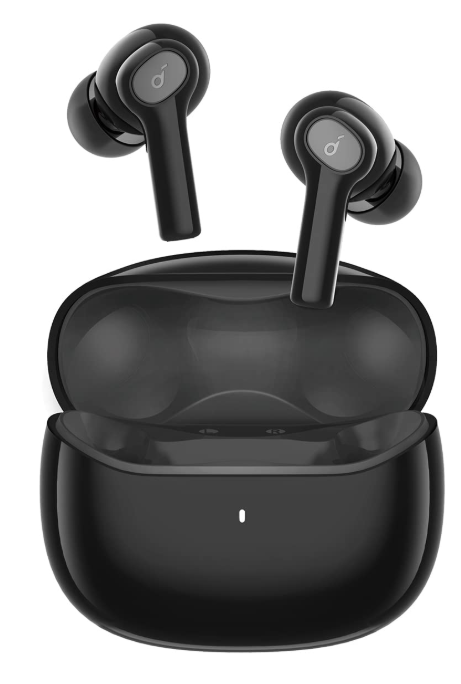
Introduction:
Experience immersive audio with the Soundcore Life P2i Hybrid Earbuds, engineered for those who demand both premium sound and everyday convenience. These true wireless earbuds are crafted to deliver impressive audio performance, clear calls, and long-lasting comfort—whether you’re working, working out, or relaxing at home.
The Soundcore Life P2i Hybrid Earbuds feature 10mm dynamic drivers that deliver deep bass and balanced mids, creating a rich listening experience for music, podcasts, and calls alike. Dual EQ modes—Bass Mode for powerful lows and Podcast Mode for crisp vocals—let you tailor your audio to your mood and activity. AI-powered noise reduction and dual microphones ensure your voice is heard clearly, even in noisy environments, making these earbuds ideal for remote work, gaming, or a busy commute.s
With up to 8 hours of playtime per charge and a compact charging case that extends usage to 28 hours, the Life P2i Hybrid Earbuds keep up with your lifestyle Fast charging gives you an hour of playback with just 10 minutes in the case, perfect for when you’re on the move Bluetooth 5.2 provides a stable, lag-free connection, and the earbuds automatically reconnect to your device when you open the case. The lightweight, secure-fit design (IPX5-rated for sweat and splash resistance) ensures comfort and durability for all-day we.ar.
These earbuds are perfect for students, professionals, fitness enthusiasts, and anyone seeking reliable wireless audio at an affordable price. Available globally through major retailers and online stores, the Soundcore Life P2i Hybrid Earbuds typically retail in the $30–$50 range, offering exceptional value for their features.
Charging
- Remove the protective film from the earbuds before the first use.
- Fully dry off the earbuds and the USB port before charging.
- Use a certified USB-C charging cable and charger to prevent any damage.
- Fully charge both the earbuds and the charging case before the first use.
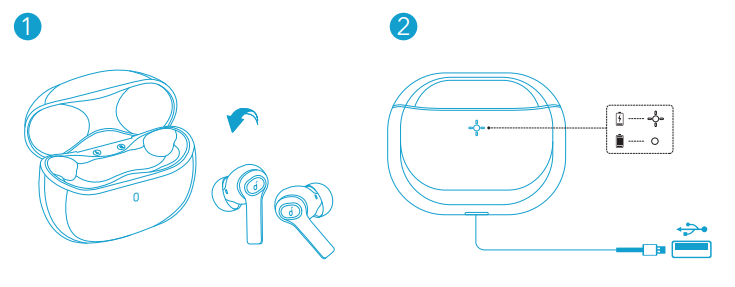
- Place the earbuds in the charging case and close it.
- Connect the charging case to the power supply by using a USB-C charging cable.
- The LED indicator on the charging case indicates the charging status.
Wearing
- Choose the EarTips that fit your ears best.
- Insert the earbuds into the inner canal of your ears and turn gently until you find the most comfortable and secure position.
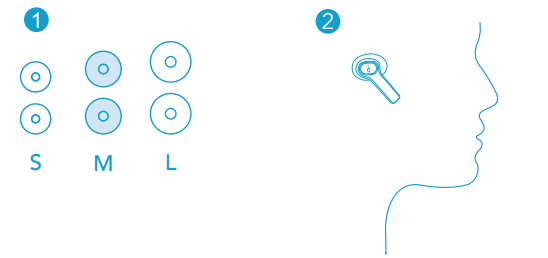
Your earbuds come with 3 pairs of EarTips, among which the Medium-sized are pre-installed.
Bluetooth Pairing
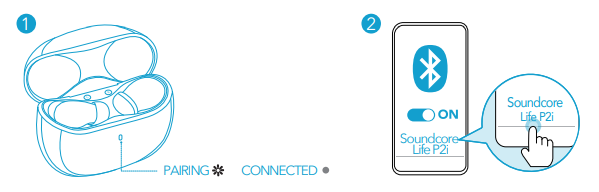
- Open the charging case, and the earbuds will automatically enter Bluetooth pairing mode.
- The LED indicator on the charging case will flash white.
- Select “Soundcore Life P2i” on your device’s Bluetooth list to connect.
- When successfully connected, the LED indicator on the charging case will turn off.
- When earbuds are out of the charging case and powered off, to manually enter Bluetooth pairing mode, press and hold the multi-function button on both earbuds for 3 seconds.
- Each time you power on your Soundcore earbuds, they will automatically connect to your last successfully connected device if available within the Bluetooth range.
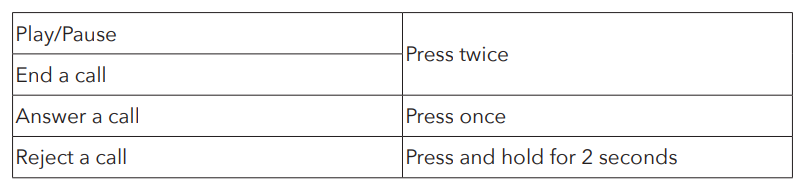
- Mono mode: When Bluetooth is connected, you can use either one of the earbuds only by placing the other one into the charging case.
- When powered on and connected, if either one of the earbuds is out of battery and powered off, you can keep using the other one.
- When you are on a call, place either one of the earbuds into the charging case, and the microphone in the other earbud will be activated.
Controls
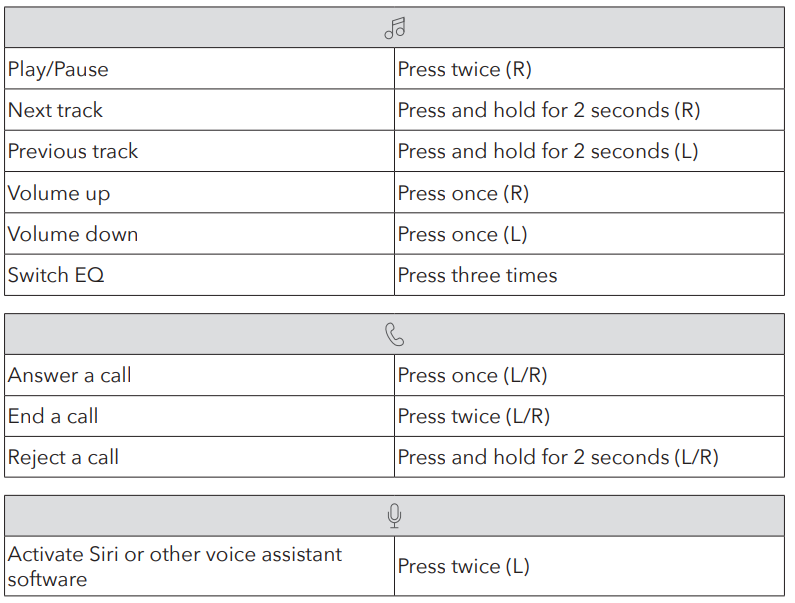
Mono mode
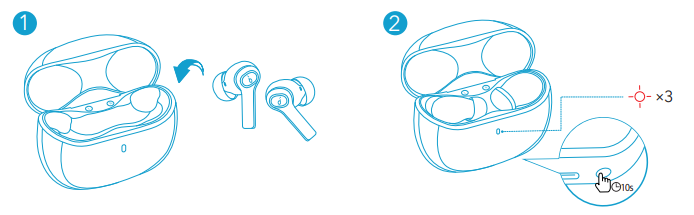
Reset
You might need to reset the earbuds if you experience any connectivity problems or function issues.
- Place the earbuds into the charging case and keep the case open.
- Press and hold the button on the case for 10 seconds until the LED indicator on the charging case flashes red 3 times. This confirms that the reset was successful and your earbuds can be connected normally.
Specifications
- Input: 5 V 0.5 A
- Rated output power: 5 mW (@1% THD)
- Battery capacity: 55 mAh x 2 (earbuds) 500 mAh (charging case)
- Charging time: 2 hours
- Playtime (varies by volume level and content)
- Up to 8 hours (Total 28 hours with the charging case)
- Driver size: 10 mm x 2
- Frequency response: 20 Hz - 20 kHz
- Impedance: 16 Ω
- Waterproof level : IPX5 (earbuds)
- Bluetooth version: V 5.2
- Bluetooth range: 10 m / 33 ft
Troubleshooting: Common Issues & Solutions
Even the best wireless earbuds can encounter occasional hiccups. Here’s how to troubleshoot common problems with your Soundcore Life P2i Hybrid Earbuds:
Connection Problems
- Earbuds won’t pair: Ensure the charging case has power. Open the case to activate pairing mode—the LED should flash. Go to your device’s Bluetooth settings and select “Soundcore Life P2i”
- Intermittent audio drops: Keep your device within 10 meters (30 feet) of the earbuds. Avoid obstacles and interference from other wireless devices.
- Only one earbud works: Place both earbuds in the case, close the lid, then reopen to reset. If the issue persists, unpair and re-pair the earbuds from your device
Charging Issues
- Earbuds not charging: Clean the charging contacts on both the earbuds and case. Use the supplied USB-C cable and a reliable power source
- Case LED not lighting up: Check the cable and the power source. If the case still won’t charge, contact support.
Audio Quality
- Muffled sound or low volume: Try different ear tips for a better seal. Clean the earbud mesh with a dry, soft brush.
- Call quality issues: Ensure the microphones are unobstructed. Test in a quieter environment; background noise can affect AI noise reduction.
Preventive Measures
- Keep firmware updated via the Soundcore app (if available).
- Avoid exposing earbuds to excessive moisture beyond the IPX5 rating.
- Store in the case when not in use to preserve battery life.
Warranty & Support
The Soundcore Life P2i Hybrid Earbuds come with a standard manufacturer’s warranty. For warranty claims or further assistance, visit the official Soundcore website or contact customer support through the retailer where you purchased the product. Always retain your proof of purchase.
Pros & Cons: Balanced Assessment
Advantages
- Impressive Sound Quality: 10mm drivers deliver deep bass and clear mids, with customizable EQ modes for music and podcasts
- Long Battery Life: Up to 8 hours on a single charge, 28 hours with the case, plus fast charging for quick top-ups.
- AI-Enhanced Calls: Dual microphones and noise reduction ensure clear voice pickup in noisy environments
- Secure, Comfortable Fit: Lightweight design and multiple ear tip sizes suit all-day wear; IPX5 rating for sweat and splash resistance
- Easy Connectivity: Bluetooth 5.2 for stable pairing; automatic reconnection when opening the case
- Value for Money: Competitive pricing for feature-rich wireless earbuds
Limitations
- No Active Noise Cancellation: Passive isolation only; not ideal for extremely noisy environments.
- Button Controls: Physical buttons may feel less premium than touch controls and can require firm presses.
- Basic App Support: Limited customization compared to higher-end models; no advanced EQ or firmware updates via app.
- No Wireless Charging: Charging case uses USB-C only.
Comparison with Alternatives
Compared to budget rivals, the Soundcore Life P2i Hybrid Earbuds stand out for their battery life, call quality, and secure fit. While they lack ANC and wireless charging found in pricier models, they deliver reliable performance for everyday use at an accessible price point.
Customer Reviews: Real User Experiences
User feedback for the Soundcore Life P2i Hybrid Earbuds is overwhelmingly positive, with many praising sound quality, battery life, and ease of use. Multiple reviews highlight clear calls and good performance in both music and gaming scenarios.s Customers appreciate the comfortable fit and secure ear tips, making them suitable for workouts and long listening sessions.
Star ratings frequently reach 4.5 to 5 out of 5, with testimonials like “Great sound quality in calls and games too—I really suggest buying this product On official sites, all reviewers rated the product 5 stars, citing “fantastic sound,” “easy pairing,” and “great value for money. Common minor complaints include the lack of advanced app features and the reliance on physical buttons instead of touch controls.
Frequently mentioned issues include occasional Bluetooth pairing hiccups (easily resolved by resetting) and a desire for more EQ customization. Despite these, most users recommend the Soundcore Life P2i Hybrid Earbuds for anyone seeking reliable, affordable wireless audio.
Faqs
How do I set up soundcore Life P2i Hybrid Earbuds for the first time?
What should I do if soundcore Life P2i Hybrid Earbuds are not connecting properly?
Can I use soundcore Life P2i Hybrid Earbuds with my Android tablet?
How often should I clean soundcore Life P2i Hybrid Earbuds?
What are the key features that make soundcore Life P2i Hybrid Earbuds different?
How do I switch between EQ modes on soundcore Life P2i Hybrid Earbuds?
Can I use one earbud independently with soundcore Life P2i Hybrid Earbuds?
How do I optimize battery life for soundcore Life P2i Hybrid Earbuds?
More soundcore manuals
- How to Pair: Soundcore Space A40 Wireless Earbuds User Manual
- Pairing: Soundcore Life A2 NC+ Wireless Earbuds Setup Guide
- How to Use: Soundcore P41i Adaptive Noise Cancelling Earbuds User Manual
- Pairing & Usage: Soundcore Life P3i Hybrid Active Earbuds User Manual
- How to Pair: Soundcore Motion Boom Loudspeaker User Manual
- Pairing & Usage: Soundcore K20i wireless earbuds User Manual
Leave a Comment