
How to Pair: Soundcore Motion Boom Loudspeaker User Manual
Content
Soundcore Motion Boom Loudspeaker
Introduction
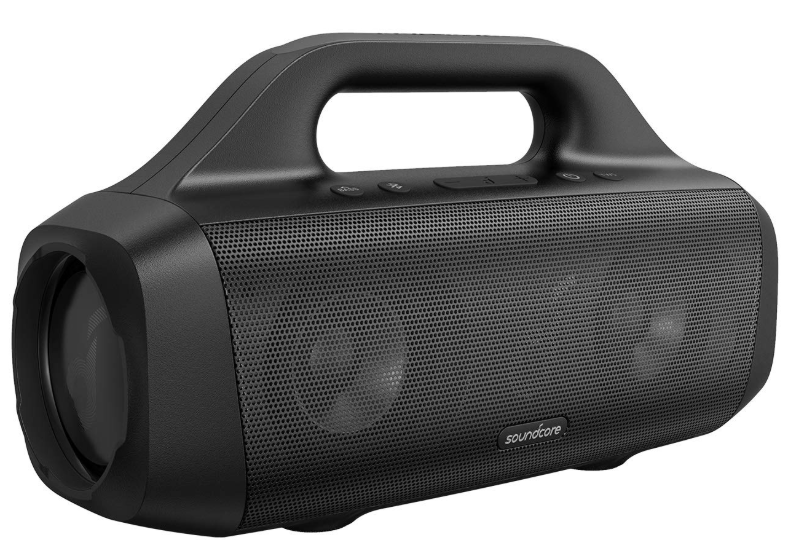
The soundcore Motion Boom Loudspeaker is a versatile, portable Bluetooth speaker designed for both indoor and outdoor audio enjoyment. It delivers powerful 30-watt output through dual 2.5-inch titanium drivers and passive bass radiators, offering impressively clear and deep bass sound performance. Equipped with the latest Bluetooth 5.0 technology, the speaker ensures a stable and skip-free wireless connection, ideal for streaming music, podcasts, or movies.
Thanks to its robust IPX7 waterproof rating, the Motion Boom is perfectly suited for outdoor activities such as camping, pool parties, or beach outings, as it can even float if accidentally dropped in water. The speaker’s long-lasting 24-hour battery life supports extended use without frequent recharging. For sound customization, users can utilize the Soundcore app, which includes a 9-band equalizer and multiple presets like Soundcore Signature, Voice, and Treble Boost, to tailor audio to different genres and listening preferences.
Targeted at music enthusiasts and outdoor adventurers seeking a balance of portability, durability, and high-quality sound, the Motion Boom stands out as a reliable companion for active lifestyles. The typical price range for this speaker is approximately $120 to $150, making it an affordable option for consumers looking for premium features without a premium price tag. It is widely available through online retailers and authorized dealers.
At a Glance
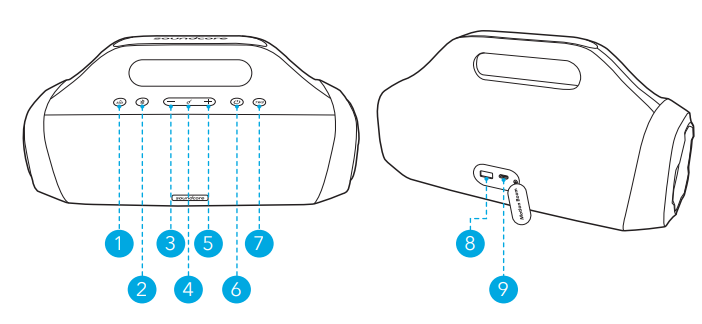
- Bass button
- Bluetooth button
- Volume down button
- Multi-function button
- Volume up button
- Power button
- TWS button
- USB-A port for charging out
- USB-C port for charging in
Charging
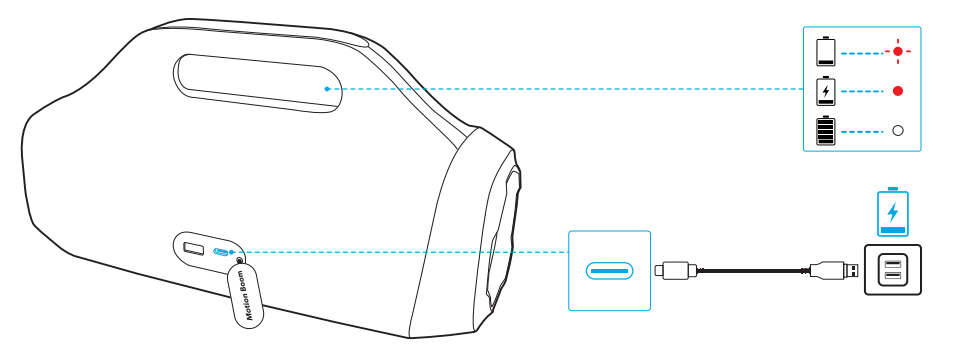
Charge your Speaker
- Use a certified USB-C cable and charger to prevent any damage. Fully charge this speaker before the first use to prolong the lifespan of the built-in battery.
- Disconnect this speaker from the charger when fully charged. Do not charge for extended periods.
Powering On/Off
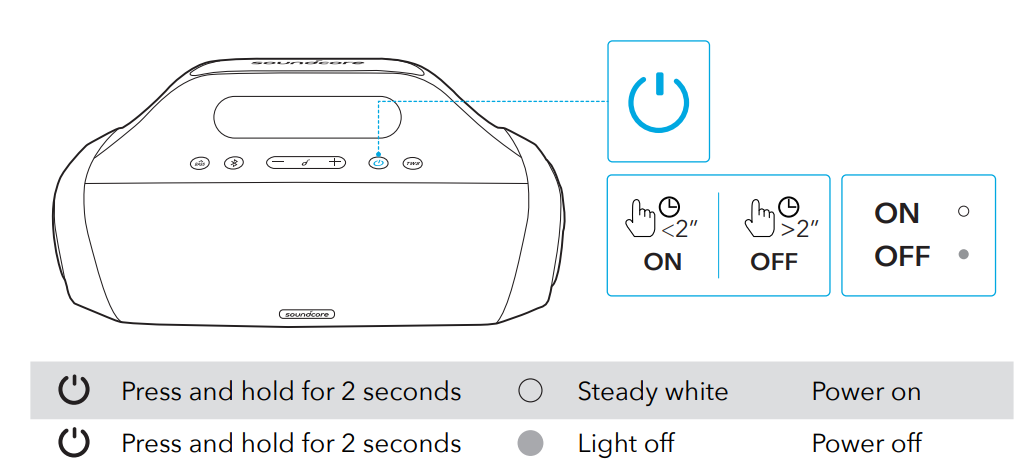
Using Your Speaker
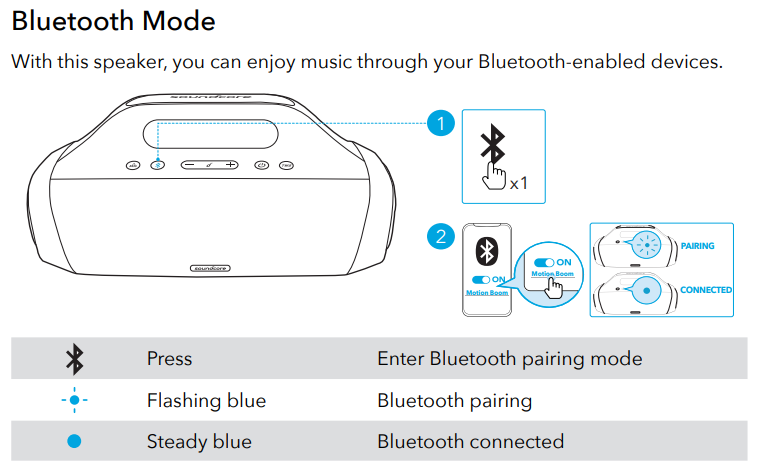
- Each time you power on your Soundcore speaker, it will automatically connect to your last connected device if available within the Bluetooth range. If not, press the Bluetooth button to enter Bluetooth pairing mode.
TWS (True Wireless Stereo) Mode
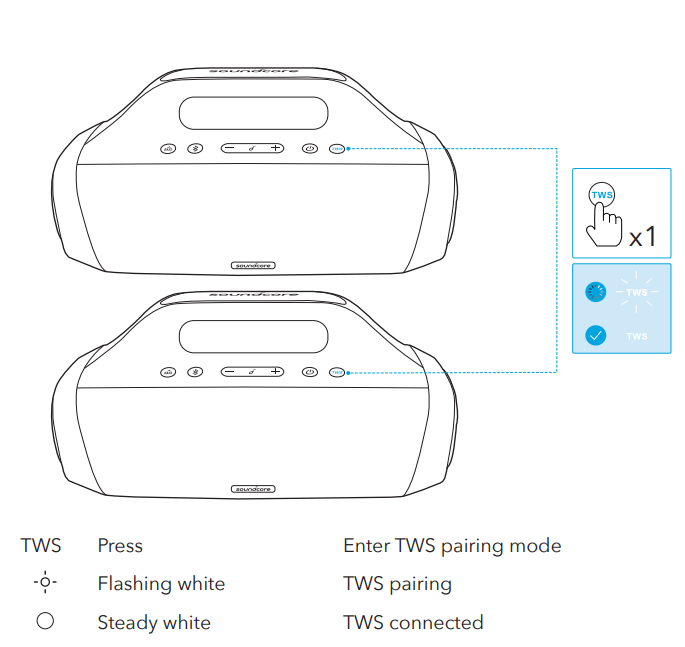
- Two identical Soundcore speakers can pair up with each other for true wireless stereo sound. In TWS mode, connect either one of the two speakers with your mobile device so that both speakers play the same audio (one as L channel and the other as R channel).
- On both Soundcore speakers, press the TWS button to enter TWS pairing mode.
- The speakers start searching for each other to establish the TWS connection.
- The TWS LED indicator on both speakers will flash white.
- Once successfully connected, the TWS LED indicator on both speakers will become steady white.
Button Controls
Soundcore App
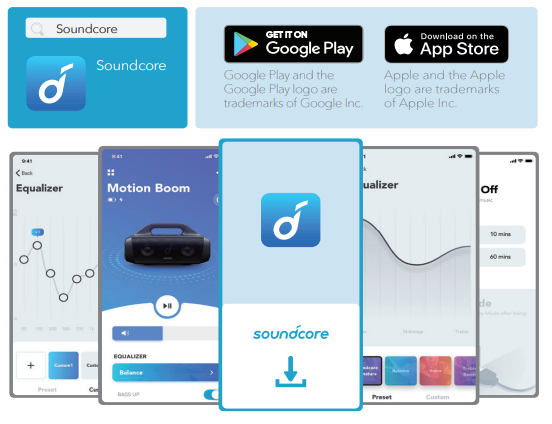
- Download the Soundcore app to enhance your experience.
- Product information: Check the product name and software version, or read the user manual.
- Firmware update: You will be informed once a new version of firmware is detected when you connect the speaker with the app. Battery status: Indicates the remaining battery level of your speaker. Volume control: Adjust the volume level via the app
- without pressing the buttons on the speaker.
- EQ settings: There are 4 EQ settings you can choose from in the app to optimize your experience while enjoying different music genres.
- Soundcore Signature: Normal EQ mode with well-balanced sound.
- Voice: Voices stand out more clearly from other ambient sounds.
- Treble Boost: High frequencies are enhanced.
- Balance: No enhancement for high-frequency and low-frequency sounds.
- Set Auto-power off time: Set an auto-power off time (5/10/30/60 minutes, 30 minutes by default), the speaker will automatically power off when time is up. Voice prompt: Mute or restore the voice prompt while powering on/off.
Specifications
Specifications are subject to change without notice.
- DC power input
- 5 V = 2.1 A
- Battery capacity
- 10000 mAh
- USB output
- 5V= 1A
- Audio output power
- 30 W
- Charging time
- 4 hours
- Playtime (varies by volume level and music content)
- Up to 24 hours
- Waterproof level
- IPX7
- Bluetooth version
- 5.0
- Bluetooth range
- 20 m / 66 ft
Troubleshooting the soundcore Motion Boom Loudspeaker: Common Issues and Solutions
Users of the soundcore Motion Boom Loudspeaker may occasionally face connectivity or performance issues. Common problems and their solutions include:
- Bluetooth pairing failure: Ensure Bluetooth is enabled on your device. Restart both the speaker and the device, then search for “Soundcore Motion Boom” to pair again.
- No sound or low volume: Check the speaker’s volume level and device volume. Reset the speaker by holding the reset button for 10 seconds until lights flash.
- Speaker not turning on: Confirm the battery is charged using the included USB-C cable. Allow full charging before use.
- Audio delay or distortion: Update the Soundcore app and ensure no interference from other Bluetooth devices. Use the app’s EQ presets to optimize sound.
To prevent issues, keep the firmware updated via the Soundcore app, avoid exposure to extreme temperatures, and handle the speaker carefully to protect the passive radiators. The product comes with a standard warranty covering manufacturing defects, and customer support is available through Soundcore’s official website and authorized service centers.
For further assistance, contact Soundcore support via email or phone as listed on the official product page.
Pros & Cons of the soundcore Motion Boom Loudspeaker
Pros
- Powerful sound output: 30W total power with dual titanium drivers delivers clear highs and thumping bass suitable for various music genres.
- Long battery life: Up to 24 hours of continuous playback supports all-day outdoor use without frequent charging.
- Waterproof and durable: IPX7 rating and floating capability make it ideal for poolside and outdoor adventures.
- Customizable sound: Soundcore app offers a 9-band equalizer and presets to tailor audio experience efficiently.
- Wireless stereo pairing: Ability to pair two speakers for immersive stereo sound enhances versatility.
Cons
- Lack of auxiliary input: No 3.5mm jack limits wired connectivity options for non-Bluetooth devices.
- Exposed bass radiators: Passive bass radiators lack protective covers, potentially vulnerable to damage.
- Midrange clarity: While bass is strong, some users note that mids and vocals could be clearer compared to higher-end competitors.
- Weight and size: At around 6 lbs, it is less portable than ultra-compact Bluetooth speakers for some users.
Overall, the soundcore Motion Boom offers excellent value for money by combining robust sound quality, durability, and user-friendly features, making it competitive against alternatives like JBL Xtreme 3, especially at a lower price point.
Customer Reviews of the soundcore Motion Boom Loudspeaker
Customers generally praise the soundcore Motion Boom Loudspeaker for its loud, clear sound and impressive bass, with many noting its excellent performance in outdoor settings. The 24-hour battery life and waterproof design are frequently highlighted as key benefits. Users appreciate the Soundcore app’s EQ customization, which allows personalized sound profiles for different music types.
Common complaints include the absence of an auxiliary input and concerns over the exposed passive radiators, which some users find susceptible to damage during transport. Several reviews mention mild distortion at very high volumes, but this is generally considered minor given the speaker’s price range.
On average, the speaker receives ratings between 4 and 4.5 stars out of 5, with recommendations often emphasizing its strong bass and portability for outdoor use. Buyers looking for a durable, affordable Bluetooth speaker with substantial sound output frequently endorse the Motion Boom as a worthwhile purchase.
Faqs
How do I set up the soundcore Motion Boom Loudspeaker for the first time?
What should I do if my soundcore Motion Boom Loudspeaker is not pairing with my device?
Can the soundcore Motion Boom Loudspeaker connect to multiple devices at once?
How do I use the TWS (True Wireless Stereo) feature with the soundcore Motion Boom Loudspeaker?
What are the best practices to optimize battery life on the soundcore Motion Boom Loudspeaker?
Is the soundcore Motion Boom Loudspeaker waterproof, and how should I care for it after exposure to water?
How can I customize the sound settings on my soundcore Motion Boom Loudspeaker?
What should I do if the soundcore Motion Boom Loudspeaker stops charging or charging is slow?
More soundcore manuals
- How to Use: Soundcore Boom 2 Portable Bluetooth Speaker User Manual
- How to Use: Soundcore P41i Adaptive Noise Cancelling Earbuds User Manual
- How to Pair: Soundcore Boom 3i Portable Bluetooth Speaker User Manual
- How to Pair: Soundcore Space A40 Wireless Earbuds User Manual
- How to Pair: Soundcore Select Pro Bluetooth Speaker User Manual
- Pairing & Setup: Soundcore Life P2i Hybrid Earbuds Instruction Manual
Leave a Comment