
How to Use: Soundcore P41i Adaptive Noise Cancelling Earbuds User Manual
Content
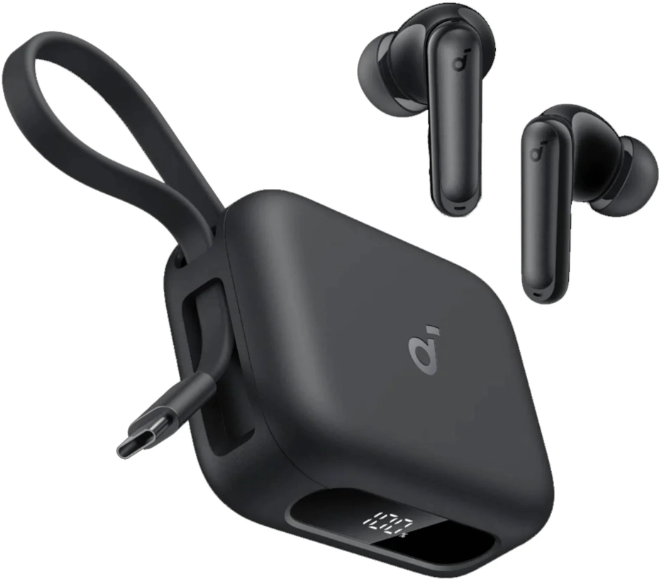
Soundcore P41i Adaptive Noise Cancelling Earbuds
Introduction
The Soundcore P41i Adaptive Noise Cancelling Earbuds deliver a cutting-edge listening experience, combining powerful sound performance with innovative features designed for modern users. Equipped with 11mm composite drivers enhanced by BassUp technology, these earbuds produce thunderous bass and crystal-clear highs, perfect for music lovers, commuters, and professionals alike. Their standout feature is the adaptive noise cancelling (ANC) which intelligently monitors your surroundings and blocks unwanted ambient noise, allowing you to stay fully immersed, whether on busy streets or noisy offices.
Ideal for users who demand long battery life, the P41i offers up to 12 hours of playback on a single charge, extended to an impressive 192 hours with the charging case. Uniquely, the charging case itself doubles as a portable phone charger with a 3,000mAh capacity, capable of charging an iPhone 16 Pro to 50% or a Samsung Galaxy S24 to 45%, making it a versatile companion for travel and daily use. The earbuds also feature six microphones with AI noise reduction, ensuring superior call quality in any environment.
With a patented built-in phone stand integrated into the charging case, watching shows and videos on the go becomes effortless. The Soundcore P41i is priced around $120 USD and is widely available through online retailers such as Amazon, Noon, and Soundcore’s official website, with flexible instalment options and various shipping methods to suit your needs.
Specifications
- Input: USB-C (Receptacle) Input: 5V 2.4A USB-C (Plug) Input: 5V 1A
- Rated Output Power: 10mW
- Battery Capacity: 60mAh ×2 (Earbuds)3000mAh (Charging Case)
- Charging Time: Up to 1 Hour (Earbuds) Up to 5 Hours (Charging Case with Earbuds)
- Playtime (ANC Off): Up to 12 Hours (Up to 192 hours with Case)
- Playtime (ANC On): Up to 10 Hours (Up to 160 hours with Case)
- Driver:11mm Dynamic Driver
- Frequency Response: 20Hz-20kHz
- Impedance: 14Ω
- Waterproof and Dustproof Level (Earbuds): IPX5
- Bluetooth Version: Bluetooth 5.3
- Bluetooth Range: 10m
Soundcore P41i (With Lightning Adapter)
.png)
Soundcore P41i (Without Lightning Adapter)
.png)
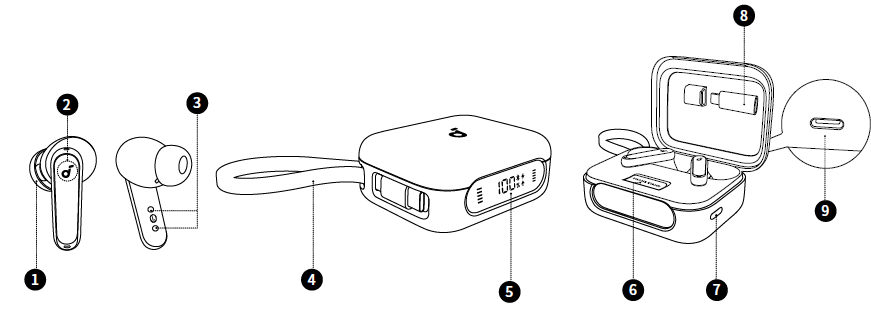
OVERVIEW
- Ear Tip
- M-size ear tips are pre-installed at the time of purchase.
- Touch Control Area
- Tap the control area on the earbud stems to manage different functions.
- Charging Contacts
- Built-in Type-C Cable
- LED Display
- Phone Stand
- Charging Case Button
- Lightning Converter
- USB-C Charging Port
- Charge the case via a USB-A to USB-C or USB-C to USB-C cable (not included).
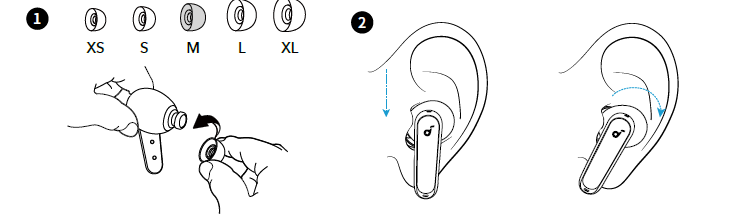
WEARING
- Try different ear tips to find the best fit.
- Gently place the earbuds into your ear canal and rotate them until they feel snug.
- Use the fit test in the Soundcore app to ensure optimal adaptive noise cancelling performance.
Dust, earwax, or other debris can accumulate in the earbuds. To maintain optimal sound quality, clean them regularly. Use a slightly moistened cotton swab with rubbing alcohol to gently wipe the metal mesh filter beneath the rubber ear tips. Make sure the alcohol has completely dried on the metal mesh filter before using the earbuds again.
POWERING ON AND PAIRING

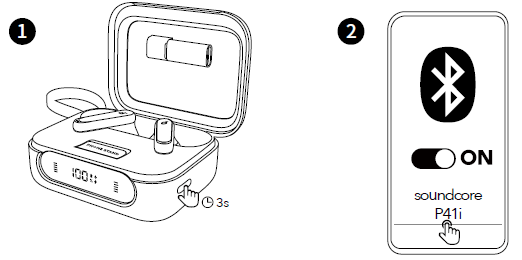
- Open the charging case. The earbuds will power on automatically and enter Bluetooth pairing mode. Google Fast Pair: Instantly pair with your Android smartphone (running Android 6.0 or above) using Google Fast Pair.
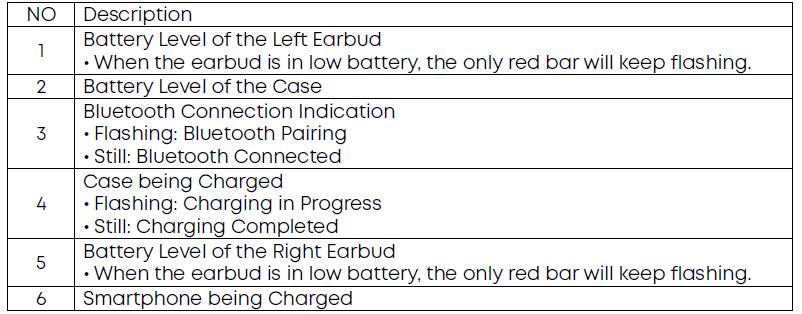
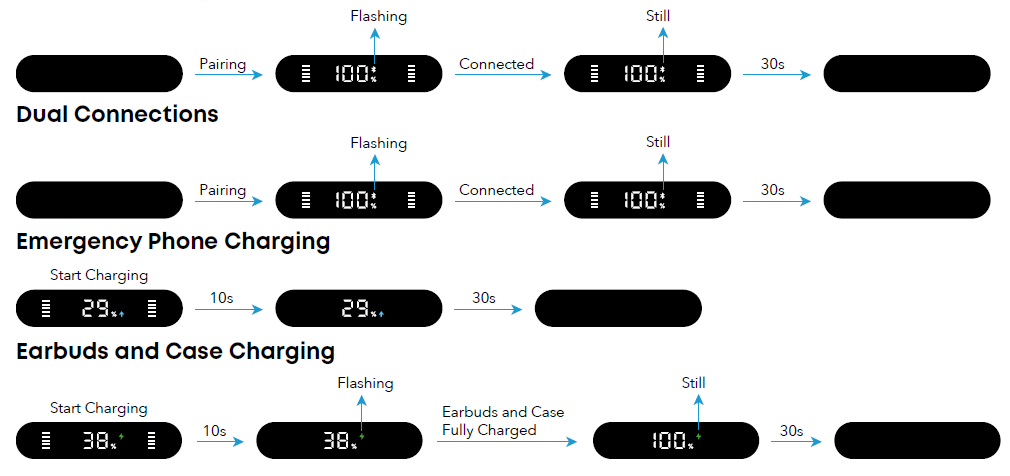
- Select Soundcore P41i from your device's Bluetooth list to connect. Once connected, the Bluetooth icon will stay on, and the LED Display will remain lit for 30 seconds and then go off.

To manually enable Bluetooth pairing mode for future use, place the earbuds in the charging case with the lid open. Then, press and hold the charging case button for 3 seconds until the Bluetooth icon begins to flash.
DUAL CONNECTIONS
To connect earbuds with two Bluetooth devices at the same time, there are two methods:
Method 1: Using the Soundcore App
In the Soundcore app, tap on the Settings icon located at the upper right corner of the app's interface. Then select Dual Connections > Enable Dual Connections > Connect New Device.
Method 2: Manual Pairing with the Second Device
While wearing the earbuds, press and hold the touch control area on both earbuds for 3 seconds until you hear a voice prompt to enter pairing mode. Then you can proceed to pair with the second device.
Upon successful Bluetooth connection, the Bluetooth icon on the LED Display will stay on.
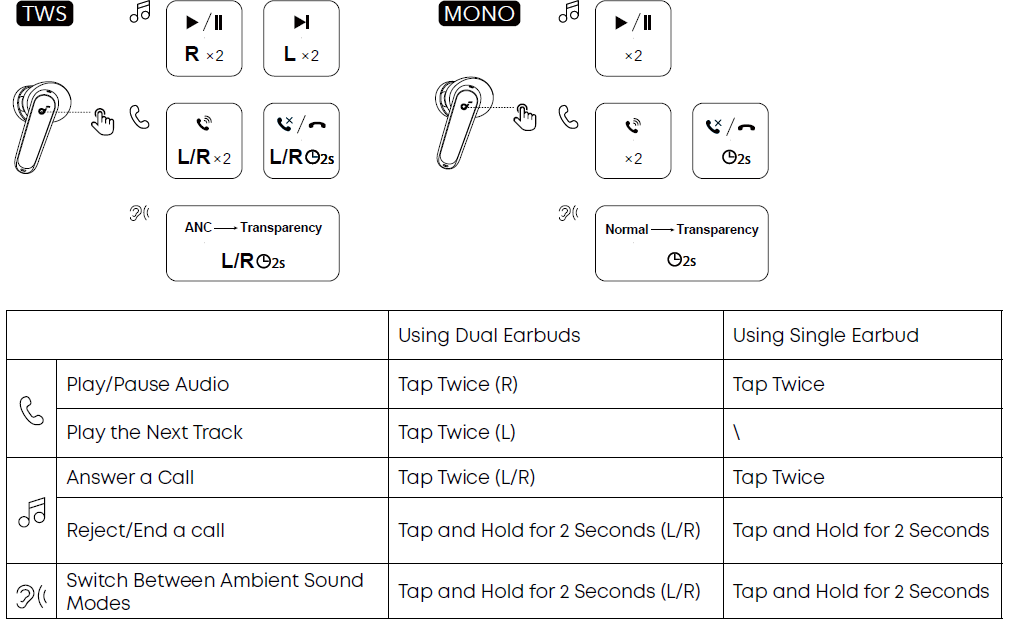
CONTROLS
Note: You can customise controls in the Soundcore app.
LED DISPLAY GUIDE
The LED Display on the charging case will illuminate under the following conditions: when you open or close the lid, place the earbuds back into the case, press the charging case button, charge the case, or use the built-in USB-C cable to charge your smartphone.
If no activity is detected for 30 seconds, the LED Display will automatically turn off.
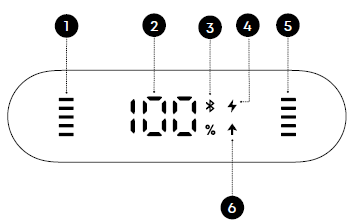
Display Icons
Bluetooth Pairing
AMBIENT SOUND
In the Soundcore app, you can select from Adaptive Noise Cancellation, normal, or transparency mode.
- Adaptive Noise Cancellation: Optimises noise cancellation by adjusting to your ears and environment.
- Normal: Enjoy balanced sound without noise cancellation.
- Transparency: Hear ambient sounds clearly while enjoying music.
EMERGENCY PHONE CHARGING
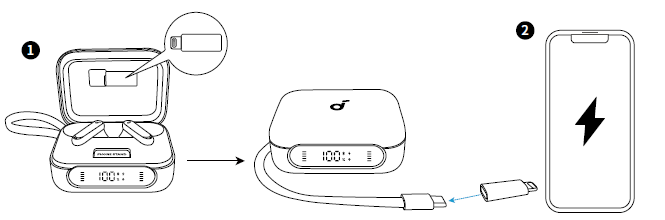
To use the emergency charging feature, follow these steps:
- For Type-C interface phones: Simply connect the charging case's USB-C cable directly to your phone. Once connected, the screen will light up with a charging icon, indicating that charging has started.
- For iPhones with Lightning interface: Open the top cover of the charging case, take out the Lightning Adapter, and attach it to the USB-C cable. Then, plug the cable into your iPhone. The screen will light up with a charging icon to indicate that charging has started.
Additionally, you can press the charging case button once to light up the screen and check the charging status.
When the battery level of the charging case is 10% or lower, it will stop charging the phone. Charging other devices may result in a malfunction.
EARBUDS AND CASE CHARGING

- Ensure the earbuds and the USB-C charging port are completely dry before charging. Place the earbuds in the charging case and close it.
- There are three ways to charge the case:
- Using a USB-A to USB-C cable: Connect the charging case to a power supply using a USB-A to USB-C cable (not included in the package).
- Using a USB-C to USB-C cable: Insert a USB-C to USB-C cable (not included in the package) into the USB-C port on the charging case and connect it to a power supply.
- Using the built-in USB-C cable: Plug the built-in USB-C cable into an adapter to charge the case.
A full recharge for the case and earbuds takes 5 hours. Charging the earbuds for 10 minutes provides 5 hours of playtime.
When the battery level of the charging case drops to 10% or below, the battery level indication will flash 10 times every time the LED Display lights up.
POWERING OFF
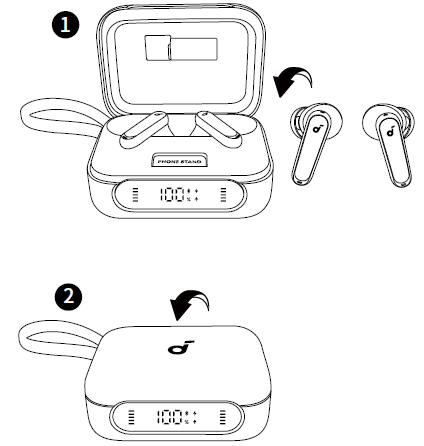
To power off, return both earbuds to the charging case and close it.
When removed from the case, the earbuds automatically power off after 30 minutes if not connected to any device. The duration can be set in the Soundcoree app.
RESET
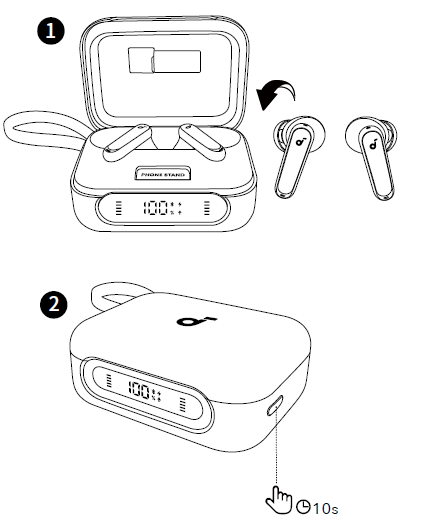
Place the earbuds in the charging case with the lid open. Press and hold the charging case button for 10 seconds.
Upon a successful reset, the earbuds will re-enter Bluetooth pairing mode. At this time, the Bluetooth icon on the LED Display will start flashing.
FIRMWARE UPDATE
You will be notified once a new firmware version of the earbuds or charging case is detected when the earbuds are connected to the app. Ensure the earbuds are placed in the charging case, and the case remains open until the firmware update is complete. During the update, ensure the battery levels of both the earbuds and the charging case are above 20%, and avoid any usage.
Troubleshooting Common Issues for sSoundcoreP41i Adaptive Noise Cancelling Earbuds
Users of the Soundcore P41i Adaptive Noise Cancelling Earbuds may encounter occasional issues such as connectivity drops, charging delays, or ANC malfunctions. Common solutions include:
- Connectivity Problems: Ensure the earbuds are fully charged and reset Bluetooth pairing by forgetting the device and reconnecting. Keep devices within 10 meters (32.8 feet) to maintain a stable wireless connection.
- Charging Case Not Charging Phone: Verify the charging case battery is above 10%, as charging stops below this level. Use the built-in USB-C cable and Lightning adapter if charging an iPhone. Avoid charging if the case or earbuds are wet.
- Noise Cancelling Ineffective: Update the firmware via the Soundcore app and ensure earbuds fit properly with the correct ear tips to optimise ANC performance.
- Error Code LED Flashes: If the LED display flashes 10 times, the battery is critically low; recharge the case and earbuds fully.
Preventive measures include regularly cleaning the earbuds and case, avoiding exposure to moisture, and updating firmware through the Soundcore app. The product includes a warranty covering manufacturing defects, and customer support can be reached through the official Soundcore website or authorised retailers for assistance and repairs.
Pros & Cons of Soundcore P41i Adaptive Noise Cancelling Earbuds
- Pros:
- Exceptional Battery Life: Up to 12 hours per charge with a massive 192-hour total using the charging case, plus a fast 10-minute quick charge for 5 hours of listening.
- Portable Phone Charger: The built-in 3,000mAh power bank in the charging case can recharge popular smartphones, adding great travel convenience.
- Advanced Adaptive Noise Cancelling: Intelligent ANC adapts dynamically to surrounding sounds for immersive listening and improved call clarity.
- Superior Call Quality: Six microphones combined with AI noise reduction deliver clear voice calls even in noisy environments.
- Built-in Phone Stand: Unique patented design for hands-free video watching, enhancing usability beyond audio.
- Cons:
- Charging Time: Full recharge of the case and earbuds takes about 5 hours, which might be long compared to competitors.
- Bulkier Charging Case: Incorporating a power bank increases the size and weight compared to standard earbud cases.
- Price Point: At approximately $120, it is mid-range but pricier than some basic true wireless earbuds without phone charging.
While offering outstanding value through multi-functionality and sound quality, the Soundcore P41i competes with alternatives like Sony WF-C500 or JBL Tune series, which may offer lighter cases but lack portable phone charging and the same ANC sophistication.
Customer Reviews of Soundcore P41i Adaptive Noise Cancelling Earbuds
Customers generally praise the Soundcore P41i Adaptive Noise Cancelling Earbuds for their strong bass performance, reliable noise cancellation, and the unique convenience of a phone-charging case. Many reviewers highlight the long battery life and excellent call clarity as standout features. For example, one user commented, "I am absolutely shocked by the sound quality and ANC, better than other brands I’ve tried."
Common complaints include the relatively longer charging time for the case and occasional connectivity glitches, which can often be resolved with resets and firmware updates. Star ratings typically range around 4 to 4.5 out of 5 stars, reflecting high overall satisfaction. Users recommend these earbuds for travellers, remote workers, and anyone needing extended usage without frequent recharging.
Faqs
How do I set up soundcore P41i Adaptive Noise Cancelling Earbuds for the first time?
What should I do if soundcore P41i Adaptive Noise Cancelling Earbuds won't pair?
Can I use soundcore P41i Adaptive Noise Cancelling Earbuds with both Android and iOS devices?
How often should I charge the charging case of soundcore P41i Adaptive Noise Cancelling Earbuds?
What features make soundcore P41i Adaptive Noise Cancelling Earbuds different from other earbuds?
How do I maintain and clean soundcore P41i Adaptive Noise Cancelling Earbuds for optimal performance?
What should I do if one earbud of the soundcore P41i Adaptive Noise Cancelling Earbuds is quieter than the other?
Can I use soundcore P41i Adaptive Noise Cancelling Earbuds during exercise or in wet conditions?
More soundcore manuals
- How to Pair: Soundcore Motion Boom Loudspeaker User Manual
- How to Pair: Soundcore Space A40 Wireless Earbuds User Manual
- How to Use: Soundcore Boom 2 Portable Bluetooth Speaker User Manual
- Pairing & Setup: Soundcore Life P2i Hybrid Earbuds Instruction Manual
- How to Pair: Soundcore Boom 3i Portable Bluetooth Speaker User Manual
- Pairing: Soundcore Life A2 NC+ Wireless Earbuds Setup Guide
Leave a Comment