
How to Use: Soundcore Boom 2 Portable Bluetooth Speaker User Manual
Content
Soundcore Boom 2 Portable Bluetooth Speaker

Introduction
The Soundcore Boom 2 Portable Bluetooth Speaker by Anker delivers a powerful and immersive audio experience tailored for music lovers on the go. Featuring an 80W max output with advanced BassUp™ 2.0 technology, this speaker enhances low frequencies to provide punchy, deep bass alongside crisp highs through its 2.1 stereo setup with a racetrack subwoofer and dual tweeters. Its customizable Pro EQ allows users to fine-tune sound profiles for various music genres, ensuring personalized listening satisfaction.
Designed for outdoor enthusiasts and casual listeners alike, the Boom 2 boasts an IPX7 waterproof and floatable build, making it ideal for pool parties, beach trips, or rainy day adventures. With up to 24 hours of continuous playtime and a built-in 4900mAh power bank, it keeps both music and devices powered throughout the day. The PartyCast 2.0 feature enables connection of over 100 speakers for an amplified party atmosphere, while True Wireless Stereo (TWS) allows pairing two units for full stereo separation.
Available at an estimated price of around $130, the Soundcore Boom 2 is widely accessible through online retailers and select stores. Its blend of durability, sound quality, and versatility makes it a strong choice for users seeking a reliable portable speaker to fuel any adventure or social gathering.
Specifications
- DC Power Input: 5V 3A
- DC Output: 5V 1A
- Battery Capacity: 3100mAh/7.2V
- Audio Output Power: 30W
- Speaker Driver: 70x70mm Full Ranges x2
- Frequency Response: 50Hz-20kHz
- Charging Time: 4 Hours
- Play Time (varies by volume level and music content): Up to 18 Hours
- Waterproof Level: IPX7
- Bluetooth Version: 5.3
- Bluetooth Range: 100m / 328ft
At a Glance
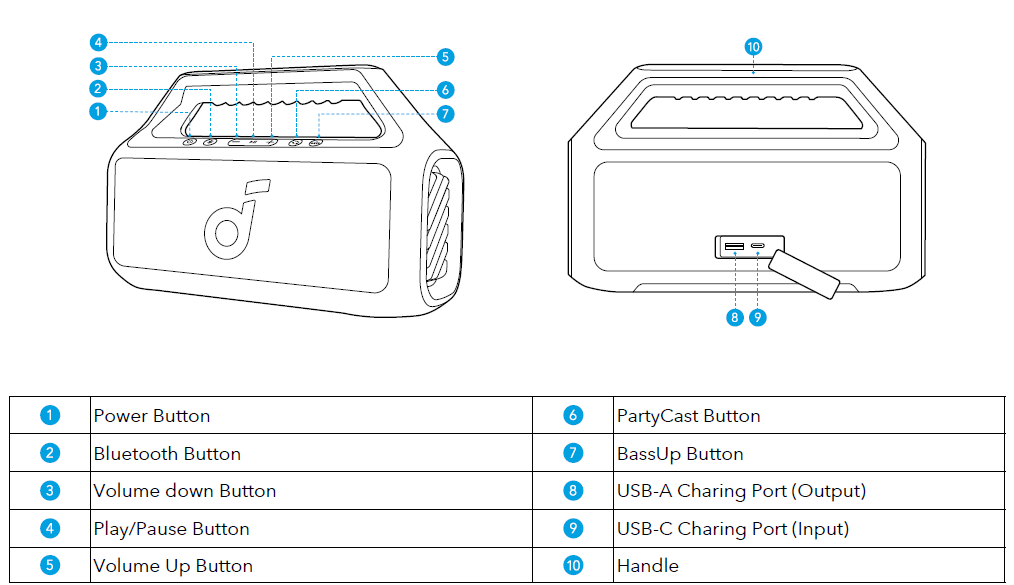
Charging
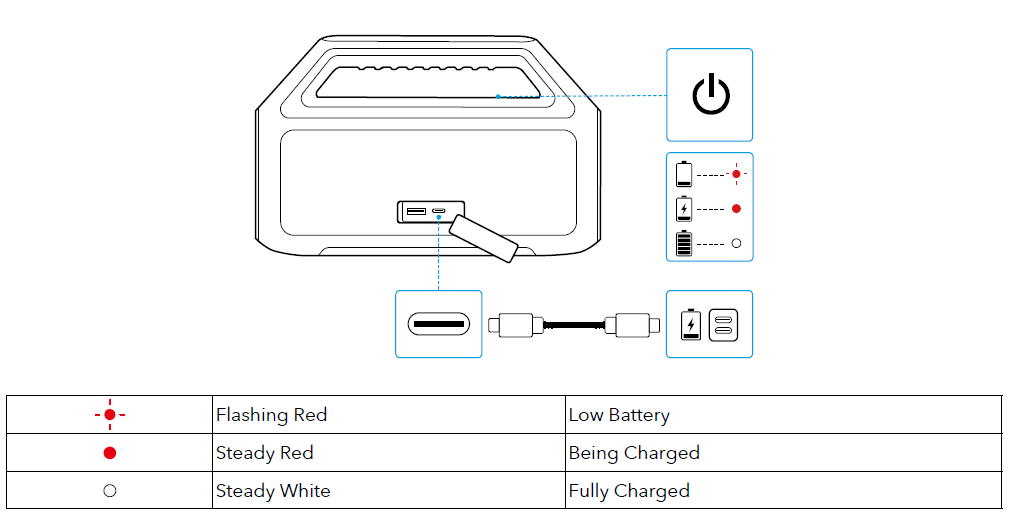
Charging Your Speaker
Use a certified USB-C cable and charger to prevent any damage.
Charging External Devices
Use this speaker as a power bank to charge your portable devices or accessories.

Powering On / Off
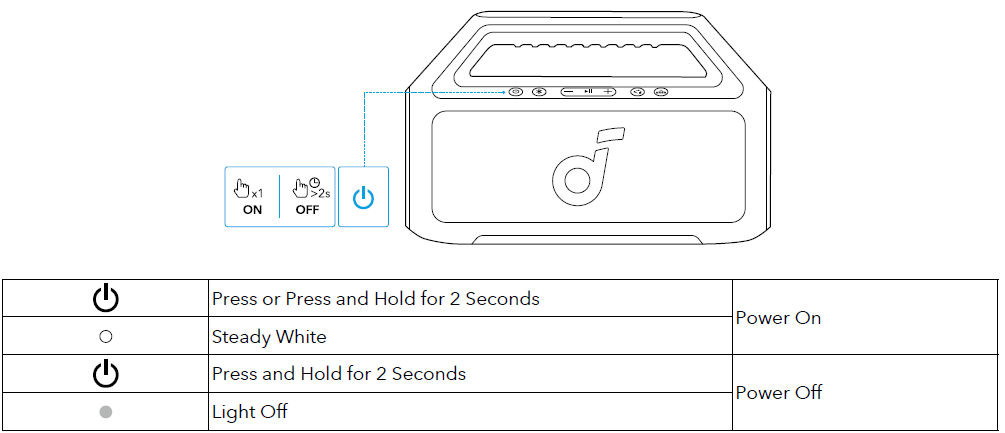
- This speaker will automatically power off after 20 minutes of no audio input.
- You can also set an auto-power-off time in the Soundcore app.
Using Your Speaker
Bluetooth Mode
Press the Bluetooth button to enter Bluetooth pairing mode, then select "Soundcore Boom 2 SE" from the Bluetooth list to connect.


- To re-enter Bluetooth pairing mode, press the Bluetooth button once.
- This speaker can only play music on one mobile device at a time. To play from another connected device, pause the device that's currently active first.
- Each time you power on your speaker, it will automatically connect to your last connected device if available within the Bluetooth range. If not, press the Bluetooth button to enter Bluetooth pairing mode.
TWS (True Wireless Stereo) Mode
Two identical Soundcore speakers can pair with each other for stereo sound. Both speakers can play the same audio (one as the left channel and the other as the right channel).
With one speaker connected to a smartphone, press and hold the Bluetooth button for 2 seconds on two speakers to enter TWS pairing mode.
_mode.png)
To exit TWS mode, press and hold the Bluetooth button for at least 2 seconds.
PartyCast Mode
With one speaker connected to a smartphone, press the PartyCast button on up to 100 Soundcore speakers with the PartyCast function to synchronize audio and light.
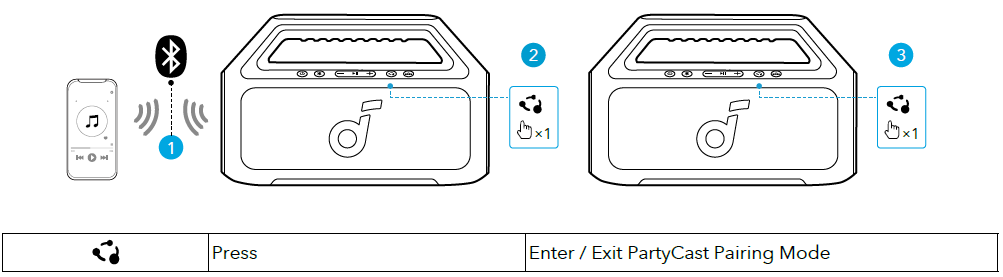

Soundcore speakers with PartyCast function can also be connected to this speaker.
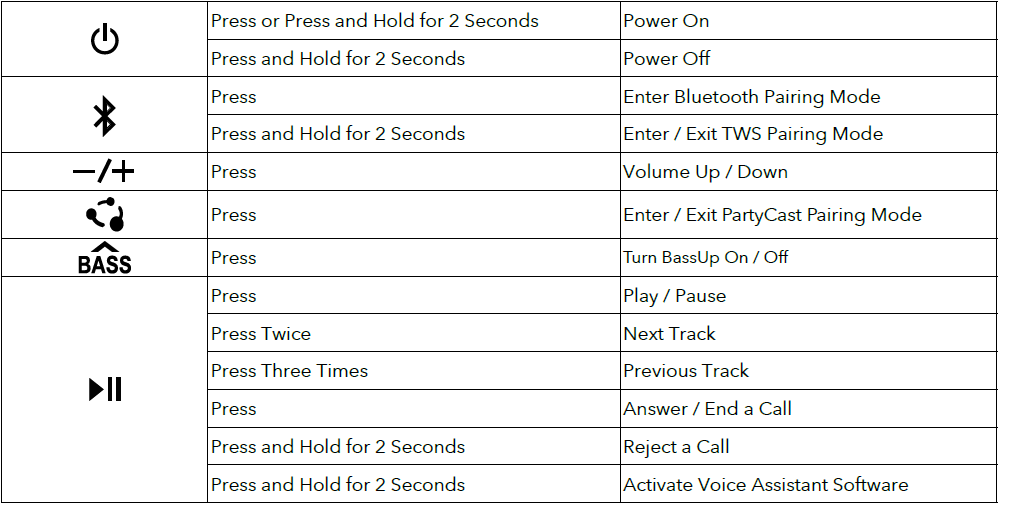
Button Controls
Soundcore App
Download the Soundcore app to enhance your experience.

- Product information: Check the product name and software version, or read the user manual.
- Firmware update: You will be informed once a new version of firmware is detected when you connect the speaker to the app.
- Battery status: Indicates the remaining battery level of your speaker.
- Volume control: Adjust the volume level via the app without pressing the buttons on the speaker.
- EQ settings: There are various preset EQ settings you can choose from in the app to optimize your experience while enjoying different music genres.
- Soundcore Signature: Standard EQ mode optimized for well-balanced sound.
- Voice: Voices stand out more clearly from other ambient sounds.
- Balance: No enhancement for high-frequency and low-frequency sounds.
- Xtra Bass: Enhance the low-frequency sound.
Set auto-power-off time: Set an auto-power-off time. The speaker will automatically power off when the time is up. Voice prompt: Mute or restore the voice prompt while powering on/off.
Reset
Press and hold the Bluetooth button and volume up button simultaneously for at least 4 seconds to reset the speaker.
Troubleshooting Soundcore Boom 2 Portable Bluetooth Speaker Issues
Common problems with the Soundcore Boom 2 Portable Bluetooth Speaker include connectivity issues, low volume, or failure to power on. To resolve pairing difficulties, ensure the speaker is in Bluetooth mode by pressing the Bluetooth button, then reconnect via your device’s Bluetooth settings. Reset the speaker by pressing and holding the Bluetooth and volume up buttons simultaneously for 4 seconds if problems persist.
Low audio output can often be fixed by adjusting the customizable EQ through the Soundcore app or checking battery levels. If the speaker won’t power on, connect it to a charger using the USB-C cable and allow it to charge for at least 5.5 hours. The LED indicators help monitor battery and charging status.
There are no specific error codes displayed on the Boom 2, but keeping the firmware updated via the Soundcore app ensures optimal performance. To prevent issues, avoid fully depleting the battery regularly and keep the waterproof seals closed during use near water.
The Boom 2 comes with a 1-year warranty covering manufacturing defects. For technical support or repairs, users can contact Anker’s customer service through the official Soundcore website or authorized resellers.
Pros & Cons of the Soundcore Boom 2 Portable Bluetooth Speaker
- Pros:
- Impressive 80W Bass Output: Delivers deep, rich bass thanks to BassUp™ 2.0 and a racetrack subwoofer, enhancing music genres like hip-hop and EDM.
- Long Battery Life: Up to 24 hours of playback with a built-in power bank to charge mobile devices on the go.
- Durable and Waterproof: IPX7 rating and floatable design make it perfect for outdoor adventures and water exposure.
- Advanced Connectivity: PartyCast 2.0 supports linking over 100 speakers; TWS enables stereo pairing for expanded soundstage.
- Customizable Sound: Pro EQ presets and adjustable settings via the dedicated app suit various audio preferences.
- Cons:
- Weight and Size: At 3.65 lbs and dimensions of 11.65 x 7.28 x 3.98 inches, it is less compact compared to some ultra-portable speakers.
- Price Point: Priced around $130, it may be costlier than basic Bluetooth speakers,, but justifiable by features and sound quality.
- Limited Color Options: Fewer color variants might not satisfy all style preferences.
- App Dependency: Some sound customization features require the use of the Soundcore app, which may not appeal to all users.
Customer Reviews of the Soundcore Boom 2 Portable Bluetooth Speaker
Users consistently praise the Soundcore Boom 2 Portable Bluetooth Speaker for its robust bass and clear audio quality, often highlighting its suitability for outdoor use thanks to its waterproof design. With an average rating of approximately 4.1 stars, many customers appreciate the long battery life and the convenience of the built-in power bank.
Common compliments include its ability to maintain sound quality at high volumes and the ease of linking multiple speakers via PartyCast 2.0 for enhanced sound coverage. However, some users mention that the speaker is heavier than expected for portability and that the app can occasionally be unresponsive during EQ adjustments.
Despite minor criticisms, the majority recommend the Boom 2 for its value-for-money balance, making it a popular choice for both casual listeners and outdoor enthusiasts seeking a reliable, feature-rich Bluetooth speaker.
Faqs
How do I set up the soundcore Boom 2 Portable Bluetooth Speaker for the first time?
What should I do if my soundcore Boom 2 Portable Bluetooth Speaker is not connecting via Bluetooth?
Can I use the soundcore Boom 2 Portable Bluetooth Speaker with multiple devices simultaneously?
How do the customizable EQ settings on the soundcore Boom 2 Portable Bluetooth Speaker work?
What are the best practices to maintain and clean the soundcore Boom 2 Portable Bluetooth Speaker?
How long does the battery last on the soundcore Boom 2 Portable Bluetooth Speaker, and how do I optimize playtime?
What should I do if the soundcore Boom 2 Portable Bluetooth Speaker's sound is distorted or low quality?
Is the soundcore Boom 2 Portable Bluetooth Speaker waterproof and suitable for outdoor use?
More soundcore manuals
- How to Pair: Soundcore Boom 3i Portable Bluetooth Speaker User Manual
- How to Pair: Soundcore Motion Boom Loudspeaker User Manual
- How to Pair: Soundcore Select Pro Bluetooth Speaker User Manual
- How to Use: Soundcore P41i Adaptive Noise Cancelling Earbuds User Manual
- Pairing: Soundcore Life P2 Wireless earbuds User Manual
- How to Pair: Soundcore Space A40 Wireless Earbuds User Manual
Leave a Comment