
How to Pair: Soundcore Space A40 Wireless Earbuds User Manual
Content
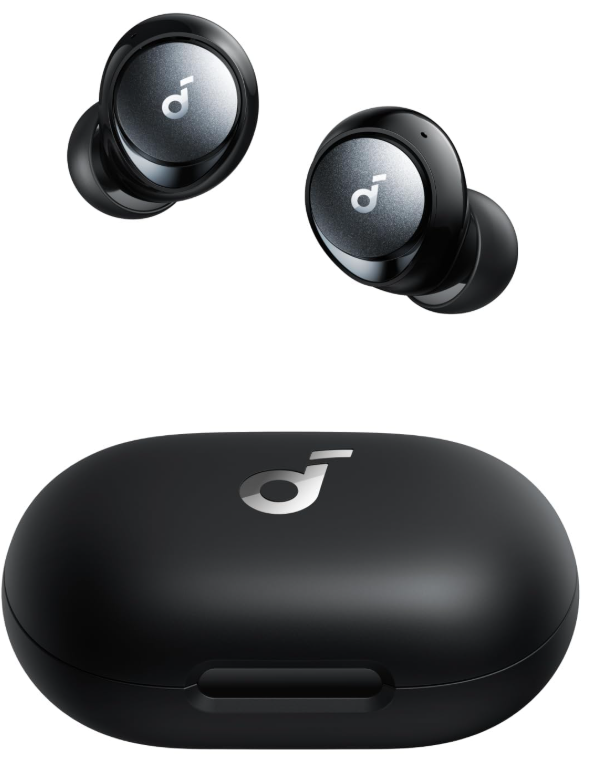
soundcore Space A40 Wireless Earbuds
Introduction
The Soundcore Space A40 Wireless Earbuds are advanced true wireless earbuds designed to deliver immersive sound with cutting-edge noise cancellation technology. Equipped with adaptive active noise cancelling (ANC) that reduces up to 98% of ambient noise, these earbuds are ideal for users seeking clear and focused audio in any environment—whether commuting, working remotely, or enjoying music outdoors. Their ergonomic design is lightweight and comfortable, suitable for extended daily use.
Featuring an impressive 50-hour total playtime with the charging case and a quick 10-minute fast charge providing 4 hours of playback, the Space A40 ensures uninterrupted listening throughout your day. With six AI-enhanced microphones, voice calls are crystal clear, making them perfect for professionals and casual users alike. Additional features include multipoint Bluetooth connectivity for seamless device switching, 22 customizable EQ presets, and premium Hi-Res sound support via LDAC codec for audiophiles.
Targeted at music lovers, remote workers, travelers, and fitness enthusiasts, these earbuds balance performance and convenience with IPX4 water resistance and wireless charging capability. The price range typically falls between $130 to $160, positioning the Space A40 as a competitive mid-range option available globally through authorized retailers and online stores.
WEARING
CHARGING
- Tear off the insulation sticker on the earbuds before first use.
- Place the earbuds in the charging case and close it.
- Connect the charging case to the power supply by using a certified USB-C charging cable. Alternatively, position the charging case at the center of your wireless charger for wireless charging.
- Fully charge both the earbuds and the charging case before the first use. When they are fully charged, the LED indicators will turn off.

POWERING ON & PAIRING
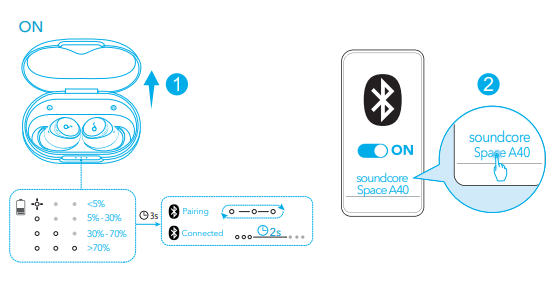
- Open the charging case, and the earbuds will automatically power on and enter Bluetooth pairing mode.
- Select "Soundcore Space A40" from your device's Bluetooth list when connecting for the first time.
MULTIPOINT CONNECTION
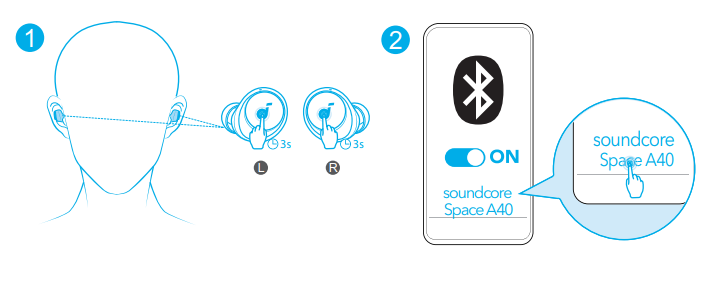
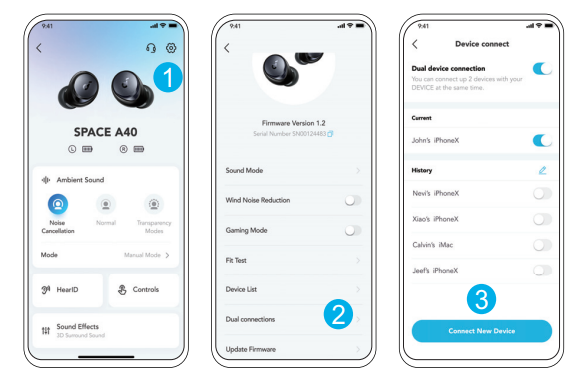
- The earbuds can connect with two devices at the same time, so you can switch between them effortlessly. Wear the earbuds, then press and hold the touchpad on both earbuds for 3 seconds simultaneously. Select
Soundcoree Space A40" from your device's Bluetooth list to connect. - In the Soundcore app, go to settings and select Dual Connections > Connect New Device.
CONTROLS
SPECS
- Input: 5 V 0.65 A
- Rated output power: 2.2 mW
- Battery capacity :53 mAh x 2 (earbuds); 800 mAh (charging case)
- Charging time :2 hours
- Playtime :(with ANC off)
- Up to 10 hours (Total 50 hours with the charging case)
- Playtime (with ANC on) Up to 8 hours (Total 40 hours with the charging case)
- Driver unit :10 mm dynamic driver
- Frequency response: 20 Hz - 20 kHz
- Waterproof level :(Earbuds) IPX4
- Bluetooth version: 5.2
- Bluetooth range :10 m / 33 ft
Troubleshooting Common Issues with Soundcore Space A40 Wireless Earbuds
Users may occasionally encounter issues such as connectivity problems, suboptimal noise cancellation, or audio dropouts. Here are some common problems and solutions:
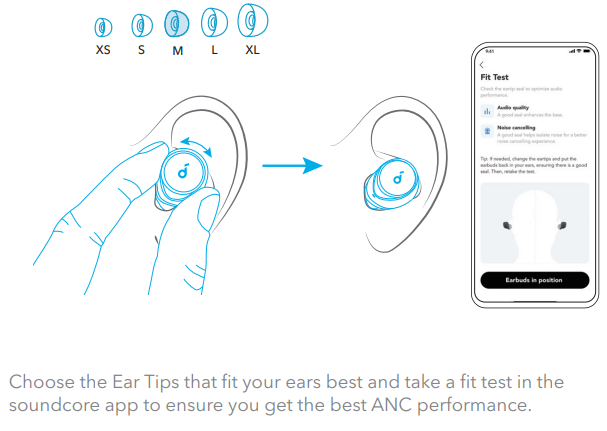
- Poor Noise Cancellation: Ensure you are using the correct size of ear tips for a tight seal and proper fit. Running the Fit Test in the Soundcore app can help optimize ANC performance.
- Bluetooth Connection Drops: Disable LDAC mode if enabled, as it can cause instability. Try reconnecting or resetting the earbuds by placing them in the charging case and holding the reset button.
- Mic Issues During Calls: Clean the microphones gently and ensure firmware is updated via the app for optimal AI noise suppression.
- Charging Problems: Use the included USB-C cable or a compatible wireless charger. Clean charging contacts if charging fails.
Preventive measures include regularly updating firmware through the Soundcore app and storing earbuds in the charging case when not in use. The Space A40 earbuds come with a one-year warranty covering manufacturing defects. For support, users can contact Soundcore customer service via their official website or app.
Pros & Cons of the Soundcore Space A40 Wireless Earbuds
Pros
- Exceptional Noise Cancellation: Adaptive ANC reduces up to 98% of background noise, outperforming many competitors in the mid-range segment.
- Long Battery Life: Offers up to 10 hours per charge, with 50 hours total using the charging case, including fast charging capability.
- Clear Voice Calls: Six AI-driven microphones ensure high-quality call clarity even in noisy environments.
- Customizable Sound: 22 EQ presets and HearID sound personalization via the Soundcore app enhance the listening experience.
- Multipoint Connectivity: Connects simultaneously to two Bluetooth devices, ideal for multitasking across phone and tablet, or computer.
- Comfortable Design: Lightweight with five sizes of ergonomic ear tips for a secure, comfortable fit during extended use.
Cons
- LDAC Mode Limitations: Enabling LDAC disables multipoint connectivity and may reduce connection stability in some environments.
- Mid-Bass Bias: Sound profile favors boosted mid-bass, which may not satisfy audiophiles seeking neutral sound.
- Ear Tip Size Limits: The Largest included ear tips might be too small for users with larger ear canals, requiring third-party replacements.
- No Earbud Location Feature: Unlike some competitors, the Space A40 does not include a find-my-earbuds tracker.
Overall, the Soundcore Space A40 Wireless Earbuds offer excellent value for money, especially compared to alternatives like the older Soundcore Liberty 3 Pro, by delivering superior noise cancelling and sound quality in a versatile package.
Customer Reviews of Soundcore Space A40 Wireless Earbuds
Users generally praise the Soundcore Space A40 Wireless Earbuds for their effective noise cancellation and comfortable fit. Many highlight the convenience of multipoint Bluetooth connection and the rich, detailed sound with customizable EQ settings. Customers appreciate the extended battery life and fast charging feature, which supports all-day use without frequent recharging.
Common complaints include occasional connection instability when LDAC mode is enabled and the need for larger ear tips for some users. Some reviewers report that while call quality is good, microphone audio can be slightly below average but still clear enough for typical use. Overall, the earbuds receive an average rating of around 4 to 4.5 stars out of 5, with most users recommending them for daily commuting, work calls, and casual listening.
Frequent buyers recommend purchasing directly from authorized sellers to ensure warranty coverage and access to firmware updates through the official Soundcore app.
Faqs
How do I set up soundcore Space A40 Wireless Earbuds for the first time?
What can I do if the noise cancellation on my soundcore Space A40 Wireless Earbuds isn’t working effectively?
Can soundcore Space A40 Wireless Earbuds connect to two Bluetooth devices simultaneously?
How do I enable and use LDAC mode on soundcore Space A40 Wireless Earbuds for high-resolution audio?
What features make soundcore Space A40 Wireless Earbuds suitable for clear calls in noisy environments?
How long does the battery last on soundcore Space A40 Wireless Earbuds and how fast can I recharge them?
How should I clean and maintain my soundcore Space A40 Wireless Earbuds to ensure longevity?
Are soundcore Space A40 Wireless Earbuds compatible with non-Android devices and what should I expect?
More soundcore manuals
- How to Use: Soundcore P41i Adaptive Noise Cancelling Earbuds User Manual
- Pairing & Setup: Soundcore Life P2i Hybrid Earbuds Instruction Manual
- How to Pair: Soundcore Motion Boom Loudspeaker User Manual
- Pairing: Soundcore Life A2 NC+ Wireless Earbuds Setup Guide
- How to Use: Soundcore Boom 2 Portable Bluetooth Speaker User Manual
- Pairing & Usage: Soundcore Life P3i Hybrid Active Earbuds User Manual
Leave a Comment