
How to Pair: Soundcore Select Pro Bluetooth Speaker User Manual
Content
Soundcore Select Pro Bluetooth Speaker
Introduction
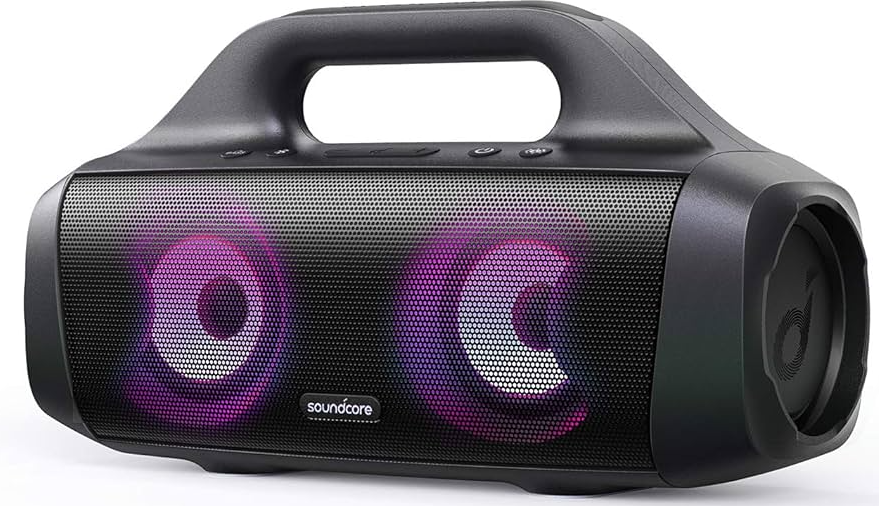
The soundcore Select Pro Bluetooth Speaker by Anker is a powerful, portable audio solution designed to elevate your music experience anywhere you go. Featuring robust 30W stereo sound enhanced with BassUp technology, this speaker delivers deep, booming bass and crystal-clear highs that fill rooms or outdoor spaces with immersive audio quality. Its dynamic LED light show pulses in sync with the beat, creating a vibrant atmosphere for parties, camping trips, poolside gatherings, or casual listening.
With an IPX7 waterproof rating, the Select Pro is built to withstand immersion in water up to 1 meter for 30 minutes, making it an ideal companion for outdoor adventures or pool parties. The speaker boasts up to 16 hours of continuous playtime on a single charge, ensuring your music won’t stop until you decide. Its compact yet sturdy design includes a built-in handle for easy portability, targeting music lovers who need a rugged, reliable speaker for both indoor and outdoor use.
Priced in the mid-range segment, typically around $80 to $120 depending on the retailer, the soundcore Select Pro offers excellent value by combining premium sound features with water resistance and long battery life. It is widely available through major online platforms and retail stores specializing in audio gear. Whether you are hosting a backyard barbecue or enjoying a solo hike, this Bluetooth speaker is engineered for versatile use and dependable performance.
At a Glance
Using Your Speaker
Bluetooth Mode
With this speaker, you can enjoy music through your Bluetooth-enabled devices.
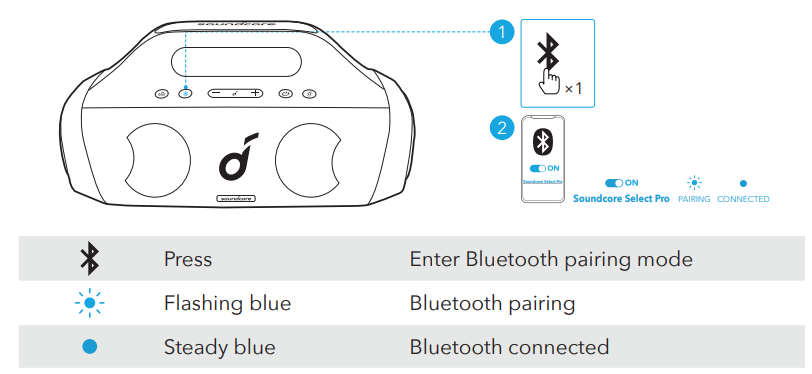
- This speaker can pair with 2 mobile devices via Bluetooth. To pair with another Bluetooth device, press the Bluetooth button to re-enter Bluetooth pairing mode.
- This speaker can only play music on one mobile device at a time. To play from another connected device, pause the device that's currently active first.
- Each time you power on your Soundcore speaker, it will automatically connect to your last connected device if available within the Bluetooth range. If not, press the Bluetooth button to enter Bluetooth pairing mode.
Party Cast Mode
- You can wirelessly connect up to 100 identical Soundcore Select Pro speakers together. In PartyCast mode, connect one of the speakers with your mobile device so that all connected speakers play the same audio.
Soundcore speakers with PartyCast function can also be connected with this speaker.- Press and hold the Bluetooth button for 2 seconds on the Soundcore Select Pro that's currently connected to your device as the primary speaker.
- Repeat Step 1 on the other Soundcore Select Pro you want to connect and then press the Bluetooth button twice to make them secondary speakers in PartyCast pairing.
- The secondary speakers will automatically connect with the primary speaker.
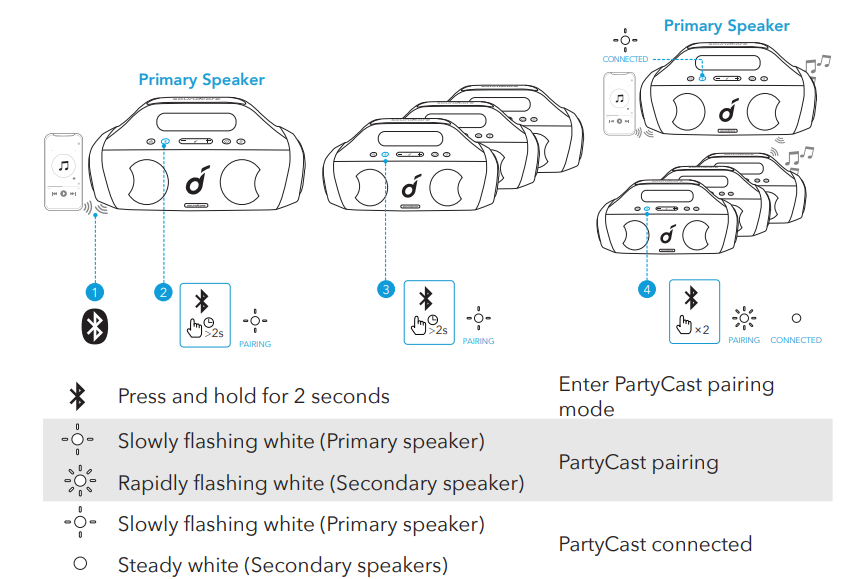
When PartyCast mode is successfully entered:
- Any secondary speaker can be switched to become the primary speaker by pressing the Bluetooth button twice and connecting to your smartphone.
- Any primary speaker can be switched to become the secondary speaker by pressing the Bluetooth button twice and searching for an available primary speaker.
- To exit the PartyCast mode, press and hold the Bluetooth button on any speaker for 2 seconds.
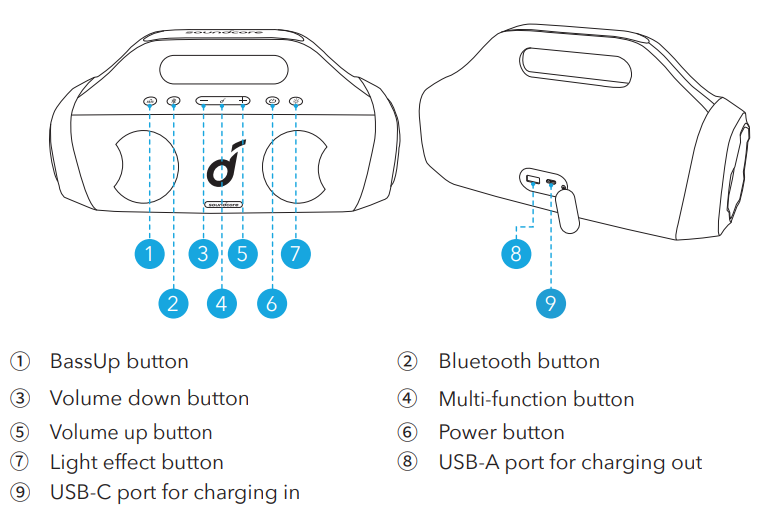
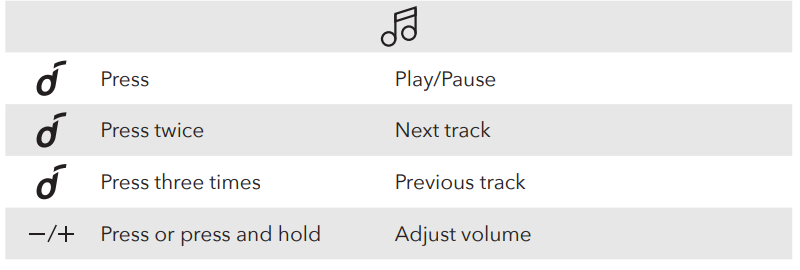
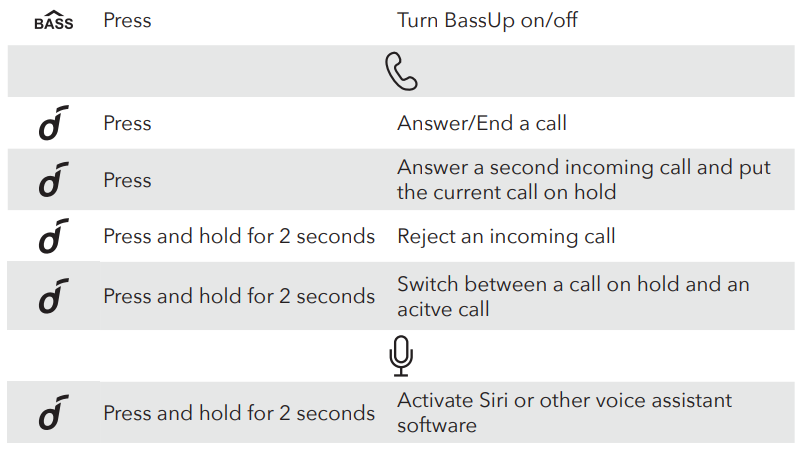
Button Controls
Soundcore App
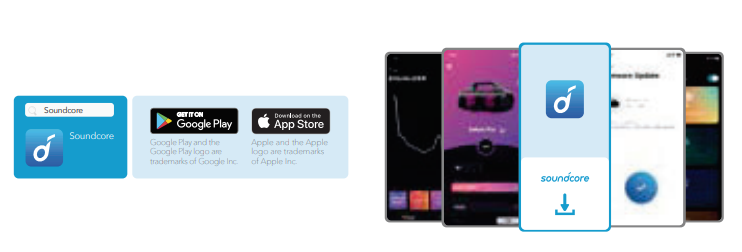
- Download the Soundcore app to enhance your experience.
- Product information: Check the product name and software version, or read the user manual.
- Firmware update: You will be informed once a new version of firmware is detected when you connect the speaker with the app.
- Battery status: Indicates the remaining battery level of your speaker.
- Volume control: Adjust the volume level via the app without pressing the buttons on the speaker.
- EQ settings: There are 4 EQ settings you can choose from in the app to optimize your experience while enjoying different music genres.
- Soundcore Signature: Normal EQ mode with well-balanced sound.
- Voice: Voices stand out more clearly from other ambient sounds.
- Treble Boost: High frequencies are enhanced.
- Balance: No enhancement for high-frequency and low-frequency sounds.
- Set Auto-power off time: Set an auto-power off time (5/10/30/60 minutes, 30 minutes by default), the speaker will automatically power off when time is up.
- Light effects: Besides the music-sync light effects, you can also choose your favorite light effects (Beach Party, Camping Trip, Evening Breeze, Midnight Groove) from in the app.
- Voice prompt: Mute or restore the voice prompt while powering on/off.
Specifications
Specifications are subject to change without notice.
- DC power input
- 5 V = 2.1 A
- Battery capacity
- 3350 mAh / 7.2 V
- USB output
- 5V= 1A
- Audio output power
- 30 W
- Charging time
- 4-6 hours
- Playtime (varies by volume level and music content)
- Up to 16 hours
- Waterproof level
- IPX7
- Bluetooth version
- 5.0
- Bluetooth range
- 20 m / 66 ft
Troubleshooting the soundcore Select Pro Bluetooth Speaker
While the soundcore Select Pro Bluetooth Speaker is designed for ease of use, users may encounter occasional issues. Here are common problems and their solutions:
- Speaker won’t turn on: Ensure the speaker is fully charged using the provided USB-C charger. Press and hold the power button for 2-3 seconds until the LED indicator lights up.
- Bluetooth pairing fails: Turn off the speaker and your device, then restart both. Remove previous pairing history on your phone and search again for “Select Pro” in Bluetooth settings.
- No sound despite connection: Check device volume and speaker volume. Also, ensure the correct audio output device is selected on your phone or computer.
- LED lights not syncing with music: Use the Soundcore app to customize or reset LED light effects and ensure the speaker firmware is updated.
- Error codes or speaker buzzing: Reset the speaker by holding down the power button for 10 seconds. If issues persist, consult the Soundcore support site for detailed diagnostics.
Preventive measures include avoiding exposure to extreme temperatures and fully drying the speaker after water exposure despite its waterproof rating. The soundcore Select Pro comes with a 12-month limited warranty covering manufacturing defects. For further assistance, contact Soundcore Customer Support via their official website or support hotline.
Pros & Cons of the soundcore Select Pro Bluetooth Speaker
- Pros:
- Powerful 30W stereo output with BassUp technology delivers rich, deep bass for an immersive audio experience.
- IPX7 waterproof rating allows safe use around water, including poolside and rainy environments.
- Long battery life of up to 16 hours ensures extended playtime without frequent recharging.
- Dynamic, customizable LED light show enhances the ambiance for parties and gatherings.
- Compact and portable design with an integrated handle, ideal for outdoor activities and travel.
- Ability to charge phones using PowerIQ technology, adding utility beyond audio playback.
- Cons:
- LED light presets may not appeal to all users; customization requires the Soundcore app.
- Some users note the default preset EQ settings can be suboptimal, necessitating manual adjustment for best sound.
- No built-in microphone, so it cannot be used for hands-free calls.
- At around 4.4 lbs, it is heavier than some competing portable speakers.
- USB-A port intended for charging devices may not support data transfer or firmware updates.
Compared to alternatives like the Soundcore Motion Boom, the Select Pro offers louder, bassier sound but lacks voice assistant integration. Overall, it provides excellent value for money with features tuned for outdoor enthusiasts and party-goers.
Customer Reviews of the soundcore Select Pro Bluetooth Speaker
Users consistently praise the soundcore Select Pro Bluetooth Speaker for its loud, clear sound and impressive bass performance, often highlighting how well it fills large outdoor spaces. The 16-hour battery life and waterproof design are frequently mentioned as major advantages, enabling worry-free use in diverse environments.
Some common complaints include dissatisfaction with default equalizer presets and the need to use the Soundcore app to fully customize the sound and LED settings. A few users remark on the speaker’s weight, which is heavier than ultra-compact rivals. However, the overall star rating averages around 4 to 4.5 out of 5, with many recommending it as a reliable and affordable Bluetooth speaker for outdoor events.
Testimonials often emphasize the speaker’s fun LED light show and robust build quality, recommending it for camping, tailgating, and pool parties. Customers appreciate the added convenience of phone charging capabilities, although some wish for a built-in microphone feature. On balance, the soundcore Select Pro is viewed as a top contender in its price range.
More soundcore manuals
- Pairing: Soundcore Life P2 Wireless earbuds User Manual
- How to Pair: Soundcore Boom 3i Portable Bluetooth Speaker User Manual
- How to Pair: Soundcore Liberty True-Wireless Earbuds User Manual
- How to Use: Soundcore Boom 2 Portable Bluetooth Speaker User Manual
- Pair & Setup: Soundcore Spirit X2 True Wireless Earbuds User Guide
- How to Pair: Soundcore Motion Boom Loudspeaker User Manual
Leave a Comment