
Pair & Setup: Soundcore Spirit X2 True Wireless Earbuds User Guide
Content
Soundcore Spirit X2 True Wireless Earbuds
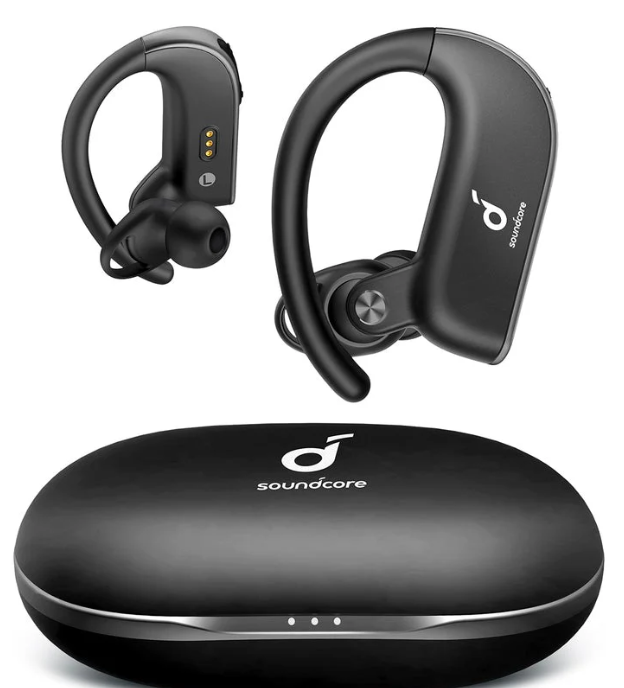
Introduction
The Soundcore Spirit X2 True Wireless Earbuds by Anker are engineered for fitness enthusiasts and active lifestyle users who demand premium sound quality combined with rugged durability. Designed with advanced BassTurbo and BassUp™ technology, these earbuds deliver powerful, deep bass resonances inspired by high-end speaker systems, making them ideal for energetic workouts, running, or everyday music enjoyment. Their IP68-rated SweatGuard technology ensures exceptional resistance against sweat, dust, and water, allowing use in intense gym sessions or rainy conditions without worry.
Offering up to 9 hours of continuous playtime per charge and extending to a comprehensive 36 hours with the portable charging case, the Spirit X2 earbuds support long-lasting use without frequent recharging. Equipped with Qualcomm aptX codec and Bluetooth 5.0, they provide a stable connection with high-fidelity, low-latency audio for clear music and calls. The ergonomic design features extra-flex ear tips and wings to secure a comfortable, invincible fit during vigorous activity.
Targeted at fitness buffs, commuters, and casual listeners alike, these true wireless earbuds blend functionality with style and durability. They typically retail in the price range of $70 to $100, available through major retailers and online marketplaces globally. By combining superior sound, robust construction, and excellent battery life, the Soundcore Spirit X2 True Wireless Earbuds stand out as a compelling choice for consumers seeking quality sports earbuds.
Charging
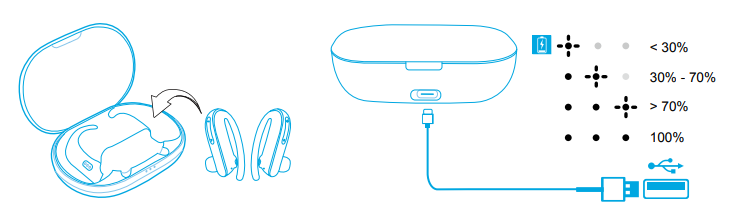
- Open or close the charging case to activate the LED battery indicator.
- Fully charge both the earbuds and the charging case before the first use.
- To prevent damage, use the provided USB-C cable.
- Fully dry off the earbuds and the USB port before charging.
Powering On/Off
- Open the charging case, and the earbuds will automatically power on.
- Place the earbuds back into the charging case and close the case; the earbuds will automatically power off.
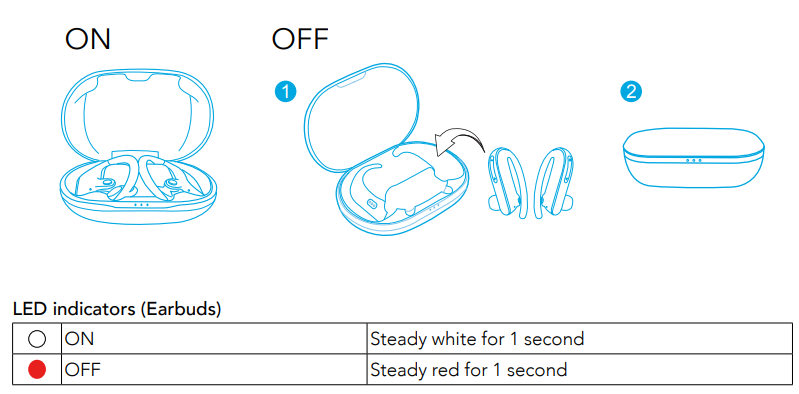
- To manually power on, press and hold the multi-function button on both earbuds for 1 second until the LED indicator turns white for 1 second.
- To manually power off, press and hold the multi-function button on both earbuds for 5 seconds until the LED indicator turns red for 1 second.
Pairing
True Wireless Stereo Connection
Open the charging case, and the right earbud will automatically connect with the left earbud.
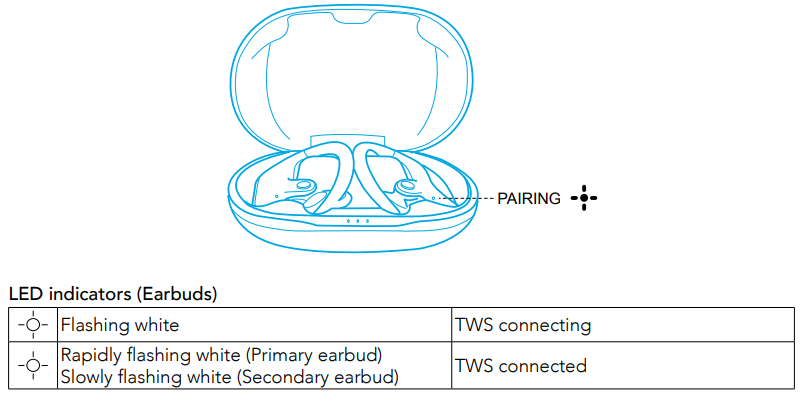
- When powered off, press and hold the multi-function button on both earbuds for 1 second, and the earbuds will enter TWS connecting mode.
- When powered on and connected, place either one of the earbuds into the charging case; you can keep using the other one.
- When powered on and connected, if either one of the earbuds is out of battery and powered off, you can keep using the other one.
- When you are on a call, place either one of the earbuds into the charging case and close the charging case. 3 to 5 seconds later, the microphone in the other earbud will be activated.
Bluetooth Pairing with your Device
- Open the charging case and wait for 1 to 3 seconds until the LED on one of the earbuds rapidly flashes white; the earbud enters pairing mode successfully.
- Turn on Bluetooth on your device and click “Soundcore Spirit X2”.
- Wait for 3 to 5 seconds until you see a pop-up and click “Pair”. The LED on the earbud will turn white for 1 second when Bluetooth is connected.

LED indicators (Earbuds)

- In the pairing process, some devices are incompatible with Qualcomm True Wireless Primary-Secondary dual pairing names; you may notice “connection unsuccessful” when you tap “Pair,” or even no screen pops up. Don’t wor,ry and it will not influence usage.
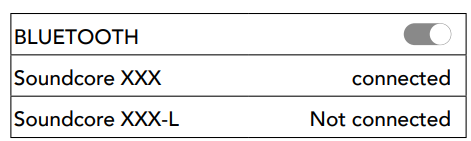
- Once successfully paired, the primary earbud connects with your device and transfers the signal to the secondary earbud; the latter one will not connect with your device. As a result, in the Bluetooth pairing list on your device, it may indicate that only one side is connected while the other side is not.
To pair with another Bluetooth device, open the charging case and make sure the earbuds are being charged, then press and hold the button on the charging case for 3 seconds until the LED indicator on one earbud flashes white rapidly.
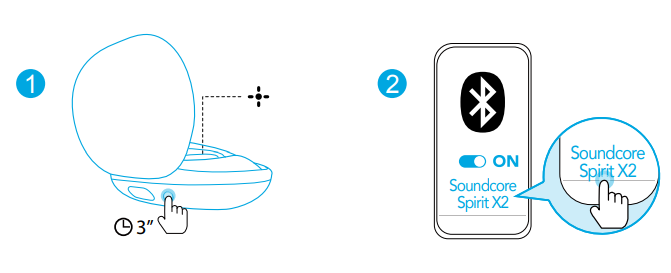
Each time you power on your Soundcore earphones, it will automatically connect to your last successfully connected device if available.
Wearing
- Choose the EarTips that fit your ears best.
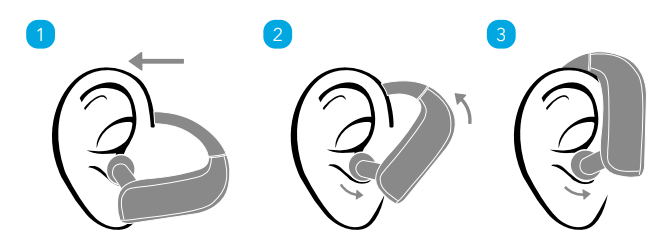
- Route the ear hooks around your ears, then insert the earbuds into the inner canal of your ears.
- Adjust the earbuds until you find the most comfortable position.
Controls

Reset
You might need to reset the earbuds if you experience any connectivity problems or function issues.
- Place the earbuds into the charging case and make sure they are being charged.
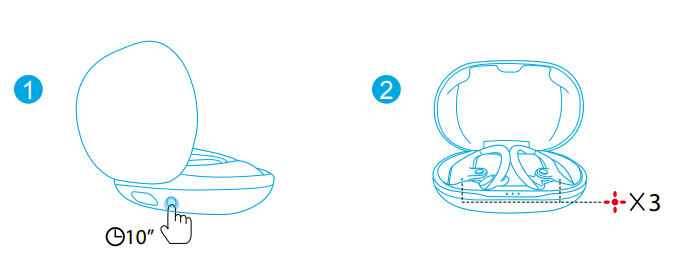
- Keep the charging case open, then press and hold the button on the charging case for 10 seconds until the LED indicators on both earbuds flash red 3 times and then turn white.
- All the memory data will be cleared.
Specifications
- Input: 5 V 550 mA
- Rated output power: 7 mW @ 1% THD
- Battery capacity: 65 mA x 2 (earbuds); 545 mA (charging case)
- Charging time: 1.5 hours
- Playtime (varies by volume level and content): 9 hours (Totally 36 hours with the charging case)
- Driver size :12 mm x 2
- Frequency response: 20 Hz - 20 kHz
- Waterproof level :IP68
- Impedance ;16 Ω
- Bluetooth version: V 5.0
- Bluetooth range: 10 m / 33 ft
Troubleshooting common issues with Soundcore Spirit X2 True Wireless Earbuds
Users may occasionally encounter issues such as connectivity drops, audio imbalance, or charging problems with the Soundcore Spirit X2 True Wireless Earbuds. Below are common problems and solutions:
- Bluetooth connection fails or drops: Ensure the earbuds are within 33 feet of the device and free of obstructions. Reset earbuds by placing them in the charging case and holding the multifunction button for 10 seconds. Confirm Bluetooth version compatibility (v5.0 supported).
- One earbud has no sound: Check battery levels and clean the charging contacts. Re-pair the earbuds with your device to re-establish stereo mode.
- Charging issues: Use the provided USB-C cable and charger. Clean charging pins on the earbuds and in the case. Avoid charging cases exposed to extreme temperatures.
- Audio distortion or low volume: Disable any equalizer settings on the connected device. Ensure the earbuds are properly seated in the ears with the correct ear tips.
Error codes are rare, but blinking red lights typically indicate a low battery. Always charge for at least 1.5 hours before use. Preventive care includes keeping the earbuds dry, regularly cleaning the ear tips, and storing them in the charging case when not in use.
The product comes with an 18-month warranty covering defects and hardware failures. For support, contact Soundcore customer service via their official website or authorized reseller channels for troubleshooting assistance and warranty claims.
Pros & Cons of Soundcore Spirit X2 True Wireless Earbuds
Pros
- Exceptional bass performance: BassTurbo and BassUp technology deliver deep, punchy bass unmatched in this price range.
- Long battery life: 9 hours per charge, extendable to 36 hours with the charging case, ideal for extended use.
- Durability and sweat resistance: IP68 rating and SweatGuard technology make them suitable for intense workouts and outdoor activities.
- Comfortable fit: Multiple ear tip and wing sizes provide a secure, comfortable fit, preventing ear fatigue.
- Clear calls: Dual microphones with cVc 8.0 noise reduction ensure clear voice transmission in noisy environments.
Cons
- Minor latency: Slight audio delay reported during gaming or video playback, which may affect synchronization.
- No active noise cancellation: Lacks ANC, so ambient noise may not be fully blocked in very loud settings.
- Controls have a learning curve: Touch/button controls can be less intuitive initially compared to competitors.
- Price competition: Though offering solid value, some alternatives offer additional features like ANC or wireless charging at a similar price point.
Customer Reviews and Feedback on Soundcore Spirit X2 True Wireless Earbuds
Customers praise the Soundcore Spirit X2 True Wireless Earbuds for their robust bass response, reliable Bluetooth connectivity, and comfortable fit during workouts. Many users highlight the extended battery life and the IP68 rating as major advantages for sports and outdoor use. Typical star ratings average between 4 and 4.5 out of 5.
Common praises include clear call quality with minimal background noise and the secure fit that prevents earbuds from falling out during vigorous activity. On the downside, some users report an occasional delay in audio during gaming and minor difficulties with touch controls. A few also wish for active noise cancellation features.
Overall, the earbuds are highly recommended for athletes and fitness enthusiasts who prioritize sound quality, durability, and battery endurance, making them a great value purchase for true wireless sport earbuds.
Faqs
What is the process for setting up soundcore Spirit X2 True Wireless Earbuds for the first time?
How do I troubleshoot soundcore Spirit X2 True Wireless Earbuds if they are not pairing properly?
What are the key features that make soundcore Spirit X2 True Wireless Earbuds different?
Can I use soundcore Spirit X2 True Wireless Earbuds with any device?
How often should I clean soundcore Spirit X2 True Wireless Earbuds to maintain their performance?
What is the best way to optimize the sound quality of soundcore Spirit X2 True Wireless Earbuds?
Can soundcore Spirit X2 True Wireless Earbuds be used independently for mono listening?
What are the charging requirements and time for soundcore Spirit X2 True Wireless Earbuds?
More soundcore manuals
- How to Pair: Soundcore Life Dot 2 True Wireless Earbuds Owner Guide
- How to Pair: Soundcore Liberty True-Wireless Earbuds User Manual
- How to Pair: Soundcore Life A2 NC Wireless Earbuds User Guide
- Pairing: Soundcore Life P2 Wireless earbuds User Manual
- How to Pair: Soundcore Liberty 3 Pro True Wireless Earbuds User Guide
- How to Pair: Soundcore Select Pro Bluetooth Speaker User Manual
Leave a Comment