
How to Pair: Soundcore Liberty 3 Pro True Wireless Earbuds User Guide
Content
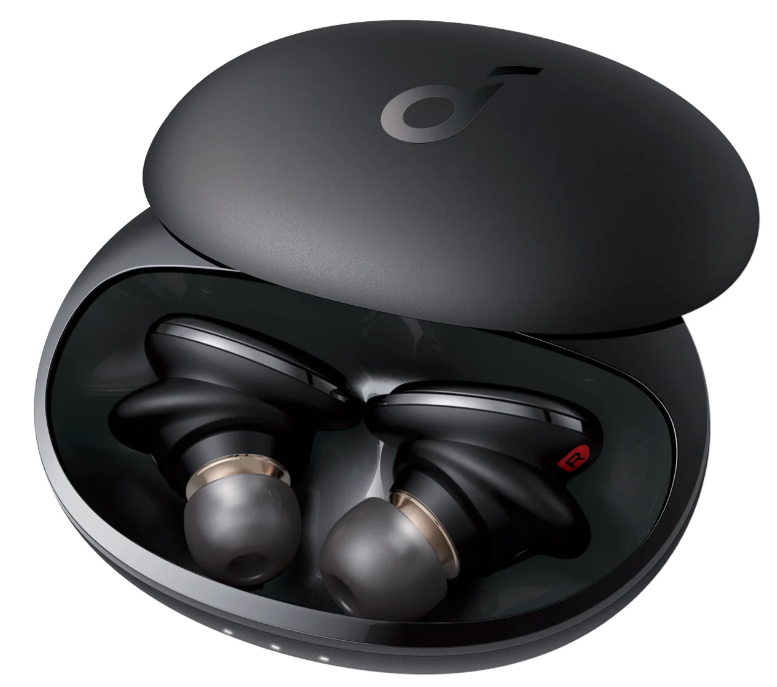
Soundcore Liberty 3 Pro True Wireless Earbuds
Introduction
The Soundcore Liberty 3 Pro True Wireless Earbuds represent a significant upgrade in the realm of wireless audio technology. These earbuds cater to a wide audience, from music enthusiasts to individuals seeking enhanced productivity with their active noise canceling (ANC) feature. Key benefits include a dual-driver setup, personalized ANC, and a high-quality LDAC codec for superior sound quality. The Liberty 3 Pro is recommended by 20 Grammy-winning producers and offers an impressive battery life of up to 32 hours with the charging case. Priced competitively at around $160, these earbuds are available in various colors and support both wired and wireless charging. With their advanced features and affordability, they are ideal for anyone looking for a premium audio experience without breaking the bank.
Specifications
- Input: 5 V 0.5 A,, Rated output power 8 mW
- Battery capacity: 68 mAh x 2 (earbuds); 500 mAh (charging case)
- Charging time: 3.5 hours
- Playtime (varies by volume level and content): Up to 8 hours (Total 32 hours with the charging case)
- Playtime (with ANC mode turned on): Up to 6 hours (Total 24 hours with the charging case)
- Driver unit: 10.6 mm dynamic driver, balanced armature driver
- Frequency response: 20 Hz - 40 kHz
- Impedance: 16 Ω
- Waterproof level (Earbuds): IPX4
- Bluetooth version: 5.2
- Bluetooth range: 10 m / 33 ft
Charging
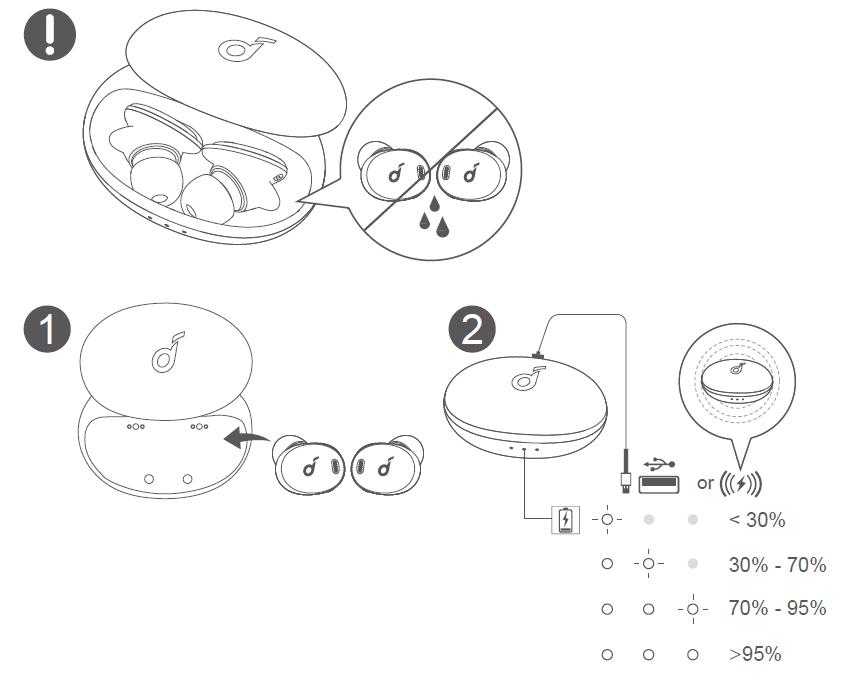
- Fully dry off the earbuds and the USB port before charging.
- Use a certified USB-C charging cable and charger to prevent any damage.
- Fully charge both the earbuds and the charging case before the first use.
- Place the earbuds in the charging case and close it.
- Connect the charging case to the power supply by using a USB-C charging cable. Alternatively, position the charging case at the center of your wireless charger for wireless charging.
- The LED indicators on the charging case indicate the charging status.
Wearing
Wearing the Earbuds
- Insert the earbuds into your ears.
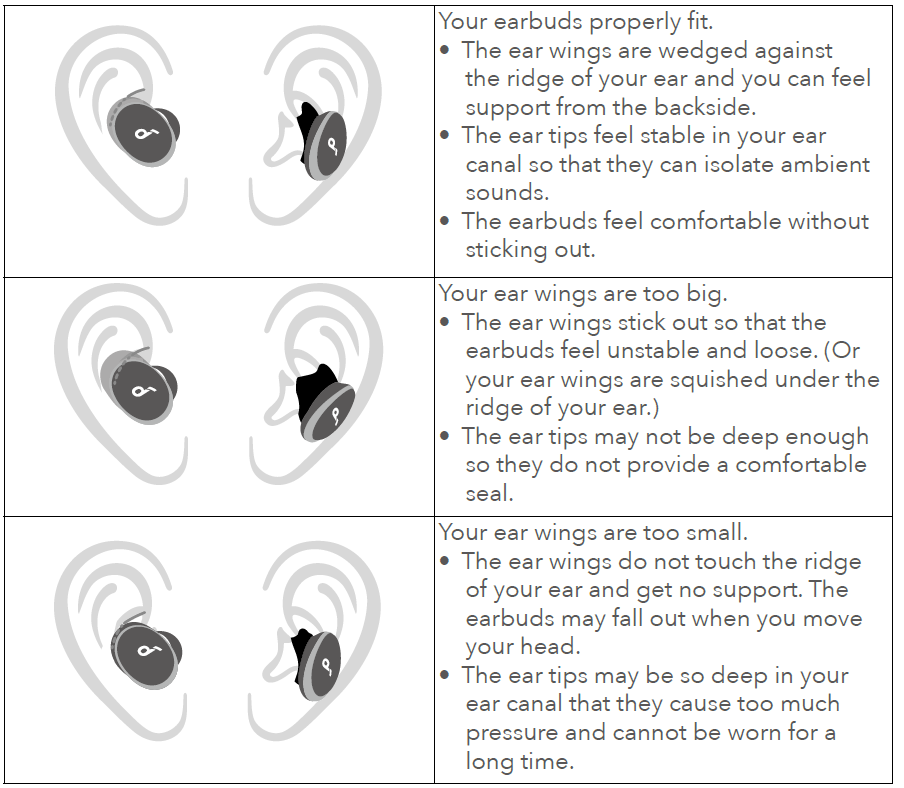
- Twist the earbuds until the ear wings are wedged against the ridge of your ears.
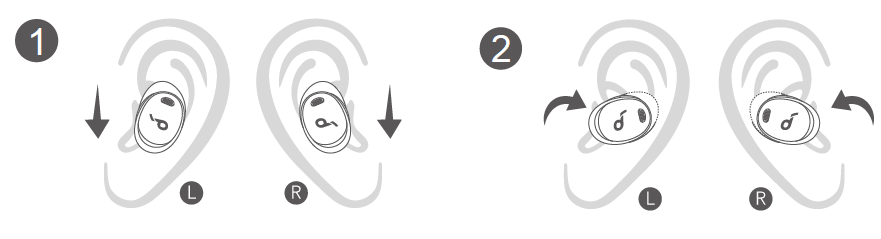
Use a mirror to check if you are wearing your earbuds correctly.
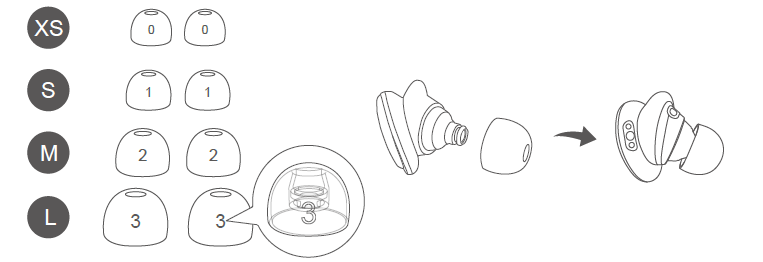
Changing the Ear Tips
- Select the size of ear tips that fit your ears best.
- Attach the ear tips to the earbuds. Ensure the ear tips are firmly attached.
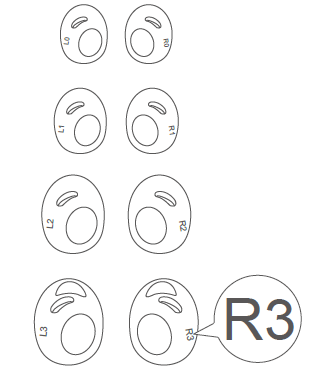
Changing the Ear Wings
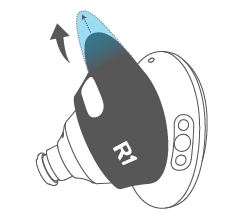
- Remove the current ear wings. Note that L2 and R2 ear wings are pre-installed.
Choose the best ear wing size for your ears.
Align the oval hole on the ear wings with the wearing detection sensor on the earbuds.
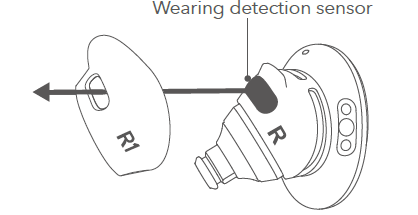
Insert the earbuds into the ear wings through the narrow side.
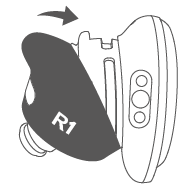
Stretch the ear wings into position by holding the narrow side. Ensure the ear wings are not folded.
Powering On/Off
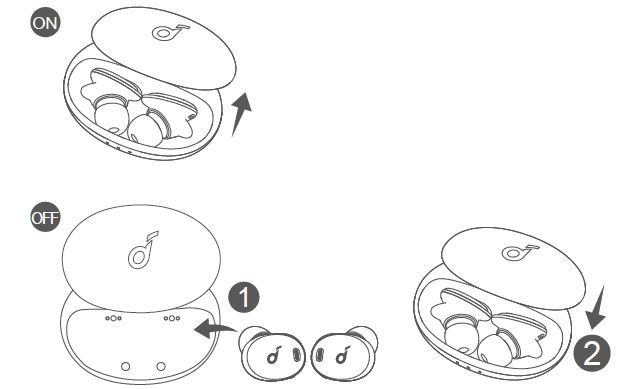
Open the charging case, and the earbuds will automatically power on. To power off, place the earbuds in the charging case and close it.
- To manually power on, wear both earbuds, then press and hold the touchpad on both earbuds for 3 seconds.
- The earbuds will automatically power off after 30 minutes if they are not being worn and are not connected.
Bluetooth Pairing
Automatic Pairing
- Open the charging case, and the earbuds will automatically enter Bluetooth pairing mode.
- The 2 LED indicators inside the charging case will flash white.
- Select "Soundcore Liberty 3 Pro" on your device's Bluetooth list to connect.
- When successfully connected, the 2 LED indicators will pulse white.
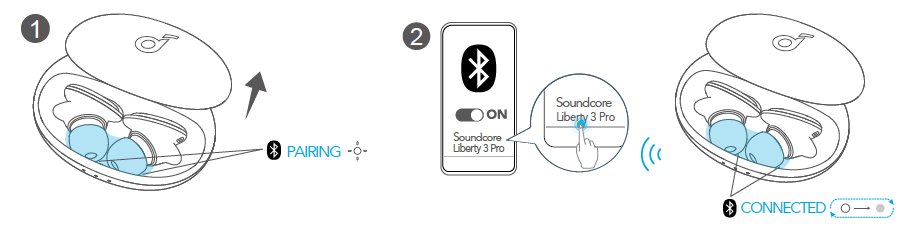
Automatic pairing is available only for earbuds in factory mode.
Manual Pairing
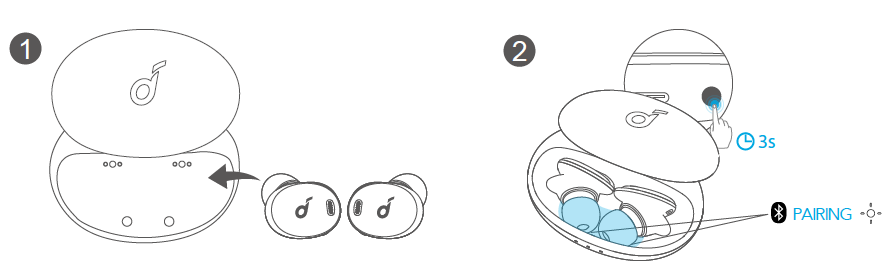
- Place the earbuds in the charging case and leave the case open.
- Press and hold the button on the charging case for 3 seconds until the 2 LED indicators inside the charging case flash white.
Controls
Stereo Mode
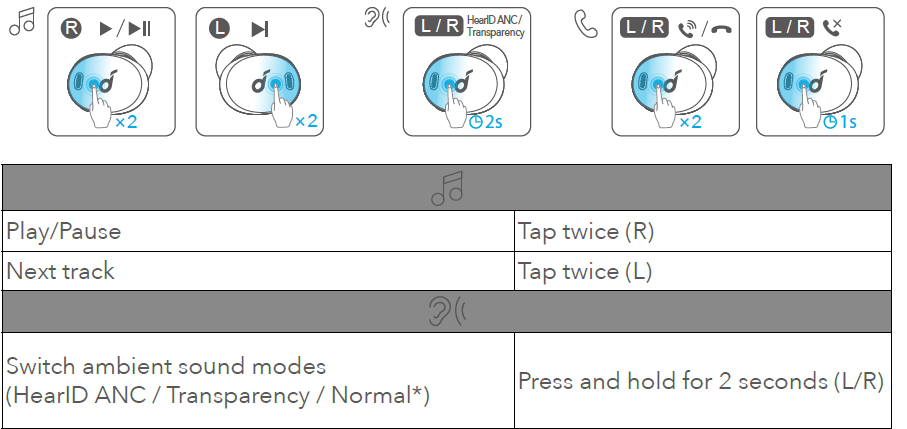
You can add "Normal" in the Soundcore app

You can enable this function in the Soundcore app.
- All of the controls in stereo and mono modes can be customized in the Soundcore app.
- Adjust the volume level via the connected device or in the Soundcore app.
- In stereo mode, noise cancellation mode is set by default. Each time you power on and connect, or switch to the stereo mode from mono mode, your earbuds will restore the last setting.
Soundcore App
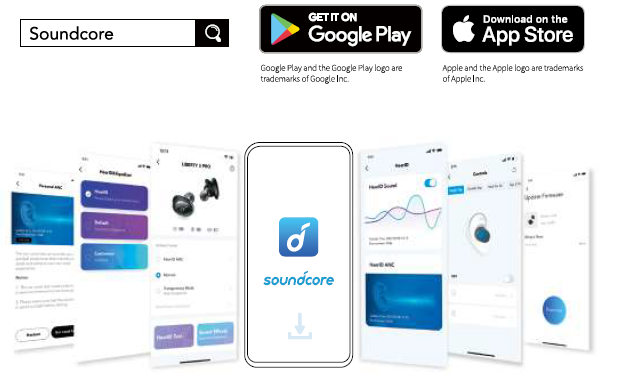
Download the Soundcore app to enhance your experience.
- User interface customization: In stereo mode, all of the controls (e.g.,, adjust volume, control playback, activate Siri) can be customized in the app.
- EQ settings: There are more than 20 EQ settings you can choose from in the app to optimize your experience while enjoying different music genres.
- HearID Sound: HearID maps your personal hearing sensitivity at multiple frequencies and analyzes the results. It traces the EQ settings and creates a personalized sound profile for you.
- HearID ANC: Take the ear canal test and tailor your noise cancellation experience.
- Adaptive mode: Adjust the level of noise cancelling automatically depending on the noise levels in your surroundings to reduce pressure for a more comfortable noise cancelling experience.
- Transparency mode: Stay aware of your surroundings by allowing ambient sounds in.
- Fully transparent: Hear all ambient sounds.
- Vocal mode: Voices stand out more clearly from other ambient sounds. Earbuds firmware upgrade: You will be informed once the new version of firmware is detected when you connect the earbuds to the app. Ensure the earbuds are placed in the charging case,, and the case remains open until the firmware upgrade is completed. During the upgrade, ensure the earbuds are being charged and avoid any operation.
LDAC
- Use devices powered by Android 8.0 or later to experience LDAC quality sound.
- Download the Soundcore app from the Android app store in advance.
- You can enable or disable LDAC using the Soundcore app.
- LDAC provides higher quality sound, increases power consumption, and reduces playtime.
- Enable LDAC in a low-interference environment to ensure a stable Bluetooth connection.
- The earbuds do not support LDAC when connected to two devices.
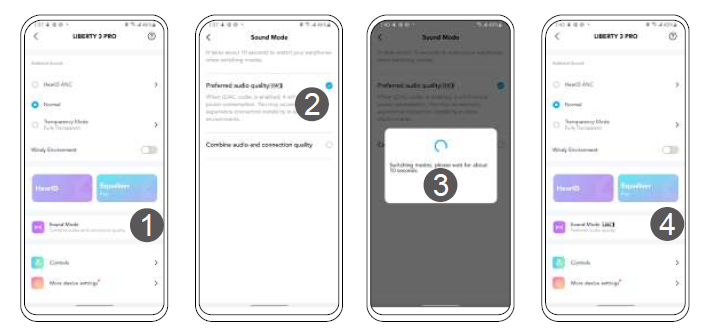
- Click on "Sound Mode" in the Soundcore app.
- Select "Preferred audio quality" to switch to the LDAC codec.
- It takes about 10 seconds to switch audio codes. You may be requested to upgrade the earbuds' firmware if available.
- Once successfully switched, you will see the LDAC icon next to "Sound Mode".
Wearing Detection
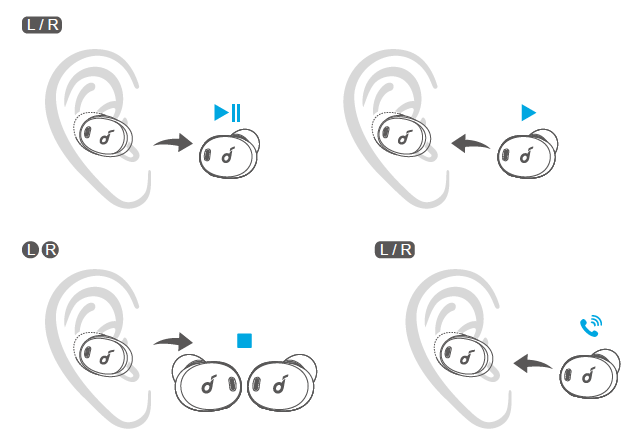
- The playback will automatically pause when removing either earbud and will resume when wearing it again.
- Wear either earbud to automatically answer an incoming call.
Reset
Reset if the earbuds cannot properly pair with each other or with other devices.
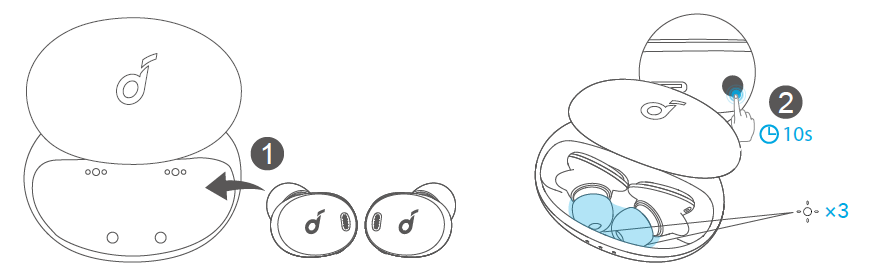
- Delete the pairing history from your Bluetooth device first. Place the earbuds into the charging case and leave the case open.
- Press and hold the button on the case for 10 seconds until the 2 LED indicators inside the charging case rapidly flash white 3 times. This confirms that the reset was successful and your earbuds can be connected normally.
Troubleshooting
Common issues with the Soundcore Liberty 3 Pro often relate to connectivity, noise cancellation, or battery life. Here are some solutions and preventive measures:
- Connection Issues: Ensure that your device's Bluetooth is enabled and that the earbuds are properly paired. Restart both devices if necessary.
- Noise Cancellation Issues: Adjust the ANC settings using the Soundcore app. Clean the microphones regularly to enhance performance.
- Battery Life Concerns: Charge the earbuds regularly and avoid extreme temperatures. Update firmware to the latest version for optimized performance.
For further assistance, Soundcore offers a comprehensive warranty and dedicated customer support. You can contact their support team through their official website or via email.
Pros and Cons
Here's a balanced assessment of the Soundcore Liberty 3 Pro True Wireless Earbuds:
Pros
- Excellent Sound Quality: Dual-driver setup provides deep bass and clear highs, making them suitable for a wide range of music genres.
- Adaptive Noise Cancellation: Effective ANC that adapts to different environments, enhancing the listening experience.
- Comfortable Design: Ergonomic fit ensures long-lasting comfort during extended use.
- Value for Money: Offers high-quality features at an affordable price point.
Cons
- Wind Sensitivity: May pick up wind noise during outdoor use.
- ANC Performance: While good, it may not match top-tier competitors like Sony or Bose.
Compared to alternatives, the Soundcore Liberty 3 Pro offers a compelling balance of features and price, making it a strong choice for those seeking premium performance without the hefty cost.
Customer Reviews
Users of the Soundcore Liberty 3 Pro True Wireless Earbuds have praised their sound quality and comfort. Many appreciate the customization options available through the Soundcore app, such as the HearID feature for personalized sound profiles. Some users have noted minor issues with wind noise and ANC performance, but overall, the consensus is positive, with many recommending these earbuds for their excellent value.
With an average rating of 4.5 out of 5 stars, the Liberty 3 Pro is highly recommended for those seeking a premium audio experience without breaking the bank. Users have noted the earbuds' ability to deliver a wide soundstage and clear, detailed audio, making them suitable for both music enthusiasts and casual listeners.
Faqs
How do I set up my soundcore Liberty 3 Pro True Wireless Earbuds for the first time?
What should I do if my soundcore Liberty 3 Pro True Wireless Earbuds are not pairing with my device?
How can I optimize noise cancellation and sound quality on the soundcore Liberty 3 Pro True Wireless Earbuds?
Are soundcore Liberty 3 Pro True Wireless Earbuds compatible with both Android and iOS devices?
How do I manually power on and off the soundcore Liberty 3 Pro True Wireless Earbuds?
What are the best practices for maintaining and cleaning soundcore Liberty 3 Pro True Wireless Earbuds?
How can I customize touch controls on my soundcore Liberty 3 Pro True Wireless Earbuds?
What should I do if only one earbud of my soundcore Liberty 3 Pro True Wireless Earbuds is working?
More soundcore manuals
- How to Pair: Soundcore Life Note 3 Wireless Earbuds User Guide
- How to Pair: Soundcore Life A2 NC Wireless Earbuds User Guide
- How to Pair: Soundcore P2 Mini True Wireless Earbuds User Guide
- How to Pair: Soundcore Life Dot 2 True Wireless Earbuds Owner Guide
- How to Use: Soundcore Life Note-E True Wireless Earbuds User Guide
- Pair & Setup: Soundcore Spirit X2 True Wireless Earbuds User Guide
Leave a Comment