
How to Pair: Soundcore Life A2 NC Wireless Earbuds User Guide
Content
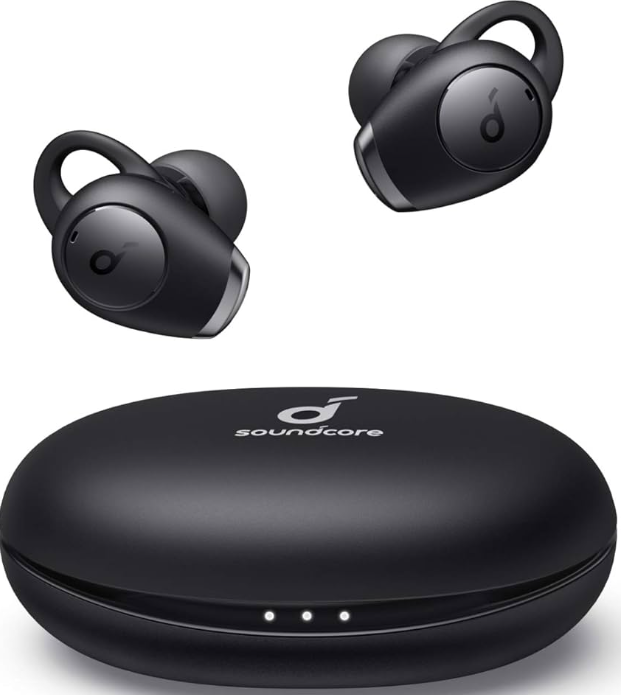
Soundcore Life A2 NC Wireless Earbuds
Introduction
The Soundcore Life A2 NC Wireless Earbuds are high-performance true wireless earbuds designed to deliver immersive sound, advanced noise cancellation, and superior call clarity. Featuring multi-mode hybrid active noise cancelling (ANC) technology, they block up to 90% of ambient noise,, whether you are commuting, working indoors, or outdoors, allowing you to focus entirely on your music or calls. Equipped with oversized 11mm bio-composite drivers, these earbuds produce 50% more bass for deep, punchy audio without sacrificing clarity or treble, making them ideal for music enthusiasts who crave rich sound detail.
Targeted at daily commuters, remote workers, fitness enthusiasts, and audiophiles, these earbuds combine comfort with durable IPX5-rated sweat and splash resistance, suitable for active lifestyles. The earbuds offer up to 7 hours of playback on a single charge, with the compact charging case providing four additional charges, totaling an impressive 35 hours of listening time. With 6 beam-forming microphones and a noise-cancelling algorithm, calls are crystal clear, isolating your voice from background noise and wind.
Users can personalize their listening experience via the freSoundcorere app, which offers 22 sound profiles, customizable EQ settings, and ANC adjustments. The earbuds support Bluetooth 5.0, ensuring stable connectivity. The Soundcore Life A2 NC Wireless Earbuds are available for an estimated price range between $70 to $90 and can be purchased online with standard shipping within 3-7 business days.
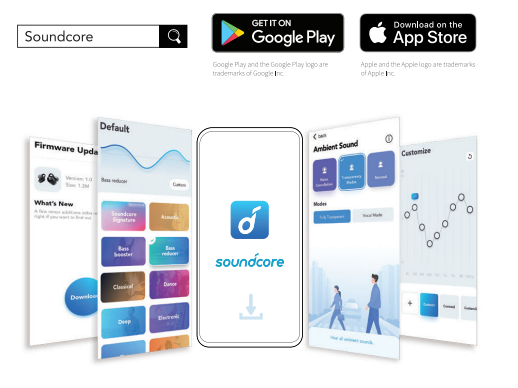
Soundcore App
- Download the Soundcore app to enhance your experience.
- User interface customization: In stereo mode, all of the controls (e.g.,, fewer adjust volume, control playback, activate Siri) can be customized in the app.
- EQ settings: There are more than 20 EQ settings you can choose from in the app to optimize your experience while enjoying different music genres.
- Noise cancellation: Choose an active noise cancellation mode to reduce ambient noise according to your surroundings.
- Transport: Targets low-end frequencies like engine and road noise for peaceful journeys and commutes.
- Outdoor: Reduces ambient sounds in cities for fewer distractions.
- Indoor: Reduces voices and mid-frequency noise from coffee shops and other indoor spaces.
- Transparency mode: Stay aware of your surroundings by allowing ambient sounds in.
- Fully Transparent: Hear all ambient sounds.
- Vocal Mode: Voices stand out more clearly from other ambient sounds.
- Earbuds firmware update: You will be informed once the new version of firmware is detected when you connect the earbuds to the app. Ensure the earbuds are laced in the charging case,, and the case remains open until the firmware upgrade is completed. During the upgrade, ensure the earbuds are being charged and avoid any operation.
Wearing
- Choose the EarTips and EarWings that fit your ears best.
- Insert the earbuds into the inner canal of your ears and turn gently until you find the most comfortable and secure position.
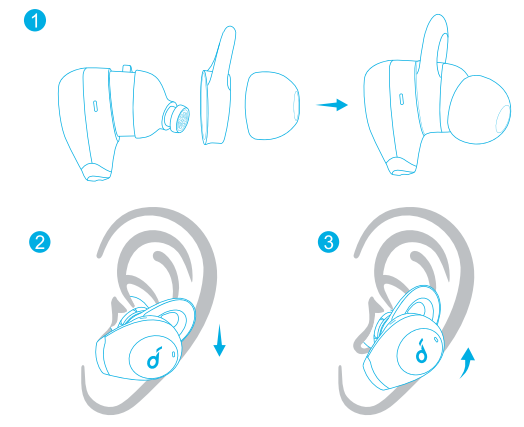
Your earbuds come with multiple pairs of EarTips and EarWings, among which the Medium-sized are pre-installed.
Bluetooth Pairing
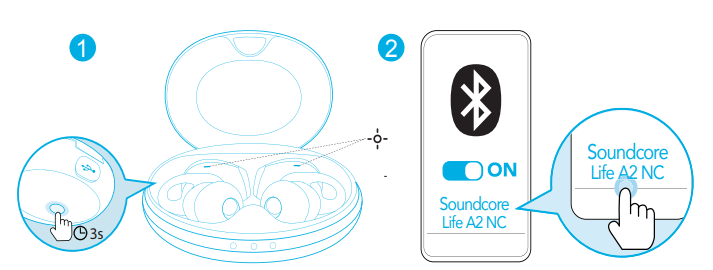
- Open the charging case, and the earbuds will automatically enter the Bluetooth pairing mode.
The LED indicator on one earbud will flash quickly,, and on the other earbud breathe slowly. - Select "Soundcore Life A2 NC" on your device's Bluetooth list to connect.
When successfully connected, the LED indicator on the earbuds will light up white for 1 second and then turn off.
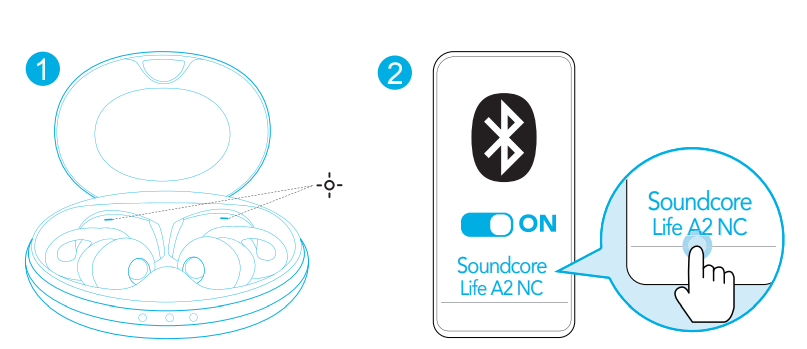
- Each time you power on your Soundcore earbuds, they will automatically connect to your last successfully connected device if available within the Bluetooth range.
- Mono mode: When Bluetooth is connected, you can use either one of the earbuds only by placing the other one into the charging case and closing it.
- When powered on and connected, if either one of the earbuds is out of battery and powered off, you can keep using the other one.
- When you are on a call, place either one of the earbuds into the charging case and close it; the microphone in the other earbud will be activated.
- The right earbud is the primary earbud by default. If you want to change this, remove the right earbud from your ear and leave the charging case open; the microphone in the other earbud will be activated. Place the right earbud in the charging case and close it; the left earbud will become the primary earbud.
Pairing with another device
- Place the earbuds in the charging case and leave the case open. Press and hold the button on the case for 3 seconds until the earbud LED indicators flash white to enter the pairing mode.
- Select "Soundcore Life A2 NC" on your device's Bluetooth list to connect.
Controls
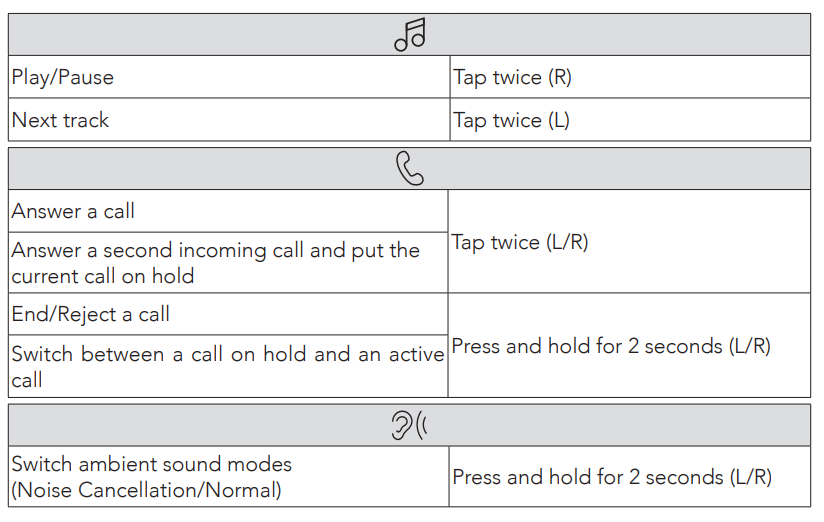
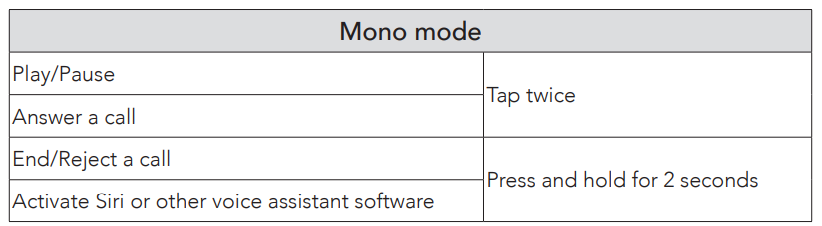
- All of the controls in stereo mode can be customized in the Soundcore app. In mono mode, controls cannot be customized in the app.
- Adjust the volume level via the connected device or in the Soundcore app.
- In stereo mode, noise cancellation mode is set by default. Each time you power on and connect, or switch to the stereo mode from mono mode, your earbuds will restore the last setting.
- Noise cancellation or transparency mode is unavailable in mono mode.
Specifications
Specifications are subject to change without notice.
- Input
- 5 V == 0.75 A
- Rated output power
- 5 mW @ 1% THD
- Battery capacity
- 55 mA x 2 (earbuds); 750 mA (charging case)
- Charging time
- 2 hours
- Playtime (varies by volume level and content)
- Up to 7 hours (Total 35 hours with the charging case)
- Playtime (with ANC mode turned on)
- Playtime (with transparency mode turned on)
- Up to 6 hours (Total 30 hours with the charging case)
- Talk time
- Up to 5 hours (Total 25 hours with the charging case)
- Driver size
- 11 mm
- Frequency response
- 20 Hz - 20 kHz
- Impedance
- 16 S2
- Waterproof level (Earbuds)
- IPX5
- Bluetooth version
- V 5.0
- Bluetooth range
- 10 m / 33 ft
Troubleshooting Common Issues with Soundcore Life A2 NC Wireless Earbuds
Users may encounter common problems such as connection failures, poor audio quality, or charging issues. If the earbuds fail to pair, open the charging case to enter Bluetooth pairing mode and select "Soundcore Life A2 NC" on your device. If pairing issues persist, reset the earbuds by placing them in the case and holding the touch controls for 10 seconds.
For low or distorted sound, ensure the earbuds and charging contacts are clean and fully charged. If noise cancellation is ineffective, check the ANC mode in the Soundcore app and toggle between the multiple ANC presets for optimal performance. In case of call quality issues, make sure the microphones are unobstructed and the firmware is updated through the app.
Error codes are not explicitly reported, but persistent faults may require resetting or reinstalling the app. Preventive measures include keeping the earbuds dry, charging with the original USB-C cable, and regularly updating firmware. The product comes with a standard warranty—typically 12 months for new devices and 3 months for renewed models—offering support for manufacturing defects.
For additional assistance, contact Soundcore customer support via their official website or consult the user manual included with the earbuds for detailed troubleshooting steps and warranty information.
Pros and Cons of Soundcore Life A2 NC Wireless Earbuds
- Pros:
- Multi-mode hybrid ANC reduces up to 90% of ambient noise for immersive listening.
- Powerful 11mm bio-composite drivers deliver 50% more bass without loss of clarity.
- Long battery life: 7 hours per charge plus 4 charges from the compact case (total 35 hours).
- Customizable with the Soundcore app with 22 sound profiles and adjustable EQ settings.
- Clear call quality with six beamforming microphones and noise-cancelling algorithms.
- IPX5 sweat and splash resistance is suitable for workouts and outdoor use.
- Cons:
- Microphone quality for recordings is adequate but not exceptional, with some users noting sub-par recording clarity.
- Bluetooth 5.0 lacks multi-device pairing; it cannot stay connected to multiple devices simultaneously.
- Latency can be noticeable on some devices, impacting video sync and gaming experiences.
- The charging case supports USB-C cable charging only; no wireless charging option.
- Value for Money: Offering strong ANC and sound quality at a mid-range price, the Life A2 NC earbuds present excellent value compared to alternatives without premium brand pricing, making them a competitive choice for budget-conscious audiophiles.
Customer Reviews and Feedback on Soundcore Life A2 NC Wireless Earbuds
Users consistently praise the Soundcore Life A2 NC Wireless Earbuds for their impressive noise cancellation and robust bass response. Many highlight the comfort and stability in-ear fit, suitable for long listening sessions and active use. The long battery life and quick charging case are also frequently appreciated.
Common complaints include the microphone’s limited recording quality, occasional Bluetooth latency on certain devices, and the lack of multi-device pairing support. Despite these minor drawbacks, star ratings average around 4 to 4.5 out of 5 stars, with many recommending the earbuds for everyday commuting, remote work, and casual listening.
Several users recommend the earbuds for those seeking budget-friendly wireless earbuds with effective ANC and customizable sound profiles, though audiophiles seeking studio-grade microphones or gamers requiring ultra-low latency may want to consider alternatives.
Faqs
How do I set up soundcore Life A2 NC Wireless Earbuds for the first time?
What should I do if soundcore Life A2 NC Wireless Earbuds are not pairing?
Can I use soundcore Life A2 NC Wireless Earbuds with any device?
How often should I maintain soundcore Life A2 NC Wireless Earbuds?
What are the key features that make soundcore Life A2 NC Wireless Earbuds different?
How do I optimize the sound quality of soundcore Life A2 NC Wireless Earbuds?
What if soundcore Life A2 NC Wireless Earbuds are not producing sound?
Can I customize the controls on soundcore Life A2 NC Wireless Earbuds?
More soundcore manuals
- How to Pair: Soundcore Liberty 3 Pro True Wireless Earbuds User Guide
- How to Pair: Soundcore Life Dot 2 True Wireless Earbuds Owner Guide
- How to Pair: Soundcore Life Note 3 Wireless Earbuds User Guide
- Pair & Setup: Soundcore Spirit X2 True Wireless Earbuds User Guide
- How to Pair: Soundcore P2 Mini True Wireless Earbuds User Guide
- How to Pair: Soundcore Liberty True-Wireless Earbuds User Manual
Leave a Comment