
How to Pair: Soundcore Life Dot 2 True Wireless Earbuds Owner Guide
Content
Soundcore Life Dot 2 True Wireless Earbuds
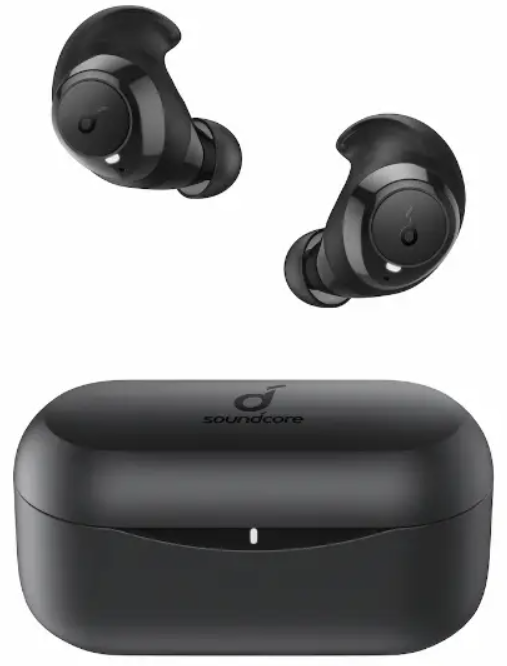
Introduction
The Soundcore Life Dot 2 True Wireless Earbuds redefine wireless audio with a combination of superior sound quality, exceptional battery life, and ergonomic design. Engineered with advanced 8mm triple-layer dynamic drivers, these earbuds deliver a rich sound profile featuring 40% more bass and 100% more treble, offering a balanced and immersive listening experience suitable for all music genres. Their standout feature is the extreme 100-hour playtime enabled by the high-capacity charging case, providing up to 8 hours on a single charge and fast-charging capabilities that offer 1.5 hours of playback from just 10 minutes of charging.
Designed for active users, the Life Dot 2 earbuds incorporate zero-pressure AirWings made of ultra-soft silicone, ensuring a secure and comfortable fit even during intense workouts or extended wear. With an IPX5 water resistance rating, they withstand sweat and rain, making them ideal for sports enthusiasts and daily commuters alike. The latest Bluetooth 5 technology guarantees a stable and seamless connection with automatic one-step pairing to the last device used.
Perfectly suited for music lovers, fitness buffs, and professionals seeking reliable wireless earbuds, the Life Dot 2 offers remarkable value at an estimated price range of $50 to $60. Available globally through online retailers and major electronics stores, these earbuds combine affordability with premium features, making them a compelling choice in the true wireless earbuds market.
Specifications
- Input: 5V 2.5A
- Rated output power: 5 mW (@1% THD)
- Battery capacity: 85 mA x 2 (earbuds); 2600 mA (charging case)
- Charging time: 1.5 hours
- Playtime (varies by volume level and content): 8 hours (Total 100 hours with the charging case)
- Driver size: 8 mm x 2
- Frequency response: 20 Hz - 20 kHz
- Impedance: 16 Ω
- Waterproof level: IPX5
- Bluetooth version: V 5.0
- Bluetooth range: 10 m / 33 ft
Charging
- Open or close the charging case to activate the LED battery indicator.
- Fully charge both the earbuds and the charging case before the first use.
- To prevent damage, use the provided USB-C cable.
- Fully dry off the earbuds and the USB port before charging.
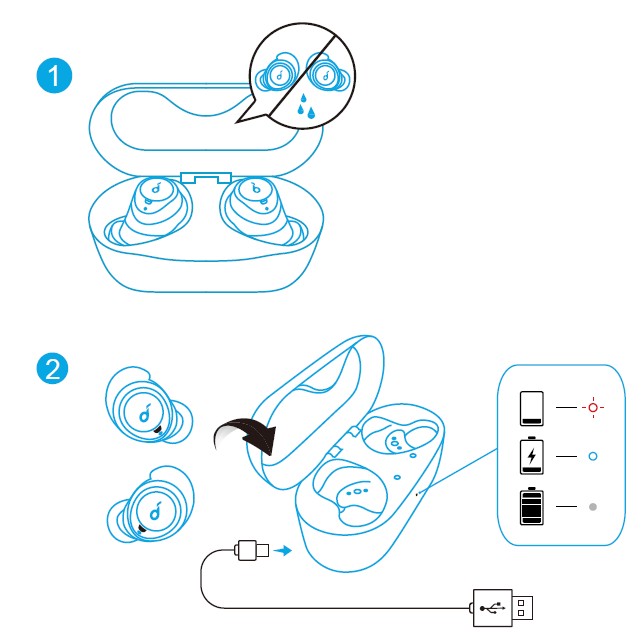
LED indicator

Powering On/Off
The earbuds will automatically power on when taken out of the charging case and power off when placed back into the charging case.

- To manually power on, press and hold the multi-function button on both earbuds for 1 second until the LED indicator turns white for 1 second.
- To manually power off, press and hold the multi-function button on either earbud for 8 seconds until the LED indicator turns red for 1 second.
Pairing
True Wireless Stereo Connection
The right earbud will automatically connect with the left earbud when taken out of the charging case.
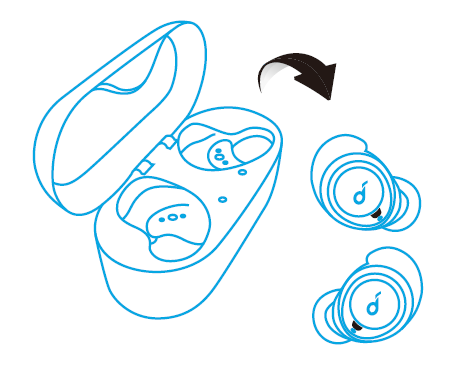
LED indicator (Earbuds)
.png)
- The right earbud is the primary earbud by default. In TWS mode, place either one of the earbuds into the charging case, and the other one will switch to be the primary earbud.
- When powered on and connected, if either one of the earbuds is out of battery and powered off, you can keep using the other one.
Bluetooth Pairing with your Device
- Take the earbuds out of the charging case or manually power on the earbuds. The earbuds enter the Bluetooth pairing mode successfully when the LED indicator on either earbud flashes white.
- Turn on Bluetooth on your device and click “Soundcore Life Dot 2”. The LED indicator on either earbud will turn white for 1 second when Bluetooth is connected.

LED indicator (Earbuds)
,.png)
- When earbuds are out of the charging case and powered off, to manually enter Bluetooth pairing mode, press and hold the multi-function button on both earbuds for 3 seconds.
- Each time you power on your Soundcore earphones, it will automatically connect to your last successfully connected device if available within the Bluetooth range.
Wearing
- Choose the EarTips and EarWings that fit your ears best.
- Insert the earbuds into the inner canal of your ears.
- Turn and find the most comfortable position.
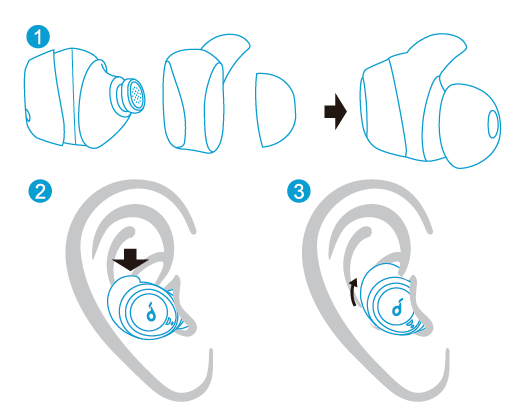
Button Controls
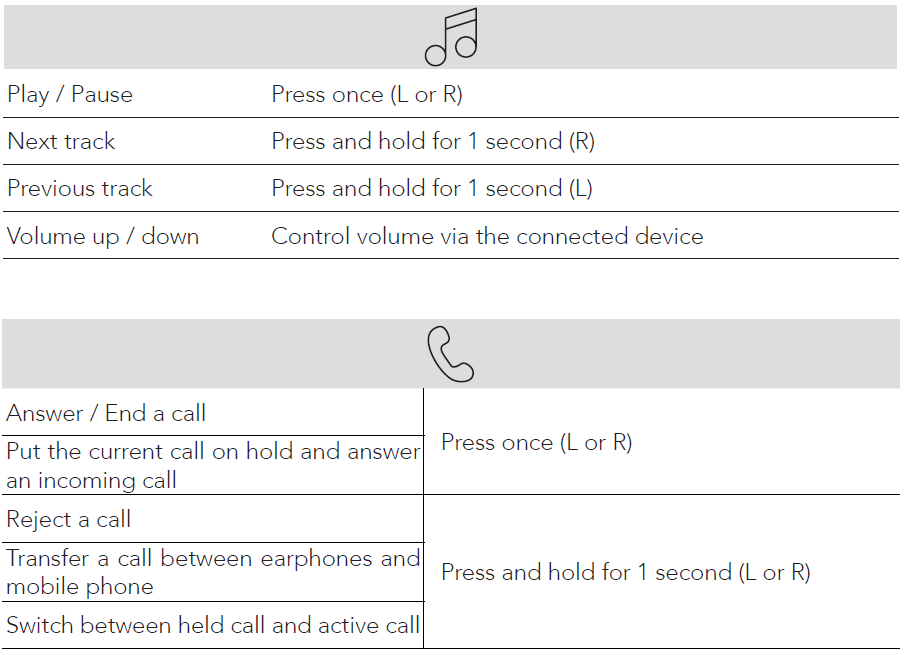

Mono mode

Reset
- Place the earbuds into the charging case and make sure they are being charged.
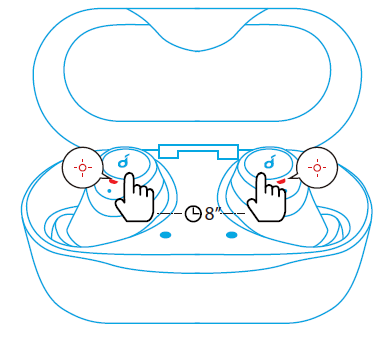
- Press and hold the button on both earbuds for 8 seconds until the LED indicators on the earbuds flash red for 3 times.
All the memory data will be cleared.
Troubleshooting soundcore Life Dot 2 True Wireless Earbuds: Common Issues and Solutions
- Problem: Earbuds not pairing or connecting
Solution: Ensure the earbuds are charged. Reset by placing them back in the charging case, then remove and try pairing again. Clear Bluetooth cache on your device if necessary. - Problem: One earbud not producing sound
Solution: Confirm the earbud is properly seated in your ear and the charging case. Try removing and reinserting the earbud to reconnect in mono mode. - Problem: Audio dropouts or unstable connection
Solution: Check for interference from other Bluetooth devices. Ensure the latest Bluetooth 5 enabled device is used. Keep the earbuds within a 10-meter range. - Error Codes: No specific error codes; LED indicators show charging and connection status—refer to the user manual for LED signal meanings.
To prevent issues, regularly clean the earbuds and charging contacts, avoid exposing them to extreme temperatures, and update your device’s Bluetooth drivers. The soundcore Life Dot 2 earbuds come with a limited warranty covering manufacturing defects. For support, contact the official Soundcore customer service via their website or authorized retailer channels.
Pros & Cons of soundcore Life Dot 2 True Wireless Earbuds
Pros
- Exceptional Battery Life: Up to 8 hours per charge and an impressive 100 hours total with the charging case, far exceeding most competitors.
- Superior Sound Quality: 8mm triple-layer dynamic drivers deliver clear, balanced audio with notable bass and treble enhancement.
- Comfort & Fit: Zero-pressure AirWings provide secure and comfortable wear suitable for sports and prolonged use.
- Stable Connection: Bluetooth 5 technology ensures reliable, skip-free streaming with automatic one-step pairing.
- Water Resistance: IPX5 rating protects against sweat and rain, ideal for workouts and outdoor activities.
Cons
- Lack of App Support: Unlike some Soundcore models, Life Dot 2 does not support customization via a mobile app, limiting EQ and button configuration options.
- Plastic Build: Glossy black plastic may show scratches and can feel slippery compared to premium materials.
- Passive Noise Isolation: Good in mid and treble ranges but less effective against low-frequency noises like bus engine rumble.
Compared to alternatives like the Life Dot 2S, which offers app support and IPX7 rating, the Life Dot 2 strikes a balance between performance and affordability, making it an excellent value-for-money choice for everyday users and fitness enthusiasts.
Customer Reviews of soundcore Life Dot 2 True Wireless Earbuds
Users consistently praise the soundcore Life Dot 2 True Wireless Earbuds for their remarkable battery life and comfortable fit. Many reviewers highlight the earbuds’ ability to last multiple days on a single charge combined with a reliable Bluetooth connection. The sound quality receives positive feedback for its balanced profile with enhanced bass and treble, suitable for diverse music tastes.
Common complaints include the absence of an app for sound customization and the earbuds’ plastic finish, which some find prone to scratches and less premium compared to higher-end models. Despite these minor drawbacks, the majority of users rate the Life Dot 2 at 4 to 4.5 stars out of 5, recommending them especially for users prioritizing battery life and comfort over advanced features.
Many buyers commend the earbuds’ secure fit during exercise and appreciate their quick pairing and mono/stereo flexibility, often endorsing them as a top budget-friendly option in true wireless earbuds.
Faqs
How do I set up soundcore Life Dot 2 True Wireless Earbuds for the first time?
What should I do if soundcore Life Dot 2 True Wireless Earbuds is not working properly?
Can I use soundcore Life Dot 2 True Wireless Earbuds with non-Android devices?
How often should I maintain soundcore Life Dot 2 True Wireless Earbuds?
What are the key features that make soundcore Life Dot 2 True Wireless Earbuds different?
Can I use soundcore Life Dot 2 True Wireless Earbuds during exercise or in wet conditions?
How do I switch between mono and stereo modes on soundcore Life Dot 2 True Wireless Earbuds?
Can I customize the sound settings on soundcore Life Dot 2 True Wireless Earbuds?
More soundcore manuals
- How to Pair: Soundcore Life A2 NC Wireless Earbuds User Guide
- Pair & Setup: Soundcore Spirit X2 True Wireless Earbuds User Guide
- How to Pair: Soundcore Liberty 3 Pro True Wireless Earbuds User Guide
- How to Pair: Soundcore Liberty True-Wireless Earbuds User Manual
- How to Pair: Soundcore Life Note 3 Wireless Earbuds User Guide
- Pairing: Soundcore Life P2 Wireless earbuds User Manual
Leave a Comment