
How to Pair: Soundcore Life Note 3 Wireless Earbuds User Guide
Content
Soundcore Life Note 3 Wireless Earbuds
Introduction
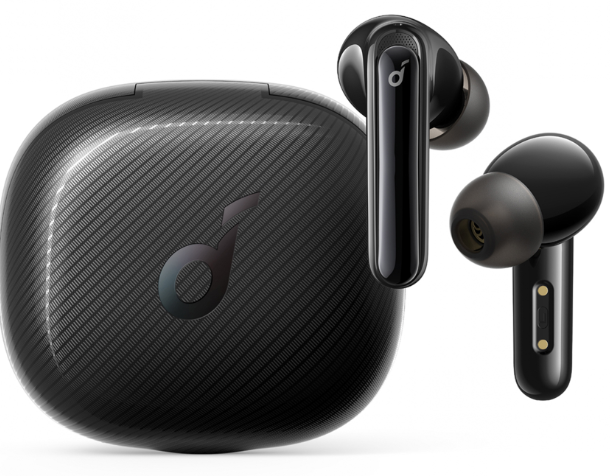
The Soundcore Life Note 3 Wireless Earbuds offer an exceptional blend of high-fidelity audio, comfortable fit, and advanced features, designed for music lovers and active users alike. These earbuds stand out with their robust sound quality powered by graphene drivers, providing clear vocals and deep bass that enhance every listening experience. With IPX5 water resistance, the Life Note 3 earbuds are suitable for workouts, commuting, and everyday use, ensuring durability against sweat and light rain.
Key benefits include long battery life—up to 7 hours on a single charge, plus an additional 28 hours with the charging case—plus fast charging capabilities that give 2 hours of playtime from just 10 minutes of charging. The earbuds support Bluetooth 5.2 for stable connectivity and include touch controls for easy music playback and call management. The inclusion of environmental noise reduction for calls improves voice clarity, making them ideal for remote work and calls on the go.
Targeted at users seeking quality wireless audio without premium pricing, these earbuds suit commuters, fitness enthusiasts, and casual listeners who value convenience and sound performance. The Soundcore Life Note 3 Wireless Earbuds are typically priced in the mid-range segment, approximately $50-$70 USD, and are widely available through online retailers and authorized stores worldwide, providing accessible quality for a broad audience.
Charging
- Fully dry off the earbuds and the USB port before charging.
- Use a certified USB-C charging cable and charger to prevent any damage.
- Fully charge both the earbuds and the charging case before the first use.
- Place the earbuds in the charging case and close it.
- Connect the charging case to the power supply by using a USB-C charging cable.
- The LED indicators on the charging case indicate the charging status.
Wearing
- Choose the EarTips that fit your ears best.
- Insert the earbuds into the inner canal of your ears and turn gently until you find the most comfortable and secure position.
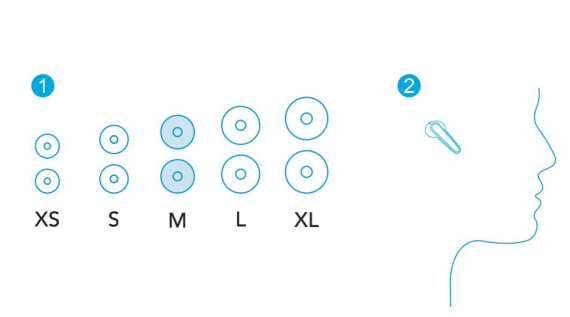
Your earbuds come with multiple pairs of EarTips, among which the Medium-sized are pre-installed.
Bluetooth Pairing
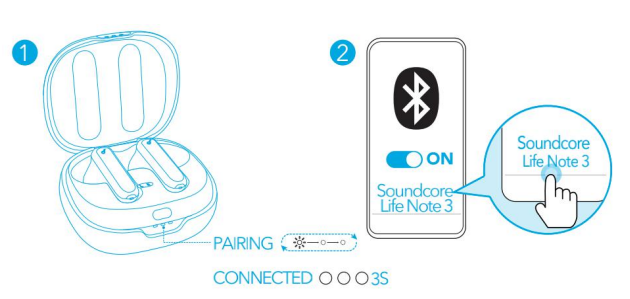
- Open the charging case, and the earbuds will automatically enter the Bluetooth pairing mode.
- The 3 LED indicators on the charging case will flash white in sequence continuously.
- Select “Soundcore Life Note 3” on your device’s Bluetooth list to connect. When successfully connected, the LED indicators on the charging case will turn white for 3 seconds.
- Pairing with another device: Place the earbuds in the charging case and leave the case open. To enter pairing mode, press and hold the button on the case for 3 seconds until the 3 LED indicators flash white in sequence continuously.
- Each time you power on your Soundcore earbuds, they will automatically connect to your last successfully connected device if available within the Bluetooth range.
- Mono mode: When Bluetooth is connected, you can use either one of the earbuds only by placing the other one into the charging case.
- When powered on and connected, if either one of the earbuds is out of battery and powered off, you can keep using the other one.
- When you are on a call, place either one of the earbuds into the charging case, and the microphone in the other earbud will be activated.
Controls
Specifications
- Input :5V ⎓ 0.35A
- Battery capacity:63 mAh x 2 (earbuds); 800 mAh (charging case)
- Charging time: 3 hours
- Playtime (varies by volume level and content)
- Up to 7 hours (Total 35 hours with the charging case)
- Playtime (with ANC mode turned on): Up to 6 hours (Total 30 hours with the charging case)
- Driver size :11 mm x 2
- Frequency response :20 Hz - 20 kHz
- Impedance :16 Ω
- Waterproof level : IPX5
- Bluetooth version : V 5.0
- Bluetooth range :15 m / 49 ft
How to Troubleshoot Soundcore Life Note 3 Wireless Earbuds Common Issues
Users of the Soundcore Life Note 3 Wireless Earbuds might occasionally encounter common issues such as pairing failures, one earbud not syncing, or poor sound quality. To resolve pairing problems, ensure the earbuds and the Bluetooth device are fully charged and that any protective films covering connectors are removed. Restarting Bluetooth on your device and forgetting previous pairings can also help. If earbuds fail to sync, place both buds in the charging case, open the lid, then press and hold the button on the case for 10 seconds until the LED flashes three times — this initiates a factory reset and often restores connectivity.
Microphone issues during calls can be addressed by updating the earbuds’ firmware via the Soundcore app, ensuring both earbuds are selected as the audio source during calls, and testing them in a quiet environment. Preventive measures include regular charging, keeping the earbuds clean, and storing them in the case when not in use.
Soundcore offers comprehensive warranty coverage and customer support. For persistent problems, users can reach out to OUR website with details about the troubleshooting steps already taken. Official support resources and firmware updates are also available on the Soundcore support website.
Pros & Cons of Soundcore Life Note 3 Wireless Earbuds
Pros
- Excellent sound quality: Graphene drivers deliver clear, balanced audio with strong bass and crisp highs.
- Long battery life: Up to 35 hours total with charging case, suitable for extended use.
- Water resistance: IPX5 rating makes them reliable for workouts and outdoor activities.
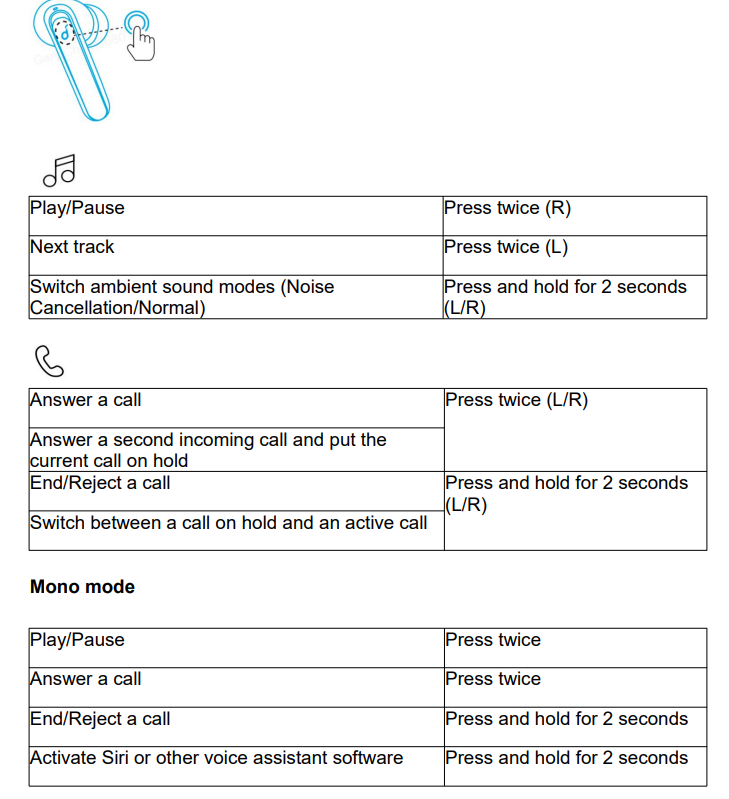
- Easy controls: Touch-sensitive panels support music, call, and voice assistant commands.
- Affordable price: Offers competitive features at a mid-range price point, delivering strong value for money.
Cons
- Occasional sync issues: Some users report earbuds not syncing properly, requiring resets.
- Microphone limitations: Call quality can degrade in noisy environments despite noise reduction.
- Limited advanced features: Lacks active noise cancellation present in higher-end models.
- Fit variability: Earbud fit may not be ideal for all ear shapes, potentially affecting comfort.
Compared with alternatives like the Life P3 or Liberty Air series, the Life Note 3 provides solid audio and battery backup but falls short on noise cancellation and premium build quality. Nonetheless, it remains a highly competitive choice for budget-conscious users seeking reliable wireless earbuds.
Customer Reviews and User Feedback on Soundcore Life Note 3 Wireless Earbuds
Many users praise the Soundcore Life Note 3 Wireless Earbuds for their impressive sound clarity and comfortable fit. Positive reviews often highlight the extended battery life and quick charging as major advantages, giving the earbuds a 4 to 4.5-star average rating on popular retail platforms. Users appreciate the intuitive touch controls and stable Bluetooth 5.2 connection in everyday scenarios.
Common complaints include occasional issues with Bluetooth pairing or earbuds not syncing, which can usually be resolved by performing a factory reset as described in the troubleshooting section. Some users also mention that microphone performance during calls could be improved, especially in noisy settings. Despite these concerns, many recommend the Life Note 3 for casual listening, gym use, and budget-friendly wireless audio solutions.
Overall, customers find the Soundcore Life Note 3 Wireless Earbuds a worthwhile purchase for the price, combining quality sound and essential features in one compact package.
Faqs
How do I set up the soundcore Life Note 3 Wireless Earbuds for the first time?
What should I do if one of my soundcore Life Note 3 Wireless Earbuds is not connecting or not working properly?
Can I use the soundcore Life Note 3 Wireless Earbuds with both Android and iOS devices?
How do the active noise cancellation and transparency modes work on soundcore Life Note 3 Wireless Earbuds?
What should I do if the soundcore Life Note 3 Wireless Earbuds have low sound quality or distorted audio?
How long does the battery last on soundcore Life Note 3 Wireless Earbuds, and how do I optimize battery life?
Are the soundcore Life Note 3 Wireless Earbuds water-resistant, and how should I care for them?
How can I customize the touch controls on my soundcore Life Note 3 Wireless Earbuds?
More soundcore manuals
- How to Pair: Soundcore P2 Mini True Wireless Earbuds User Guide
- How to Pair: Soundcore Liberty 3 Pro True Wireless Earbuds User Guide
- How to Use: Soundcore Life Note-E True Wireless Earbuds User Guide
- How to Pair: Soundcore Life A2 NC Wireless Earbuds User Guide
- Usage & Pairing: Soundcore Liberty Neo Wireless Earbuds User Guide
- How to Pair: Soundcore Life Dot 2 True Wireless Earbuds Owner Guide
Leave a Comment