
Usage & Pairing: Soundcore Liberty Neo Wireless Earbuds User Guide
Content
Soundcore Liberty Neo Wireless Earbuds
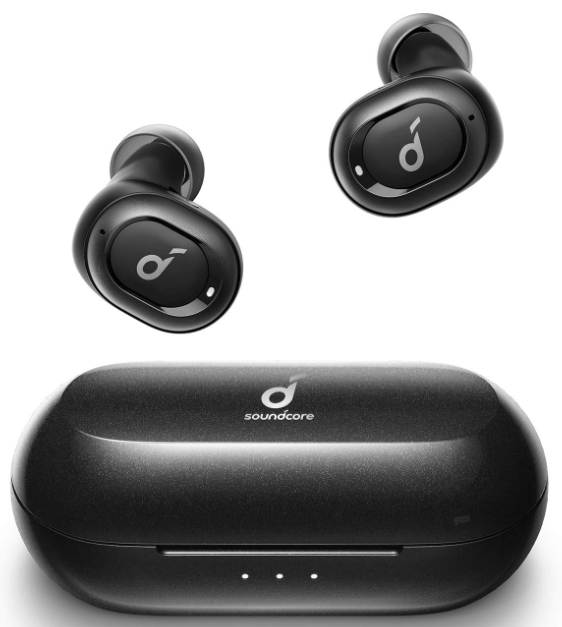
Introduction
The Soundcore Liberty Neo Wireless Earbuds offer a compact, affordable, and high-quality true wireless audio experience designed to meet the needs of active users and casual listeners alike. These earbuds combine advanced Bluetooth 5.0 technology with an ergonomic design, providing stable connectivity and comfortable all-day wear. Their 6mm dynamic drivers deliver clear, balanced sound with strong bass, making them ideal for workouts, commuting, and casual music enjoyment.
Key benefits include a robust 5-hour playtime per charge, quick 1.5-hour charging via the included case, and IPX5-rated water resistance, which protects against sweat and light rain. The earbuds’ minimal latency and seamless True Wireless Stereo connection ensure smooth stereo audio, while multi-function buttons offer easy management of calls and music playback without needing to reach for your device.
Targeted primarily at fitness enthusiasts, commuters, and budget-conscious audiophiles looking for reliable sound quality and wireless convenience, the Soundcore Liberty Neo is a versatile choice for everyday use. They typically retail in the price range of $40 to $60, making them a competitive option within the entry-level wireless earbud market. Available widely through online retailers and electronics stores, these earbuds provide a balanced mix of performance, durability, and affordability.
Wearing
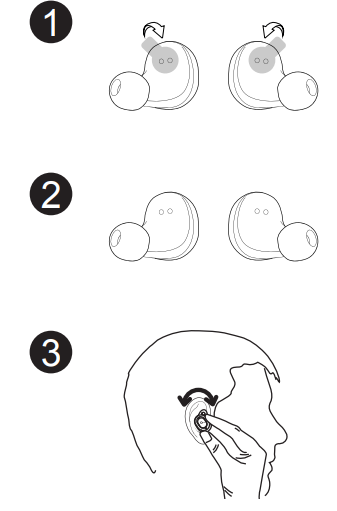
- Choose the EarTips and jackets that fit your ears the best.
- Insert the earbuds into the inner canal of your ears.
- Turn to lock.
Remove the film from the earbuds when taking them out of the charging case for the first time.
If all the jackets are too large, Soundcore Liberty Neo can be used without jackets.
Pairing
Bluetooth connection (Device)
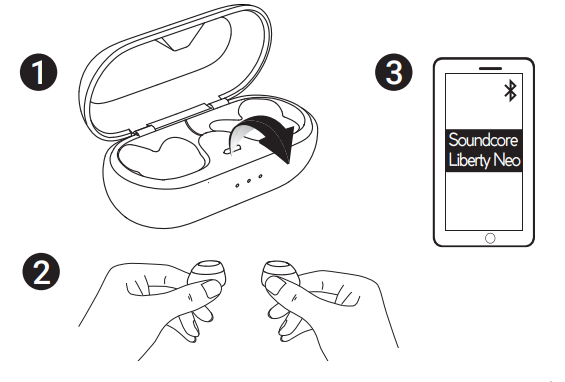
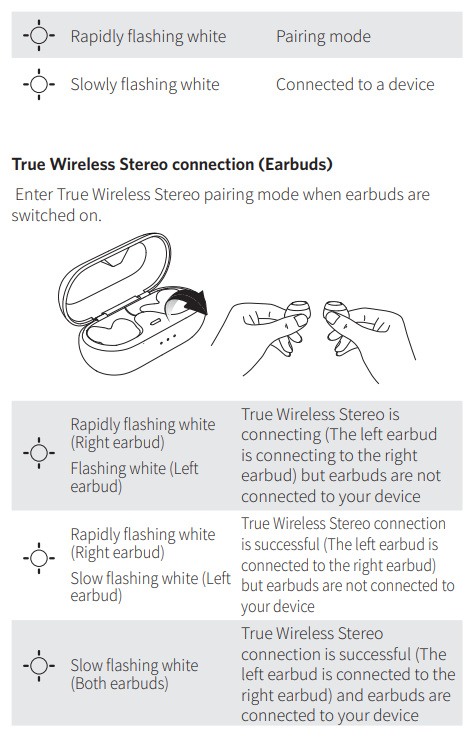
Enter pairing mode when the earbuds are switched on
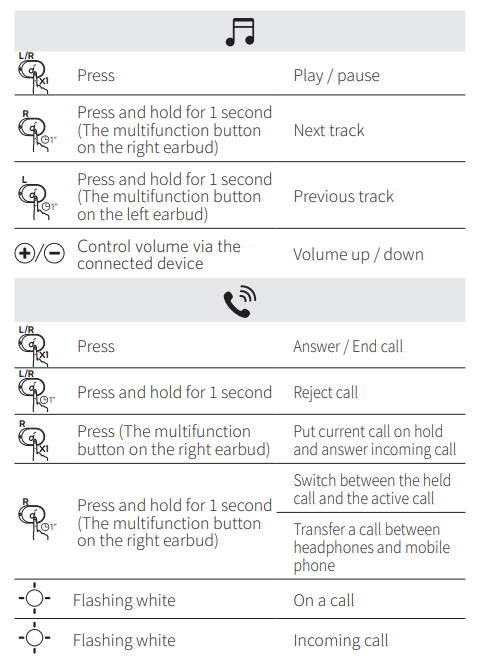
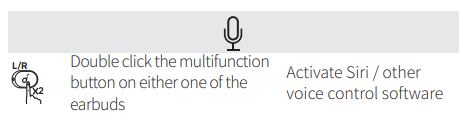
Controls
Specifications
Specifications are subject to change without notice.
- Earbud Input Rating :5 V 0.3 A
- Charging Box Input Rating :5 V 0.5 A
- Charging time :1.5 hours
- Playtime (varies by volume level and content): 5 hours
- Weight (product net weight) :51 g / 1.8 oz
- Impedance :16 Ω
- Driver (full range) :6 mm × 2
- Frequency response :20 Hz - 20 KHz
- Bluetooth version: V5.0
- Range ;10 m / 33 ft
Troubleshooting Common Issues with Soundcore Liberty Neo Wireless Earbuds
Users occasionally report issues such as one earbud not working, connectivity problems, or charging failures. A frequent problem is the left earbud not connecting or producing sound, which can often be resolved by resetting the earbuds. To reset, delete “Soundcore Liberty Neo” from your device’s Bluetooth list, place both earbuds in the charging case, then press and hold the multi-function buttons for 8 seconds until the LEDs flash red three times. Take them out to reconnect; the left earbud should flash slowly while the right flashes rapidly, indicating successful pairing.
Charging issues may stem from dirty or misaligned charging contacts. Cleaning the earbuds and case pins with a dry cloth and ensuring the earbuds sit correctly in the case can prevent these problems. Charging fully typically takes about 1.5 hours, and the case’s LED indicators assist in confirming charging status.
To avoid issues, keep firmware updated, handle the earbuds gently, and avoid exposure to excessive moisture beyond their IPX5 rating.
Pros & Cons of the Soundcore Liberty Neo Wireless Earbuds
Pros
- Excellent value for money: Provides quality sound and features at a budget-friendly price point.
- Good sound quality: Clear audio with punchy bass from dual 6mm drivers.
- Reliable Bluetooth 5.0: Stable connection and True Wireless Stereo for synchronized audio.
- Comfortable fit: Lightweight design suitable for workouts and long listening sessions.
- IPX5 water resistance: Protects against sweat and splashes, ideal for exercise.
Cons
- Limited playtime: About 5 hours per charge, shorter than some premium models.
- Occasional connectivity issues: Some users report left earbud syncing problems requiring resets.
- Basic controls: Lacks advanced touch controls or customizable features.
- Charging case size: Slightly bulkier compared to ultra-compact alternatives.
Compared to alternatives like the Soundcore Liberty Air 2, the Liberty Neo offers fewer features but remains a strong contender for users prioritizing affordability without sacrificing core audio performance.
Customer Reviews of Soundcore Liberty Neo Wireless Earbuds
Customers generally praise the Soundcore Liberty Neo Wireless Earbuds for their sound clarity and budget-friendly pricing, often highlighting their suitability for workouts and daily commuting. Typical ratings average around 4 out of 5 stars. Users appreciate the comfortable fit and water resistance, making them reliable in active scenarios.
Common complaints include connectivity glitches, particularly with the left earbud failing to sync or produce sound, which users resolve through resetting procedures or cleaning the charging contacts. Some reviews mention the limited battery life compared to higher-end models.
Overall, many customers recommend the Liberty Neo for those seeking affordable true wireless earbuds with solid audio quality, especially if they follow the recommended troubleshooting steps for any pairing issues.
Faqs
How do I set up soundcore Liberty Neo Wireless Earbuds for the first time?
What should I do if only one earbud of my soundcore Liberty Neo Wireless Earbuds is working?
How can I check the battery status of my soundcore Liberty Neo Wireless Earbuds and charging case?
Are soundcore Liberty Neo Wireless Earbuds compatible with both Android and iOS devices?
How do I manually turn on and off the soundcore Liberty Neo Wireless Earbuds?
What should I do if my soundcore Liberty Neo Wireless Earbuds won’t pair with my device?
How can I optimize the sound quality and fit of my soundcore Liberty Neo Wireless Earbuds?
What is the recommended way to clean and maintain soundcore Liberty Neo Wireless Earbuds for longevity?
More soundcore manuals
- How to Pair: Soundcore R50i/P20i/P25i True Wireless Earbuds User Manual
- How to Use: Soundcore Life Note-E True Wireless Earbuds User Guide
- Pairing & Usage: Soundcore AeroClip Earbuds A3388 User Manual
- How to Pair: Soundcore P2 Mini True Wireless Earbuds User Guide
- Setup & Pairing: Soundcore P30i / R50i NC A3959 Earbuds User Manual
- How to Pair: Soundcore Life Note 3 Wireless Earbuds User Guide
Leave a Comment