
Pairing & Usage: Soundcore AeroClip Earbuds A3388 User Manual
Content
Soundcore AeroClip Earbuds A3388
Introduction
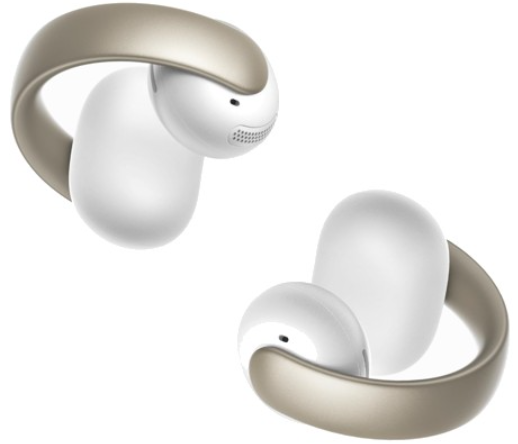
The Soundcore AeroClip Earbuds A3388 represent a breakthrough in open-ear audio technology, designed for users who prioritize comfort, clear calls, and immersive sound without the discomfort of in-ear buds. Featuring an innovative, flexible open-ring design made from 0.5mm memory titanium wire combined with soft TPU, these clip-on earbuds fit all ear sizes comfortably and distribute pressure evenly to avoid fatigue during extended wear. This makes them ideal for outdoor enthusiasts, commuters, and professionals who need awareness of their surroundings while enjoying premium audio quality.
Equipped with 12mm titanium-coated drivers and advanced virtual bass technology, the AeroClip delivers punchy, rich lows and natural sound clarity across all frequencies, rivaling in-ear level performance. The earbuds feature four beamforming microphones enhanced by AI algorithms, ensuring your voice sounds three times clearer during calls, even in noisy environments such as busy cafes or outdoors.
Additional benefits include an IPX4 water resistance rating to protect against splashes and rain, fast charging capabilities (10 minutes of charging for 3 hours of playback), and multipoint Bluetooth 5.4 connectivity for seamless switching between devices. Their lightweight design (just 5.9g per earbud) and customizable tap controls, which can be personalized via the Soundcore app, offer users flexibility and convenience.
Priced competitively in the mid-range wireless earbuds market, typically around $80-$100 USD, the Soundcore AeroClip Earbuds A3388 are widely available through major online retailers and the official Soundcore website. Their unique combination of open-ear comfort, high-quality sound, and robust call features targets active users seeking an alternative to traditional in-ear headphones.
Specifications
- Input: 5V 1A
- Output: 5V0.25A
- Battery capacity Earbud: 60mAh
- Charging Case: 580mAh
- Playtime: Up to 8 hours(32 hours in total with the charging case)
- Charging time: 2h
- Driver unit: 12.8mm 12.8mm
- Frequency response: 20HZ-20KHZ
- Impedance: 16 ohms
- Waterproof rating(earbuds): IPX4
- Bluetooth version: 5.4
- Bluetooth range: 15m
OVERVIEW
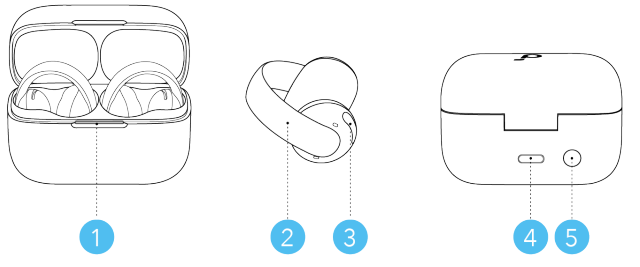
- LED Indicator
- C-Bridge with Tap Control Area
The Tap Control Area covers the entire C-bridge. - Sound Outlet
- USB-C Charging Port
- Charging Case Button
WEARING
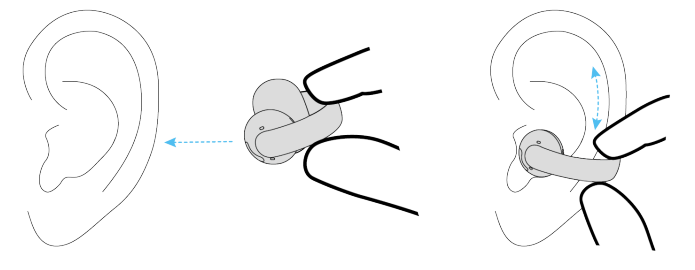
Put the earbuds onto the thinnest point of your ear's outer edge. Adjust for optimal audio performance while listening.
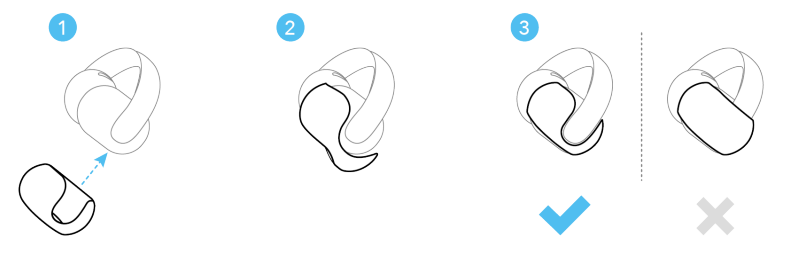
Medium and large sizes of ear grips come with the package. If the fit is loose, try the ear grips for a more stable fit.
POWERING ON & PAIRING
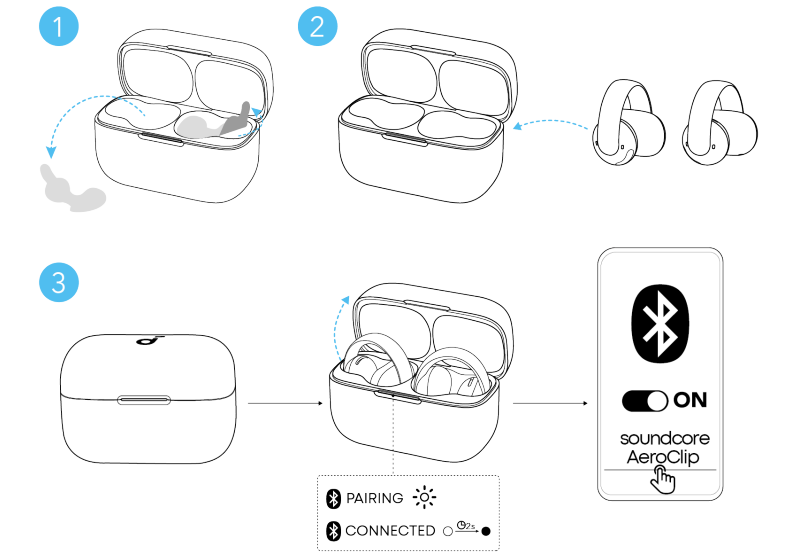
- Remove the protective films from the earbuds.
- Return the earbuds to the case and close the case.
- Reopen the case to power on the earbuds and enter pairing mode. Select "Soundcore AeroClip " from your device's Bluetooth list to connect.
When pairing, the LED indicator will start flashing white. After the pairing is successful, the LED indicator will stay on for 2 seconds and then go off.
MANUAL PAIRING
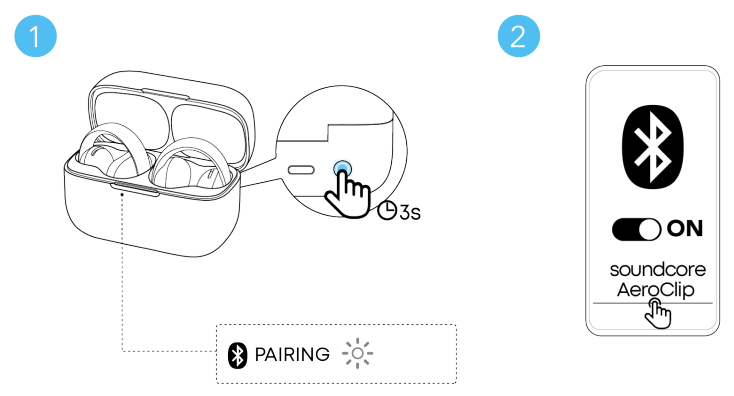
To manually enter Bluetooth pairing mode:
- Return the earbuds to the charging case.
- Leave the case open, then press and hold the charging case button for 3 seconds until the LED indicator starts flashing white.
- The earbuds will enter pairing mode. Proceed to pair with your device.
CHARGING
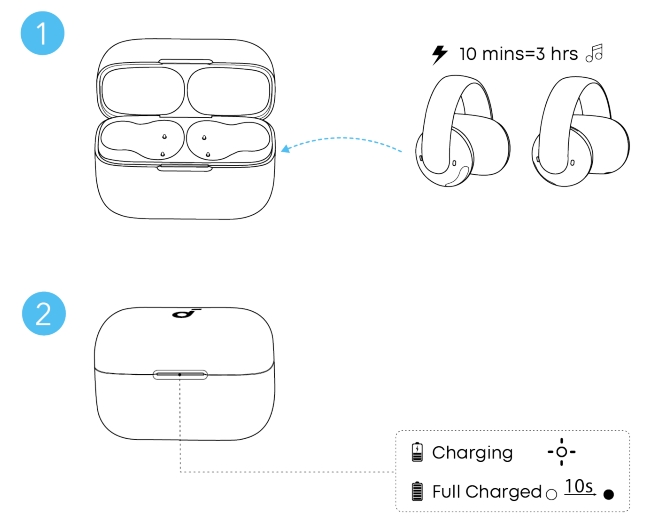
- Place the earbuds in the charging case and close it.
Ensure the earbuds and the USB-C charging port are fully dry before charging. - Connect the charging case to a power supply using the provided USB-C charging cable.
A full battery recharge of the charging case takes about 2 hours, and 10 minutes of charging offers 3 hours of playtime.
DUAL CONNECTIONS
To connect your earbuds to two Bluetooth devices at the same time, there are two methods:
Method 1: Manually Pair with the Second Device
Place the earbuds into the charging case and keep the case open. Then, press and hold the charging case button for 3 seconds until the LED indicator flashes white rapidly. The earbuds will enter Bluetooth pairing mode, and you can proceed to pair them with the second device.
Method 2: Use the Soundcore App
In the Soundcore app, tap the cogwheel icon in the upper right corner to access Settings.. Then select Dual Connections > Enable Dual Connections >Connect New Device.
CONTROLS
RESET
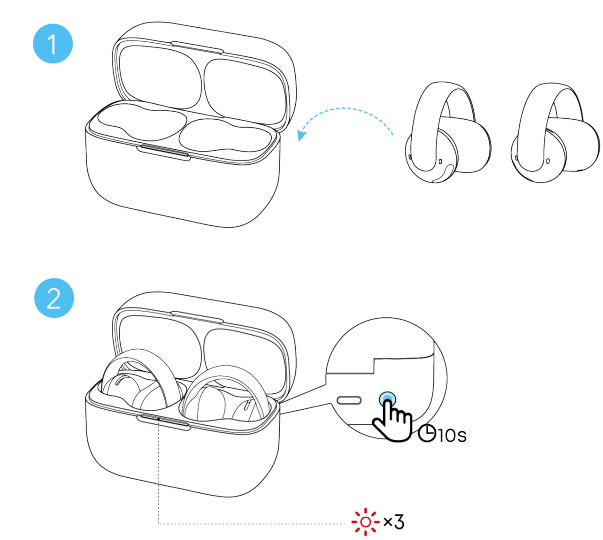
Reset the earbuds if they have functionality issues.
- Return the earbuds to the charging case and leave the case open.
- Press and hold the charging case button for 10 seconds until the LED indicator flashes red slowly three times, indicating a successful reset.
LED LIGHT GUIDE
When you connect the charging case to a power source, the LED indicator will display the charging status.
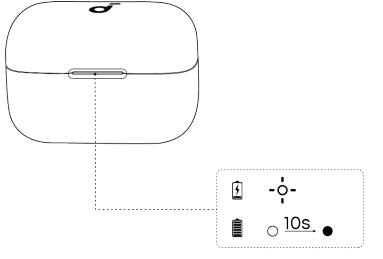
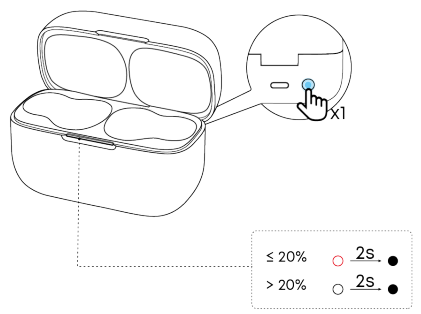
When both earbuds are out of the charging case, press the charging case button to check the battery level of the charging case.
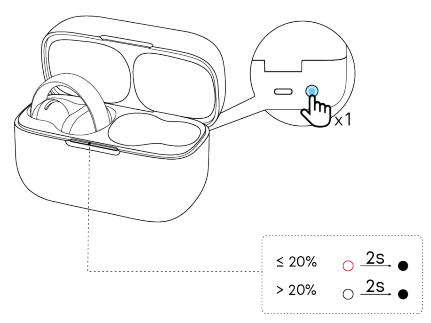
When either earbud is in the charging case, press the charging case button to check the battery level of a single earbud.
FIRMWARE UPDATE
You will be notified once a new firmware version is detected when the earbuds are connected to the app. Ensure the earbuds are in the charging caseand the case remains open until the firmware update is complete. Avoid using the earbuds during the update.
Troubleshooting Common Issues with Soundcore AeroClip Earbuds A3388
While the Soundcore AeroClip Earbuds A3388 offer advanced features, users may encounter occasional issues. Here are common problems and their solutions:
- No Sound or Audio Dropouts: Ensure the earbuds are charged and the Bluetooth connection is stable. Reset the earbuds by placing them in the charging case, opening the lid, then holding the case button for 10 seconds until the LED flashes red three times.
- Pairing Problems: Clear Bluetooth cache on your device, turn Bluetooth off and on, and try reconnecting. Ensure the earbuds are in pairing mode by removing them from the case.
- Poor Call Quality: Clean the microphones and ear grips of dust and debris. Avoid windy environments or use the Soundcore app’s noise reduction settings.
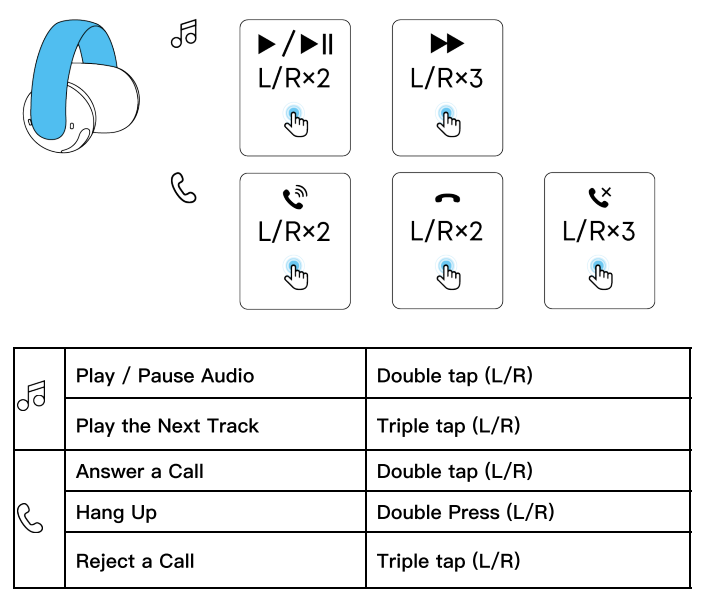
- Tap Controls Not Responding: Tap the blue-highlighted area with firm pressure as recommended. Customize or reset controls via the Soundcore app if issues persist.
Preventive tips include regular firmware updates through the Soundcore app, keeping earbuds clean, and storing them in the charging case when not in use. The earbuds come with a standard warranty covering manufacturing defects; for support, contact Soundcore customer service at service@soundcore.com or via regional numbers such as +1 (800) 988 7973 (US/Canada) and +44 (0) 1604 936200 (UK).
Pros & Cons of Soundcore AeroClip Earbuds A3388
Pros
- Innovative Open-Ear Design: Comfortable clip-on fit with pressure-distributing titanium wire suits all ear sizes and supports long-term wear without pain.
- Exceptional Call Quality: Four AI-enhanced mics provide clear voice pickup, outperforming many open-ear earbuds in noisy environments.
- Powerful, Balanced Sound: 12mm titanium-coated drivers and virtual bass technology deliver rich lows and clear mids/highs, unusual for open-ear models.
- Long Battery Life & Fast Charging: Up to 8 hours per charge and 32 hours total with charging case; 10-minute quick charge offers 3 hours of playback.
- Water Resistance: IPX4 rating protects against sweat and splashes, ideal for active outdoor use.
- Customizable Controls: Tap control functions and sound profiles can be personalized via the Soundcore app.
Cons
- Limited Noise Isolation: Open-ear design means ambient noise is not blocked, which may affect the listening experience in very loud environments.
- Tap Controls Sensitivity: Requires firm taps on specific areas, which some users find less intuitive than physical buttons.
- Price Point: Slightly higher than basic open-ear alternatives, though justified by enhanced features and sound quality.
- Fit Variability: While flexible, some users with unusual ear shapes may find the clip less stable than in-ear models.
Compared to in-ear earbuds, the AeroClip excels in comfort and awareness but sacrifices noise isolation. Against other open-ear competitors, it stands out for sound and call clarity, offering exceptional value for money in its class.
Customer Reviews and Feedback on Soundcore AeroClip Earbuds A3388
Users widely praise the Soundcore AeroClip Earbuds A3388 for their comfortable fit and high audio clarity, especially highlighting the powerful bass uncommon in open-ear designs. Many reviewers give four to five stars, noting the convenience of multipoint Bluetooth and the effective AI-enhanced microphones for calls.
Common praises include:
- “Perfect for cycling and outdoor activities because I can still hear ambient sounds.”
- “Amazing call quality even with wind noise, thanks to AI noise reduction.”
- “Long battery life and quick charging make these my go-to earbuds for travel.”
Some users mention occasional difficulty mastering the tap controls and desire stronger passive noise isolation. A few note that the earbuds can feel a bit loose during intense exercise, recommending trying both ear grip sizes for a better fit.
Overall, the AeroClip is recommended for those seeking open-ear comfort without compromising sound quality. Customers consistently highlight its value as versatile, stylish, and technologically advanced open-ear earbuds.
Faqs
How do I set up soundcore AeroClip Earbuds A3388 for the first time?
What should I do if soundcore AeroClip Earbuds A3388 are not charging properly?
How can I improve call clarity on soundcore AeroClip Earbuds A3388 in noisy environments?
Are soundcore AeroClip Earbuds A3388 compatible with all Bluetooth devices?
What features make soundcore AeroClip Earbuds A3388 suitable for outdoor use?
How do I customize tap controls on the soundcore AeroClip Earbuds A3388?
What should I do if one or both soundcore AeroClip Earbuds A3388 are not connecting?
How do I clean and maintain my soundcore AeroClip Earbuds A3388 for optimal performance?
More soundcore manuals
- Setup & Pairing: Soundcore P30i / R50i NC A3959 Earbuds User Manual
- How to Pair: Soundcore R50i/P20i/P25i True Wireless Earbuds User Manual
- Pairing & Setup: Soundcore P40i Earbuds User Manual
- Usage & Pairing: Soundcore Liberty Neo Wireless Earbuds User Guide
- How to Use: Soundcore Life Note-E True Wireless Earbuds User Guide
- How to Pair: Soundcore P2 Mini True Wireless Earbuds User Guide
Leave a Comment