
How to Pair: Soundcore R50i/P20i/P25i True Wireless Earbuds User Manual
Content
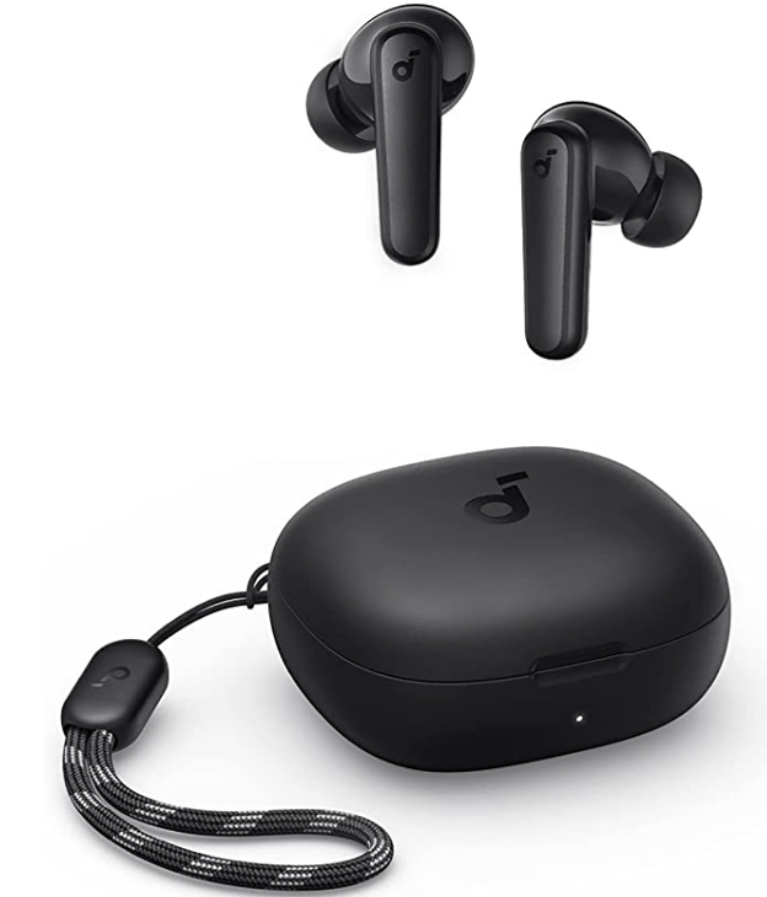
Soundcore R50i/P20i/P25i True Wireless Earbuds
Introduction
The Soundcore R50i/P20i/P25i True Wireless Earbuds offer an exceptional blend of powerful audio, modern convenience, and durable design tailored for music lovers, commuters, and active users alike. Featuring advanced 10mm drivers, these earbuds deliver rich, deep bass and clear sound, perfect for immersive listening experiences whether you're working out, on calls, or streaming media. Their compact and ergonomic build ensures a comfortable and secure fit for long hours of use.
Uniquely, the earbuds come with customizable sound profiles via the Soundcore app, allowing users to choose from 22 EQ presets or boost bass with the BassUp technology, catering to diverse audio preferences. Enhanced with AI-powered microphones, the earbuds provide clear call quality by efficiently filtering background noise. The IPX5 sweat-resistant rating makes them suitable for workouts and outdoor activities.
Battery life is a strong point, with up to 10 hours of playtime on a single charge and a total of 30 hours when combined with the compact charging case. A quick 10-minute charge can provide up to 2 hours of playback, ideal for users on the go. Integrated Bluetooth 5.3 ensures stable connectivity, while helpful features like Find My Earbuds prevent loss.
Priced competitively around $39.99 for the P20i variant, these earbuds offer excellent value for budget-conscious buyers. Available globally through major retailers and online platforms, they suit users seeking a balance of quality sound, durability, and affordability.
Specifications
- Input: 5 V 0.43A
- Rated output power: 5mW
- Battery capacity: 60mAh × 2 (earbuds); 430mAh (charging case)
- Charging time: Up to 2 hours
- Playtime (varies by volume level and content): Up to 10 hours (up to 30 hours with the charging case)
- Driver unit: 10mm dynamic driver
- Frequency response: 20Hz - 20kHz
- Impedance: 16Ω
- Waterproof level (Earbuds): IPX5
- Bluetooth version: 5.3
- Bluetooth range: 10m / 33ft
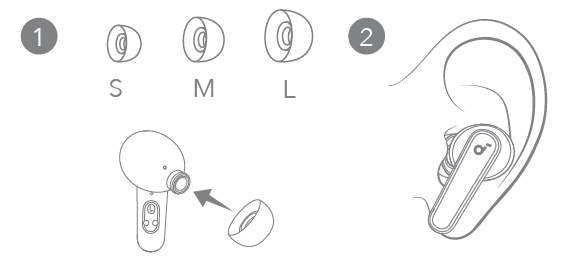
WEARING
Choose the ear tips that fit your ears best.
CHARGING
- Tear off the insulation sticker on the earbuds before first use.
- Place the earbuds in the charging case and close it.
Fully dry off the earbuds and the USB-C charging port before charging. - Connect the charging case to the power supply by using a certified USB-C charging cable.
Fully charge both the earbuds and the charging case before the first use.

POWERING ON & PAIRING
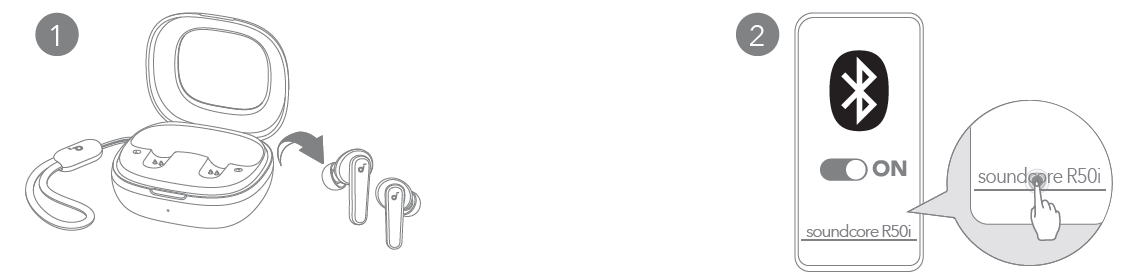
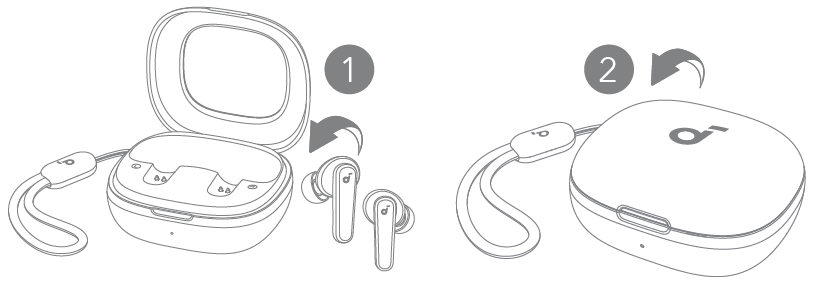
Open the charging case and take the earbuds out of the case. They will automatically power on and enter Bluetooth pairing mode.
Select Soundcore R50i / P20i / P25i on your device's Bluetooth list when connecting for the first time. The device name may vary depending on the region.
MANUAL PAIRING
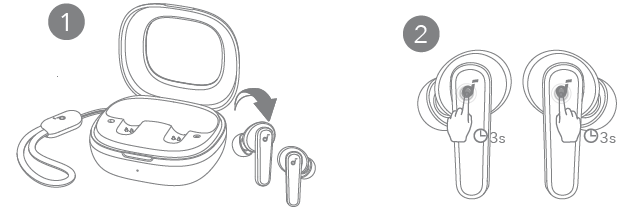
To manually enter Bluetooth pairing mode, take the earbuds out of the case, then tap and hold the touchpads on both earbuds for 3 seconds.
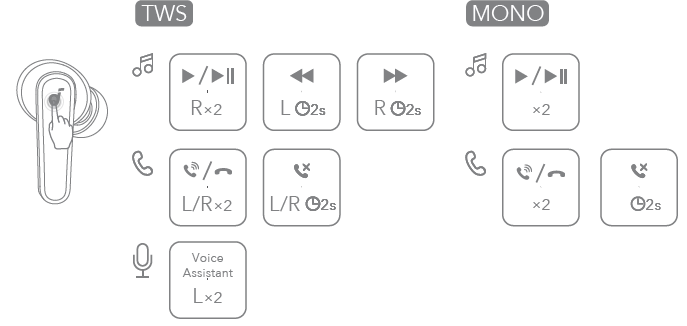
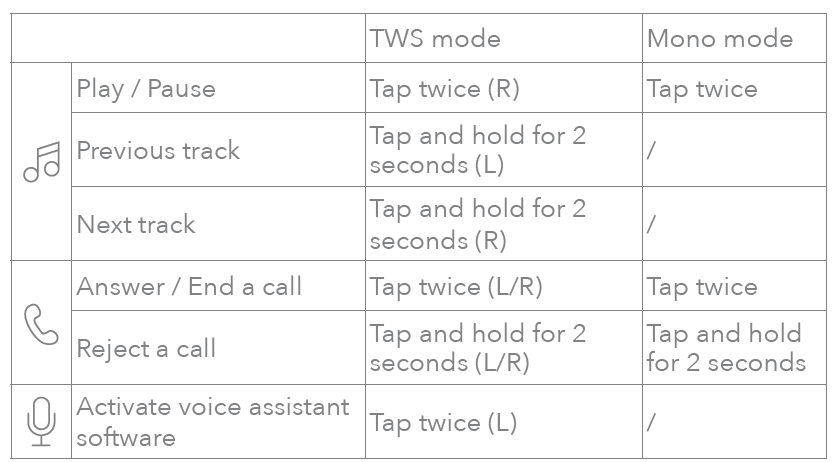
CONTROLS
You can also customize controls in the Soundcore app.
POWERING OFF
To power off, return the earbuds to the charging case and close it. The earbuds will automatically power off after 30 minutes if they are not connected.
RESET
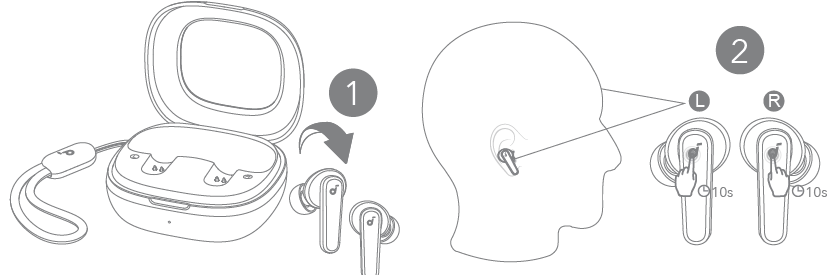
Reset if the earbuds have issues pairing with each other or with other devices.
Delete the pairing history from your Bluetooth device first. Take the earbuds out of the case. Within one minute of the earbuds powering on, tap and hold the touchpads on both earbuds for 10 seconds until you hear a notification sound.
LED LIGHT GUIDE

FIRMWARE UPDATE
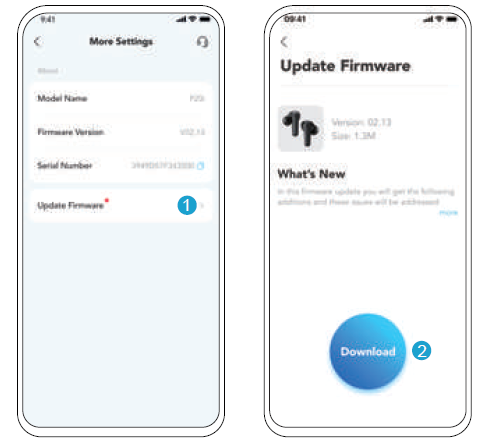
You will be informed once the new version of firmware is detected when you connect the earbuds to the app. Ensure the earbuds are placed in the charging case, and the case remains open until the firmware update is completed. During the update, ensure the earbuds are being charged and avoid any usage.
Troubleshooting soundcore R50i/P20i/P25i True Wireless Earbuds
Users may occasionally face common issues such as pairing difficulties, uneven audio, or microphone clarity problems. Troubleshooting steps include:
- Pairing Issues: Ensure the earbuds are fully charged and Bluetooth is enabled. Reset the earbuds by holding the multifunction buttons for 10 seconds to clear previous connections.
- Low or Uneven Sound: Check for ear tip fit; improper sealing reduces bass and clarity. Use the Soundcore app to adjust EQ settings for personalized sound.
- Microphone Problems: Clean microphone openings and ensure firmware is updated via the app. Background noise may affect call quality; try switching locations.
Preventive measures include regular charging, keeping firmware updated through the Soundcore app, and storing earbuds in the case when not in use to avoid damage.
The product comes with a standard manufacturer's warranty covering defects for 12 months. For support, users can contact Soundcore customer service through their official website or authorized sellers for assistance and replacement options.
Pros & Cons of soundcore R50i/P20i/P25i True Wireless Earbuds
- Pros:
- Powerful 10mm drivers deliver deep bass and clear sound quality suitable for multiple genres.
- Long battery life with up to 30 hours total playback, including charging case.
- Customizable sound profiles via the Soundcore app with multiple EQ presets and the BassUp feature.
- AI-enhanced microphones provide clear call audio and noise reduction.
- IPX5 sweat resistance makes them ideal for workouts and outdoor use.
- Compact, portable design with lanyard and strong magnetic case closure.
- Affordable price point (~$40), offering excellent value for money.
- Cons:
- Case size may be bulkier compared to some competitors.
- No multi-device Bluetooth pairing, limits seamless switching between devices.
- The microphone quality is decent, but it may struggle in very noisy environments.
- Absence of volume control on earbuds without app customization.
- Latency can be noticeable without enabling Game Mode, affecting video sync.
Customer Reviews of soundcore R50i/P20i/P25i True Wireless Earbuds
Users generally praise the Soundcore R50i/P20i/P25i True Wireless Earbuds for their robust bass and clear sound quality at a budget-friendly price. Many highlight the long battery life and portability, with positive feedback on the customizability from the Soundcore app. The AI-powered call clarity is appreciated, especially for casual phone conversations.
Common complaints include the lack of multi-device pairing and the slightly large charging case. Some users note that microphone performance can decrease in loud or irregular noise environments. Volume control is often requested as a native button feature rather than relying solely on app settings.
Overall, these earbuds receive average ratings around 4 out of 5 stars, with strong recommendations for users seeking affordable, reliable true wireless earbuds with customizable sound and extended battery life.
Faqs
How do I set up soundcore R50i/P20i/P25i True Wireless Earbuds for the first time?
What should I do if my soundcore R50i/P20i/P25i True Wireless Earbuds are not connecting to Bluetooth?
Can I customize the touch controls on my soundcore R50i/P20i/P25i True Wireless Earbuds?
Are soundcore R50i/P20i/P25i True Wireless Earbuds compatible with both Android and iOS devices?
How can I optimize the sound quality and battery performance of my soundcore R50i/P20i/P25i True Wireless Earbuds?
What steps should I follow to properly clean and maintain my soundcore R50i/P20i/P25i True Wireless Earbuds?
How do I update the firmware of soundcore R50i/P20i/P25i True Wireless Earbuds?
What should I do if one earbud of my soundcore R50i/P20i/P25i True Wireless Earbuds is not working or pairing?
More soundcore manuals
- Pairing & Usage: Soundcore AeroClip Earbuds A3388 User Manual
- Usage & Pairing: Soundcore Liberty Neo Wireless Earbuds User Guide
- Setup & Pairing: Soundcore P30i / R50i NC A3959 Earbuds User Manual
- How to Use: Soundcore Life Note-E True Wireless Earbuds User Guide
- Pairing & Setup: Soundcore P40i Earbuds User Manual
- How to Pair: Soundcore P2 Mini True Wireless Earbuds User Guide
Leave a Comment