
Pairing & Setup: Soundcore P40i Earbuds User Manual
Content
Soundcore P40i Earbuds
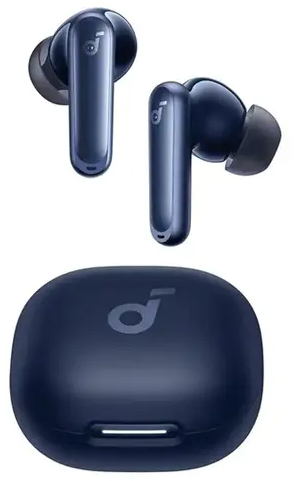
Introduction
The Soundcore P40i Earbuds by Anker deliver a powerful blend of advanced technology and user-centric design, making them an outstanding choice for audiophiles and everyday listeners alike. Featuring adaptive active noise cancellation (ANC), these earbuds intelligently adjust to your environment to block out distractions, providing immersive sound whether commuting, working, or relaxing. Their standout feature is the unique 2-in-1 charging case that doubles as a convenient phone stand—ideal for hands-free viewing on the go.
Equipped with 11mm composite drivers and BassUp technology, the P40i offers thumping bass and clear audio detail, catering especially to bass lovers and gamers. With an impressive battery life of up to 60 hours total (12 hours per charge plus additional charges in the case), these earbuds ensure all-day and beyond usage without frequent recharging. The IPX5 rating adds water resistance, making them suitable for workouts and outdoor activities.
Targeted at active users, commuters, and multimedia enthusiasts, the soundcore P40i are designed for versatile use—from music streaming and calls to gaming and video watching. Available through major retailers with an estimated price range of $80 to $120, these earbuds provide excellent value packed with premium features.
Specifications and Key Features of soundcore P40i Earbuds
- Input
- 5V= 0.8A
- Output
- 5V = 0.34A
- Battery capacity
- 60mAh*2 (earbuds) +800mAh (charging case)
- Playtime (with ANC off)
- 12 hours / 60 hours
- Playtime (with ANC on)
- 10 hours / 50 hours
- Charging time
- Full Charging Time (charging case) for earbuds: 1 hour
- Full Charging Time (type C) for charging case: 3 hours
- Driver unit
- 11 mm dynamic driver
- Frequency response
- 20Hz - 20kHz
- Impedance
- 149
- Waterproof rating (earbuds) |
- IPX5
- Bluetooth version
- |5.3
- Bluetooth range
- 10m
When compared to similar models like the Soundcore Liberty 4 NC and Soundcore Space A40, the P40i offers better latency in gaming mode and superior water resistance (IPX5 vs IPX4), though it lacks LDAC codec support found in some higher-end models. It strikes a balance between premium ANC performance and affordable pricing, making it a strong contender in the budget ANC earbuds segment.
OVERVIEW
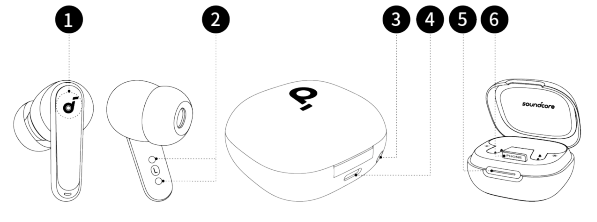
- Touch Control Area
- Charging Contactors
- Reset Button
- USB-C Charging Port
- LED Light Strip
- Phone Stand
WEARING
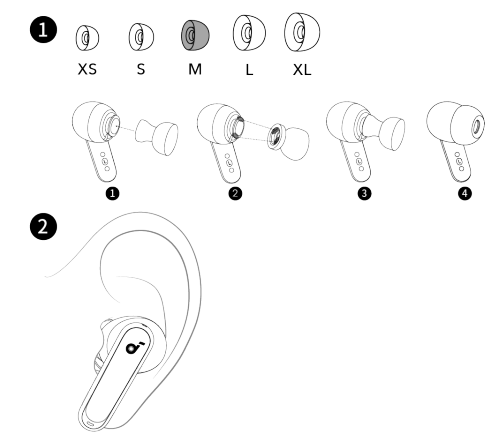
Choose the ear tips that fit your ears best and take a fit test in the soundcore app to ensure you get the best ANC performance.
POWERING ON & PAIRING
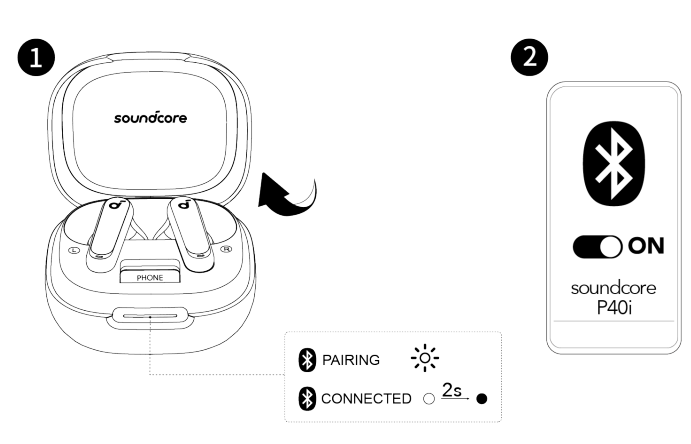
Open the charging case, the earbuds will automatically power on and enter Bluetooth pairing mode. Select "soundcore P40i" from your device's Bluetooth list when connecting for the first time.
When pairing, the LED light strip will start flashing white slowly. After the pairing is successful, the LED light strip will stay on for 2 seconds and then go off.
CHARGING
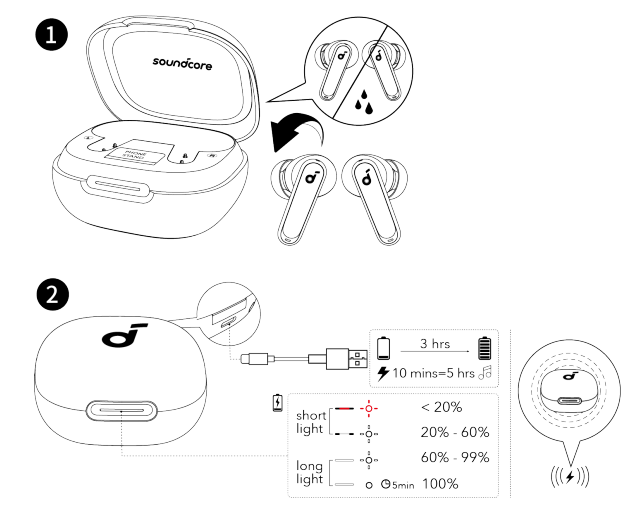
- Place the earbuds in the charging case and close it.
- Fully dry off the earbuds and the USB-C charging port before charging.
- Connect the charging case to a power supply by using a certifi ed USB-C charging cable. Alternatively, position the charging case at the center of yourwireless charger for wireless charging.
DUAL CONNECTIONS
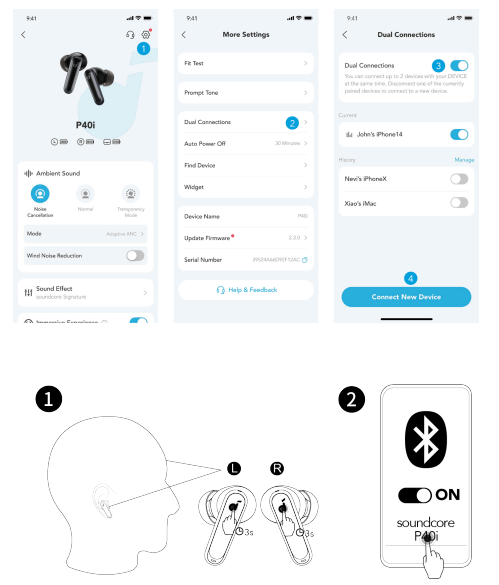
To connect earbuds with two Bluetooth devices at the same time, there are two methods:
Method 1: Using the soundcore App
In the soundcore app, tap on the Settings icon located at the upper right corner of the app's interface. Then select Dual Connections > Enable DualConnections > Connect New Device.
Method 2: Manual Pairing with the Second Device
While wearing the earbuds, press and hold the touch control area on both earbuds for 3 seconds until you hear a voice prompt of entering pairing mode.Then you can proceed to pair with the second device.
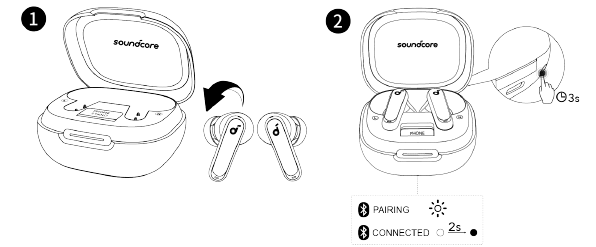
To manually enter Bluetooth pairing mode, place the earbuds in the charging case and leave the case open. Press and hold the reset button behind thecharging case for 3 seconds until the LED light strip fl ashes white rapidly
Troubleshooting Common Issues with soundcore P40i Earbuds
- Issue: Earbuds not pairing or connecting to device
Solution: Ensure Bluetooth 5.3 is enabled on your device, reset earbuds by placing them in the case and holding the reset button for 10 seconds, then retry pairing. - Issue: Poor sound quality or audio distortion
Solution: Adjust equalizer settings in the Soundcore app; reduce volume to minimize distortion; ensure firmware is updated via the app. - Issue: ANC not working properly or insufficient noise cancellation
Solution: Select appropriate ANC mode (adaptive, manual, or multi-scene) in the app; ensure earbuds fit securely for best passive isolation. - Issue: Charging case or earbuds not charging
Solution: Clean charging contacts; verify charging cable and power source; try wireless charging pad if supported.
Preventive Measures: Keep earbuds and case clean and dry; avoid exposure to extreme temperatures; regularly update firmware through the Soundcore app.
The soundcore P40i earbuds come with a manufacturer warranty, typically one year, covering defects. For support, contact Anker customer service via their official website or support hotline. Online resources such as FAQs and user manuals are also available to assist users.
Pros & Cons of soundcore P40i Earbuds
- Pros:
- Long battery life with up to 60 hours total playtime, surpassing many competitors
- Adaptive ANC effectively reduces ambient noise, improving listening experience
- Unique 2-in-1 charging case that also functions as a phone stand—enhances convenience
- Strong bass response with 11mm drivers and BassUp technology, ideal for bass enthusiasts
- Robust IPX5 water resistance suitable for workouts and outdoor use
- Low latency "Game Mode" improves audio sync in gaming applications
- Cons:
- Sound signature leans heavily on bass, which may overshadow treble and midrange clarity for some listeners
- Distortion can occur at high volumes or with complex audio passages
- Lacks advanced codecs like LDAC found in some competing Soundcore models
- ANC performance, while good, not as premium as higher-priced earbuds
- Some users find the Movie Mode EQ setting harsh on vocals and treble
Overall, the soundcore P40i offers excellent value for money, especially for users prioritizing battery life, noise cancellation, and bass performance. Alternatives like the Liberty 4 NC or Space A40 offer subtle feature differences, so buyer choice depends on preferences for codec support or audio tuning[2][4].
Customer Reviews and User Feedback on soundcore P40i Earbuds
The soundcore P40i earbuds enjoy a positive reception from users, boasting an average rating of around 4.5 out of 5 stars. Customers frequently praise the impressive battery life and strong bass performance, often highlighting the earbuds’ comfort and stable Bluetooth connectivity as major benefits.
Common complaints focus on occasional audio distortion at high volume levels and some users finding the treble too bright or piercing, especially in specific EQ modes. The multi-functional charging case and phone stand feature receive consistent praise for enhancing usability.
Reviewers recommend the soundcore P40i earbuds for those seeking affordable noise-cancelling wireless earbuds with robust bass and long battery life, particularly suitable for travel, workouts, and gaming. Many note that while the ANC is not the most advanced, it is effective for the price point. Overall, the earbuds are seen as a solid purchase for budget-conscious consumers seeking quality sound and functionality.
Faqs
How do I set up my soundcore P40i Earbuds for the first time?
What should I do if my soundcore P40i Earbuds are not charging properly?
How can I optimize battery life on soundcore P40i Earbuds?
What noise cancelling features do soundcore P40i Earbuds offer and how do I use them?
Are soundcore P40i Earbuds compatible with both iPhone and Android devices?
How do I clean and maintain my soundcore P40i Earbuds to ensure longevity?
Why is there a slight audio delay when using soundcore P40i Earbuds in gaming mode?
What makes the 2-in-1 charging case of soundcore P40i Earbuds unique?
More soundcore manuals
- Setup & Pairing: Soundcore P30i / R50i NC A3959 Earbuds User Manual
- Pairing & Usage: Soundcore AeroClip Earbuds A3388 User Manual
- How to Pair: Soundcore R50i/P20i/P25i True Wireless Earbuds User Manual
- Usage & Pairing: Soundcore Liberty Neo Wireless Earbuds User Guide
- How to Use: Soundcore Life Note-E True Wireless Earbuds User Guide
- How to Pair: Soundcore P2 Mini True Wireless Earbuds User Guide
Leave a Comment