
Setup & Pairing: Soundcore P30i / R50i NC A3959 Earbuds User Manual
Content
Soundcore P30i / R50i NC A3959 Earbuds
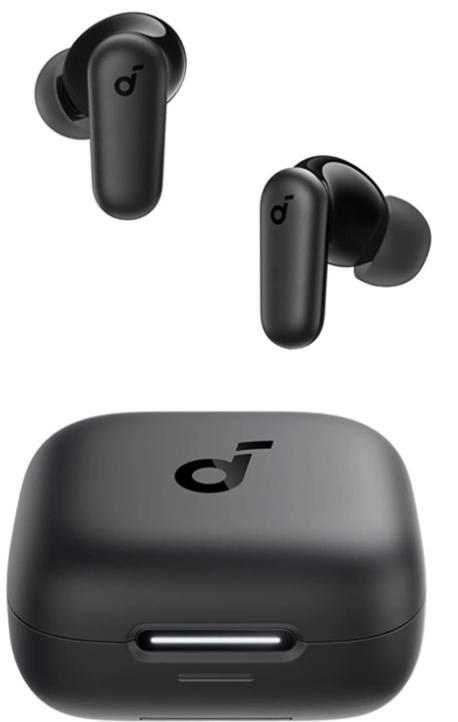
Introduction
The Soundcore P30i / R50i NC A3959 Earbuds are a standout choice for anyone seeking immersive audio, advanced noise cancellation, and everyday convenience in a true wireless design. These earbuds deliver powerful bass, thanks to 10mm dynamic drivers and BassUp™ technology, while adaptive active noise cancellation (ANC) blocks up to 42dB of ambient noise automatically adjusting to your surroundings for optimal sound isolation. The touch controls, multipoint Bluetooth 5.4 connectivity, and IP54 water resistance make them ideal for commuters, fitness enthusiasts, and anyone who values both style and substance.
What sets the Soundcore P30i / R50i NC earbuds apart is their versatility: five stylish color options, a unique 2-in-1 charging case that doubles as a phone stand, and a customizable listening experience through the Soundcore app featuring 22 EQ presets and 3D sound mode. With up to 10 hours of playtime per charge and 45 hours in the case (fast charging support included), these earbuds are designed for all-day use, whether you’re working, traveling, or working out.
Priced competitively at around $40, the Soundcore P30i / R50i NC A3959 Earbuds are widely available online, offering premium features at a budget-friendly price point. They’re perfect for users who want reliable performance, customizable sound, and adaptive noise cancellation without breaking the bank.
Specifications
- Input: 5V 0.5A
- Output: 5V 0.24A (0.12A per port)
- Battery capacity: 700mAh / 2.66Wh
- Playtime (with ANC off): 10 hours / 45 hours
- Playtime (with ANC on): 7 hours / 30 hours
- Charging time:
- Full Charging Time for Earbuds: 1 hour
- Full Charging Time for Charging Case: 2.5 hours
- Driver unit: 10mm
- Frequency response: 20-20KHz
- Impedance: 16Ω
- Bluetooth version: Bluetooth 5.4
- Bluetooth range: 10m
APP
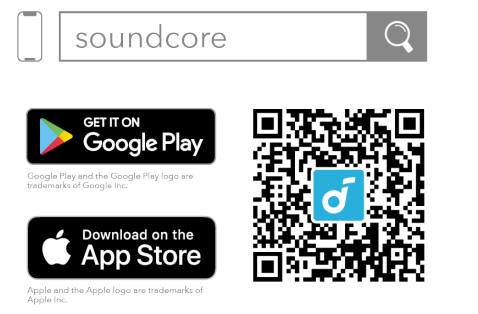
- Download the Soundcore app to experience Adaptive Noise Cancelling, Find Earbuds, dual connections, firmware updates, and more exciting features. If your earbuds cannot connect with the Soundcore app, reinstall the app or update it to the latest version in your mobile app store.
- Click this link to download: http://dl-soundcore.soundcore.com/qcdl?flow=soundcore.
WEARING
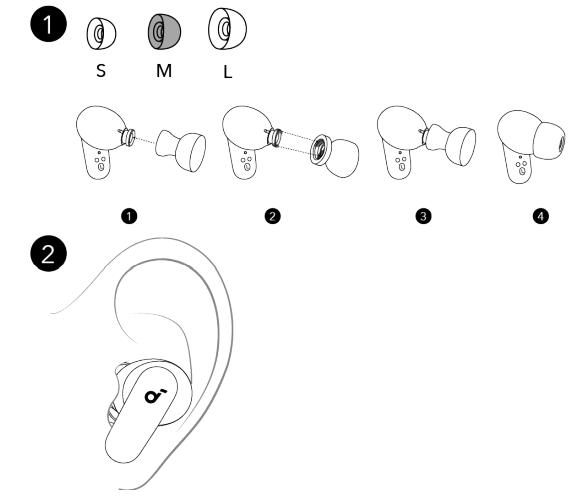
- Choose the ear tips that fit your ears best and take a fit test in the Soundcore app to ensure you get the best ANC performance. Note: Medium ear tips come attached to the earbuds.
- Dust, earwax, or other debris can accumulate in the earbuds. To maintain optimal sound quality, regularly clean your earbuds by using a cotton swab slightly moistened with rubbing alcohol to gently wipe the metal mesh filter under the rubber ear tips.
USING THE PHONE HOLDER

- The charging case can also be used as a mobile phone holder.
- Unfold the phone holder as shown. Then you can place your phone in the holder.
POWERING ON AND PAIRING
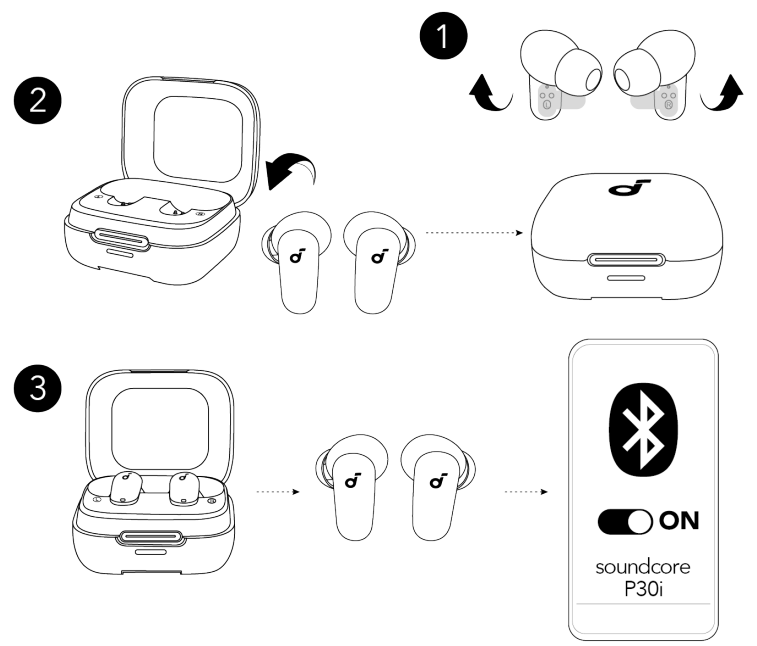
- Peel off the protective film on the earbuds.
- Return the earbuds to the charging case and close the case. Then reopen the charging case.
- Take out the earbuds. The earbuds will automatically power on and enter pairing mode. Select "Soundcore P30i" from your device's Bluetooth list.
When taken out, the earbuds will automatically power off after 30 minutes if they are not connected. The duration can be set in the Soundcore app.
PAIRING WITH A NEW DEVICE
To pair with a new device, press and hold the touch areas of both earbuds simultaneously for 3 seconds to enter pairing mode.

CHARGING
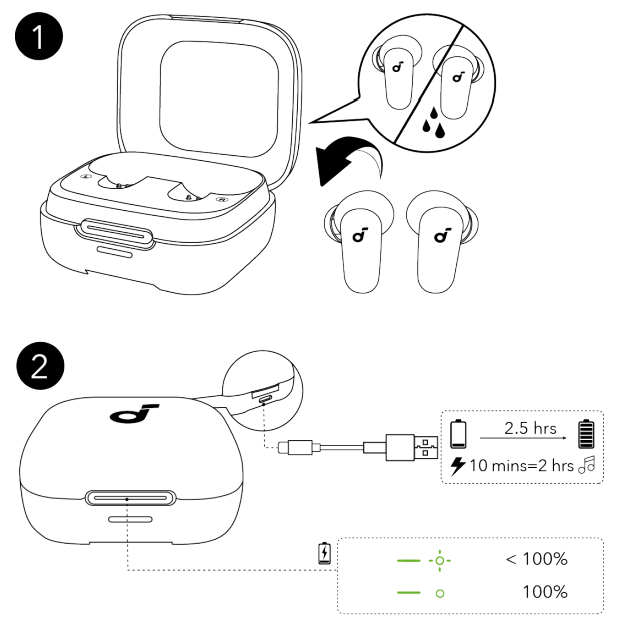
- Place the earbuds in the charging case and close it. Fully dry off the earbuds and the USB-C charging port before charging.
- Connect the charging case to a power supply by using the provided USB-C charging cable.
A full battery recharge takes about 2.5 hours, and 10 minutes of charging offers 2 hours of playtime.
DUAL CONNECTIONS
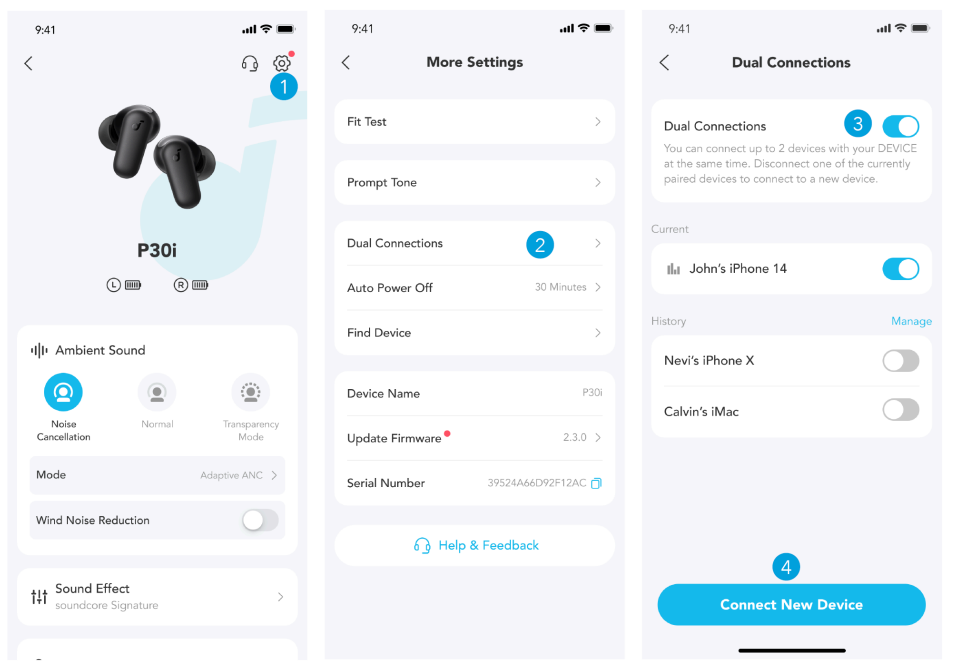
To connect the earbuds with two Bluetooth devices at the same time, first open the Soundcore app, go to settings, and select Dual Connections > Enable Dual Connections > Connect New Device.
CONTROLS
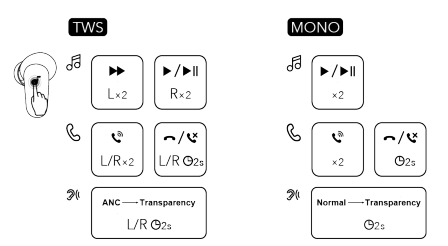
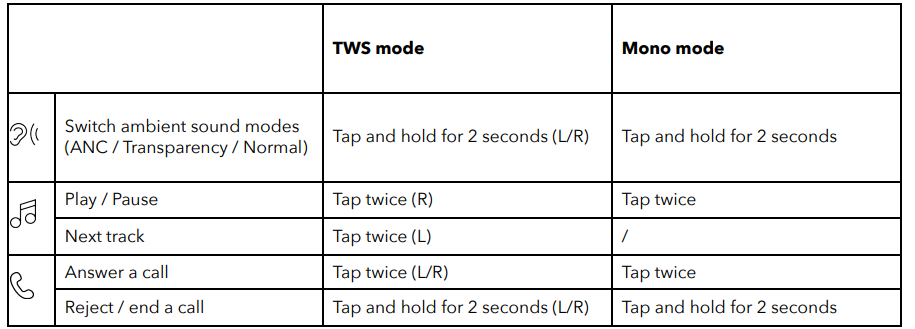
- ×2: Tap twice 2s: Tap and hold for 2 seconds.. You can also customize controls in the Soundcore app.
LED INDICATION
- You can check the battery level of the charging case through the status of the LED indicator.
- Place the earbuds into the charge case:
- If the LED indicator stays on for 4 seconds and then goes off, it means the charging case has sufficient power.
- If the LED indicator flashes white for 4 seconds, it means the charging case is at a low battery and needs to be charged.
- You can check the battery level of the earbuds in the Soundcore app.
Open the charging case and take out the earbuds, then press and hold the touch areas of both earbuds simultaneously for 10 seconds to reset.
FIRMWARE UPDATE
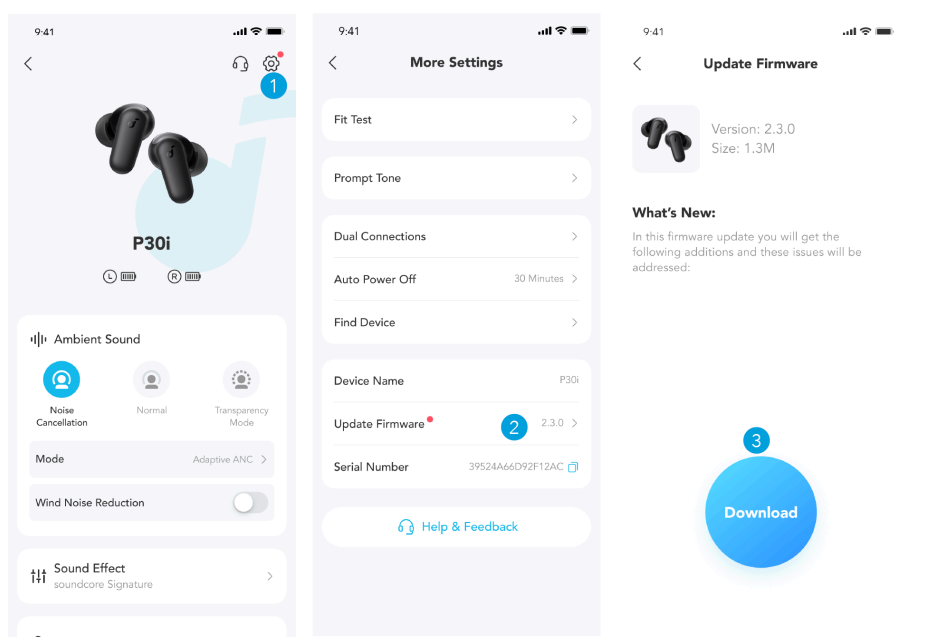
You will be informed once a new firmware version is detected when you connect the earbuds to the app. Ensure the earbuds are outside the charging case until the firmware update is complete. During the update, avoid any usage.
Troubleshooting
Common Problems and Solutions
- Earbuds Won’t Pair: Ensure Bluetooth is enabled on your device. Place both earbuds in the case, close the lid for 10 seconds, then reopen to reset. Delete old pairings from your device’s Bluetooth menu and try again.
- Unequal Sound or No Sound in One Earbud: Check for debris in the earbud’s mesh. Reset the earbuds by placing them in the case for 10 seconds. Update the firmware via the Soundcore app.
- Poor Call Quality: Ensure the microphones are clean and unobstructed. Switch to a less noisy environment and confirm the latest firmware is installed.
- Noise Cancellation Not Working: Activate ANC via the Soundcore app or touch controls. Make sure you are in a supported mode (ANC, Transparency, or Normal). If issues persist, reset the earbuds and update the firmware.
- Battery Drains Quickly: Disable unused features like ANC or transparency mode. Charge the case fully before use, and avoid exposing the earbuds to extreme temperatures.
Error Codes and Fixes
If you encounter error codes or persistent issues, refer to the official Soundcore support website for specific troubleshooting steps. Regularly update your earbuds’ firmware through the Soundcore app to resolve bugs and improve performance.
Preventive Measures
Keep your earbuds and case clean and dry. Store them in their case when not in use. Avoid exposing them to water beyond the IP54 rating. Regularly update the Soundcore app for the latest features and fixes..
Warranty and Support
Soundcore products come with a limited warranty—check your packaging or the official website for details. For technical assistance, visit the Soundcore support page or contact customer service via the app or website. Keep your proof of purchase for warranty claims.
Pros & Cons
Advantages
- Adaptive Active Noise Cancellation: Blocks up to 42dB of ambient noise and switches modes automatically for optimal performance
- Powerful, Customizable Sound: 10mm drivers with BassUp™ technology deliver deep bass, while 22 EQ presets and 3D sound let you tailor your listening experience
- Long Battery Life: Up to 10 hours per charge (45 hours with case), with fast charging support for quick top-ups
- Comfort and Durability: Lightweight, secure fit ideal for workouts and travel; IP54 rating for sweat and water resistance
- Smart Features: Multipoint Bluetooth 5.4, touch controls, 2-in-1 charging case/phone stand, and four-mic AI for clear calls
- Value for Money: Premium features at a budget price,, excellent for users who want ANC and customization without a high cost
Limitations
- Bass-Heavy Sound Signature: May be too intense for listeners who prefer a neutral or treble-focused profile
- No Wireless Charging: The case must be charged via USB-C, unlike some competitors
- Plastic Build: While durable, it lacks the premium feel of metal or glass finishes
- App Dependency: Full customization requires the Soundcore app, which may not appeal to all users
Comparison with Alternatives
Compared to the Soundcore P40i, the P30i/R50i NC lacks wireless charging and has slightly less battery life, but offers similar ANC and sound customization at a lower price. The Life P3i matches waterproofing but lacks 3D sound. The P20i is more affordable but lacks ANC entirely.
Customer Reviews
Users consistently praise the Soundcore P30i / R50i NC A3959 Earbuds for their impressive noise cancellation, powerful bass, and long battery life, especially given the affordable price. Many highlight the comfort and secure fit, making them ideal for workouts and commutes. The 2-in-1 charging case/phone stand is frequently mentioned as a unique, practical feature.
Common complaints include the bass being overwhelming for some genres and the lack of wireless charging, which is available in pricier models. A few users note occasional connectivity glitches, though firmware updates often resolve these. Star ratings average around 4.5/5 across major retailers, with most users recommending these earbuds for budget-conscious buyers who want premium features.
If you’re looking for reliable wireless earbuds with active noise cancellation and customizable sound under $50, the Soundcore P30i / R50i NC A3959 Earbuds are a top contender offering solid value and performance for everyday use.
More soundcore manuals
- Pairing & Setup: Soundcore P40i Earbuds User Manual
- Pairing & Usage: Soundcore AeroClip Earbuds A3388 User Manual
- How to Pair: Soundcore R50i/P20i/P25i True Wireless Earbuds User Manual
- Usage & Pairing: Soundcore Liberty Neo Wireless Earbuds User Guide
- How to Use: Soundcore Life Note-E True Wireless Earbuds User Guide
- How to Pair: Soundcore P2 Mini True Wireless Earbuds User Guide
Leave a Comment