
How to Use: Soundcore Life Note-E True Wireless Earbuds User Guide
Content
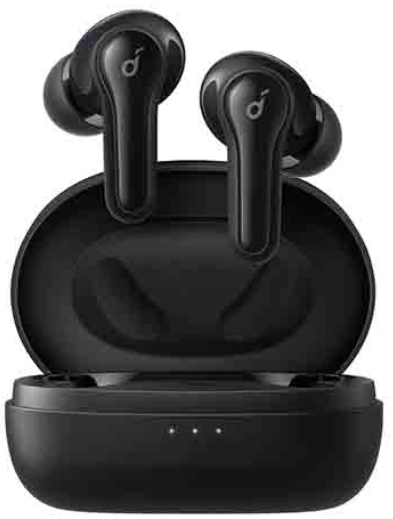
Soundcore Life Note-E True Wireless Earbuds
Introduction
The Soundcore Life Note-E True Wireless Earbuds by Anker deliver an immersive audio experience tailored for music lovers and active users alike. Featuring powerful 10mm oversized drivers, these earbuds produce 50% more bass for rich, thumping beats combined with crystal-clear sound, ideal for enjoying everything from bass-heavy tracks to spoken word content. With three customizable EQ modes—Signature, Bass Booster, and Podcast—the Life Note-E adapts perfectly to diverse listening preferences and environments.
Designed for comfort and portability, the earbuds weigh just 0.16 oz each and come with a compact charging case that enhances mobility. Their IPX5 water-resistant rating ensures durability against sweat and splashes, making them an excellent choice for workouts, commuting, or casual outdoor use. Equipped with AI-enhanced microphones, the Life Note-E offers clear call quality, while Bluetooth 5.2 technology guarantees a stable wireless connection.
Users can expect up to 8 hours of playtime per charge, with the charging case providing up to 32 hours total, supporting extended listening sessions without interruptions. The earbuds support seamless single-earbud use and quick pairing as soon as the case is opened.
Targeted at fitness enthusiasts, commuters, and casual listeners seeking affordable yet high-performance earbuds, the Soundcore Life Note-E True Wireless Earbuds typically retail in the $50 to $70 price range, widely available through online retailers and electronics stores.
Specifications
- Input: 5V ⎓ 0.6A
- Rated output power: 5 mW
- Battery capacity: 60 mAh x 2 (earbuds); 540 mAh (charging case)
- Charging time: 2 hours
- Playtime (varies by volume level and content): Up to 8 hours(Total 32 hours with the charging case)
- Driver size: 10 mm
- Frequency response: 20 Hz - 20 kHz
- Impedance: 16 Ω
- Waterproof level (Earbuds): IPX5
- Bluetooth version: 5.2
- Bluetooth range: 10 m / 33 ft
Charging
- Fully dry off the earbuds and the USB port before charging.
- Use a certified USB-C charging cable and charger to prevent any damage.
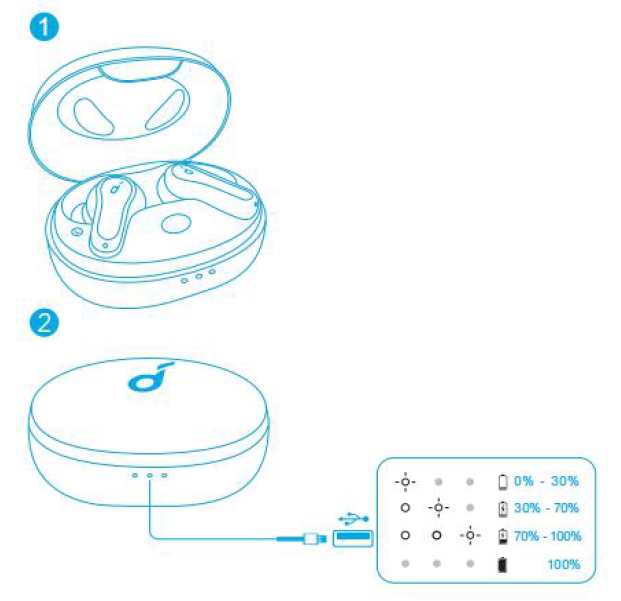
- Fully charge both the earbuds and the charging case before the first use.
- Place the earbuds in the charging case and close it.
- Connect the charging case to the power supply by using a USB-C charging cable.
The LED indicator on the charging case indicates the charging status.
Wearing
- Choose the EarTips that fit your ears best.
- Insert the earbuds into the inner canal of your ears and turn gently until you find the most comfortable and secure position.
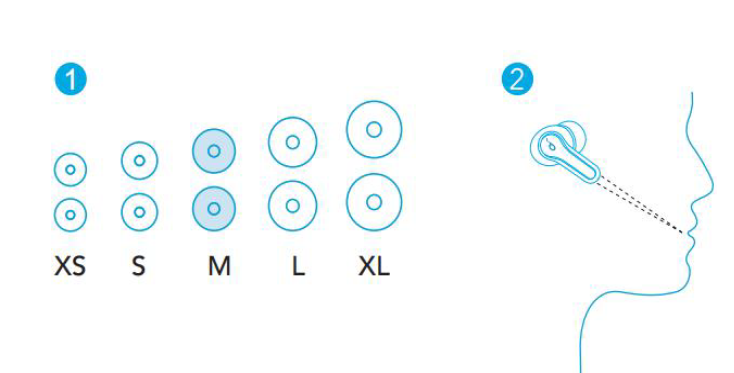
- Your earbuds come with 5 pairs of EarTips, among which the Medium-sized are pre-installed.
Powering On/Off
- Open the charging case, and the earbuds will automatically power on.
- To power off, place the earbuds in the charging case and close it.
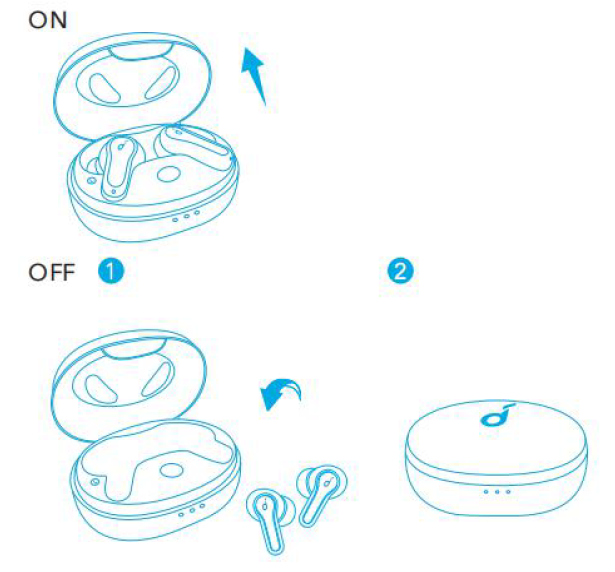
- The earbuds will automatically power off after 10 minutes if no device is connected.
- To manually power on, press and hold the touchpad on the earbuds for 3 seconds.
- To manually power off, press and hold the touchpad on the earbuds for 8 seconds.
Bluetooth Pairing
- Tear off the insulation sticker on the earbuds before first use.
- Place the earbuds in the charging case and close it.
- Open the charging case (no need to take out the earbuds), and the earbuds will automatically enter Bluetooth pairing mode.
- The 3 LED indicators on the charging case will flash white in sequence continuously.
- Select “Soundcore Life Note E” on your device’s Bluetooth list to connect.
- When successfully connected, the 3 LED indicators will turn white for 3 seconds and then turn off.
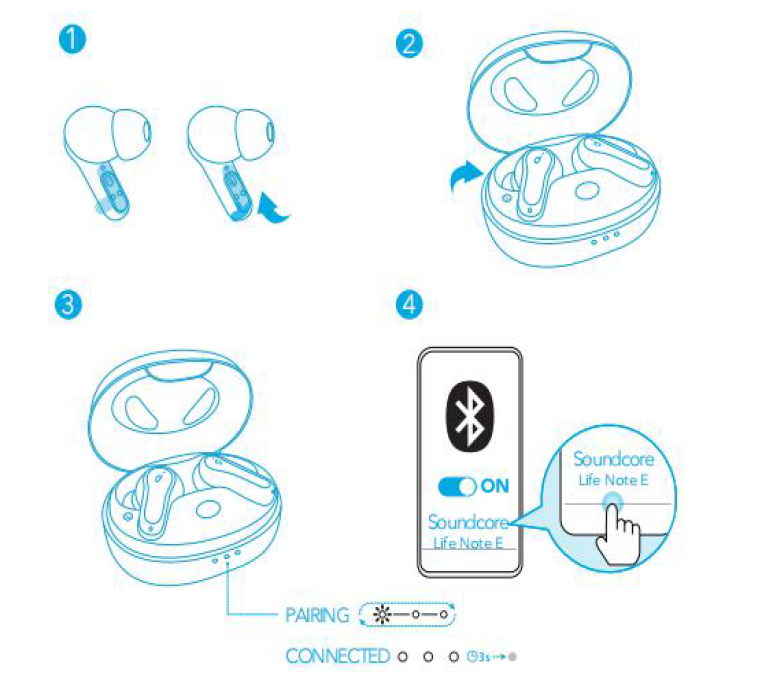
- Pairing with another device: Place the earbuds in the charging case and leave the case open. To enter pairing mode, press and hold the button on the charging case for 3 seconds until the 3 LED indicators flash white in sequence continuously.
- Each time you power on your Soundcore earbuds, they will automatically connect to your last successfully connected device if available within the Bluetooth range.
- Mono mode: When Bluetooth is connected, you can use either one of the earbuds only by placing the other one into the charging case and closing it.
- When powered on and connected, if either one of the earbuds is out of battery and powered off, you can keep using the other one.
- When you are on a call, place either one of the earbuds into the charging case, and the microphone in the other earbud will be activated.
Controls
Stereo Mode
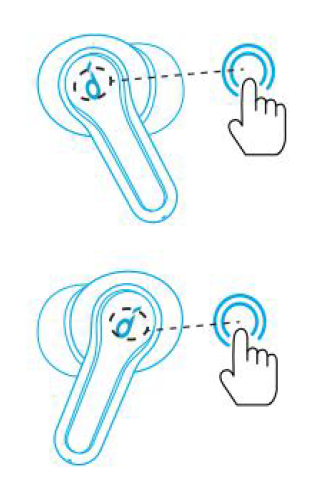
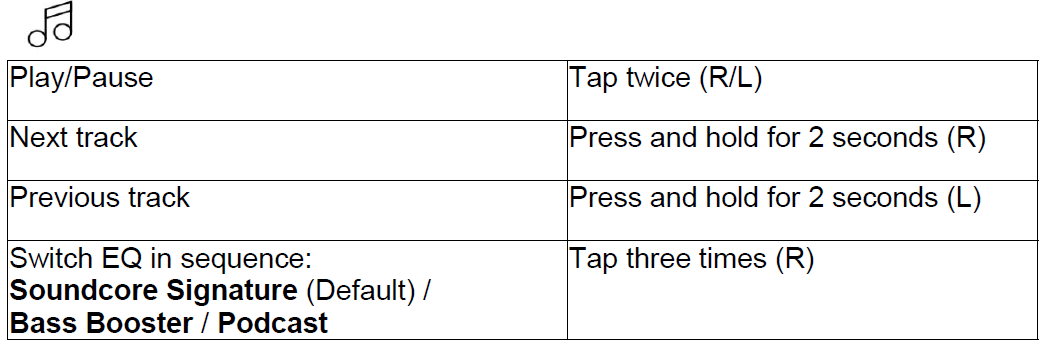
Quickly tap the touchpad on the right earbud three times to cycle through Soundcore Signature (default), Bass Booster, and Podcast modes. You will hear a tone for each successful switch.
- Soundcore Signature: Default EQ mode with well-balanced sound.
- Bass Booster: Enhances low-frequency sound.
- Podcast: Focus on mid-frequency for clearer voices.


Mono Mode
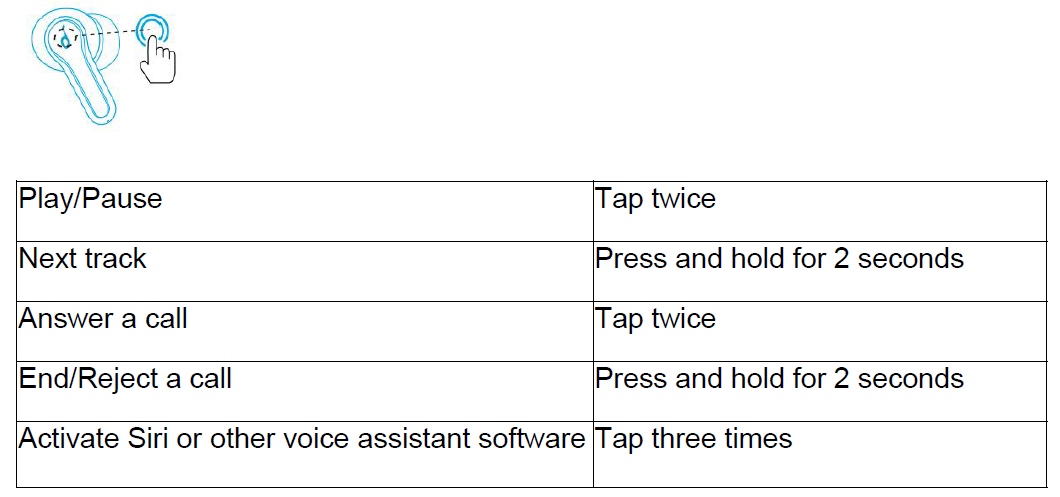
Reset
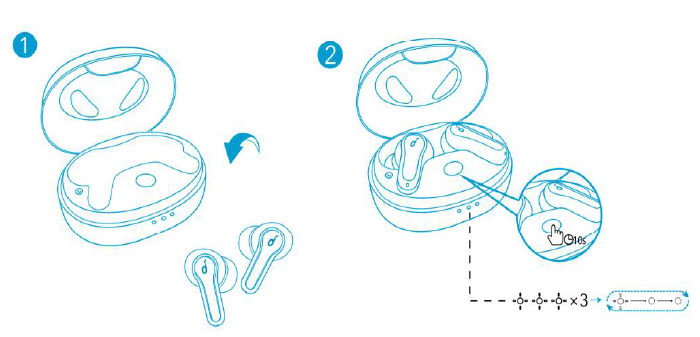
You might need to reset the earbuds if you experience any connectivity problems or function issues.
- Place the earbuds in the charging case and make sure they are being charged.
- Press and hold the button on the case for 10 seconds until the 3 LED indicators flash white 3 times and then flash white in sequence continuously. This confirms that the reset was successful and your earbuds can be connected normally.
Troubleshooting Common Issues with Soundcore Life Note-E True Wireless Earbuds
Despite their user-friendly design, you may encounter occasional issues with the Soundcore Life Note-E True Wireless Earbuds. Here are common problems and their solutions:
- No sound from one earbud: Ensure both earbuds are charged and properly seated in your ears. Reset the earbuds by placing both in the charging case, closing the lid for 10 seconds, then reopening and reconnecting.
- Bluetooth pairing failure: Turn Bluetooth off and on again on your device. Forget the earbuds in your device’s Bluetooth settings, then initiate one-step pairing by opening the charging case near your device.
- Microphone issues during calls: Clean the microphone openings to avoid blockage. Confirm AI noise reduction is enabled and that the earbuds fit snugly.
- Touch controls not responsive: Remove dirt or moisture from the earbud surface. Restart the earbuds or reset to factory settings if needed.
Preventive measures include keeping the earbuds and charging case clean, avoiding exposure to excessive moisture or dust beyond the IPX5 rating, and regular firmware checks if available.
Soundcore provides a limited warranty covering manufacturing defects. For additional assistance, contact Soundcore customer support via their official website or consult the included quick start guide and user manual.
Pros & Cons of Soundcore Life Note-E True Wireless Earbuds
- Pros:
- Exceptional bass performance with 10mm oversized drivers enhances music enjoyment.
- Three distinct EQ modes offer versatile sound customization.
- Lightweight and compact design ensures comfortable all-day wear and easy portability.
- Long battery life—up to 8 hours per charge and 32 hours total with case—supports extended use.
- IPX5 water resistance protects from sweat and splashes, suitable for active lifestyles.
- AI-enhanced call clarity improves voice pickup in noisy environments.
- Cons:
- Touch controls lack volume adjustment and are not customizable.
- No companion app support limits personalization options.
- Passive noise cancellation only; some users may experience ambient noise interference.
- Bluetooth range is typical but may be reduced with physical obstructions.
Compared to similar earbuds in the $50-$70 segment, the Life Note-E offers superior bass and sound customization but trades off advanced controls and app integration. For users prioritizing sound quality and battery life over feature-rich controls, these earbuds provide excellent value for money.
Customer Reviews of Soundcore Life Note-E True Wireless Earbuds
Users consistently praise the Soundcore Life Note-E True Wireless Earbuds for their robust bass response and clear call quality. Many highlight the lightweight fit and long battery life as major benefits, reporting comfortable wear during workouts and daily commutes. The three EQ modes receive positive feedback for allowing tailored listening experiences.
Common complaints include the lack of volume control via touch gestures and the absence of a dedicated app for further customization. Some users note that the earbuds’ passive noise isolation is less effective in very noisy environments. Overall, the product maintains an average rating of around 4.3 out of 5 stars on major retail platforms.
Most reviewers recommend the Life Note-E for budget-conscious buyers seeking a reliable, bass-forward true wireless earbud option with solid battery life and water resistance.
Faqs
How do I set up my soundcore Life Note-E True Wireless Earbuds for the first time?
What should I do if my soundcore Life Note-E True Wireless Earbuds won’t connect to Bluetooth?
How can I switch between Soundcore Life Note-E True Wireless Earbuds' EQ modes for better sound experience?
Can I use only one earbud from the soundcore Life Note-E True Wireless Earbuds for calls or music?
Are soundcore Life Note-E True Wireless Earbuds compatible with both Android and iOS devices?
How do I activate and use the voice assistant feature on soundcore Life Note-E True Wireless Earbuds?
What is the best way to maintain and clean my soundcore Life Note-E True Wireless Earbuds for optimal performance?
How can I optimize battery life on my soundcore Life Note-E True Wireless Earbuds?
More soundcore manuals
- Usage & Pairing: Soundcore Liberty Neo Wireless Earbuds User Guide
- How to Pair: Soundcore P2 Mini True Wireless Earbuds User Guide
- How to Pair: Soundcore R50i/P20i/P25i True Wireless Earbuds User Manual
- How to Pair: Soundcore Life Note 3 Wireless Earbuds User Guide
- Pairing & Usage: Soundcore AeroClip Earbuds A3388 User Manual
- How to Pair: Soundcore Liberty 3 Pro True Wireless Earbuds User Guide
Leave a Comment